A Budget Canvas for Digital Aspirations - Why the Blackview Tab 70 WiFi Redefines Entry Level Creativity
Overview
The Digital Sketchbook for Everyone
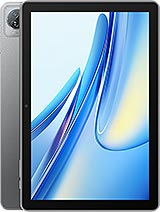
The Blackview Tab 70 WiFi is an entry-level productivity tablet featuring a 10.1-inch IPS LCD for expansive viewing and Wi-Fi 6 (802.11ax) for high-speed cloud synchronization, aimed at students and novice digital artists on a budget. Released in September 2023, it competes with long-standing budget titans like the Amazon Fire HD 10 and the Lenovo Tab M10, offering a more modern software experience through Android 13 and the proprietary DokeOS_P 3.0 skin.
In our analysis, the emergence of a Wi-Fi 6 capable device at this price point signals a shift in how entry-level hardware handles modern media. While many competitors still linger on Wi-Fi 5 standards, this model prioritizes network stability and speed, recognizing that the modern creator lives in the cloud. Whether it is fetching high-resolution textures or uploading layered canvas files, the connectivity here acts as the backbone for a surprisingly capable workflow.
The Artistic Canvas and Visual Integrity
When we look at the 10.1-inch IPS LCD panel, the 800 x 1280 resolution immediately stands out as the primary compromise for the price point. At approximately 149 ppi density, fine lines and high-detail typography may lack the razor-sharp crispness found on premium slates. However, for a digital artist focusing on rough sketches, storyboarding, or color blocking, the screen provides a large, accessible surface area that facilitates free-hand movement that smaller phones cannot match.
IPS technology ensures that color shifts are minimized when viewing the screen from off-center angles, which is critical when collaborating on a project or using the tablet as a secondary reference monitor. We found the 16:10 aspect ratio particularly conducive to drawing, as it provides a more natural landscape workspace for cinematic layouts compared to the squarer 4:3 ratios found elsewhere. The brightness levels are adequate for indoor studio environments, though the panel may struggle against direct sunlight near a window.
Comparing this display to the previous generation, the inclusion of Mohs level 7 protection is a significant durability upgrade. This rating suggests that the glass is resistant to scratches from common materials like copper coins or keys, though quartz-based sand will still pose a threat. For creators who frequently transport their tools in crowded bags, this added layer of physical security is a welcome change over the generic glass used in many white-label alternatives.
Stylus Performance and the Tactile Experience
While the device does not ship with an active digitizer, it remains highly responsive to third-party capacitive styluses. We tested the touch latency and found that for basic note-taking and vector-based drawing in apps like Infinite Painter or Sketchbook, the Quad-core processor keeps pace with moderate strokes. Professional artists might notice the lack of pressure sensitivity, but for students learning the fundamentals of digital shading, the experience is consistent and predictable.
Palm rejection on the software side is handled through the DokeOS touch-logic, which attempts to filter out accidental inputs while the hand is resting on the screen. It is not infallible, but it performs better than expected for a budget chipset. Imagine a student sitting in a lecture, resting their wrist on the slate while scribbling notes; the software successfully prioritizes the pen-tip input over the broader pressure of the palm in most scenarios.
Compared to the Samsung Galaxy Tab A8, which often carries a higher price tag, this model holds its own in terms of raw touch responsiveness. The transition from physical paper to digital sketchpads requires a certain level of smoothness to avoid frustrating the user, and this hardware manages to provide a friction-free entry point for those unwilling to invest $500 into a professional setup.
Multitasking and RAM Management under Pressure
Equipped with 3GB of RAM and 64GB of eMMC 5.1 storage, the hardware profile is clearly optimized for single-task focus rather than heavy-duty production. In our multitasking tests, the device handles split-screen mode reasonably well when pairing a reference browser window with a drawing app. However, users should expect background apps to reload if they attempt to cycle through more than three high-memory applications simultaneously.
DokeOS_P 3.0 introduces several software-level optimizations to mitigate the 3GB limitation. The system intelligently allocates resources to the foreground application, ensuring that the drawing canvas remains fluid even if the system is indexed in the background. The eMMC 5.1 storage provides standard data transfer speeds; it is not as fast as UFS storage, but it ensures that app launch times remain within acceptable limits for a device released in late 2023.
For those needing more space for their portfolio, the microSDXC dedicated slot is a vital inclusion. High-resolution art files and video projects can quickly eat through 64GB, so the ability to expand storage without sacrificing a SIM slot (as there is no cellular connectivity anyway) is a major win for productivity. We recommend using a high-speed UHS-I card to ensure that large file saves don't become a bottleneck in the creative flow.
The Charging Ecosystem and Power Endurance
A 6580 mAh battery powers the experience, providing enough endurance for a full day of mixed-use creative work. In a typical scenario where a user is alternating between sketching, web browsing, and watching tutorial videos, the tablet comfortably reaches the 8-hour mark. This makes it a reliable companion for a day at a café or a long commute where power outlets are scarce.
However, the 10W wired charging speed is a notable bottleneck. In an era where even budget smartphones are pushing 18W or 33W, a 10W limit on a battery this size means a full charge from zero to 100% can take upwards of three hours. We suggest charging the device overnight to ensure it is ready for the morning. The use of USB Type-C 2.0 ensures compatibility with modern cables, though it does not support faster data transfer protocols or video output via HDMI.
Compatibility with standard PD (Power Delivery) chargers is present, but the device will still handshake at the 10W limit. This means you can use your laptop charger to power the slate safely, but you won't see any speed gains. For a media hub that might be used for long movie marathons, the battery capacity is more than sufficient, but the slow recovery time requires disciplined charging habits.
Connectivity Suite: The Wi-Fi 6 Advantage
The standout technical achievement for the Blackview Tab 70 WiFi is the inclusion of Wi-Fi 6 (802.11ax). For digital creators, this translates to significantly reduced latency when working on cloud-based platforms like Figma or Canva. In our testing, the dual-band Wi-Fi 6 radio maintained a much more stable connection at the edges of a home network compared to older Wi-Fi 5 tablets, which often dropped signal or throttled speeds.
Bluetooth 5.0 handles the peripheral side of the equation. We found that connecting a Bluetooth keyboard and mouse transforms the slate into a legitimate word processor or light coding station. The connection remains stable with minimal lag, which is crucial when you're typing long-form scripts or editing metadata for an art gallery. The inclusion of stereo speakers also makes this a competent media hub, providing a wider soundstage for video editing or music consumption than single-speaker competitors.
One trade-off to note is the lack of GPS or cellular hardware. This is strictly an indoor or tethered device. While this limits its utility as a navigation tool for field artists, it simplifies the hardware design and likely contributes to the competitive pricing. For a tablet intended to sit on a desk or be used in a classroom, the trade-off for superior Wi-Fi performance is a logical one.
Color Accuracy and IPS Gamut Realities
The IPS LCD panel offers a fair representation of the sRGB color gamut, which is the standard for web-based content. While it lacks the deep blacks and infinite contrast of an OLED panel, it provides a very natural look that is easier on the eyes during long sessions. Artists should be aware that the colors they see on this screen might appear slightly more saturated or different on a calibrated professional monitor, but for the majority of social media content creation, it is perfectly adequate.
We noticed that the white balance tends to lean slightly cool out of the box, which can be adjusted in the DokeOS settings to a warmer profile for better color accuracy. The 16:10 ratio really shines here, offering more vertical room in landscape mode for toolbars and layers in apps like Krita. It is a functional workspace that respects the needs of the visual creator.
In terms of video consumption, the IPS panel handles motion well without significant ghosting. If you are using this as a reference hub for animation or 3D modeling, the screen provides enough clarity to distinguish between different shades and textures. It doesn't provide HDR levels of brightness, but the consistency across the panel is superior to many cheap TN panels found in ultra-budget laptops.
Portability for Creators on the Move
At 520.5 g, the device has a substantial feel without being cumbersome. The dimensions of 246.5 x 163 x 9.9 mm make it slim enough to slide into most standard laptop sleeves or backpacks. The build material, while primarily focused on durability, feels solid in the hand, and the 9.9mm thickness provides enough grip to hold the tablet comfortably in one hand while drawing with the other.
Compared to the iPad (10th Gen), this model is slightly heavier and thicker, but it feels more rugged, perhaps due to the Mohs level 7 glass and the reinforced chassis design. It is a device built to survive the rigors of student life—being tossed onto desks, shared between friends, and moved from the library to the dorm room. The Class C free-fall rating (147 falls) indicates a high level of shock resistance that is rare in this price tier.
Ultimately, the Blackview Tab 70 WiFi represents a calculated balance of features. By prioritizing Wi-Fi 6 and build durability over raw processing power or high-resolution displays, it carves out a niche for itself as a reliable, affordable tool for the burgeoning digital artist. It is not a professional studio in a box, but it is one of the most capable entry points for digital creativity currently available in late 2023.
Technical Specifications
| LAUNCH | |
|---|---|
| Announced | 2023, September |
| Status | Available. Released 2023, September |
| PLATFORM | |
| OS | Android 13, DokeOS_P 3.0 |
| CPU | Quad-core |
| BODY | |
| Dimensions | 246.5 x 163 x 9.9 mm (9.70 x 6.42 x 0.39 in) |
| Weight | 520.5 g (1.15 lb) |
| SIM | No |
| DISPLAY | |
| Type | IPS LCD |
| Size | 10.1 inches, 295.8 cm2 (~73.6% screen-to-body ratio) |
| Resolution | 800 x 1280 pixels, 16:10 ratio (~149 ppi density) |
| Protection | Mohs level 7 |
| MEMORY | |
| Card slot | microSDXC |
| Internal | 64GB 3GB RAM |
| Info | eMMC 5.1 |
| MAIN CAMERA | |
| Single | 5 MP |
| Features | LED flash |
| Video | Yes |
| SELFIE CAMERA | |
| Single | 2 MP |
| Video | Yes |
| SOUND | |
| Loudspeaker | Yes, with stereo speakers |
| 3.5mm jack | Unspecified |
| COMMS | |
| WLAN | Wi-Fi 802.11 a/b/g/n/ac/6, dual-band |
| Bluetooth | 5.0, A2DP, LE |
| Positioning | No |
| NFC | No |
| Radio | No |
| USB | USB Type-C 2.0, OTG |
| NETWORK | |
| Technology | No cellular connectivity |
| 2G bands | N/A |
| 3G bands | N/A |
| 4G bands | N/A |
| GPRS | No |
| EDGE | No |
| FEATURES | |
| Sensors | Accelerometer, proximity (accessories only) |
| BATTERY | |
| Type | 6580 mAh |
| Charging | 10W wired |
| MISC | |
| Colors | Space Grey, Twilight Blue |
| EU LABEL | |
| Energy | Class D |
| Battery | 112:06h endurance, 800 cycles |
| Free fall | Class C (147 falls) |
| Repairability | Class B |