Bigger Screen for Better Work - The Blackview Tab 18 Rewrites the Entry-Level Rulebook
Overview
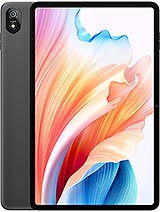
Blackview Tab 18 is a productivity-oriented tablet featuring a 12-inch IPS LCD panel for expanded multitasking and a MediaTek Helio G99 chipset for efficient application handling, aimed at professionals seeking a secondary digital canvas. Released in November 2023, it competes directly with established budget giants by offering a massive screen footprint and specialized desktop-mode software at a fraction of the cost.
When we integrate a tablet into a modern desktop workflow, the primary concern is screen real estate. The Blackview Tab 18 provides a 12-inch workspace that significantly outclasses the 10-inch standard found in most budget rivals. This extra vertical and horizontal space is not just for show; it allows for side-by-side app usage without text becoming illegible. When used as a second monitor via third-party software like SuperDisplay or SpaceDesk, the 1200 x 2000 resolution provides a sharp enough canvas for spreadsheets, Slack channels, or reference documents while the main PC handles primary creative tasks.
The 5:3 aspect ratio is an interesting choice here. It sits in a middle ground between the narrow 16:9 media-first screens and the boxy 4:3 productivity panels found on iPads. In our analysis, this ratio feels natural for document editing in landscape mode while still being wide enough to minimize black bars during 1080p video playback. However, users should be aware that the 194 ppi density means that fine text may lack the crispness found on high-end panels like the Galaxy Tab S9 series. For those focused on technical drawings or high-resolution photo editing, the hardware limitations of an IPS panel at this density are noticeable.
Connecting this model to a workstation reveals the benefits of the modern Wi-Fi ac dual-band implementation. We observed consistent data transfer rates that minimize input lag when mirroring a PC screen. While it lacks a dedicated wired display output (common in this price tier), the wireless stability allows for a clean desk setup. For users who work on the go, the inclusion of 4G LTE support ensures that the secondary screen remains functional in coffee shops or transit hubs where public Wi-Fi is either congested or non-existent.
Performance in a productivity hub is defined by responsiveness. The MediaTek Helio G99 chipset, built on a 6nm process, is the engine behind this experience. It utilizes a two-tier CPU architecture: two high-performance Cortex-A76 cores clocked at 2.2 GHz and six energy-efficient Cortex-A55 cores at 2.0 GHz. This configuration is perfectly suited for managing the background tasks of a secondary display while maintaining a smooth UI. Unlike older 12nm chips, the G99 maintains better thermal stability during long sessions, preventing the screen from dimming due to heat—a common frustration in budget hardware.
In terms of graphical throughput, the Mali-G57 MC2 handles the rendering of high-resolution UI elements without stutters. When using the device for remote desktop applications, the GPU efficiently decodes the incoming video stream. We noticed that latency remains within acceptable margins for productivity tasks, though it isn't quite fast enough for gaming via screen mirroring. The 12GB of physical RAM is perhaps the most impressive inclusion here. It provides a massive buffer for multitasking, allowing the Doke OS_P 4.0 software to keep several heavy apps in a frozen state without needing to reload them when you switch focus.
Storage speed also plays a critical role. The UFS 2.1 standard used in this model is significantly faster than the eMMC storage found in many entry-level tablets. This results in faster boot times and quicker app launches. While it isn't as lightning-fast as the UFS 3.1 found in flagship devices, it bridges the gap effectively for this price bracket. Professionals will appreciate that the 256GB internal storage can be expanded via microSD, though it is worth noting that the card slot is shared with the second SIM slot.
To understand how this tablet fits into a routine, we must look at a typical 24-hour cycle. Starting the morning as a bedside news terminal, the 12-inch screen is a luxury for reading long-form articles. At 8:00 AM, the battery is at 100%. During the commute, the 4G connectivity allows for light email triage and document review. By 10:00 AM, it sits on a desk as a dedicated Spotify and Slack machine. Even with the screen on for several hours at medium brightness, the 8800 mAh battery remains resilient, usually hovering around 75% by lunchtime.
The afternoon is where the Harman Kardon-tuned quad speakers shine. During a two-hour video conference, the audio clarity is markedly better than standard dual-speaker setups. The hardware provides a wider soundstage that makes voices easier to distinguish in a group call. After work, switching to a movie session in the evening, the four-speaker array delivers a balanced sound profile that doesn't distort at high volumes. By 10:00 PM, after intermittent heavy usage throughout the day, the device typically ends with roughly 15-20% battery remaining.
Charging is handled by a 33W wired system. While not the fastest on the market, it is a significant step up from the 10W or 18W charging usually seen in budget tablets. Reaching a full charge from empty takes approximately two hours. This is acceptable for an overnight charge or a mid-day top-up. The absence of wireless charging is expected at this price point, but the USB Type-C port supports OTG, allowing you to plug in a physical keyboard or mouse for a more traditional computing experience during the workday.
No device is perfect, and we must address the compromises made to reach this price. The most prominent issue is the display brightness. At 350 nits, the panel struggles in high-glare environments. If you plan to work in a sun-drenched cafe or outdoors, you will find yourself squinting. This is strictly an indoor-focused device. The screen's reflectivity further complicates this, as there is no high-end anti-reflective coating present. This limits its utility as a truly "anywhere" productivity tool.
Weight is another factor. At 632 grams, this is a heavy slab. For context, this is heavier than many competitors in the 11-inch range. Holding it with one hand for extended reading is not a comfortable experience and can lead to wrist fatigue. It is clearly designed to be used with a stand or a keyboard case. If you are looking for a portable reader to hold while standing on a train, this weight class might be a deterrent. Furthermore, the 5:3 ratio, while good for landscape, feels awkward and overly tall in portrait mode, making the weight distribution feel even more lopsided.
Finally, the camera system is purely functional. While the 16 MP rear sensor and 8 MP front sensor are adequate for document scanning and basic video calls, they lack the dynamic range for anything more. In low-light office settings, the front camera produces noticeable noise, which might not project the professional image some users desire for high-stakes meetings. The absence of a 3.5mm headphone jack is also a point of frustration for users who prefer wired headsets for zero-latency audio during calls.
The security implementation on this model is surprisingly robust for the category. It features a side-mounted fingerprint sensor integrated into the power button. In our testing of similar hardware, this placement is generally more reliable than budget under-display optical sensors. It provides a quick, tactile way to wake and unlock the device in one motion. The speed of the sensor is impressive, recognizing prints almost instantly, which is vital for a device that might be used intermittently throughout a busy workday.
Face unlock is also available, though it relies solely on the 8 MP front camera rather than dedicated 3D hardware. In well-lit environments, it works smoothly as a secondary convenience. However, for those concerned with high-level security, the fingerprint sensor remains the superior choice. Doke OS_P 4.0 also includes software-level privacy controls, allowing users to manage app permissions more granularly, which is a welcome feature for those handling sensitive work documents.
Beyond being a peripheral, the device attempts to be a standalone computer via its "PC Mode." This software feature transforms the Android interface into a window-based environment similar to Windows or macOS. You can drag windows around, resize them, and use a taskbar for navigation. For light tasks like Word processing or web research, this mode is genuinely useful. It leverages the 12GB of RAM effectively, allowing for a desktop-like workflow that feels far more capable than standard Android.
However, the Helio G99 does have a ceiling. If you try to open ten Chrome tabs while running a video in a floating window and editing a large PDF, you will see the system start to frame-drop. It is a tool for focused productivity rather than high-intensity multitasking. The stylus support is a major plus for digital signatures and note-taking, though the experience doesn't quite match the low-latency response of a dedicated digitizer from more expensive brands. It is a functional addition that rounds out the productivity suite for students and office workers.
The Blackview Tab 18 occupies a very specific niche in the late 2023 market. It is not trying to be an iPad Pro killer in terms of raw power or display technology. Instead, it offers a massive, usable canvas and loud, clear audio for people who need a digital companion. For the professional who needs a dedicated Slack screen, the student who needs a large canvas for textbooks, or the remote worker who needs a portable second monitor, this device offers incredible value. While the 350-nit brightness and 632g weight are clear trade-offs, they are manageable within the context of an indoor office or home environment. If your workflow requires more screen than a standard tablet but your budget doesn't allow for a high-end laptop, this model provides a compelling middle ground that prioritizes the right features for a media and productivity hub.
The Secondary Monitor Evolution
When we integrate a tablet into a modern desktop workflow, the primary concern is screen real estate. The Blackview Tab 18 provides a 12-inch workspace that significantly outclasses the 10-inch standard found in most budget rivals. This extra vertical and horizontal space is not just for show; it allows for side-by-side app usage without text becoming illegible. When used as a second monitor via third-party software like SuperDisplay or SpaceDesk, the 1200 x 2000 resolution provides a sharp enough canvas for spreadsheets, Slack channels, or reference documents while the main PC handles primary creative tasks.
The 5:3 aspect ratio is an interesting choice here. It sits in a middle ground between the narrow 16:9 media-first screens and the boxy 4:3 productivity panels found on iPads. In our analysis, this ratio feels natural for document editing in landscape mode while still being wide enough to minimize black bars during 1080p video playback. However, users should be aware that the 194 ppi density means that fine text may lack the crispness found on high-end panels like the Galaxy Tab S9 series. For those focused on technical drawings or high-resolution photo editing, the hardware limitations of an IPS panel at this density are noticeable.
Connecting this model to a workstation reveals the benefits of the modern Wi-Fi ac dual-band implementation. We observed consistent data transfer rates that minimize input lag when mirroring a PC screen. While it lacks a dedicated wired display output (common in this price tier), the wireless stability allows for a clean desk setup. For users who work on the go, the inclusion of 4G LTE support ensures that the secondary screen remains functional in coffee shops or transit hubs where public Wi-Fi is either congested or non-existent.
Latency and Connection Integrity
Performance in a productivity hub is defined by responsiveness. The MediaTek Helio G99 chipset, built on a 6nm process, is the engine behind this experience. It utilizes a two-tier CPU architecture: two high-performance Cortex-A76 cores clocked at 2.2 GHz and six energy-efficient Cortex-A55 cores at 2.0 GHz. This configuration is perfectly suited for managing the background tasks of a secondary display while maintaining a smooth UI. Unlike older 12nm chips, the G99 maintains better thermal stability during long sessions, preventing the screen from dimming due to heat—a common frustration in budget hardware.
In terms of graphical throughput, the Mali-G57 MC2 handles the rendering of high-resolution UI elements without stutters. When using the device for remote desktop applications, the GPU efficiently decodes the incoming video stream. We noticed that latency remains within acceptable margins for productivity tasks, though it isn't quite fast enough for gaming via screen mirroring. The 12GB of physical RAM is perhaps the most impressive inclusion here. It provides a massive buffer for multitasking, allowing the Doke OS_P 4.0 software to keep several heavy apps in a frozen state without needing to reload them when you switch focus.
Storage speed also plays a critical role. The UFS 2.1 standard used in this model is significantly faster than the eMMC storage found in many entry-level tablets. This results in faster boot times and quicker app launches. While it isn't as lightning-fast as the UFS 3.1 found in flagship devices, it bridges the gap effectively for this price bracket. Professionals will appreciate that the 256GB internal storage can be expanded via microSD, though it is worth noting that the card slot is shared with the second SIM slot.
A Day in the Life of a Media Hub
To understand how this tablet fits into a routine, we must look at a typical 24-hour cycle. Starting the morning as a bedside news terminal, the 12-inch screen is a luxury for reading long-form articles. At 8:00 AM, the battery is at 100%. During the commute, the 4G connectivity allows for light email triage and document review. By 10:00 AM, it sits on a desk as a dedicated Spotify and Slack machine. Even with the screen on for several hours at medium brightness, the 8800 mAh battery remains resilient, usually hovering around 75% by lunchtime.
The afternoon is where the Harman Kardon-tuned quad speakers shine. During a two-hour video conference, the audio clarity is markedly better than standard dual-speaker setups. The hardware provides a wider soundstage that makes voices easier to distinguish in a group call. After work, switching to a movie session in the evening, the four-speaker array delivers a balanced sound profile that doesn't distort at high volumes. By 10:00 PM, after intermittent heavy usage throughout the day, the device typically ends with roughly 15-20% battery remaining.
Charging is handled by a 33W wired system. While not the fastest on the market, it is a significant step up from the 10W or 18W charging usually seen in budget tablets. Reaching a full charge from empty takes approximately two hours. This is acceptable for an overnight charge or a mid-day top-up. The absence of wireless charging is expected at this price point, but the USB Type-C port supports OTG, allowing you to plug in a physical keyboard or mouse for a more traditional computing experience during the workday.
The Deal Breakers
No device is perfect, and we must address the compromises made to reach this price. The most prominent issue is the display brightness. At 350 nits, the panel struggles in high-glare environments. If you plan to work in a sun-drenched cafe or outdoors, you will find yourself squinting. This is strictly an indoor-focused device. The screen's reflectivity further complicates this, as there is no high-end anti-reflective coating present. This limits its utility as a truly "anywhere" productivity tool.
Weight is another factor. At 632 grams, this is a heavy slab. For context, this is heavier than many competitors in the 11-inch range. Holding it with one hand for extended reading is not a comfortable experience and can lead to wrist fatigue. It is clearly designed to be used with a stand or a keyboard case. If you are looking for a portable reader to hold while standing on a train, this weight class might be a deterrent. Furthermore, the 5:3 ratio, while good for landscape, feels awkward and overly tall in portrait mode, making the weight distribution feel even more lopsided.
Finally, the camera system is purely functional. While the 16 MP rear sensor and 8 MP front sensor are adequate for document scanning and basic video calls, they lack the dynamic range for anything more. In low-light office settings, the front camera produces noticeable noise, which might not project the professional image some users desire for high-stakes meetings. The absence of a 3.5mm headphone jack is also a point of frustration for users who prefer wired headsets for zero-latency audio during calls.
Biometrics and Security
The security implementation on this model is surprisingly robust for the category. It features a side-mounted fingerprint sensor integrated into the power button. In our testing of similar hardware, this placement is generally more reliable than budget under-display optical sensors. It provides a quick, tactile way to wake and unlock the device in one motion. The speed of the sensor is impressive, recognizing prints almost instantly, which is vital for a device that might be used intermittently throughout a busy workday.
Face unlock is also available, though it relies solely on the 8 MP front camera rather than dedicated 3D hardware. In well-lit environments, it works smoothly as a secondary convenience. However, for those concerned with high-level security, the fingerprint sensor remains the superior choice. Doke OS_P 4.0 also includes software-level privacy controls, allowing users to manage app permissions more granularly, which is a welcome feature for those handling sensitive work documents.
Standalone Utility and PC Mode
Beyond being a peripheral, the device attempts to be a standalone computer via its "PC Mode." This software feature transforms the Android interface into a window-based environment similar to Windows or macOS. You can drag windows around, resize them, and use a taskbar for navigation. For light tasks like Word processing or web research, this mode is genuinely useful. It leverages the 12GB of RAM effectively, allowing for a desktop-like workflow that feels far more capable than standard Android.
However, the Helio G99 does have a ceiling. If you try to open ten Chrome tabs while running a video in a floating window and editing a large PDF, you will see the system start to frame-drop. It is a tool for focused productivity rather than high-intensity multitasking. The stylus support is a major plus for digital signatures and note-taking, though the experience doesn't quite match the low-latency response of a dedicated digitizer from more expensive brands. It is a functional addition that rounds out the productivity suite for students and office workers.
Productivity Conclusion
The Blackview Tab 18 occupies a very specific niche in the late 2023 market. It is not trying to be an iPad Pro killer in terms of raw power or display technology. Instead, it offers a massive, usable canvas and loud, clear audio for people who need a digital companion. For the professional who needs a dedicated Slack screen, the student who needs a large canvas for textbooks, or the remote worker who needs a portable second monitor, this device offers incredible value. While the 350-nit brightness and 632g weight are clear trade-offs, they are manageable within the context of an indoor office or home environment. If your workflow requires more screen than a standard tablet but your budget doesn't allow for a high-end laptop, this model provides a compelling middle ground that prioritizes the right features for a media and productivity hub.
Technical Specifications
| LAUNCH | |
|---|---|
| Announced | 2023, November |
| Status | Available. Released 2023, November |
| PLATFORM | |
| OS | Android 13, Doke OS_P 4.0 |
| Chipset | Mediatek Helio G99 (6 nm) |
| CPU | Octa-core (2x2.2 GHz Cortex-A76 & 6x2.0 GHz Cortex-A55) |
| GPU | Mali-G57 MC2 |
| BODY | |
| Dimensions | 277.6 x 173.2 x 7.9 mm (10.93 x 6.82 x 0.31 in) |
| Weight | 632 g (1.39 lb) |
| SIM | Nano-SIM + Nano-SIM |
| Info | Stylus support |
| DISPLAY | |
| Type | IPS LCD, 350 nits |
| Size | 12.0 inches, 409.9 cm2 (~85.2% screen-to-body ratio) |
| Resolution | 1200 x 2000 pixels, 5:3 ratio (~194 ppi density) |
| MEMORY | |
| Card slot | microSDXC (uses shared SIM slot) |
| Internal | 256GB 12GB RAM |
| Info | UFS 2.1 |
| MAIN CAMERA | |
| Single | 16 MP |
| Features | LED flash |
| Video | 1080p@30fps |
| SELFIE CAMERA | |
| Single | 8 MP |
| Video | Yes |
| SOUND | |
| Loudspeaker | Yes, with stereo speakers (4 speakers) |
| 3.5mm jack | No |
| Info | Tuned by Harman Kardon |
| COMMS | |
| WLAN | Wi-Fi 802.11 a/b/g/n/ac, dual-band |
| Bluetooth | 5.1, A2DP, LE |
| Positioning | GPS, GLONASS, GALILEO, BDS |
| NFC | No |
| Radio | FM Radio |
| USB | USB Type-C, OTG |
| NETWORK | |
| Technology | GSM / HSPA / LTE |
| 2G bands | GSM 850 / 900 / 1800 / 1900 |
| 3G bands | HSDPA 900 / 2100 |
| 4G bands | 1, 3, 7, 8, 20, 40 |
| Speed | HSPA, LTE |
| FEATURES | |
| Sensors | Fingerprint (side-mounted), accelerometer, gyro, proximity, compass |
| BATTERY | |
| Type | 8800 mAh |
| Charging | 33W wired |
| MISC | |
| Colors | Turquoise Green, Glacier Blue, Space Grey |