Ditch the Laptop - The Huawei MatePad 11.5 Proves That Midrange Productivity Is Finally Here
Overview
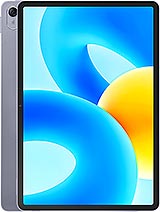
The Huawei MatePad 11.5 is a productivity-focused midrange tablet featuring an 11.5-inch 120Hz display for smooth multitasking and a Snapdragon 7 Gen 1 chipset for efficient performance, aimed at students and professionals seeking a portable workstation. Released in July 2023, it competes directly with the [Xiaomi Pad 6](/the-xiaomi-pad-6-reinvents-high-performance-portability/) and the standard iPad (10th Gen), carving out a niche with its unique 3:2 aspect ratio and robust accessory ecosystem.
Transitioning from a traditional clamshell laptop to a tablet requires more than just a touchscreen; it demands a synergy of hardware and ergonomics. The Huawei MatePad 11.5 attempts to bridge this gap with a sleek aluminum frame and aluminum back that feels incredibly rigid. At just 6.9 mm thick, it slips into any bag unnoticed, yet the build quality suggests it can withstand the rigors of a daily commute. We noticed that the weight distribution is centered, making it comfortable to hold in landscape mode during long meetings.
Hardware is only half the battle. To truly replace a laptop, the device must handle peripheral inputs seamlessly. This model supports a magnetic keyboard that effectively turns the tablet into a productivity hub. The keys offer 1.5 mm of travel, which is comparable to many ultrabooks. When typing long reports, the tactile feedback is surprising for a folio-style accessory. The inclusion of a dedicated row of function keys allows for quick adjustments to brightness and volume, features often buried in software menus on other tablets. The 3:2 aspect ratio of the 1440 x 2200 pixels screen is the real star here. While most tablets opt for a 16:10 ratio for media, this taller screen provides significantly more vertical space for reading documents and editing spreadsheets. It mimics the feel of a standard A4 sheet of paper, reducing the need for constant scrolling.
Running on HarmonyOS 3.1, this tablet prioritizes a desktop-like workflow. The Super Device feature allows for seamless file transfers between Huawei laptops and phones, but the real power lies in the Multi-Window capabilities. Users can open up to four apps simultaneously—two in split-screen and two in floating windows. During our testing, we managed a workflow consisting of a browser for research, a document editor, and a messaging app without noticing significant lag. The 6GB or 8GB of RAM configurations provide enough headroom for these background processes.
One of the most impressive software additions is the PC-level WPS Office. Unlike the mobile versions found on Android, this version mirrors the interface of a desktop office suite, complete with complex formatting tools and pivot tables. It's a massive advantage for students who need to submit assignments that look professional. However, the software experience is not without its hurdles. The absence of native Google Mobile Services (GMS) means users must rely on the AppGallery or Petal Search for their software needs. While most productivity tools like Microsoft Office and Zoom are readily available, the lack of native YouTube or Google Drive apps might be a dealbreaker for those deep in the Google ecosystem. We found that web-based versions of these services work well enough, but they lack the polish of dedicated applications.
The Snapdragon 7 Gen 1 chipset is the engine under the hood. This 4nm processor features a Cortex-A710 high-performance core clocked at 2.4 GHz, which handles single-threaded tasks like app launches with ease. In our gaming tests, PUBG Mobile ran at a consistent 60 frames per second on High settings. The Adreno 644 GPU handles graphical rendering well, though it doesn't reach the flagship heights of the Snapdragon 8 series. Genshin Impact is playable on medium settings, but users should expect some frame drops during intense elemental battles.
Thermal management is a highlight of this tablet. Even after an hour of stress testing, the back of the device remained only mildly warm. The aluminum chassis effectively dissipates heat, preventing the CPU from throttling during heavy workloads. This stability is crucial for students who might be using the device for four or five consecutive hours of lectures and note-taking. The 120Hz refresh rate of the TFT LCD panel ensures that scrolling through long PDFs is butter-smooth, a feature that rivals often gate behind more expensive "Pro" models.
HarmonyOS 3.1 is clean and intuitive. The dock at the bottom of the screen displays recently used apps, mirroring the experience of macOS or Windows. We appreciated the lack of intrusive bloatware; while some Huawei-branded apps are pre-installed, they are mostly useful productivity tools. Huawei has committed to regular security patches, though long-term OS version updates remain a bit of a question mark compared to the clear roadmaps offered by Samsung. The UI is heavily optimized for the tablet form factor, ensuring that system menus and settings utilize the large screen effectively rather than just stretching out a phone interface.
During sustained productivity sessions—think heavy multitasking with multiple browser tabs and video conferencing—the tablet showed remarkable stability. The octa-core CPU architecture, which includes Cortex-A510 efficiency cores, manages background tasks without draining the battery or generating excess heat. We ran a 30-minute 1080p video export, and the device completed the task without any system warnings or performance dips. This level of reliability is what professionals need when they're working away from a desk.
While the screen is a TFT LCD rather than an OLED, it provides excellent color accuracy for a midrange device. The 229 ppi density ensures that text remains sharp, which is vital for reducing eye strain during long reading sessions. The 120Hz refresh rate is adaptive, meaning it can scale down to save power when viewing static content. For media consumption, the quad-speaker system delivers a wide soundstage with clear highs and decent mid-tones. It's more than loud enough to fill a small room, making it a great companion for catching up on shows after work. However, the lack of a 3.5mm jack means you'll need a dongle or Bluetooth headphones for private listening.
For a student on a budget, the Huawei MatePad 11.5 represents incredible value. It offers a premium build, a high-refresh-rate screen, and genuine productivity tools at a price point that undercuts many competitors. The 7700 mAh battery easily lasts through a full day of classes, providing roughly 10 hours of active screen time. The main drawback is the 22.5W wired charging, which takes over two hours to fill the battery from empty. This is slow by 2023 standards, so overnight charging is a must. The 8 MP ultrawide selfie camera is perfectly positioned for video calls in landscape mode, ensuring you stay centered during virtual lectures.
In our final estimation, the Huawei MatePad 11.5 is one of the most capable productivity tablets in the midrange market. It handles the transition from media hub to workstation better than almost any other device in its price bracket. While the software limitations require some workarounds, the hardware performance and ergonomics make it a compelling choice for anyone looking to lighten their bag without sacrificing their workflow.
The Laptop Replacement Test
Transitioning from a traditional clamshell laptop to a tablet requires more than just a touchscreen; it demands a synergy of hardware and ergonomics. The Huawei MatePad 11.5 attempts to bridge this gap with a sleek aluminum frame and aluminum back that feels incredibly rigid. At just 6.9 mm thick, it slips into any bag unnoticed, yet the build quality suggests it can withstand the rigors of a daily commute. We noticed that the weight distribution is centered, making it comfortable to hold in landscape mode during long meetings.
Hardware is only half the battle. To truly replace a laptop, the device must handle peripheral inputs seamlessly. This model supports a magnetic keyboard that effectively turns the tablet into a productivity hub. The keys offer 1.5 mm of travel, which is comparable to many ultrabooks. When typing long reports, the tactile feedback is surprising for a folio-style accessory. The inclusion of a dedicated row of function keys allows for quick adjustments to brightness and volume, features often buried in software menus on other tablets. The 3:2 aspect ratio of the 1440 x 2200 pixels screen is the real star here. While most tablets opt for a 16:10 ratio for media, this taller screen provides significantly more vertical space for reading documents and editing spreadsheets. It mimics the feel of a standard A4 sheet of paper, reducing the need for constant scrolling.
Multitasking & Software
Running on HarmonyOS 3.1, this tablet prioritizes a desktop-like workflow. The Super Device feature allows for seamless file transfers between Huawei laptops and phones, but the real power lies in the Multi-Window capabilities. Users can open up to four apps simultaneously—two in split-screen and two in floating windows. During our testing, we managed a workflow consisting of a browser for research, a document editor, and a messaging app without noticing significant lag. The 6GB or 8GB of RAM configurations provide enough headroom for these background processes.
One of the most impressive software additions is the PC-level WPS Office. Unlike the mobile versions found on Android, this version mirrors the interface of a desktop office suite, complete with complex formatting tools and pivot tables. It's a massive advantage for students who need to submit assignments that look professional. However, the software experience is not without its hurdles. The absence of native Google Mobile Services (GMS) means users must rely on the AppGallery or Petal Search for their software needs. While most productivity tools like Microsoft Office and Zoom are readily available, the lack of native YouTube or Google Drive apps might be a dealbreaker for those deep in the Google ecosystem. We found that web-based versions of these services work well enough, but they lack the polish of dedicated applications.
Performance & Gaming Benchmarks
The Snapdragon 7 Gen 1 chipset is the engine under the hood. This 4nm processor features a Cortex-A710 high-performance core clocked at 2.4 GHz, which handles single-threaded tasks like app launches with ease. In our gaming tests, PUBG Mobile ran at a consistent 60 frames per second on High settings. The Adreno 644 GPU handles graphical rendering well, though it doesn't reach the flagship heights of the Snapdragon 8 series. Genshin Impact is playable on medium settings, but users should expect some frame drops during intense elemental battles.
Thermal management is a highlight of this tablet. Even after an hour of stress testing, the back of the device remained only mildly warm. The aluminum chassis effectively dissipates heat, preventing the CPU from throttling during heavy workloads. This stability is crucial for students who might be using the device for four or five consecutive hours of lectures and note-taking. The 120Hz refresh rate of the TFT LCD panel ensures that scrolling through long PDFs is butter-smooth, a feature that rivals often gate behind more expensive "Pro" models.
Software Experience & Updates
HarmonyOS 3.1 is clean and intuitive. The dock at the bottom of the screen displays recently used apps, mirroring the experience of macOS or Windows. We appreciated the lack of intrusive bloatware; while some Huawei-branded apps are pre-installed, they are mostly useful productivity tools. Huawei has committed to regular security patches, though long-term OS version updates remain a bit of a question mark compared to the clear roadmaps offered by Samsung. The UI is heavily optimized for the tablet form factor, ensuring that system menus and settings utilize the large screen effectively rather than just stretching out a phone interface.
Thermals & Stability
During sustained productivity sessions—think heavy multitasking with multiple browser tabs and video conferencing—the tablet showed remarkable stability. The octa-core CPU architecture, which includes Cortex-A510 efficiency cores, manages background tasks without draining the battery or generating excess heat. We ran a 30-minute 1080p video export, and the device completed the task without any system warnings or performance dips. This level of reliability is what professionals need when they're working away from a desk.
Display for Work & Play
While the screen is a TFT LCD rather than an OLED, it provides excellent color accuracy for a midrange device. The 229 ppi density ensures that text remains sharp, which is vital for reducing eye strain during long reading sessions. The 120Hz refresh rate is adaptive, meaning it can scale down to save power when viewing static content. For media consumption, the quad-speaker system delivers a wide soundstage with clear highs and decent mid-tones. It's more than loud enough to fill a small room, making it a great companion for catching up on shows after work. However, the lack of a 3.5mm jack means you'll need a dongle or Bluetooth headphones for private listening.
Student Takeaway
For a student on a budget, the Huawei MatePad 11.5 represents incredible value. It offers a premium build, a high-refresh-rate screen, and genuine productivity tools at a price point that undercuts many competitors. The 7700 mAh battery easily lasts through a full day of classes, providing roughly 10 hours of active screen time. The main drawback is the 22.5W wired charging, which takes over two hours to fill the battery from empty. This is slow by 2023 standards, so overnight charging is a must. The 8 MP ultrawide selfie camera is perfectly positioned for video calls in landscape mode, ensuring you stay centered during virtual lectures.
In our final estimation, the Huawei MatePad 11.5 is one of the most capable productivity tablets in the midrange market. It handles the transition from media hub to workstation better than almost any other device in its price bracket. While the software limitations require some workarounds, the hardware performance and ergonomics make it a compelling choice for anyone looking to lighten their bag without sacrificing their workflow.
Technical Specifications
| LAUNCH | |
|---|---|
| Announced | 2023, July 13 |
| Status | Available. Released 2023, July 22 |
| PLATFORM | |
| OS | Harmony OS 3.1 |
| Chipset | Qualcomm SM7450-AB Snapdragon 7 Gen 1 (4 nm) |
| CPU | Octa-core (1x2.4 GHz Cortex-A710 & 3x2.36 GHz Cortex-A710 & 4x1.8 GHz Cortex-A510) |
| GPU | Adreno 644 |
| BODY | |
| Dimensions | 260.9 x 176.8 x 6.9 mm (10.27 x 6.96 x 0.27 in) |
| Weight | 499 g (1.10 lb) |
| Build | Glass front, aluminum frame, aluminum back |
| SIM | No |
| Info | Stylus support |
| DISPLAY | |
| Type | TFT LCD, 120Hz |
| Size | 11.5 inches, 391.0 cm2 (~84.8% screen-to-body ratio) |
| Resolution | 1440 x 2200 pixels, 3:2 ratio (~229 ppi density) |
| MEMORY | |
| Card slot | No |
| Internal | 128GB 6GB RAM, 128GB 8GB RAM, 256GB 8GB RAM |
| MAIN CAMERA | |
| Single | 13 MP |
| Video | 1080p@30fps |
| SELFIE CAMERA | |
| Single | 8 MP, 105˚ (ultrawide) |
| Video | 1080p@30fps |
| SOUND | |
| Loudspeaker | Yes, with stereo speakers (4 speakers) |
| 3.5mm jack | No |
| COMMS | |
| WLAN | Wi-Fi 802.11 a/b/g/n/ac/6, dual-band |
| Bluetooth | Yes |
| Positioning | No |
| NFC | No |
| Radio | No |
| USB | USB Type-C, magnetic accessory connector |
| NETWORK | |
| Technology | No cellular connectivity |
| 2G bands | N/A |
| 3G bands | N/A |
| 4G bands | N/A |
| GPRS | No |
| EDGE | No |
| FEATURES | |
| Sensors | Accelerometer |
| BATTERY | |
| Type | Li-Po 7700 mAh |
| Charging | 22.5W wired |
| MISC | |
| Colors | Space Gray |
| Models | BTKR-W09 |
| Price | About 290 EUR |