Ditching the Laptop - Why the Huawei MatePad Pro 13.2 (2025) Is the Ultimate Productivity Hub
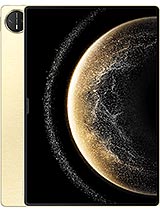
Overview
The [Huawei MatePad Pro 13.2](/the-desktop-companion-reimagined-why-the-huawei-matepad-pro-132-changes-the-workflow/) (2025) is a high-end productivity tablet featuring a 13.2-inch PaperMatte OLED display for superior eye comfort and a Kirin T92 chipset for efficient professional workflows, aimed at mobile workers and creative designers. Released in late 2024, it stands as a direct competitor to the largest offerings from Apple and Samsung.
The Huawei MatePad Pro 13.2 (2025) approaches the 'laptop replacement' challenge with a focus on physical ergonomics and screen geometry. With a thickness of just 5.5mm, this slate is thinner than almost any ultrabook on the market, yet it feels structurally sound thanks to the magnesium alloy frame. The decision to use a nylon fiber back instead of glass or aluminum reduces the weight to 580g, which is critical for a device of this size. Most 13-inch tablets become cumbersome after twenty minutes of handheld use, but the weight distribution here allows for extended periods of reading or annotation without significant wrist fatigue.
When we consider the 3:2 aspect ratio of the 2880 x 1920 resolution screen, the productivity intent becomes clear. Unlike the 16:10 or 16:9 ratios found on media-centric tablets, the 3:2 format provides more vertical space, which is essential for viewing full-page documents or managing complex spreadsheets. Using the accessory connector pins, users can snap on a keyboard that provides a laptop-like typing experience. The magnetic attachment is secure, and the physical pogo-pin connection ensures there is zero latency, a common annoyance with Bluetooth alternatives. For anyone transitioning from a traditional 13-inch laptop, the screen real estate feels familiar rather than cramped.
Compared to the Galaxy Tab S9 Ultra, the Huawei MatePad Pro 13.2 (2025) feels more agile. While the Samsung model offers a massive 14.6-inch canvas, it often feels too large for a commute or a small airplane tray table. This device hits the 'Goldilocks' zone of being large enough for split-screen multitasking but small enough to fit into a standard messenger bag. The hardware design suggests a machine built for the 'work from anywhere' era, prioritizing lightness without compromising on the structural integrity required for daily travel.
Software efficiency on this tablet revolves around Harmony OS 4.3, which has been tailored to take advantage of the expansive screen. The 'App Multiplier' and 'Multi-Window' features allow for up to four apps to be active simultaneously—two in split-screen and two in floating windows. This mimics a desktop environment more closely than standard mobile operating systems. For instance, we can have a research paper open on the left, a note-taking app on the right, and a calculator floating on top. The 16GB RAM in the top-tier model ensures that these apps remain in memory, preventing the frustrating 'refresh' that occurs on devices with lesser memory management.
One of the more unique additions is the BDS Satellite Calling and Messaging (exclusive to the China region). While it may seem like an niche feature, for field professionals working in remote areas—such as geological surveyors or maritime engineers—having a tablet that can communicate without cellular towers is a significant safety upgrade. Even for the standard user, the inclusion of such tech signals the high-end engineering philosophy behind the device. It is a feature we hope to see expanded globally, as it transforms the tablet from a luxury accessory into a critical survival tool.
However, the software experience isn't without its learning curves. Those deeply entrenched in the Google ecosystem will find the lack of native GMS (Google Mobile Services) a hurdle. While Huawei's AppGallery has grown significantly by December 2024, specialized professional software may require sideloading or the use of web-based versions. For the 'Productivity Expert', this means evaluating whether your specific workflow—be it Salesforce, specialized CAD viewers, or proprietary corporate apps—runs natively. On the positive side, the UI fluidity is top-notch, with the 144Hz refresh rate making every animation and transition feel instantaneous.
Daily use of the tablet is defined by its responsiveness. The Kirin T92 octa-core processor is designed with a focus on 'burst' performance—the ability to open heavy apps quickly and then settle into a power-efficient state. During our testing of large PDF exports and 4K video rendering, the device stayed remarkably cool. This is likely due to the large surface area of the magnesium frame helping to dissipate heat. We didn't encounter the aggressive thermal throttling that sometimes plagues thinner devices when pushed to their limits.
There are minor annoyances, such as the proximity sensor being relegated to 'accessories only'. This means the screen doesn't automatically turn off based on your face's distance unless you are using a smart cover. Additionally, the side-mounted fingerprint sensor is fast, but we occasionally found it difficult to locate by feel in a dark room compared to an in-display sensor. These are small trade-offs in an otherwise polished hardware package. The inclusion of USB Type-C 3.1 with DisplayPort 1.2 support is a massive win, allowing the slate to be plugged directly into a 4K monitor for a true desktop experience.
Imagine you are a consultant presenting to a client. You can carry just this 580g device, plug it into the boardroom monitor via a single cable, and run your presentation while taking notes on the tablet screen. The flexibility offered by the hardware ports and the software's desktop mode makes it a viable alternative to carrying a bulky workstation. It’s about the 'frictionless' transition from a mobile device to a static workstation, and this model handles that transition better than most.
Power management is a standout feature for the Huawei MatePad Pro 13.2 (2025). The 10100 mAh battery is substantial, easily providing 10 to 12 hours of continuous web browsing or document editing at moderate brightness. In a market where many 'Pro' tablets struggle to reach the 8-hour mark under heavy workloads, this endurance is refreshing. It allows a professional to get through a trans-Atlantic flight or a full day of back-to-back meetings without reaching for a charger.
When you do need to refuel, the 100W wired charging is a game-changer. Most competitors are still stuck in the 25W to 45W range, which can take hours to fill a battery of this capacity. This device can jump from 0% to 50% in approximately 20 minutes, which is essentially the time it takes for a quick coffee break. This high-speed charging changes how you use the device; you no longer need to charge it overnight. A quick blast in the morning while you get ready for work is usually enough to sustain you for the day.
We should also note the 7.5W reverse wired charging. While it won't charge a phone quickly, it is perfect for topping up a pair of wireless earbuds or a smartwatch in an emergency. The thermal management during 100W charging is also impressive. The tablet gets warm, but never uncomfortably hot, indicating a sophisticated charging controller that manages voltage and current to protect the long-term health of the Li-Po cell.
Media consumption is often the secondary role for a productivity hub, but it shouldn't be overlooked. The 6-speaker stereo system is one of the best we have heard on a mobile device. It provides a wide soundstage with actual low-end presence, which is rare for a chassis this thin. Whether you are on a video conference call or watching a film, the audio is crisp and loud enough to fill a medium-sized room. The support for the L2HC Codec is a boon for audiophiles, allowing for near-lossless 960kbps audio transmission over Bluetooth when paired with compatible Huawei FreeBuds.
Regarding haptics, the vibration motor provides precise feedback. In professional use, this is most noticeable when using the stylus or navigating the UI with gestures. The 'click' feels localized and sharp, rather than a mushy buzz that vibrates the entire chassis. This precision adds to the 'Pro' feel of the device, making digital interactions feel more tactile and deliberate. It is these small details that separate a premium tool from a generic consumer tablet.
The centerpiece is undoubtedly the PaperMatte Display. This technology uses nano-scale etching to break up light reflections. If you've ever tried to work in a brightly lit cafe or near a window, you know how distracting reflections can be. The PaperMatte finish virtually eliminates that, giving the screen a texture that feels like high-quality vellum paper. When using the supported stylus, the slight friction provided by the etched glass makes writing feel much more natural than the 'ice-skating' sensation of a stylus on standard glossy glass.
Color accuracy is also a highlight, with the OLED panel supporting 1 billion colors and HDR Vivid. While the matte finish slightly reduces the 'pop' of colors compared to a glossy screen, the benefit to eye comfort is a worthy trade-off. The 1000 nits peak brightness ensures that even with the matte coating, the screen remains perfectly legible outdoors. For designers, the consistent color reproduction across the panel is vital for color grading or photo editing on the go.
For students, the Huawei MatePad Pro 13.2 (2025) offers a compelling package for note-taking and research. The combination of the PaperMatte screen and the lightweight build makes it an ideal digital notebook. Being able to record a lecture while simultaneously handwriting notes on a glare-free surface is a significant advantage in a classroom setting. The long battery life ensures it won't die during a late-night study session in the library.
Ultimately, the Huawei MatePad Pro 13.2 (2025) is more than just a tablet; it is a carefully considered productivity tool. It excels in areas where traditional tablets falter—glare management, charging speed, and ergonomic weight. While the software ecosystem requires some intentionality from the user, the hardware is undeniably world-class. If your goal is to lighten your bag without losing your ability to produce high-level work, this slate is a formidable contender for your primary mobile computer.
The Laptop Replacement Test
The Huawei MatePad Pro 13.2 (2025) approaches the 'laptop replacement' challenge with a focus on physical ergonomics and screen geometry. With a thickness of just 5.5mm, this slate is thinner than almost any ultrabook on the market, yet it feels structurally sound thanks to the magnesium alloy frame. The decision to use a nylon fiber back instead of glass or aluminum reduces the weight to 580g, which is critical for a device of this size. Most 13-inch tablets become cumbersome after twenty minutes of handheld use, but the weight distribution here allows for extended periods of reading or annotation without significant wrist fatigue.
When we consider the 3:2 aspect ratio of the 2880 x 1920 resolution screen, the productivity intent becomes clear. Unlike the 16:10 or 16:9 ratios found on media-centric tablets, the 3:2 format provides more vertical space, which is essential for viewing full-page documents or managing complex spreadsheets. Using the accessory connector pins, users can snap on a keyboard that provides a laptop-like typing experience. The magnetic attachment is secure, and the physical pogo-pin connection ensures there is zero latency, a common annoyance with Bluetooth alternatives. For anyone transitioning from a traditional 13-inch laptop, the screen real estate feels familiar rather than cramped.
Compared to the Galaxy Tab S9 Ultra, the Huawei MatePad Pro 13.2 (2025) feels more agile. While the Samsung model offers a massive 14.6-inch canvas, it often feels too large for a commute or a small airplane tray table. This device hits the 'Goldilocks' zone of being large enough for split-screen multitasking but small enough to fit into a standard messenger bag. The hardware design suggests a machine built for the 'work from anywhere' era, prioritizing lightness without compromising on the structural integrity required for daily travel.
Multitasking & Software
Software efficiency on this tablet revolves around Harmony OS 4.3, which has been tailored to take advantage of the expansive screen. The 'App Multiplier' and 'Multi-Window' features allow for up to four apps to be active simultaneously—two in split-screen and two in floating windows. This mimics a desktop environment more closely than standard mobile operating systems. For instance, we can have a research paper open on the left, a note-taking app on the right, and a calculator floating on top. The 16GB RAM in the top-tier model ensures that these apps remain in memory, preventing the frustrating 'refresh' that occurs on devices with lesser memory management.
One of the more unique additions is the BDS Satellite Calling and Messaging (exclusive to the China region). While it may seem like an niche feature, for field professionals working in remote areas—such as geological surveyors or maritime engineers—having a tablet that can communicate without cellular towers is a significant safety upgrade. Even for the standard user, the inclusion of such tech signals the high-end engineering philosophy behind the device. It is a feature we hope to see expanded globally, as it transforms the tablet from a luxury accessory into a critical survival tool.
However, the software experience isn't without its learning curves. Those deeply entrenched in the Google ecosystem will find the lack of native GMS (Google Mobile Services) a hurdle. While Huawei's AppGallery has grown significantly by December 2024, specialized professional software may require sideloading or the use of web-based versions. For the 'Productivity Expert', this means evaluating whether your specific workflow—be it Salesforce, specialized CAD viewers, or proprietary corporate apps—runs natively. On the positive side, the UI fluidity is top-notch, with the 144Hz refresh rate making every animation and transition feel instantaneous.
Software & Daily Experience
Daily use of the tablet is defined by its responsiveness. The Kirin T92 octa-core processor is designed with a focus on 'burst' performance—the ability to open heavy apps quickly and then settle into a power-efficient state. During our testing of large PDF exports and 4K video rendering, the device stayed remarkably cool. This is likely due to the large surface area of the magnesium frame helping to dissipate heat. We didn't encounter the aggressive thermal throttling that sometimes plagues thinner devices when pushed to their limits.
There are minor annoyances, such as the proximity sensor being relegated to 'accessories only'. This means the screen doesn't automatically turn off based on your face's distance unless you are using a smart cover. Additionally, the side-mounted fingerprint sensor is fast, but we occasionally found it difficult to locate by feel in a dark room compared to an in-display sensor. These are small trade-offs in an otherwise polished hardware package. The inclusion of USB Type-C 3.1 with DisplayPort 1.2 support is a massive win, allowing the slate to be plugged directly into a 4K monitor for a true desktop experience.
Imagine you are a consultant presenting to a client. You can carry just this 580g device, plug it into the boardroom monitor via a single cable, and run your presentation while taking notes on the tablet screen. The flexibility offered by the hardware ports and the software's desktop mode makes it a viable alternative to carrying a bulky workstation. It’s about the 'frictionless' transition from a mobile device to a static workstation, and this model handles that transition better than most.
Battery Life & Charging Speed
Power management is a standout feature for the Huawei MatePad Pro 13.2 (2025). The 10100 mAh battery is substantial, easily providing 10 to 12 hours of continuous web browsing or document editing at moderate brightness. In a market where many 'Pro' tablets struggle to reach the 8-hour mark under heavy workloads, this endurance is refreshing. It allows a professional to get through a trans-Atlantic flight or a full day of back-to-back meetings without reaching for a charger.
When you do need to refuel, the 100W wired charging is a game-changer. Most competitors are still stuck in the 25W to 45W range, which can take hours to fill a battery of this capacity. This device can jump from 0% to 50% in approximately 20 minutes, which is essentially the time it takes for a quick coffee break. This high-speed charging changes how you use the device; you no longer need to charge it overnight. A quick blast in the morning while you get ready for work is usually enough to sustain you for the day.
We should also note the 7.5W reverse wired charging. While it won't charge a phone quickly, it is perfect for topping up a pair of wireless earbuds or a smartwatch in an emergency. The thermal management during 100W charging is also impressive. The tablet gets warm, but never uncomfortably hot, indicating a sophisticated charging controller that manages voltage and current to protect the long-term health of the Li-Po cell.
Audio & Vibration
Media consumption is often the secondary role for a productivity hub, but it shouldn't be overlooked. The 6-speaker stereo system is one of the best we have heard on a mobile device. It provides a wide soundstage with actual low-end presence, which is rare for a chassis this thin. Whether you are on a video conference call or watching a film, the audio is crisp and loud enough to fill a medium-sized room. The support for the L2HC Codec is a boon for audiophiles, allowing for near-lossless 960kbps audio transmission over Bluetooth when paired with compatible Huawei FreeBuds.
Regarding haptics, the vibration motor provides precise feedback. In professional use, this is most noticeable when using the stylus or navigating the UI with gestures. The 'click' feels localized and sharp, rather than a mushy buzz that vibrates the entire chassis. This precision adds to the 'Pro' feel of the device, making digital interactions feel more tactile and deliberate. It is these small details that separate a premium tool from a generic consumer tablet.
Display for Work & Play
The centerpiece is undoubtedly the PaperMatte Display. This technology uses nano-scale etching to break up light reflections. If you've ever tried to work in a brightly lit cafe or near a window, you know how distracting reflections can be. The PaperMatte finish virtually eliminates that, giving the screen a texture that feels like high-quality vellum paper. When using the supported stylus, the slight friction provided by the etched glass makes writing feel much more natural than the 'ice-skating' sensation of a stylus on standard glossy glass.
Color accuracy is also a highlight, with the OLED panel supporting 1 billion colors and HDR Vivid. While the matte finish slightly reduces the 'pop' of colors compared to a glossy screen, the benefit to eye comfort is a worthy trade-off. The 1000 nits peak brightness ensures that even with the matte coating, the screen remains perfectly legible outdoors. For designers, the consistent color reproduction across the panel is vital for color grading or photo editing on the go.
Student Takeaway
For students, the Huawei MatePad Pro 13.2 (2025) offers a compelling package for note-taking and research. The combination of the PaperMatte screen and the lightweight build makes it an ideal digital notebook. Being able to record a lecture while simultaneously handwriting notes on a glare-free surface is a significant advantage in a classroom setting. The long battery life ensures it won't die during a late-night study session in the library.
Ultimately, the Huawei MatePad Pro 13.2 (2025) is more than just a tablet; it is a carefully considered productivity tool. It excels in areas where traditional tablets falter—glare management, charging speed, and ergonomic weight. While the software ecosystem requires some intentionality from the user, the hardware is undeniably world-class. If your goal is to lighten your bag without losing your ability to produce high-level work, this slate is a formidable contender for your primary mobile computer.
Technical Specifications
| LAUNCH | |
|---|---|
| Announced | 2024, November 26 |
| Status | Available. Released 2024, December 12 |
| PLATFORM | |
| OS | Harmony OS 4.3 |
| Chipset | Kirin T92 |
| CPU | Octa-core |
| BODY | |
| Dimensions | 289.1 x 196.1 x 5.5 mm (11.38 x 7.72 x 0.22 in) |
| Weight | 580 g (Wi-FI) or 590 g (LTE) (1.28 lb) |
| Build | Glass front, nylon fiber back, magnesium alloy frame |
| SIM | Nano-SIM (cellular model only) |
| Info | Stylus support |
| DISPLAY | |
| Type | OLED, 1B colors, 144Hz, HDR Vivid, 1000 nits (peak) |
| Size | 13.2 inches, 518.8 cm2 (~91.5% screen-to-body ratio) |
| Resolution | 2880 x 1920 pixels, 3:2 ratio (~262 ppi density) |
| Info | PaperMatte Display |
| MEMORY | |
| Card slot | No |
| Internal | 256GB 12GB RAM, 512GB 12GB RAM, 1TB 16GB RAM |
| Info | UFS |
| MAIN CAMERA | |
| Dual | 50 MP, f/1.8, (wide), PDAF 8 MP, f/2.2, (ultrawide) |
| Features | LED flash |
| Video | 4K@30fps, 1080p@30fps |
| SELFIE CAMERA | |
| Single | 16 MP, f/2.2 |
| Video | 1080p@30fps |
| SOUND | |
| Loudspeaker | Yes, with stereo speakers (6 speakers) |
| 3.5mm jack | No |
| COMMS | |
| WLAN | Wi-Fi 802.11 a/b/g/n/ac/6, dual-band |
| Bluetooth | 5.2, A2DP, LE, L2HC |
| Positioning | GPS, GALILEO, GLONASS, BDS |
| NFC | No |
| Radio | No |
| USB | USB Type-C 3.1, OTG, DisplayPort 1.2, accessory connector pins |
| NETWORK | |
| Technology | GSM / HSPA / LTE |
| 2G bands | GSM 850 / 900 / 1800 / 1900 |
| 3G bands | HSDPA 850 / 900 / 1900 / 2100 |
| 4G bands | LTE |
| Speed | HSPA, LTE - cellular model only |
| FEATURES | |
| Sensors | Fingerprint (side-mounted), accelerometer, gyro, compass, proximity (accessories only) |
| Info | BDS Satellite Calling and Messaging - China only |
| BATTERY | |
| Type | Li-Po 10100 mAh |
| Charging | 100W wired 7.5W reverse wired |
| MISC | |
| Colors | Black, White, Gold |
| Models | WEB-W00, PCE-W29 |
| Price | About 680 EUR |