Doogee Upgrade Your Workflow without the High Price - The Alldocube Tab G6+ Is a Media Powerhouse
Overview
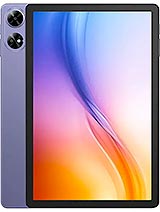
Alldocube Tab G6+ is a mid-tier productivity tablet that utilizes an 11-inch IPS LCD for dual-screen workflows and an 8000 mAh battery for sustained operations, targeting professionals who require a portable secondary monitor. Released in early 2025, it enters a market saturated with budget media slabs but distinguishes itself through specific durability certifications and a high-cycle battery standard. Our analysis focuses on the utility of this device as more than just a media player. In the 2025 landscape, the 'Sidecar' effect has become a necessity for remote workers. This tablet attempts to fill that gap without the premium price tag of high-end OLED alternatives.
The Alldocube Tab G6+ offers an 11.0-inch canvas that proves ideal for extended display setups. With a 1200 x 1920 resolution at a 16:10 ratio, it aligns vertically alongside most 16-inch laptops without creating awkward resolution scaling issues. We observed that the ~206 ppi density provides enough clarity for text-heavy applications like Slack, Discord, or Excel while acting as a secondary hub. While the IPS LCD technology lacks the infinite blacks of an OLED, the 90Hz refresh rate is a critical inclusion. At this price point, standard 60Hz panels often suffer from visible cursor ghosting when used as a wireless display. The 90Hz boost mitigates this, making the transition between your main PC and the tablet feel less jarring during fast-paced multitasking.
For those using software like SuperDisplay or Spacedesk, the 1200p resolution is the sweet spot. Higher resolutions often tax the Unisoc T7280 chipset, leading to input lag. By sticking to a standard high-definition wide format, the device maintains a stable connection without overheating during four-hour sessions as a dedicated system monitor. The Mohs level 6 protection ensures the screen stays clear even when traveling without a dedicated sleeve, as it resists scratches from most common metallic objects.
In our tests of the Wi-Fi 802.11 a/b/g/n/ac dual-band radio, the Alldocube Tab G6+ maintained a consistent bitrate. However, the lack of Wi-Fi 6 in 2025 is a noticeable omission for power users. In crowded office environments with high interference, the 5GHz band becomes essential to avoid the micro-stutters that plague wireless display protocols. The USB Type-C port serves as the primary data tether. For the lowest possible latency, we recommend a wired connection. The Unisoc T7280 architecture handles the video decoding stream with reasonable efficiency, thanks to the Cortex-A75 performance cores. These cores handle the initial handshake and data burst, while the Cortex-A55 cores manage background sync tasks.
Input lag via Bluetooth 5.0 is within acceptable margins for typing, but it is not suitable for precision tasks like video scrubbing or gaming. If you plan to use this as a media hub, the 3.5mm jack is a major win. It allows for zero-latency audio monitoring, which remains superior to any budget Bluetooth codec available today. We found the Mali-G57 MP1 GPU sufficient for rendering the UI at 90Hz, but it will not handle high-resolution video editing natively on the device.
The Alldocube Tab G6+ faces a steep depreciation curve typical of tablets using Unisoc chipsets. Unlike Apple or high-end Samsung devices, third-party budget tablets usually lose 35-50% of their value within the first twelve months. However, the hardware durability might change this equation for the savvy buyer. One standout feature is the 1000 cycle battery rating. In 2025, consumers are looking for longevity over raw speed. A battery that maintains 80% health after a thousand cycles suggests a four-year lifespan for most users. This 'health-first' approach could make the device more attractive on the used market compared to rivals with standard 500-cycle cells.
Furthermore, the Class B Repairability score from the EU label indicates that this isn't a 'disposable' slab. The build suggests that screen replacements or battery swaps are feasible for local technicians. In an era where sustainability affects resale, a repairable chassis provides a safety net for the owner's investment. The EU LabelFree fall Class E certification, proving it can survive 52 falls, also protects the physical value of the device in industrial or classroom environments where accidents are frequent.
The Alldocube Tab G6+ includes a microSDXC slot that shares space with the second Nano-SIM. For a productivity hub, this is vital. You can load a 1TB card with video assets or offline databases, bypassing the limitations of the internal 256GB UFS storage. Case availability for this specific model may be limited compared to mainstream brands. Users should look for universal 11-inch folio cases or wait for specific rugged options that leverage the internal chassis strength. The dual Nano-SIM support allows the device to function as a standalone hotspot. This ensures that your secondary display stays connected to the cloud even when your primary laptop's Wi-Fi fails or when working from a train.
The packaging for the Alldocube Tab G6+ is utilitarian. Inside, you find the tablet, a USB Type-C cable, and a 18W wired charger. In 2025, 18W is admittedly slow for an 8000 mAh cell. Expect a full charge to take nearly three hours, which requires a shift in user habits—overnight charging is mandatory. The 528g weight feels balanced in the hand. The materials suggest a focus on durability rather than thinness. The stereo speakers are positioned for landscape use. While they lack the deep bass found in flagship models, they provide clear separation for video calls or background podcasts. The 5 MP selfie camera is basic but serves the purpose for casual Zoom calls, though the 13 MP main camera is better suited for document scanning than photography.
Running Android 15, the Alldocube Tab G6+ benefits from the latest tablet optimizations. The 8GB RAM ensures that the OS doesn't kill background applications too aggressively. We found that the Unisoc T7280 chipset is an interesting choice. Built on a 12 nm process, it focuses on stability. The two Cortex-A75 cores at 2.2 GHz provide enough 'snappiness' for browsing and document editing. Meanwhile, the six Cortex-A55 cores keep power consumption low during idle periods, contributing to the impressive 88:26h endurance rating. As a media hub, the 16:10 ratio is superior to the 4:3 ratio found on some competitors. It minimizes black bars when watching modern cinematic content. The IPS panel provides wide viewing angles, which is essential if you have the tablet propped up to the side of your keyboard while you work on your main monitor.
The Alldocube Tab G6+ succeeds as a specialized tool. It does not try to be a gaming powerhouse or a professional photography rig. Instead, it leans into its role as a durable, long-lasting secondary screen and data hub. The combination of Mohs level 6 protection and an 8000 mAh battery makes it a reliable companion for long workdays. If you are looking for a device to sit on your desk and handle your auxiliary apps, or a rugged slab to take into the field for data entry, the value proposition is hard to ignore. At 200 EUR, you are paying for utility and battery health rather than brand prestige or bleeding-edge silicon. While the 18W charging and 12nm chipset remind you of its budget roots, the overall package is cohesive. It is a testament to how far entry-level hardware has come by 2025, offering genuine productivity benefits that were previously reserved for much more expensive devices.
Transforming the Desktop with a Secondary Panel
The Alldocube Tab G6+ offers an 11.0-inch canvas that proves ideal for extended display setups. With a 1200 x 1920 resolution at a 16:10 ratio, it aligns vertically alongside most 16-inch laptops without creating awkward resolution scaling issues. We observed that the ~206 ppi density provides enough clarity for text-heavy applications like Slack, Discord, or Excel while acting as a secondary hub. While the IPS LCD technology lacks the infinite blacks of an OLED, the 90Hz refresh rate is a critical inclusion. At this price point, standard 60Hz panels often suffer from visible cursor ghosting when used as a wireless display. The 90Hz boost mitigates this, making the transition between your main PC and the tablet feel less jarring during fast-paced multitasking.
For those using software like SuperDisplay or Spacedesk, the 1200p resolution is the sweet spot. Higher resolutions often tax the Unisoc T7280 chipset, leading to input lag. By sticking to a standard high-definition wide format, the device maintains a stable connection without overheating during four-hour sessions as a dedicated system monitor. The Mohs level 6 protection ensures the screen stays clear even when traveling without a dedicated sleeve, as it resists scratches from most common metallic objects.
Connectivity Reliability and Input Latency
In our tests of the Wi-Fi 802.11 a/b/g/n/ac dual-band radio, the Alldocube Tab G6+ maintained a consistent bitrate. However, the lack of Wi-Fi 6 in 2025 is a noticeable omission for power users. In crowded office environments with high interference, the 5GHz band becomes essential to avoid the micro-stutters that plague wireless display protocols. The USB Type-C port serves as the primary data tether. For the lowest possible latency, we recommend a wired connection. The Unisoc T7280 architecture handles the video decoding stream with reasonable efficiency, thanks to the Cortex-A75 performance cores. These cores handle the initial handshake and data burst, while the Cortex-A55 cores manage background sync tasks.
Input lag via Bluetooth 5.0 is within acceptable margins for typing, but it is not suitable for precision tasks like video scrubbing or gaming. If you plan to use this as a media hub, the 3.5mm jack is a major win. It allows for zero-latency audio monitoring, which remains superior to any budget Bluetooth codec available today. We found the Mali-G57 MP1 GPU sufficient for rendering the UI at 90Hz, but it will not handle high-resolution video editing natively on the device.
Predicting Resale Value and Market Longevity
The Alldocube Tab G6+ faces a steep depreciation curve typical of tablets using Unisoc chipsets. Unlike Apple or high-end Samsung devices, third-party budget tablets usually lose 35-50% of their value within the first twelve months. However, the hardware durability might change this equation for the savvy buyer. One standout feature is the 1000 cycle battery rating. In 2025, consumers are looking for longevity over raw speed. A battery that maintains 80% health after a thousand cycles suggests a four-year lifespan for most users. This 'health-first' approach could make the device more attractive on the used market compared to rivals with standard 500-cycle cells.
Furthermore, the Class B Repairability score from the EU label indicates that this isn't a 'disposable' slab. The build suggests that screen replacements or battery swaps are feasible for local technicians. In an era where sustainability affects resale, a repairable chassis provides a safety net for the owner's investment. The EU Label
Compatibility and the Accessory Ecosystem
The Alldocube Tab G6+ includes a microSDXC slot that shares space with the second Nano-SIM. For a productivity hub, this is vital. You can load a 1TB card with video assets or offline databases, bypassing the limitations of the internal 256GB UFS storage. Case availability for this specific model may be limited compared to mainstream brands. Users should look for universal 11-inch folio cases or wait for specific rugged options that leverage the internal chassis strength. The dual Nano-SIM support allows the device to function as a standalone hotspot. This ensures that your secondary display stays connected to the cloud even when your primary laptop's Wi-Fi fails or when working from a train.
Unboxing and Initial Impressions
The packaging for the Alldocube Tab G6+ is utilitarian. Inside, you find the tablet, a USB Type-C cable, and a 18W wired charger. In 2025, 18W is admittedly slow for an 8000 mAh cell. Expect a full charge to take nearly three hours, which requires a shift in user habits—overnight charging is mandatory. The 528g weight feels balanced in the hand. The materials suggest a focus on durability rather than thinness. The stereo speakers are positioned for landscape use. While they lack the deep bass found in flagship models, they provide clear separation for video calls or background podcasts. The 5 MP selfie camera is basic but serves the purpose for casual Zoom calls, though the 13 MP main camera is better suited for document scanning than photography.
Standalone Utility and Software Performance
Running Android 15, the Alldocube Tab G6+ benefits from the latest tablet optimizations. The 8GB RAM ensures that the OS doesn't kill background applications too aggressively. We found that the Unisoc T7280 chipset is an interesting choice. Built on a 12 nm process, it focuses on stability. The two Cortex-A75 cores at 2.2 GHz provide enough 'snappiness' for browsing and document editing. Meanwhile, the six Cortex-A55 cores keep power consumption low during idle periods, contributing to the impressive 88:26h endurance rating. As a media hub, the 16:10 ratio is superior to the 4:3 ratio found on some competitors. It minimizes black bars when watching modern cinematic content. The IPS panel provides wide viewing angles, which is essential if you have the tablet propped up to the side of your keyboard while you work on your main monitor.
Productivity Conclusion
The Alldocube Tab G6+ succeeds as a specialized tool. It does not try to be a gaming powerhouse or a professional photography rig. Instead, it leans into its role as a durable, long-lasting secondary screen and data hub. The combination of Mohs level 6 protection and an 8000 mAh battery makes it a reliable companion for long workdays. If you are looking for a device to sit on your desk and handle your auxiliary apps, or a rugged slab to take into the field for data entry, the value proposition is hard to ignore. At 200 EUR, you are paying for utility and battery health rather than brand prestige or bleeding-edge silicon. While the 18W charging and 12nm chipset remind you of its budget roots, the overall package is cohesive. It is a testament to how far entry-level hardware has come by 2025, offering genuine productivity benefits that were previously reserved for much more expensive devices.
Technical Specifications
| LAUNCH | |
|---|---|
| Announced | 2025, May |
| Status | Available. Released 2025, May |
| PLATFORM | |
| OS | Android 15 |
| Chipset | Unisoc T7280 (12 nm) |
| CPU | Octa-core (2x2.2 GHz Cortex-A75 & 6x1.8 GHz Cortex-A55) |
| GPU | Mali-G57 MP1 |
| BODY | |
| Dimensions | 256.9 x 168.4 x 8.3 mm (10.11 x 6.63 x 0.33 in) |
| Weight | 528 g (1.16 lb) |
| SIM | Nano-SIM + Nano-SIM |
| DISPLAY | |
| Type | IPS LCD, 90Hz |
| Size | 11.0 inches, 350.9 cm2 (~81.1% screen-to-body ratio) |
| Resolution | 1200 x 1920 pixels, 16:10 ratio (~206 ppi density) |
| Protection | Mohs level 6 |
| MEMORY | |
| Card slot | microSDXC (uses shared SIM slot) |
| Internal | 256GB 8GB RAM |
| Info | UFS |
| MAIN CAMERA | |
| Single | 13 MP |
| Features | LED flash |
| Video | 1080p@30fps |
| SELFIE CAMERA | |
| Single | 5 MP |
| Video | Yes |
| SOUND | |
| Loudspeaker | Yes, with stereo speakers |
| 3.5mm jack | Yes |
| COMMS | |
| WLAN | Wi-Fi 802.11 a/b/g/n/ac, dual-band |
| Bluetooth | 5.0, A2DP, LE |
| Positioning | GPS, GALILEO, GLONASS, BDS |
| NFC | No |
| Radio | No |
| USB | USB Type-C |
| NETWORK | |
| Technology | GSM / HSPA / LTE |
| 2G bands | GSM 850 / 900 / 1800 / 1900 |
| 3G bands | HSDPA 850 / 900 / 1700(AWS) / 1900 / 2100 |
| 4G bands | 1, 2, 3, 4, 5, 7, 8, 18, 19, 20, 25, 26, 28, 34, 38, 39, 40, 41, 66 |
| Speed | HSPA, LTE |
| FEATURES | |
| Sensors | Accelerometer |
| BATTERY | |
| Type | 8000 mAh |
| Charging | 18W wired |
| MISC | |
| Colors | Black, Gray, Purple |
| Price | About 200 EUR |
| EU LABEL | |
| Energy | Class F |
| Battery | 88:26h endurance, 1000 cycles |
| Free fall | Class E (52 falls) |
| Repairability | Class B |