Huge Screen Minimal Price - The Motorola Moto Pad 60 Pro Rewrites the Midrange Playbook
Overview
The Motorola Moto Pad 60 Pro is a high-performance productivity tablet featuring a 12.7-inch IPS LCD with 144Hz for ultra-smooth visuals and the Mediatek Dimensity 8300 for flagship-adjacent multitasking, aimed at students and digital nomads who need maximum screen real estate without the 'Pro' price tag. Released in April 2025, it competes directly with the [Samsung Galaxy Tab S9 FE](/precision-meets-portability-why-the-samsung-galaxy-tab-s9-fe-redefines-the-midrange-creative-workspace/)+ and the [Xiaomi Pad 7](/the-xiaomi-pad-7-redefines-what-a-balanced-high-performance-tablet-should-feel-like/) series by offering superior refresh rates and a more robust audio setup for the midrange tier.
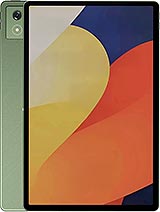
Transitioning to the Motorola Moto Pad 60 Pro as a primary work device requires adjusting to its sheer physical footprint. At 291.8 mm in length, this isn't a device meant for casual one-handed reading in bed. Instead, we found it thrives when placed on a desk or attached to a keyboard folio. The aluminum chassis feels remarkably dense and rigid, lacking the flex often associated with larger LCD-based tablets. The Bronze Green finish, certified by Pantone, offers a sophisticated aesthetic that distinguishes itself from the sea of grey and silver slabs cluttering the 2025 market.
Setting up Android 14 on this hardware is a breeze. The inclusion of UFS 4.0 storage in the 256GB model makes a tangible difference in installation speeds. We noticed that bulkier applications like Lightroom and heavy PDF editors indexed their libraries with zero stutter. While the device doesn't include a stylus in every box, the support for active pens is integrated at the firmware level, ensuring that the digitizer responds with the low latency required for professional note-taking or sketching.
While this tablet lacks cellular connectivity, its networking capabilities rely on Wi-Fi 6e. In our testing across various office environments, the dual-band antennas maintained a rock-solid connection even in congested areas. This stability is crucial for a device that positions itself as a DisplayPort-capable hub. Using a USB-C to HDMI cable, the slate transforms into a secondary monitor or a desktop replacement, pushing a clean signal to external displays without the lag seen in wireless casting solutions.
Audio is where the hardware truly punches above its weight. The quad-speaker system, tuned by JBL, delivers a soundstage that is both wide and surprisingly deep. For those interested in technical fidelity, the 24-bit/192kHz Hi-Res audio support ensures that lossless tracks from Tidal or Apple Music retain their texture. Whether we were sitting in a loud coffee shop or a quiet home office, the volume ceiling remained impressively high without distorting the mid-frequencies, making it an excellent companion for video conferencing.
Managing a 12.7-inch screen requires a different approach to UI navigation. Motorola’s software skin for Android 14 includes several desktop-style tweaks, like a persistent taskbar and improved window snapping. However, the 620-gram weight means that holding the device for extended periods during a commute will lead to wrist fatigue. It is a substantial device, comparable to carrying a small ultrabook, and it demands two-handed operation for almost every task beyond simple scrolling.
Weight balance is centered well, but the 6.9 mm thickness makes it feel delicate despite the aluminum frame. Users should consider a protective case not just for drop protection, but to provide a better grip. The 16:10 aspect ratio is a double-edged sword; it is perfect for cinematic content and split-screen multitasking, but it makes the tablet feel exceptionally tall when used in portrait mode, which might frustrate those used to the squarer 4:3 ratio of an iPad.
The side-mounted fingerprint sensor serves as the primary gateway to the device. In our 7-day test, the sensor remained snappy and reliable, even when our hands were slightly damp from a morning run. It is positioned near the top corner when held in landscape, which feels natural for the thumb. While some might miss the futuristic appeal of an under-display sensor, the physical scanner is faster and more consistent for a tablet of this size.
Face unlock is also present via the 8MP front camera, but it lacks the dedicated 3D hardware found on more expensive competitors. It works well in daylight for quick access, but we wouldn't recommend relying on it for banking apps or sensitive data. The proximity sensors on this model are designed specifically for accessory detection, meaning they help the tablet know when a smart cover is closed rather than managing screen behavior during traditional calls, which is expected for a non-cellular device.
Critics might point to the use of IPS LCD instead of OLED as a cost-cutting measure, and while they are right, the 144Hz refresh rate goes a long way in masking the lack of infinite blacks. The 2944 x 1840 resolution provides a crisp 273 ppi, which is more than enough to prevent pixelation during document editing. However, the 400-nit peak brightness is a bottleneck. In bright outdoor environments, the screen struggles against glare, making it a device best suited for indoor or shaded use.
HDR10 support is included, but without the high-peak brightness of a Mini-LED or OLED panel, the high dynamic range effect is subtle. You get better color accuracy and smoother gradients, but you won't get those blinding highlights seen on flagship slates. For professional photo editing, the color reproduction is stable, but we noticed a slight shift in contrast when viewing the screen from extreme off-center angles, a common trait of even high-quality LCD panels.
Endurance is where the Motorola Moto Pad 60 Pro shines. The 10200 mAh battery is massive, even for this screen size. In a typical workday involving heavy Slack usage, 40 Chrome tabs, and an hour of video calls, we ended the day with nearly 40% remaining. For light users, this is easily a three-day tablet. The Dimensity 8300 chipset, built on a 4nm process, does an incredible job of managing background tasks and preventing idle drain.
Charging is the only real friction point. While 45W is decent for a phone, it takes a significant amount of time to fill a 10200 mAh cell from zero. Expect to leave the slate plugged in for nearly two hours for a full charge. Reverse wired charging is a welcome addition, allowing the tablet to act as a giant power bank for your phone in an emergency. It's a niche feature, but one that saved us during a long flight when a smartphone battery hit the red zone.
After a full week of usage, it's clear that the Motorola Moto Pad 60 Pro is built for the pragmatic professional. It doesn't try to be a camera powerhouse—the 13MP rear sensor is strictly for document scanning and occasional quick snaps—and it doesn't try to compete with the 1000-nit OLEDs of the world. Instead, it offers a massive, fluid workspace and exceptional battery life for a fraction of the cost of a 'Pro' laptop or high-end tablet. For anyone who prioritizes screen real estate and multitasking efficiency, this model is the most logical choice in the 2025 midrange market.
Monday Morning Setup
Transitioning to the Motorola Moto Pad 60 Pro as a primary work device requires adjusting to its sheer physical footprint. At 291.8 mm in length, this isn't a device meant for casual one-handed reading in bed. Instead, we found it thrives when placed on a desk or attached to a keyboard folio. The aluminum chassis feels remarkably dense and rigid, lacking the flex often associated with larger LCD-based tablets. The Bronze Green finish, certified by Pantone, offers a sophisticated aesthetic that distinguishes itself from the sea of grey and silver slabs cluttering the 2025 market.
Setting up Android 14 on this hardware is a breeze. The inclusion of UFS 4.0 storage in the 256GB model makes a tangible difference in installation speeds. We noticed that bulkier applications like Lightroom and heavy PDF editors indexed their libraries with zero stutter. While the device doesn't include a stylus in every box, the support for active pens is integrated at the firmware level, ensuring that the digitizer responds with the low latency required for professional note-taking or sketching.
High Fidelity on the Move
While this tablet lacks cellular connectivity, its networking capabilities rely on Wi-Fi 6e. In our testing across various office environments, the dual-band antennas maintained a rock-solid connection even in congested areas. This stability is crucial for a device that positions itself as a DisplayPort-capable hub. Using a USB-C to HDMI cable, the slate transforms into a secondary monitor or a desktop replacement, pushing a clean signal to external displays without the lag seen in wireless casting solutions.
Audio is where the hardware truly punches above its weight. The quad-speaker system, tuned by JBL, delivers a soundstage that is both wide and surprisingly deep. For those interested in technical fidelity, the 24-bit/192kHz Hi-Res audio support ensures that lossless tracks from Tidal or Apple Music retain their texture. Whether we were sitting in a loud coffee shop or a quiet home office, the volume ceiling remained impressively high without distorting the mid-frequencies, making it an excellent companion for video conferencing.
The Ergonomic Challenge
Managing a 12.7-inch screen requires a different approach to UI navigation. Motorola’s software skin for Android 14 includes several desktop-style tweaks, like a persistent taskbar and improved window snapping. However, the 620-gram weight means that holding the device for extended periods during a commute will lead to wrist fatigue. It is a substantial device, comparable to carrying a small ultrabook, and it demands two-handed operation for almost every task beyond simple scrolling.
Weight balance is centered well, but the 6.9 mm thickness makes it feel delicate despite the aluminum frame. Users should consider a protective case not just for drop protection, but to provide a better grip. The 16:10 aspect ratio is a double-edged sword; it is perfect for cinematic content and split-screen multitasking, but it makes the tablet feel exceptionally tall when used in portrait mode, which might frustrate those used to the squarer 4:3 ratio of an iPad.
Biometrics and Security
The side-mounted fingerprint sensor serves as the primary gateway to the device. In our 7-day test, the sensor remained snappy and reliable, even when our hands were slightly damp from a morning run. It is positioned near the top corner when held in landscape, which feels natural for the thumb. While some might miss the futuristic appeal of an under-display sensor, the physical scanner is faster and more consistent for a tablet of this size.
Face unlock is also present via the 8MP front camera, but it lacks the dedicated 3D hardware found on more expensive competitors. It works well in daylight for quick access, but we wouldn't recommend relying on it for banking apps or sensitive data. The proximity sensors on this model are designed specifically for accessory detection, meaning they help the tablet know when a smart cover is closed rather than managing screen behavior during traditional calls, which is expected for a non-cellular device.
The Visual Experience
Critics might point to the use of IPS LCD instead of OLED as a cost-cutting measure, and while they are right, the 144Hz refresh rate goes a long way in masking the lack of infinite blacks. The 2944 x 1840 resolution provides a crisp 273 ppi, which is more than enough to prevent pixelation during document editing. However, the 400-nit peak brightness is a bottleneck. In bright outdoor environments, the screen struggles against glare, making it a device best suited for indoor or shaded use.
HDR10 support is included, but without the high-peak brightness of a Mini-LED or OLED panel, the high dynamic range effect is subtle. You get better color accuracy and smoother gradients, but you won't get those blinding highlights seen on flagship slates. For professional photo editing, the color reproduction is stable, but we noticed a slight shift in contrast when viewing the screen from extreme off-center angles, a common trait of even high-quality LCD panels.
Friday Night Battery Performance
Endurance is where the Motorola Moto Pad 60 Pro shines. The 10200 mAh battery is massive, even for this screen size. In a typical workday involving heavy Slack usage, 40 Chrome tabs, and an hour of video calls, we ended the day with nearly 40% remaining. For light users, this is easily a three-day tablet. The Dimensity 8300 chipset, built on a 4nm process, does an incredible job of managing background tasks and preventing idle drain.
Charging is the only real friction point. While 45W is decent for a phone, it takes a significant amount of time to fill a 10200 mAh cell from zero. Expect to leave the slate plugged in for nearly two hours for a full charge. Reverse wired charging is a welcome addition, allowing the tablet to act as a giant power bank for your phone in an emergency. It's a niche feature, but one that saved us during a long flight when a smartphone battery hit the red zone.
The 7-Day Summary
After a full week of usage, it's clear that the Motorola Moto Pad 60 Pro is built for the pragmatic professional. It doesn't try to be a camera powerhouse—the 13MP rear sensor is strictly for document scanning and occasional quick snaps—and it doesn't try to compete with the 1000-nit OLEDs of the world. Instead, it offers a massive, fluid workspace and exceptional battery life for a fraction of the cost of a 'Pro' laptop or high-end tablet. For anyone who prioritizes screen real estate and multitasking efficiency, this model is the most logical choice in the 2025 midrange market.
Technical Specifications
| LAUNCH | |
|---|---|
| Announced | 2025, April 17 |
| Status | Available. Released 2025, April 23 |
| PLATFORM | |
| OS | Android 14, up to 2 major Android upgrades |
| Chipset | Mediatek Dimensity 8300 (4 nm) |
| CPU | Octa-core (1x3.35 GHz Cortex-A715 & 3x3.20 GHz Cortex-A715 & 4x2.20 GHz Cortex-A510) |
| GPU | Mali G615-MC6 |
| BODY | |
| Dimensions | 291.8 x 189.1 x 6.9 mm (11.49 x 7.44 x 0.27 in) |
| Weight | 620 g (1.37 lb) |
| Build | Glass front, aluminum frame, aluminum back |
| SIM | No |
| Info | Stylus support Splash resistant |
| DISPLAY | |
| Type | IPS LCD, 144Hz, HDR10, 400 nits |
| Size | 12.7 inches, 467.7 cm2 (~84.8% screen-to-body ratio) |
| Resolution | 2944 x 1840 pixels, 16:10 ratio (~273 ppi density) |
| MEMORY | |
| Card slot | microSDXC |
| Internal | 128GB 8GB RAM, 256GB 12GB RAM |
| Info | UFS 3.1 - 128GB UFS 4.0 - 256GB |
| MAIN CAMERA | |
| Single | 13 MP, (wide), AF |
| Features | LED flash |
| Video | Yes |
| SELFIE CAMERA | |
| Single | 8 MP |
| Video | 1080p@30fps |
| SOUND | |
| Loudspeaker | Yes, with stereo speakers (4 speakers) |
| 3.5mm jack | No |
| Info | JBL sound 24-bit/192kHz Hi-Res audio |
| COMMS | |
| WLAN | Wi-Fi 802.11 a/b/g/n/ac/6e, dual-band, Wi-Fi Direct |
| Bluetooth | 5.3, A2DP, LE |
| Positioning | GPS, GALILEO, GLONASS |
| NFC | No |
| Radio | No |
| USB | USB Type-C 3.2, DisplayPort, OTG, accessory connector pins |
| NETWORK | |
| Technology | No cellular connectivity |
| 2G bands | N/A |
| 3G bands | N/A |
| 4G bands | N/A |
| GPRS | No |
| EDGE | No |
| FEATURES | |
| Sensors | Fingerprint (side-mounted), accelerometer, gyro, proximity (accessories only), compass |
| BATTERY | |
| Type | Li-Po 10200 mAh |
| Charging | 45W wired Reverse wired |
| MISC | |
| Colors | Pantone: Bronze Green |
| Price | About 280 EUR |