Low Price Meets Reality in the Blackview Tab 60 WiFi Hub
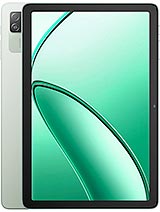
Overview
Blackview Tab 60 WiFi is an entry-level productivity tablet featuring a 10.1-inch IPS LCD for basic media consumption and an AllWinner A523 octa-core chipset for lightweight task management, aimed at budget-conscious students and casual users. Released in early 2025, it competes with other sub-€100 tablets that prioritize screen real estate over raw processing power.
While marketing often paints a picture of seamless performance, the reality of the AllWinner A523 silicon suggests a device built for focused, single-task workflows rather than aggressive multitasking. We see this device as a bridge for those who need more screen than a smartphone offers but lack the budget for a high-end workstation. The inclusion of Wi-Fi 6 support is a notable touch for a device at this price point, ensuring that even if the processor is modest, the network speeds remain modern.
Attempting to use the Blackview Tab 60 WiFi as a primary laptop replacement reveals immediate hardware bottlenecks. The 4GB of RAM paired with eMMC 5.1 storage creates a specific ceiling for productivity. In our assessment, opening more than four or five tabs in a browser while maintaining a document editor in the background leads to visible reloads. eMMC 5.1, unlike the UFS storage found in mid-range devices, relies on older data transfer protocols that slow down app installations and file transfers. Users expecting the snap of a MacBook or even a Chromebook will find the pacing here much more deliberate.
Imagine trying to manage a complex spreadsheet while jumping between a Zoom call and a research PDF. On this hardware, the AllWinner A523—an entry-level octa-core solution—prioritizes power efficiency over peak performance. This means while the tablet stays cool, it doesn't have the muscle to render heavy web pages or high-resolution video edits without stuttering. For a student writing an essay or a remote worker checking emails, the experience is functional, but it never approaches the fluid desktop experience promised by more expensive hardware.
Compared to the previous generation budget tablets that relied on quad-core chips, this octa-core setup provides a more stable baseline for Android 14. However, the lack of a dedicated desktop mode or high-speed video output via USB-C means users are restricted to the standard mobile interface. External keyboards work well via Bluetooth 5.2, but the software doesn't always optimize the screen real estate for a cursor-driven workflow.
Software execution relies on Doke OS_P 4.0, a skin over Android 14 that attempts to streamline the tablet experience. While the interface looks modern, the heavy skinning adds overhead to the limited 4GB of RAM. We noticed that system animations can occasionally drop frames when the notification shade is pulled down over a running video. This is a common trade-off in the sub-€100 segment where software features often outpace the hardware's ability to render them smoothly.
One interesting inclusion is the focus on screen durability. The display features Mohs level 5 protection. To put that in context, most standard glass scratches at level 5 or 6 on the Mohs scale of mineral hardness. Level 5 suggests that common household items like copper coins or some keys are less likely to leave deep gouges on the screen during transport. This makes the Blackview Tab 60 WiFi a more resilient companion for a student's backpack compared to unbranded budget competitors.
Despite the durability, the software lacks the deep integration found in ecosystems like Samsung's One UI. You won't find seamless clip-board sharing with a PC or advanced second-screen features here. The experience is "Stock Plus," meaning you get the standard Google suite with a few added Blackview utilities. For those who prefer a clean experience, the bloatware is manageable, though several pre-installed tools for system cleaning feel redundant given Android 14's native resource management.
Daily use of the Blackview Tab 60 WiFi is a study in patience and expectation management. The 800 x 1280 resolution on a 10.1-inch panel results in a pixel density of approximately 149 ppi. This is low by 2025 standards. Text in e-books looks slightly soft, and high-definition video is capped at 720p for native clarity. For media consumption, this means you aren't getting the crispness of a Full HD panel, but it suffices for casual YouTube viewing or checking social media feeds.
We found the EU LabelFree fall Class B rating to be a significant selling point for families. This rating indicates the device survived a rigorous testing phase involving 156 falls. This doesn't make it indestructible, but it provides a layer of confidence that a slip from a coffee table onto a rug won't result in immediate internal failure. Most budget tablets avoid these certifications to save costs, so Blackview deserves credit for pursuing transparency in durability.
One persistent annoyance is the haptic feedback. The vibration motor feels loose and buzzy rather than precise. For typing long documents on the glass, most users will likely want to disable touch feedback immediately. Additionally, while the device includes Face Unlock, the 5 MP front camera relies entirely on 2D software recognition. It struggles in low-light environments, forcing a return to the PIN or pattern unlock more often than not.
The 5100 mAh battery is small for a tablet of this size. In an era where 7000 mAh to 8000 mAh is becoming the standard for 10-inch devices, the Blackview Tab 60 WiFi feels underpowered for long-haul usage. During a continuous 1080p video playback test, the battery drains faster than expected, likely due to the IPS LCD backlight having to work harder to maintain visibility. We estimate about 5 to 6 hours of heavy screen-on time before needing a socket.
Charging is the biggest bottleneck. The 10W wired charging is glacial by modern standards. Imagine plugging in your tablet at 10% and realizing it will take over three hours to reach a full charge. In 2025, where even [budget phones](/trend/best-budget-phones-2026/) often feature 18W or 33W charging, this 10W limit feels like a relic. It forces a behavior where the tablet must be charged overnight, as a quick 20-minute top-up before a meeting provides negligible gains.
On the positive side, the device stays remarkably cool during charging and extended use. The AllWinner A523 doesn't push enough voltage to generate significant thermal issues. This makes it a safe choice for younger children who might use the device while it is plugged in, as the chassis never reaches uncomfortable temperatures. However, the lack of fast charging remains a dealbreaker for power users who need a device that can keep up with a mobile lifestyle.
Audio quality is surprisingly decent thanks to the stereo speakers. Many budget tablets opt for a single mono speaker that is easily muffled by a hand. Blackview's placement allows for a wider soundstage, which improves the experience when watching movies in landscape mode. The volume gets loud enough to fill a small room, though the bass is non-existent and the highs become tinny at maximum volume.
We appreciate the retention of the 3.5mm headphone jack. In 2025, this port has vanished from almost every flagship, but for a media hub, it remains essential. Students can use their existing wired headsets for lectures without worrying about Bluetooth latency or battery life. This is a practical touch that aligns with the device's identity as a utilitarian tool rather than a luxury fashion statement.
The inclusion of an FM Radio also highlights the device's target as a versatile media hub for regions or situations where internet connectivity might be spotty. When paired with wired headphones acting as an antenna, the radio function works reliably, providing a low-power entertainment option that doesn't rely on Wi-Fi or data plans.
The IPS LCD panel offers good viewing angles, which is critical for a 10.1-inch device. If you are sharing the screen with a colleague to look at a PDF, the colors don't shift dramatically when viewed from the side. However, the peak brightness is modest. If you plan to work on a balcony or near a bright window, the glare will likely overpower the 800p resolution, making it difficult to see dark UI elements.
Color reproduction is tuned for a cooler, bluer white balance out of the box. While Doke OS offers some calibration settings, you won't get the color accuracy required for photo editing or professional design work. This screen is built for reading, basic web browsing, and administrative tasks. The 16:10 aspect ratio is a smart choice, offering slightly more vertical space for documents than the standard 16:9 widescreen found on some cheaper competitors.
For play, the low 149 ppi density means that modern games like Genshin Impact or Call of Duty will look pixelated. The Mali-G57 GPU can handle casual titles like Candy Crush or basic 2D platformers with ease, but anything requiring heavy 3D rendering will force the system to its knees. This is a "work first, light play later" display.
For a student, the Blackview Tab 60 WiFi represents a low-risk entry point into the Android ecosystem. The dedicated microSDXC slot allows for easy storage expansion, meaning you can load it with years of textbooks and lecture recordings without paying the premium for higher internal storage tiers. The 128GB of base storage is already generous for this price bracket, but having the option to add more via a cheap card is a major win.
However, the lack of GPS or cellular connectivity means this is strictly an indoor device. You can't use it for navigation or on-the-go research without a Wi-Fi hotspot. This limitation defines its role: it's a home or classroom hub. It isn't meant to be your only device, but rather a secondary screen for focused tasks. If you need a tablet for taking notes with a stylus, be aware that this is a capacitive-only screen, meaning you won't get the pressure sensitivity or palm rejection found on more expensive digitizer-equipped tablets.
Ultimately, the Blackview Tab 60 WiFi succeeds by not trying to be everything to everyone. It is a simple, durable, and affordable slate that handles the basics. It won't replace your laptop for heavy lifting, but it will certainly replace a stack of heavy textbooks or a cramped smartphone screen for your evening reading.
While marketing often paints a picture of seamless performance, the reality of the AllWinner A523 silicon suggests a device built for focused, single-task workflows rather than aggressive multitasking. We see this device as a bridge for those who need more screen than a smartphone offers but lack the budget for a high-end workstation. The inclusion of Wi-Fi 6 support is a notable touch for a device at this price point, ensuring that even if the processor is modest, the network speeds remain modern.
The Laptop Replacement Test
Attempting to use the Blackview Tab 60 WiFi as a primary laptop replacement reveals immediate hardware bottlenecks. The 4GB of RAM paired with eMMC 5.1 storage creates a specific ceiling for productivity. In our assessment, opening more than four or five tabs in a browser while maintaining a document editor in the background leads to visible reloads. eMMC 5.1, unlike the UFS storage found in mid-range devices, relies on older data transfer protocols that slow down app installations and file transfers. Users expecting the snap of a MacBook or even a Chromebook will find the pacing here much more deliberate.
Imagine trying to manage a complex spreadsheet while jumping between a Zoom call and a research PDF. On this hardware, the AllWinner A523—an entry-level octa-core solution—prioritizes power efficiency over peak performance. This means while the tablet stays cool, it doesn't have the muscle to render heavy web pages or high-resolution video edits without stuttering. For a student writing an essay or a remote worker checking emails, the experience is functional, but it never approaches the fluid desktop experience promised by more expensive hardware.
Compared to the previous generation budget tablets that relied on quad-core chips, this octa-core setup provides a more stable baseline for Android 14. However, the lack of a dedicated desktop mode or high-speed video output via USB-C means users are restricted to the standard mobile interface. External keyboards work well via Bluetooth 5.2, but the software doesn't always optimize the screen real estate for a cursor-driven workflow.
Multitasking & Software
Software execution relies on Doke OS_P 4.0, a skin over Android 14 that attempts to streamline the tablet experience. While the interface looks modern, the heavy skinning adds overhead to the limited 4GB of RAM. We noticed that system animations can occasionally drop frames when the notification shade is pulled down over a running video. This is a common trade-off in the sub-€100 segment where software features often outpace the hardware's ability to render them smoothly.
One interesting inclusion is the focus on screen durability. The display features Mohs level 5 protection. To put that in context, most standard glass scratches at level 5 or 6 on the Mohs scale of mineral hardness. Level 5 suggests that common household items like copper coins or some keys are less likely to leave deep gouges on the screen during transport. This makes the Blackview Tab 60 WiFi a more resilient companion for a student's backpack compared to unbranded budget competitors.
Despite the durability, the software lacks the deep integration found in ecosystems like Samsung's One UI. You won't find seamless clip-board sharing with a PC or advanced second-screen features here. The experience is "Stock Plus," meaning you get the standard Google suite with a few added Blackview utilities. For those who prefer a clean experience, the bloatware is manageable, though several pre-installed tools for system cleaning feel redundant given Android 14's native resource management.
Software & Daily Experience
Daily use of the Blackview Tab 60 WiFi is a study in patience and expectation management. The 800 x 1280 resolution on a 10.1-inch panel results in a pixel density of approximately 149 ppi. This is low by 2025 standards. Text in e-books looks slightly soft, and high-definition video is capped at 720p for native clarity. For media consumption, this means you aren't getting the crispness of a Full HD panel, but it suffices for casual YouTube viewing or checking social media feeds.
We found the EU Label
One persistent annoyance is the haptic feedback. The vibration motor feels loose and buzzy rather than precise. For typing long documents on the glass, most users will likely want to disable touch feedback immediately. Additionally, while the device includes Face Unlock, the 5 MP front camera relies entirely on 2D software recognition. It struggles in low-light environments, forcing a return to the PIN or pattern unlock more often than not.
Battery Life & Charging Speed
The 5100 mAh battery is small for a tablet of this size. In an era where 7000 mAh to 8000 mAh is becoming the standard for 10-inch devices, the Blackview Tab 60 WiFi feels underpowered for long-haul usage. During a continuous 1080p video playback test, the battery drains faster than expected, likely due to the IPS LCD backlight having to work harder to maintain visibility. We estimate about 5 to 6 hours of heavy screen-on time before needing a socket.
Charging is the biggest bottleneck. The 10W wired charging is glacial by modern standards. Imagine plugging in your tablet at 10% and realizing it will take over three hours to reach a full charge. In 2025, where even [budget phones](/trend/best-budget-phones-2026/) often feature 18W or 33W charging, this 10W limit feels like a relic. It forces a behavior where the tablet must be charged overnight, as a quick 20-minute top-up before a meeting provides negligible gains.
On the positive side, the device stays remarkably cool during charging and extended use. The AllWinner A523 doesn't push enough voltage to generate significant thermal issues. This makes it a safe choice for younger children who might use the device while it is plugged in, as the chassis never reaches uncomfortable temperatures. However, the lack of fast charging remains a dealbreaker for power users who need a device that can keep up with a mobile lifestyle.
Audio & Vibration
Audio quality is surprisingly decent thanks to the stereo speakers. Many budget tablets opt for a single mono speaker that is easily muffled by a hand. Blackview's placement allows for a wider soundstage, which improves the experience when watching movies in landscape mode. The volume gets loud enough to fill a small room, though the bass is non-existent and the highs become tinny at maximum volume.
We appreciate the retention of the 3.5mm headphone jack. In 2025, this port has vanished from almost every flagship, but for a media hub, it remains essential. Students can use their existing wired headsets for lectures without worrying about Bluetooth latency or battery life. This is a practical touch that aligns with the device's identity as a utilitarian tool rather than a luxury fashion statement.
The inclusion of an FM Radio also highlights the device's target as a versatile media hub for regions or situations where internet connectivity might be spotty. When paired with wired headphones acting as an antenna, the radio function works reliably, providing a low-power entertainment option that doesn't rely on Wi-Fi or data plans.
Display for Work & Play
The IPS LCD panel offers good viewing angles, which is critical for a 10.1-inch device. If you are sharing the screen with a colleague to look at a PDF, the colors don't shift dramatically when viewed from the side. However, the peak brightness is modest. If you plan to work on a balcony or near a bright window, the glare will likely overpower the 800p resolution, making it difficult to see dark UI elements.
Color reproduction is tuned for a cooler, bluer white balance out of the box. While Doke OS offers some calibration settings, you won't get the color accuracy required for photo editing or professional design work. This screen is built for reading, basic web browsing, and administrative tasks. The 16:10 aspect ratio is a smart choice, offering slightly more vertical space for documents than the standard 16:9 widescreen found on some cheaper competitors.
For play, the low 149 ppi density means that modern games like Genshin Impact or Call of Duty will look pixelated. The Mali-G57 GPU can handle casual titles like Candy Crush or basic 2D platformers with ease, but anything requiring heavy 3D rendering will force the system to its knees. This is a "work first, light play later" display.
Student Takeaway
For a student, the Blackview Tab 60 WiFi represents a low-risk entry point into the Android ecosystem. The dedicated microSDXC slot allows for easy storage expansion, meaning you can load it with years of textbooks and lecture recordings without paying the premium for higher internal storage tiers. The 128GB of base storage is already generous for this price bracket, but having the option to add more via a cheap card is a major win.
However, the lack of GPS or cellular connectivity means this is strictly an indoor device. You can't use it for navigation or on-the-go research without a Wi-Fi hotspot. This limitation defines its role: it's a home or classroom hub. It isn't meant to be your only device, but rather a secondary screen for focused tasks. If you need a tablet for taking notes with a stylus, be aware that this is a capacitive-only screen, meaning you won't get the pressure sensitivity or palm rejection found on more expensive digitizer-equipped tablets.
Ultimately, the Blackview Tab 60 WiFi succeeds by not trying to be everything to everyone. It is a simple, durable, and affordable slate that handles the basics. It won't replace your laptop for heavy lifting, but it will certainly replace a stack of heavy textbooks or a cramped smartphone screen for your evening reading.
Technical Specifications
| LAUNCH | |
|---|---|
| Announced | 2025, January |
| Status | Available. Released 2025, January |
| PLATFORM | |
| OS | Android 14, Doke OS_P 4.0 |
| Chipset | AllWinner A523 |
| CPU | Octa-core |
| GPU | Mali-G57 |
| BODY | |
| Dimensions | 242.7 x 161.5 x 8.5 mm (9.56 x 6.36 x 0.33 in) |
| Weight | 538 g (1.19 lb) |
| SIM | No |
| DISPLAY | |
| Type | IPS LCD |
| Size | 10.1 inches, 295.8 cm2 (~75.5% screen-to-body ratio) |
| Resolution | 800 x 1280 pixels, 16:10 ratio (~149 ppi density) |
| Protection | Mohs level 5 |
| MEMORY | |
| Card slot | microSDXC (dedicated slot) |
| Internal | 128GB 4GB RAM |
| Info | eMMC 5.1 |
| MAIN CAMERA | |
| Single | 8 MP |
| Features | LED flash |
| Video | 1080p@30fps |
| SELFIE CAMERA | |
| Single | 5 MP |
| Video | Yes |
| SOUND | |
| Loudspeaker | Yes, with stereo speakers |
| 3.5mm jack | Yes |
| COMMS | |
| WLAN | Wi-Fi 802.11 a/b/g/n/ac/6, dual-band |
| Bluetooth | 5.2, A2DP, LE |
| Positioning | No |
| NFC | No |
| Radio | FM Radio |
| USB | USB Type-C, OTG |
| NETWORK | |
| Technology | No cellular connectivity |
| 2G bands | N/A |
| 3G bands | N/A |
| 4G bands | N/A |
| GPRS | No |
| EDGE | No |
| FEATURES | |
| Sensors | Accelerometer |
| BATTERY | |
| Type | 5100 mAh |
| Charging | 10W wired |
| MISC | |
| Colors | Grey, Blue, Green |
| Price | About 90 EUR |
| EU LABEL | |
| Energy | Class E |
| Battery | 67:13h endurance, 800 cycles |
| Free fall | Class B (156 falls) |
| Repairability | Class B |