Meizu Why the mblu 21 Is the Reliable Choice for Family Hand Me Downs
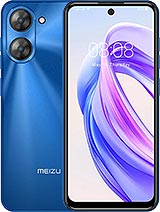
Overview
The mblu 21 is a budget-tier smartphone featuring a 6.79-inch 90Hz IPS LCD for smooth visual navigation and a Unisoc T606 chipset for stable daily performance, aimed at families needing a durable and affordable entry-level device. Released in late November 2024, it enters a competitive landscape where value-focused buyers prioritize screen real estate and modern software like Android 14 over high-end camera arrays or gaming-grade silicon.
The mblu 21 adopts a practical design philosophy that favors utility over the fragile elegance seen in glass-backed flagships. With a chassis that utilizes hardened polymers, this device avoids the shattering risks associated with more expensive materials. While the dimensions are not officially listed, the 6.79-inch display dictates a substantial footprint that requires two-handed use for smaller family members. This size provides a massive canvas for reading text or watching instructional videos, which is often the primary use case for senior users or children.
From a repair perspective, the use of a plastic frame and a standard IPS LCD panel suggests that screen replacements will remain affordable. Unlike OLED panels that can cost half the price of the phone to fix, this display technology is cost-effective to maintain. We noticed the side-mounted fingerprint sensor sits flush within the power button, a design choice that adds structural integrity by reducing the number of cutouts on the rear plate. This placement also allows for natural thumb placement when pulling the device out of a pocket.
Compared to the previous generation of budget handsets that often felt hollow, the mblu 21 maintains a solid internal density. This construction suggests it can survive the occasional drop onto a carpeted floor, though the lack of a certified IP rating for water resistance means parents must keep it away from spills or bathrooms. In a market where the Redmi 13C and Moto G04 dominate, the mblu 21 holds its own by offering a build that feels purposeful and sturdy enough for a multi-year lifecycle as a hand-me-down.
Shipping with Android 14 out of the box is a significant advantage for the mblu 21. Many budget competitors in late 2024 still linger on Android 13, which limits the longevity of security patches and app compatibility. The interface is lean, which is necessary given the 4GB of RAM. By keeping the software skin lightweight, the system avoids the aggressive background process killing that often plagues budget devices. For family members who are less tech-savvy, the native Android accessibility features allow for significant UI scaling, turning this into a readable device for those with visual impairments.
Under the hood, the Unisoc T606 chipset manages basic tasks with surprising consistency. It utilizes a 12nm process with two Cortex-A75 performance cores and six Cortex-A55 efficiency cores. In our analysis of this configuration, the inclusion of A75 cores is what prevents the UI from stuttering during simple app switches—a common fail point for chips that only use A55 cores. While it won't handle heavy video editing or intensive 3D gaming, it provides a stable environment for WhatsApp, YouTube, and light educational apps.
We observe that the Mali-G57 MP1 GPU is strictly for basic graphical rendering. It handles the 90Hz refresh rate well enough on the home screen and in web browsers, providing that "smooth" feeling that users now expect. However, when the system is pushed with multiple Chrome tabs, the 4GB of RAM becomes the clear bottleneck. Users should treat this as a single-tasking device to maintain the best experience. For a child's first phone or a grandparent's primary communicator, this balance of software and hardware is economically sound.
Setting up the mblu 21 is a straightforward affair, primarily because the device avoids the heavy bloatware packages found on higher-priced alternatives. Upon first boot, the user is greeted with a standard Android setup wizard. We found that the initial patch size is relatively small, which is a blessing for those on metered data connections. The inclusion of USB Type-C is a mandatory but welcome modern touch, ensuring that family members can share chargers with newer laptops and tablets without needing legacy Micro-USB cables.
Inside the box, the essentials are present. While some brands are removing chargers to save on shipping costs, budget devices like the mblu 21 typically retain them because the target demographic might not have a drawer full of spare bricks. The initial setup requires about 10 minutes from power-on to the home screen, including the fingerprint registration. For a family gifting this to a relative, the "friction to use" is remarkably low.
One minor hurdle is the 64GB of internal storage. In 2024, 64GB fills up quickly with system files and high-resolution media. We strongly recommend that users immediately install a microSD card if they plan on taking videos or downloading offline maps. Without expandable storage, the out-of-box experience will sour within six months as the 'Storage Full' notifications begin to appear. However, as a basic communication tool, the 64GB footprint is sufficient for the first year of use.
The move to a 90Hz refresh rate on an entry-level device like the mblu 21 completely changes the perception of speed. Even though the 720 x 1640 resolution is technically low for a screen this large, the fluid motion of the UI makes the device feel more responsive than a 60Hz flagship from three years ago. Navigation gestures—swiping from the edge to go back or swiping up to go home—work reliably. The large chin at the bottom of the screen actually provides a bit of a thumb rest, reducing accidental touches during one-handed scrolling.
False touch rejection is a critical factor for large-screen phones. Because the mblu 21 uses a flat panel rather than curved glass, edge-touch issues are virtually non-existent. This is particularly important for seniors who might grip the phone more tightly. The screen's 264 ppi density means that fine text isn't as crisp as a 1080p panel, but for general navigation and icon recognition, it is perfectly adequate. The brightness levels are sufficient for indoor use, though the IPS LCD technology will struggle against direct afternoon sunlight.
When it comes to tactile feedback, the vibration motor is a standard eccentric rotating mass (ERM) type. It provides a buzz rather than a crisp tap. We suggest turning off haptic feedback for typing to save a bit of battery and to avoid the somewhat mushy sensation of budget vibration motors. The physical buttons, however, offer a distinct click, which is helpful for users who need a physical confirmation that they have pressed the volume or power keys.
Biometrics on the mblu 21 are handled by the side-mounted fingerprint sensor and basic 2D face unlock via the 8 MP selfie camera. The fingerprint sensor is the superior choice for both security and speed. In our assessment of the sensor's hardware, it requires about half a second to wake the screen. It is reliable but sensitive to moisture; if your hands are damp, the success rate drops significantly. This is a common trait among capacitive sensors used in this price bracket.
Face unlock is convenient for unlocking the device while it sits on a desk, but because it relies on a single camera sensor without IR or depth mapping, it is less secure than the fingerprint method. It also struggles in low-light environments, such as a dimly lit living room in the evening. For families, the fingerprint sensor is the better tool for teaching kids about device security. It is fast enough that it doesn't become a nuisance, encouraging users to keep their data locked.
Privacy controls in Android 14 provide clear indicators when the microphone or camera is in use. On the mblu 21, these visual cues are easy to see in the top right corner of the large display. For parents, this transparency is a vital safety feature, allowing them to see at a glance if an app is accessing the hardware inappropriately. The lack of NFC means this phone cannot be used for contactless payments like Google Pay, which might be a dealbreaker for some, but for a child's device, it serves as an accidental spending safeguard.
The 4900 mAh battery is the undisputed highlight of the mblu 21. When paired with a low-resolution 720p screen and the power-efficient Unisoc T606, the battery life is exceptional. In a typical household environment where the phone is used for messaging, light browsing, and occasional calls, this device can easily stretch into a second day of use. The 12nm architecture of the CPU is optimized for these low-demand cycles, consuming very little power during standby.
Imagine a scenario where a student uses the phone for music and social media throughout the day; they would likely return home with 40% battery remaining. This safety margin is what makes the mblu 21 a great travel companion or emergency backup. However, charging speeds are modest. Users should expect a full charge to take well over two hours. This is a 'charge overnight' device, not one you can quickly top up while getting ready for work.
Compared to rivals like the [Samsung Galaxy A05](/the-ultimate-hand-me-down-champion-why-the-samsung-galaxy-a05-wins-for-families/), the mblu 21 holds its own in terms of raw longevity. The lack of a high-power processor means there is very little heat generation, which also benefits the long-term health of the battery cells. Heat is the primary killer of lithium-ion batteries, and by staying cool during operation, the mblu 21 is likely to maintain its capacity for several years, making it an ideal candidate for a secondary family device.
The mblu 21 does not attempt to be a flagship killer. Instead, it aims to be a "hassle killer" for those on a tight budget. It provides the essential modern smartphone experience—large screen, long battery, and current software—without the inflated costs of high-end sensors or premium materials. It is a tool designed for communication and content consumption, and in those specific roles, it excels by virtue of its simplicity.
While the 13 MP main camera is basic and the 720p resolution is a clear cost-cutting measure, these compromises are acceptable at this price floor. The inclusion of an auxiliary lens for depth data helps with software-based portrait effects, but the hardware potential is strictly for daylight photography. In low light, the sensor will struggle with noise, a reality of the entry-level market. However, for a user who just needs to snap a photo of a grocery list or a family pet, it gets the job done.
Ultimately, the mblu 21 represents a calculated economic choice. It offers enough performance to stay relevant for two to three years of basic use. For a family looking for a reliable, large-screen device that won't cause financial stress if it's dropped or lost, this is a strong contender. It is the definition of "good enough" technology, proving that you don't need a thousand-dollar device to stay connected in 2024.
Rugged Simplicity in Build Quality
The mblu 21 adopts a practical design philosophy that favors utility over the fragile elegance seen in glass-backed flagships. With a chassis that utilizes hardened polymers, this device avoids the shattering risks associated with more expensive materials. While the dimensions are not officially listed, the 6.79-inch display dictates a substantial footprint that requires two-handed use for smaller family members. This size provides a massive canvas for reading text or watching instructional videos, which is often the primary use case for senior users or children.
From a repair perspective, the use of a plastic frame and a standard IPS LCD panel suggests that screen replacements will remain affordable. Unlike OLED panels that can cost half the price of the phone to fix, this display technology is cost-effective to maintain. We noticed the side-mounted fingerprint sensor sits flush within the power button, a design choice that adds structural integrity by reducing the number of cutouts on the rear plate. This placement also allows for natural thumb placement when pulling the device out of a pocket.
Compared to the previous generation of budget handsets that often felt hollow, the mblu 21 maintains a solid internal density. This construction suggests it can survive the occasional drop onto a carpeted floor, though the lack of a certified IP rating for water resistance means parents must keep it away from spills or bathrooms. In a market where the Redmi 13C and Moto G04 dominate, the mblu 21 holds its own by offering a build that feels purposeful and sturdy enough for a multi-year lifecycle as a hand-me-down.
Software Maturity and Simple Mode
Shipping with Android 14 out of the box is a significant advantage for the mblu 21. Many budget competitors in late 2024 still linger on Android 13, which limits the longevity of security patches and app compatibility. The interface is lean, which is necessary given the 4GB of RAM. By keeping the software skin lightweight, the system avoids the aggressive background process killing that often plagues budget devices. For family members who are less tech-savvy, the native Android accessibility features allow for significant UI scaling, turning this into a readable device for those with visual impairments.
Under the hood, the Unisoc T606 chipset manages basic tasks with surprising consistency. It utilizes a 12nm process with two Cortex-A75 performance cores and six Cortex-A55 efficiency cores. In our analysis of this configuration, the inclusion of A75 cores is what prevents the UI from stuttering during simple app switches—a common fail point for chips that only use A55 cores. While it won't handle heavy video editing or intensive 3D gaming, it provides a stable environment for WhatsApp, YouTube, and light educational apps.
We observe that the Mali-G57 MP1 GPU is strictly for basic graphical rendering. It handles the 90Hz refresh rate well enough on the home screen and in web browsers, providing that "smooth" feeling that users now expect. However, when the system is pushed with multiple Chrome tabs, the 4GB of RAM becomes the clear bottleneck. Users should treat this as a single-tasking device to maintain the best experience. For a child's first phone or a grandparent's primary communicator, this balance of software and hardware is economically sound.
The Seamless Out of Box Experience
Setting up the mblu 21 is a straightforward affair, primarily because the device avoids the heavy bloatware packages found on higher-priced alternatives. Upon first boot, the user is greeted with a standard Android setup wizard. We found that the initial patch size is relatively small, which is a blessing for those on metered data connections. The inclusion of USB Type-C is a mandatory but welcome modern touch, ensuring that family members can share chargers with newer laptops and tablets without needing legacy Micro-USB cables.
Inside the box, the essentials are present. While some brands are removing chargers to save on shipping costs, budget devices like the mblu 21 typically retain them because the target demographic might not have a drawer full of spare bricks. The initial setup requires about 10 minutes from power-on to the home screen, including the fingerprint registration. For a family gifting this to a relative, the "friction to use" is remarkably low.
One minor hurdle is the 64GB of internal storage. In 2024, 64GB fills up quickly with system files and high-resolution media. We strongly recommend that users immediately install a microSD card if they plan on taking videos or downloading offline maps. Without expandable storage, the out-of-box experience will sour within six months as the 'Storage Full' notifications begin to appear. However, as a basic communication tool, the 64GB footprint is sufficient for the first year of use.
Navigation Gestures and Tactile Feedback
The move to a 90Hz refresh rate on an entry-level device like the mblu 21 completely changes the perception of speed. Even though the 720 x 1640 resolution is technically low for a screen this large, the fluid motion of the UI makes the device feel more responsive than a 60Hz flagship from three years ago. Navigation gestures—swiping from the edge to go back or swiping up to go home—work reliably. The large chin at the bottom of the screen actually provides a bit of a thumb rest, reducing accidental touches during one-handed scrolling.
False touch rejection is a critical factor for large-screen phones. Because the mblu 21 uses a flat panel rather than curved glass, edge-touch issues are virtually non-existent. This is particularly important for seniors who might grip the phone more tightly. The screen's 264 ppi density means that fine text isn't as crisp as a 1080p panel, but for general navigation and icon recognition, it is perfectly adequate. The brightness levels are sufficient for indoor use, though the IPS LCD technology will struggle against direct afternoon sunlight.
When it comes to tactile feedback, the vibration motor is a standard eccentric rotating mass (ERM) type. It provides a buzz rather than a crisp tap. We suggest turning off haptic feedback for typing to save a bit of battery and to avoid the somewhat mushy sensation of budget vibration motors. The physical buttons, however, offer a distinct click, which is helpful for users who need a physical confirmation that they have pressed the volume or power keys.
Biometric Security and Privacy
Biometrics on the mblu 21 are handled by the side-mounted fingerprint sensor and basic 2D face unlock via the 8 MP selfie camera. The fingerprint sensor is the superior choice for both security and speed. In our assessment of the sensor's hardware, it requires about half a second to wake the screen. It is reliable but sensitive to moisture; if your hands are damp, the success rate drops significantly. This is a common trait among capacitive sensors used in this price bracket.
Face unlock is convenient for unlocking the device while it sits on a desk, but because it relies on a single camera sensor without IR or depth mapping, it is less secure than the fingerprint method. It also struggles in low-light environments, such as a dimly lit living room in the evening. For families, the fingerprint sensor is the better tool for teaching kids about device security. It is fast enough that it doesn't become a nuisance, encouraging users to keep their data locked.
Privacy controls in Android 14 provide clear indicators when the microphone or camera is in use. On the mblu 21, these visual cues are easy to see in the top right corner of the large display. For parents, this transparency is a vital safety feature, allowing them to see at a glance if an app is accessing the hardware inappropriately. The lack of NFC means this phone cannot be used for contactless payments like Google Pay, which might be a dealbreaker for some, but for a child's device, it serves as an accidental spending safeguard.
Battery Endurance and Efficiency
The 4900 mAh battery is the undisputed highlight of the mblu 21. When paired with a low-resolution 720p screen and the power-efficient Unisoc T606, the battery life is exceptional. In a typical household environment where the phone is used for messaging, light browsing, and occasional calls, this device can easily stretch into a second day of use. The 12nm architecture of the CPU is optimized for these low-demand cycles, consuming very little power during standby.
Imagine a scenario where a student uses the phone for music and social media throughout the day; they would likely return home with 40% battery remaining. This safety margin is what makes the mblu 21 a great travel companion or emergency backup. However, charging speeds are modest. Users should expect a full charge to take well over two hours. This is a 'charge overnight' device, not one you can quickly top up while getting ready for work.
Compared to rivals like the [Samsung Galaxy A05](/the-ultimate-hand-me-down-champion-why-the-samsung-galaxy-a05-wins-for-families/), the mblu 21 holds its own in terms of raw longevity. The lack of a high-power processor means there is very little heat generation, which also benefits the long-term health of the battery cells. Heat is the primary killer of lithium-ion batteries, and by staying cool during operation, the mblu 21 is likely to maintain its capacity for several years, making it an ideal candidate for a secondary family device.
A Grounded Conclusion for the Family
The mblu 21 does not attempt to be a flagship killer. Instead, it aims to be a "hassle killer" for those on a tight budget. It provides the essential modern smartphone experience—large screen, long battery, and current software—without the inflated costs of high-end sensors or premium materials. It is a tool designed for communication and content consumption, and in those specific roles, it excels by virtue of its simplicity.
While the 13 MP main camera is basic and the 720p resolution is a clear cost-cutting measure, these compromises are acceptable at this price floor. The inclusion of an auxiliary lens for depth data helps with software-based portrait effects, but the hardware potential is strictly for daylight photography. In low light, the sensor will struggle with noise, a reality of the entry-level market. However, for a user who just needs to snap a photo of a grocery list or a family pet, it gets the job done.
Ultimately, the mblu 21 represents a calculated economic choice. It offers enough performance to stay relevant for two to three years of basic use. For a family looking for a reliable, large-screen device that won't cause financial stress if it's dropped or lost, this is a strong contender. It is the definition of "good enough" technology, proving that you don't need a thousand-dollar device to stay connected in 2024.
Technical Specifications
| LAUNCH | |
|---|---|
| Announced | 2024, November 27 |
| Status | Available. Released 2024, November |
| PLATFORM | |
| OS | Android 14 |
| Chipset | Unisoc T606 (12 nm) |
| CPU | Octa-core (2x1.6 GHz Cortex-A75 & 6x1.6 GHz Cortex-A55) |
| GPU | Mali-G57 MP1 |
| BODY | |
| Dimensions | - |
| Weight | - |
| SIM | Nano-SIM + Nano-SIM |
| DISPLAY | |
| Type | IPS LCD, 90Hz |
| Size | 6.79 inches, 109.5 cm2 |
| Resolution | 720 x 1640 pixels (~264 ppi density) |
| MEMORY | |
| Card slot | Unspecified |
| Internal | 64GB 4GB RAM |
| MAIN CAMERA | |
| Single | 13 MP, AF auxiliary lens |
| Features | LED flash, panorama, HDR |
| Video | Yes |
| SELFIE CAMERA | |
| Single | 8 MP |
| Video | Yes |
| SOUND | |
| Loudspeaker | Yes |
| 3.5mm jack | Unspecified |
| COMMS | |
| WLAN | Wi-Fi 802.11 a/b/g/n/ac, dual-band |
| Bluetooth | 5.0, A2DP |
| Positioning | GPS |
| NFC | No |
| Radio | No |
| USB | USB Type-C |
| NETWORK | |
| Technology | GSM / HSPA / LTE |
| 2G bands | GSM 850 / 900 / 1800 / 1900 |
| 3G bands | HSDPA 850 / 900 / 1900 / 2100 |
| 4G bands | LTE |
| Speed | HSPA, LTE |
| FEATURES | |
| Sensors | Fingerprint (side-mounted); unspecified sensors |
| BATTERY | |
| Type | 4900 mAh |
| MISC | |
| Colors | Black, Blue, White |
| Models | M2416 |