Oscal Fighting Inflation With Entry Level Hardware - The Blackview Pad 70 Value Strategy
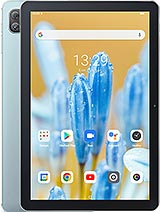
Overview
The Economic Reality of the Under-100 Euro Tablet Market
Blackview Pad 70 is a budget-tier Android tablet featuring a 10.1-inch IPS LCD for media consumption and a 6580 mAh battery for daily endurance, aimed at students and value hunters on a restricted budget. Released in July 2023, it competes with entry-level slates from Lenovo and Amazon in the sub-100 EUR bracket. Our analysis indicates this device targets the razor-thin margin where utility meets affordability. Every component choice reflects a calculation to keep costs low while providing basic functionality for the post-pandemic era where digital access is a necessity rather than a luxury.
At roughly 90 EUR, we are looking at the absolute floor of the tablet market. To understand the Blackview Pad 70, we must look past the flashy marketing and analyze the silicon and glass. The tablet market in mid-2023 is crowded with high-end OLED powerhouses, but for a large segment of the population, those are unattainable. This model steps in as a utilitarian tool. It is a digital window designed for specific, low-intensity tasks. It does not try to be a laptop replacement. It tries to be a reliable screen.
Where the Costs Were Cut
The display technology used here is IPS LCD. This is a standard in the budget world. Unlike older TFT panels, IPS offers wider viewing angles, meaning the colors won't shift drastically if you tilt the device. However, do not expect the deep blacks of an OLED. At this price point, the backlight will always bleed through dark scenes in a movie. It is perfectly functional for a child’s YouTube session or reading a digital textbook, but movie buffs will notice the lack of contrast. With a 73.6% screen-to-body ratio, the bezels are thick enough to provide a comfortable thumb rest without accidental touches, which is a practical win for ergonomics.
Internally, the choice of eMMC 5.1 storage instead of the faster UFS standard is another cost-saving measure. eMMC 5.1 is essentially an integrated SD card. It works well for sequential tasks like playing a video file, but it struggles with multitasking. When you try to update ten apps at once while browsing the web, the storage controller becomes a bottleneck. The 4GB of RAM is the bare minimum for a smooth Android 12 experience in 2023. It handles single apps well, but the system will likely kill background processes aggressively to keep the foreground app running.
Networking and Connectivity
The lack of cellular connectivity or GPS positioning (Comms Positioning: No) defines this as an indoor device. Do not buy this expecting to use it as a car navigator or for working in the park without a hotspot. It is tethered to your home or office network. This trade-off allowed the manufacturer to skip expensive modem licensing fees, passing those savings to the consumer. For a student staying within the confines of a dorm or a home, this is a logical omission.
Performance and the Quad-Core Reality
The quad-core CPU architecture is the engine of the Blackview Pad 70. In an era where octa-core processors are standard even in [budget phones](/trend/best-budget-phones-2026/), four cores tell us exactly what this device is for: basic productivity. Imagine you are a student trying to take notes while watching a lecture. This processor handles a split-screen view of a PDF and a notepad adequately. However, if you attempt to edit a high-resolution video or play 3D games like Genshin Impact, the frame rates will plummet. This is a device for the "browsing and streaming" crowd.
We must discuss the DokeOS_P 3.0 overlay on top of Android 12. Software optimization can often make up for modest hardware. In our assessment, the OS is lightweight enough to stay responsive. It avoids the heavy bloatware found on some other budget brands. The user interface is clean, focusing on utility. For a senior citizen or a young child, the learning curve is shallow. It behaves exactly how you expect a tablet to behave without unnecessary bells and whistles.
Battery Life and the Charging Bottleneck
A 6580 mAh battery is quite substantial for a tablet with these specifications. Because the screen resolution is low and the processor isn't power-hungry, the battery life is impressive. You can expect about 6 to 7 hours of continuous video playback. For a student, this means a full day of classes without hunting for a power outlet. It is the kind of endurance that makes the device feel reliable.
However, the 10W wired charging is a significant pain point. Charging a 6580 mAh cell at 10W is like trying to fill a swimming pool with a garden hose. Expect it to take over three hours to go from zero to one hundred percent. This is strictly an "overnight charge" device. If you realize you have 5% battery twenty minutes before a meeting, you are out of luck. The USB Type-C 2.0 port is modern and convenient, but the charging speed remains a relic of the past.
Optics and Audio
On the audio side, the stereo speakers are a welcome addition. Having speakers on both sides of the device when held in landscape mode creates a much better media experience than a single bottom-firing speaker. The 3.5mm headphone jack is another win for the budget-conscious. You don't need expensive wireless earbuds; a pair of cheap wired headphones will work perfectly, saving you more money and avoiding latency issues during video calls.
The Final Economic Assessment
When we look at the Blackview Pad 70, we see a device that knows its place. It weighs 520.5 g, making it substantial but manageable. It is built to a price, but it isn't built poorly. The Misty Blue and Meteorite Grey colors offer a bit of personality in a segment that is often just boring black plastic. For under 100 EUR, it provides a functional gateway to the internet, digital education, and basic entertainment.
Is it the best tablet on the market? No. But is it the best use of 90 EUR for someone who just needs a screen? Very possibly. It avoids the "trash-tier" pitfalls of no-name tablets by including Wi-Fi 6, a decent battery, and a clean version of Android 12. If you understand the limitations—the slow charging and the low-resolution screen—the Blackview Pad 70 stands as a testament to how far budget technology has come in 2023.
Technical Specifications
| LAUNCH | |
|---|---|
| Announced | 2023, July |
| Status | Available. Released 2023, July |
| PLATFORM | |
| OS | Android 12, DokeOS_P 3.0 |
| CPU | Quad-core |
| BODY | |
| Dimensions | 246.5 x 163 x 9.9 mm (9.70 x 6.42 x 0.39 in) |
| Weight | 520.5 g (1.15 lb) |
| SIM | No |
| DISPLAY | |
| Type | IPS LCD |
| Size | 10.1 inches, 295.8 cm2 (~73.6% screen-to-body ratio) |
| Resolution | 800 x 1280 pixels, 16:10 ratio (~149 ppi density) |
| MEMORY | |
| Card slot | microSDXC |
| Internal | 64GB 4GB RAM, 128GB 4GB RAM |
| Info | eMMC 5.1 |
| MAIN CAMERA | |
| Single | 13 MP |
| Features | LED flash |
| Video | 1080p@30fps |
| SELFIE CAMERA | |
| Single | 8 MP |
| Video | Yes |
| SOUND | |
| Loudspeaker | Yes, with stereo speakers |
| 3.5mm jack | Yes |
| COMMS | |
| WLAN | Wi-Fi 802.11 a/b/g/n/ac/6, dual-band |
| Bluetooth | 5.0, A2DP, LE |
| Positioning | No |
| NFC | No |
| Radio | No |
| USB | USB Type-C 2.0, OTG |
| NETWORK | |
| Technology | No cellular connectivity |
| 2G bands | N/A |
| 3G bands | N/A |
| 4G bands | N/A |
| GPRS | No |
| EDGE | No |
| FEATURES | |
| Sensors | Accelerometer, proximity (accessories only) |
| BATTERY | |
| Type | 6580 mAh |
| Charging | 10W wired |
| MISC | |
| Colors | Misty Blue, Meteorite Grey |
| Price | About 90 EUR |