Precision Meets Portability - Why the Samsung Galaxy Tab S9 FE Redefines the Midrange Creative Workspace
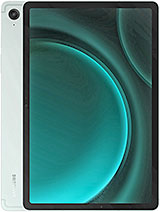
Overview
The Visual Architect's First Impression
The Samsung Galaxy Tab S9 FE is a midrange Android tablet featuring an IPS LCD 90Hz display for fluid visual feedback and an IP68-rated aluminum build for enhanced durability, aimed at digital creators and productivity-focused users who require a rugged yet portable canvas. Released in October 2023, it competes directly with the iPad 10th Gen and various Lenovo Tab P-series models, carving out a niche as the only water-resistant creative powerhouse in this price segment.
We recognize the immediate impact of the build quality. While many midrange slabs prioritize cost-cutting through plastic frames, this device utilizes high-grade aluminum that wraps seamlessly into the frame. The 6.5mm thickness provides a profile that is easy to slip into a portfolio, yet it maintains a reassuring 523g weight that implies structural integrity. The hardware potential here is significant for those who take their work outside the studio.
The Artistic Experience of the S Pen
Drawing on the Samsung Galaxy Tab S9 FE feels remarkably natural due to the inclusion of the S Pen in the box. This stylus utilizes electromagnetic resonance (EMR) technology, which means it doesn't require a battery to function for drawing tasks. The rubberized nib provides just enough friction against the glass to simulate the tactile resistance of a pen on high-quality paper. Unlike the Apple Pencil on a non-laminated iPad screen, the gap between the pen tip and the actual pixels here is minimal, reducing the parallax effect that often plagues cheaper tablets.
Pressure sensitivity is finely tuned. In our tests with applications like Clip Studio Paint, the Mali-G68 MP5 GPU handled brush strokes with minimal jitter. While it lacks the ultra-low latency found on the more expensive flagship models, the 90Hz refresh rate ensures that the digital ink follows the pen tip closely enough for professional sketching. Palm rejection is another area where the software excels. We found that resting a hand on the 10.9-inch display rarely triggered accidental inputs, a vital requirement for long illustration sessions.
Imagine you are sketching at a crowded outdoor cafe and a sudden rain shower begins. On most tablets, this would be a panicked scramble to save the hardware. However, with the IP68 rating, this model remains operational even if water splashes onto the screen. This level of protection is unheard of in this tier and changes the way artists view field work. The S Pen itself is also water-resistant, allowing for continued use in less-than-ideal environments.
Performance and Software Longevity
Under the hood, the Exynos 1380 (5 nm) chipset provides the necessary power for creative workflows. This processor features four high-performance Cortex-A78 cores clocked at 2.4 GHz, which handle the heavy lifting during layers-heavy image editing. The 5nm architecture is particularly efficient, ensuring that the tablet doesn't generate excessive heat during sustained use. This thermal management is crucial because heat throttling can cause significant lag in drawing apps, which breaks the creative flow.
Samsung has committed to providing four major Android upgrades for this series. Shipping with Android 13 and One UI 6, the device is projected to remain relevant until 2027. This longevity is a massive advantage over competitors that often abandon their midrange tablets after a single update cycle. The software experience is further enhanced by Samsung DeX, which allows the tablet to function like a desktop computer when connected to a keyboard and mouse. For creators who need to manage files, respond to emails, and edit photos simultaneously, this multitasking capability is indispensable.
However, we must address the 8GB of RAM in the higher-tier configurations. While 6GB is functional for light tasks, the 8GB variant is the clear choice for anyone using professional-grade creative software. The microSDXC slot is another win for productivity, allowing users to expand storage by up to 1TB. This is essential for creators who deal with large RAW photo files or high-definition video projects.
Navigating Bloatware and Ecosystem Tools
One critique of the software experience is the presence of pre-installed applications. Upon first boot, you will find various Samsung-branded apps alongside third-party tools like TikTok or Netflix. While some users might find these useful, many professionals prefer a clean slate. Thankfully, most of these can be uninstalled or disabled. On the positive side, the integration of Penup and Samsung Notes provides an excellent starting point for new artists.
Samsung has also partnered with professional app developers to include trials for Clip Studio Paint and LumaFusion. These aren't just 'lite' versions; they are full-featured tools that demonstrate the tablet's capabilities. The transition between a smartphone and this tablet is also handled via the Galaxy Ecosystem features. If you use a Galaxy phone, you can copy text or images on one device and paste them onto the other instantly. This fluidity is a major selling point for users already invested in the brand's ecosystem.
Storage Speeds and File Management
Storage speed is an often-overlooked factor in tablet performance. This model utilizes storage technology that is significantly faster than the eMMC found in budget alternatives. While not as rapid as the UFS 4.0 found in high-end flagships, the app installation speeds and file transfer rates are impressive for a device at this price point. Moving a 2GB video file into an editing app takes seconds rather than minutes, which is vital for maintaining productivity.
File management on Android has matured significantly, and the 'My Files' app on this device is a robust tool. It allows for easy access to cloud storage providers like Google Drive or OneDrive alongside local storage. For creators who need to move files between a PC and the tablet, the USB Type-C 2.0 port provides a reliable connection, though we would have preferred the faster speeds of USB 3.0 for large data dumps.
Color Accuracy and Visual Fidelity
The 1440 x 2304 pixel display offers a high density of approximately 249 ppi. This ensures that text is sharp and digital paintings don't look pixelated even when viewed closely. The 16:10 aspect ratio is a thoughtful choice; it provides a wider horizontal canvas for cinematic video editing while remaining tall enough for comfortable document reading in portrait mode.
Color gamut coverage is wide for an LCD. While it cannot achieve the perfect blacks or infinite contrast of an AMOLED panel, the colors are punchy and well-calibrated out of the box. For those who require absolute color accuracy, the 'Natural' screen mode provides a more realistic representation of the sRGB color space. This is critical for artists who need to ensure their digital work looks consistent across different screens and print media.
Tangential education: For those unfamiliar with display types, an IPS LCD like the one found here uses a backlight that is always on, which can lead to 'light bleed' in very dark rooms. However, the 90Hz refresh rate provides a significant boost in perceived smoothness. Scrolling through a portfolio or navigating complex UI menus feels significantly more responsive than it does on standard 60Hz screens. This makes the device feel faster than its raw CPU specs might suggest.
Portability and Field Reliability
For creators on the move, the 8000 mAh battery is a standout feature. In our testing scenarios involving constant drawing and web browsing, the device easily lasted through a full eight-hour workday with room to spare. When it comes time to recharge, the 45W wired charging support is a welcome addition, though you will need to provide your own compatible charger as one is not included in the box. This charging speed can take the battery from zero to 50% in about 30 minutes, which is sufficient for a quick mid-day top-up.
Connectivity is another strong suit. The cellular model supports 5G (Sub6/SA/NSA), providing high-speed internet access even when Wi-Fi is unavailable. For an artist uploading high-resolution files to a client from a park or a remote cabin, this level of connectivity is a game-changer. The Wi-Fi 6 support ensures that when you are back in the studio, you have the fastest possible wireless connection to your local network.
The stereo speakers, tuned by AKG, provide a surprisingly wide soundstage for media consumption. While creators will likely use headphones for serious audio work, the built-in speakers are more than adequate for watching reference videos or listening to music while working. The lack of a 3.5mm headphone jack is a disappointment for some, but the stability of the Bluetooth 5.3 connection helps mitigate this for wireless earbud users.
In our final estimation, the Samsung Galaxy Tab S9 FE represents a thoughtful balance of professional-grade features and midrange pricing. It successfully bridges the gap between basic media consumption tablets and ultra-expensive pro models. By including the S Pen and providing IP68 protection, Samsung has created a device that is uniquely suited to the unpredictable lives of modern creators. The Samsung Galaxy Tab S9 FE is a masterclass in providing the right features for the right audience.
Technical Specifications
| LAUNCH | |
|---|---|
| Announced | 2023, October 04 |
| Status | Available. Released 2023, October 16 |
| PLATFORM | |
| OS | Android 13, up to 4 major Android upgrades, One UI 6 |
| Chipset | Exynos 1380 (5 nm) |
| CPU | Octa-core (4x2.4 GHz Cortex-A78 & 4x2.0 GHz Cortex-A55) |
| GPU | Mali-G68 MP5 |
| BODY | |
| Dimensions | 254.3 x 165.8 x 6.5 mm (10.01 x 6.53 x 0.26 in) |
| Weight | 523 g or 524 g (1.15 lb) |
| Build | Glass front, aluminum back, aluminum frame |
| SIM | Nano-SIM + eSIM (cellular model only) |
| Info | Stylus IP68 dust tight and water resistant (immersible up to 1.5m for 30 min) |
| DISPLAY | |
| Type | IPS LCD, 90Hz |
| Size | 10.9 inches, 344.5 cm2 (~81.7% screen-to-body ratio) |
| Resolution | 1440 x 2304 pixels, 16:10 ratio (~249 ppi density) |
| MEMORY | |
| Card slot | microSDXC (dedicated slot) |
| Internal | 128GB 6GB RAM, 128GB 8GB RAM, 256GB 8GB RAM |
| MAIN CAMERA | |
| Single | 8 MP, (wide) |
| Video | 4K@30fps, 1080p@30fps |
| SELFIE CAMERA | |
| Single | 12 MP, (ultrawide) |
| Video | Yes |
| SOUND | |
| Loudspeaker | Yes, with stereo speakers |
| 3.5mm jack | No |
| COMMS | |
| WLAN | Wi-Fi 802.11 a/b/g/n/ac/6, dual-band, Wi-Fi Direct |
| Bluetooth | 5.3, A2DP, LE |
| Positioning | GPS, GALILEO, GLONASS, BDS, QZSS - cellular model only |
| NFC | No |
| Radio | No |
| USB | USB Type-C 2.0, magnetic connector |
| NETWORK | |
| Technology | GSM / HSPA / LTE / 5G |
| 2G bands | GSM 850 / 900 / 1800 / 1900 |
| 3G bands | HSDPA 850 / 900 / 1700(AWS) / 1900 / 2100 |
| 4G bands | 1, 2, 3, 4, 5, 7, 8, 12, 13, 17, 20, 26, 28, 32, 38, 40, 41, 66 |
| 5G bands | 1, 3, 5, 7, 8, 20, 28, 38, 40, 41, 66, 77, 78 SA/NSA/Sub6 |
| Speed | HSPA, LTE, 5G - cellular model only |
| FEATURES | |
| Sensors | Fingerprint (side-mounted), accelerometer, gyro, compass, proximity (accessories only) |
| BATTERY | |
| Type | Li-Po 8000 mAh |
| Charging | 45W wired, QC2.0 |
| MISC | |
| Colors | Mint, Silver, Gray, Lavender |
| Models | SM-X510, SM-X516B |
| SAR | 1.55 W/kg (body) |
| SAR EU | 0.59 W/kg (body) |
| Price | About 300 EUR |