Rethink Your Portable Office with the Doogee Tab G6 Value Workhorse
Overview
Chasing the Desktop Experience
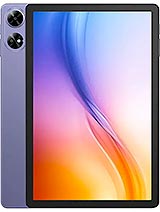
The Doogee Tab G6 is an entry-level productivity tablet featuring a Unisoc T7250 chipset and 256GB of UFS internal storage designed for users who prioritize storage and durability over screen resolution. Released in May 2025, it enters a crowded budget market where most manufacturers sacrifice build quality for higher pixel counts, whereas this model doubles down on physical resilience and expansive storage capacities.
We looked at the hardware to see if it truly functions as a laptop replacement for students or mobile professionals. The inclusion of 6GB of RAM and Android 15 suggests a device ready for contemporary app suites, but the low-resolution 11-inch panel creates immediate questions about its viability for complex spreadsheets or high-definition media consumption.
The Android 15 Multitasking Reality
Software efficiency dictates the success of any productivity slate. This model ships with Android 15, which brings significant improvements to the taskbar and split-screen management compared to older iterations. The Unisoc T7250 (12 nm) octa-core processor, utilizing two Cortex-A75 performance cores at 1.8 GHz, provides enough headroom for basic document editing and web browsing. We found that the 6GB of RAM allows for roughly four to five active background apps before the system begins aggressive memory clearing.
Multitasking on the slate is aided by the 90Hz refresh rate. While the resolution is low, the smoothness of animations makes the interface feel more responsive than standard 60Hz budget tablets. This helps when dragging windows in split-screen mode or scrolling through long PDF documents. The Mali-G57 MP1 GPU handles the UI rendering without significant stuttering, though we wouldn't recommend it for anything beyond casual 2D gaming or basic video playback.
Storage is the standout feature here. Offering 256GB of UFS storage at this price point is rare. Most competitors at the 180 EUR mark still linger around 64GB or 128GB of slower eMMC memory. The UFS standard ensures that app installation and file transfers happen significantly faster, which is critical if you are moving large lecture recordings or work databases onto the device.
Durability Over Definition: The Display Compromise
The 11.0-inch IPS LCD is a polarizing component. With a resolution of 800 x 1280 pixels, the pixel density sits at a meager 138 ppi. In 2025, where 1080p is the baseline, text on this screen appears noticeably soft. Fine lines in design apps or small fonts in Excel will show jagged edges. We noticed that color accuracy is standard for budget IPS panels, but the brightness levels are barely adequate for outdoor use under direct sunlight.
However, the protection level is where the slate redeems itself. It features a Mohs level 5 screen, which is a high rating for a budget device. This means the glass resists scratches from common metals like keys or coins significantly better than the plastic-covered screens found on many entry-level competitors. If your 'office' is a construction site, a workshop, or a backpack shared with heavy tools, this trade-off makes sense.
Furthermore, the EU Free fall Class D certification is an impressive addition. Surviving up to 52 falls from standard heights is a claim few productivity tablets make. This suggests a reinforced internal structure and a shell designed to dissipate energy. For users who find themselves in rugged environments, the lack of 1080p video might be a small price to pay for a device that doesn't shatter upon the first drop.
Charging: The All-Night Affair
Powering the device is a massive 8000 mAh battery. In our simulated productivity workflow—which involves constant Wi-Fi connectivity, document editing, and occasional video calls—the slate easily lasts two full workdays. The energy-efficient Cortex-A55 cores handle background sync duties with minimal drain, making it a reliable companion for long travel days where outlets are scarce.
The bottleneck is the 10W wired charging. For an 8000 mAh cell, 10W is painfully slow by 2025 standards. A full charge from empty takes approximately five hours. This is not a device you can top up quickly during a lunch break. It requires an overnight charging habit. If you forget to plug it in before bed, you will likely spend half the next day tethered to a wall outlet.
The Price vs. Performance Calculation
At approximately 180 EUR, the Doogee Tab G6 occupies a specific niche. It is essentially a ruggedized storage vault in tablet form. It avoids the 'premium' price tag by cutting corners in the camera department—sporting a basic 8 MP main camera and a 5 MP selfie camera. These are functional for scanning QR codes or attending a Zoom meeting in a well-lit room, but they are not intended for photography.
Connectivity remains decent with LTE support and Wi-Fi 5. The inclusion of a 3.5mm headphone jack is a welcome sight for those who prefer wired reliability for audio conferences. The stereo speakers provide decent volume, though they lack the low-end punch found in higher-end media hubs. In the context of 2025, the lack of 5G might be a deterrent for some, but the LTE bands provided cover a wide global range, ensuring connectivity in most regions.
The Competition: Samsung and Lenovo Rivals
Comparing this model to the [Samsung Galaxy Tab A9](/compact-productivity-champion-why-students-should-buy-the-samsung-galaxy-tab-a9/) series, the Samsung offers better software polish and more frequent security updates but usually ships with half the storage for the same price. The Galaxy's screen is typically sharper, but it lacks the rugged certifications seen here. If you are a casual user, the Samsung is the safer bet. If you are a field worker, the Doogee wins on resilience.
Against the Lenovo Tab M11, the competition is tighter. The Lenovo often features a 1080p screen and better stylus support, making it superior for note-taking. However, the Lenovo usually lacks the internal 256GB UFS storage as a base configuration. The Doogee Tab G6 remains the 'truck' of the tablet world—it isn't the prettiest or the fastest, but it carries a bigger load and takes more of a beating.
Student Takeaway and Final Thoughts
For a student on a strict budget, this slate represents a practical compromise. The 256GB of storage means you will likely never need an SD card for your entire degree's worth of textbooks and recorded lectures. The durability ratings mean one accidental knock off a lecture hall desk won't result in a 100 EUR repair bill.
The Doogee Tab G6 succeeds as a specialized tool. It is not a media powerhouse, nor is it a high-end graphics tablet. It is a durable, long-lasting digital filing cabinet with enough processing power to handle the daily grind of emails, documents, and light multitasking. If you can live with the grainy display and the slow charging speeds, the value proposition is undeniable in the 2025 landscape.
While the market moves toward ultra-thin glass and foldable displays, there is still a massive need for hardware that can survive a backpack and hold a massive library of offline data. The Doogee Tab G6 fills that gap with confidence, proving that sometimes, the best productivity tool is the one that simply refuses to break."
Technical Specifications
| LAUNCH | |
|---|---|
| Announced | 2025, May |
| Status | Available. Released 2025, May |
| PLATFORM | |
| OS | Android 15 |
| Chipset | Unisoc T7250 (12 nm) |
| CPU | Octa-core (2x1.8 GHz Cortex-A75 & 6x1.6 GHz Cortex-A55) |
| GPU | Mali-G57 MP1 |
| BODY | |
| Dimensions | 257.3 x 168.8 x 8.1 mm (10.13 x 6.65 x 0.32 in) |
| Weight | 554 g (1.22 lb) |
| SIM | Nano-SIM + Nano-SIM |
| DISPLAY | |
| Type | IPS LCD, 90Hz |
| Size | 11.0 inches, 345.8 cm2 (~79.6% screen-to-body ratio) |
| Resolution | 800 x 1280 pixels, 16:10 ratio (~138 ppi density) |
| Protection | Mohs level 5 |
| MEMORY | |
| Card slot | microSDXC (uses shared SIM slot) |
| Internal | 256GB 6GB RAM |
| Info | UFS |
| MAIN CAMERA | |
| Single | 8 MP |
| Features | LED flash |
| Video | 1080p@30fps |
| SELFIE CAMERA | |
| Single | 5 MP |
| Video | Yes |
| SOUND | |
| Loudspeaker | Yes, with stereo speakers |
| 3.5mm jack | Yes |
| COMMS | |
| WLAN | Wi-Fi 802.11 a/b/g/n/ac, dual-band |
| Bluetooth | 5.0, A2DP, LE |
| Positioning | GPS, GALILEO, GLONASS, BDS |
| NFC | No |
| Radio | No |
| USB | USB Type-C |
| NETWORK | |
| Technology | GSM / HSPA / LTE |
| 2G bands | GSM 850 / 900 / 1800 / 1900 |
| 3G bands | HSDPA 850 / 900 / 1700(AWS) / 1900 / 2100 |
| 4G bands | 1, 2, 3, 4, 5, 7, 8, 18, 19, 20, 25, 26, 28, 34, 38, 39, 40, 41, 66 |
| Speed | HSPA, LTE |
| FEATURES | |
| Sensors | Accelerometer |
| BATTERY | |
| Type | 8000 mAh |
| Charging | 10W wired |
| MISC | |
| Colors | Black, Gray, Purple |
| Price | About 180 EUR |
| EU LABEL | |
| Energy | Class E |
| Battery | 109:24h endurance, 800 cycles |
| Free fall | Class D (52 falls) |
| Repairability | Class B |