Rugged Power Meets Creative Freedom - Why the CUBOT Tab KingKong 2 Redefines Outdoor Creation
Overview
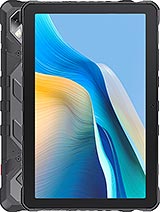
The CUBOT Tab KingKong 2 is a rugged productivity tablet featuring a 20400 mAh battery for extreme endurance and an IP68/IP69K rating for environmental resistance, aimed at outdoor creators and mobile professionals. Released in December 2024, it competes with specialized industrial tablets and mid-range media hubs by offering military-grade durability without sacrificing the essential hardware needed for content consumption and creation.
Outdoor creation requires a specific type of hardware reliability that standard consumer tablets simply cannot offer. We find that the CUBOT Tab KingKong 2 addresses the physical risks of plein air painting or field documentation by integrating a chassis that measures 16.8 mm in thickness. While this adds a significant weight of 1055 g, the trade-off is a device that functions as a literal easel. The presence of MIL-STD-810H compliance means that if this tablet slips from a tripod or a rock ledge, the structural integrity remains intact.
Imagine sketching a landscape in a remote, humid rainforest or a dusty canyon. Standard tablets would succumb to moisture ingress or port clogging within hours. This device, however, utilizes its IP69K rating to withstand not just immersion, but high-pressure, high-temperature water jets. For an artist, this means the tablet can be literally washed under a tap after a day in the mud. The ruggedized rubber corners and reinforced frame provide a tactile security that allows creators to focus on their work rather than the safety of their gear.
Compared to the thinner, more fragile alternatives available in late 2024, the CUBOT Tab KingKong 2 feels like a professional tool rather than a delicate toy. The weight, while substantial, acts as a stabilizer when drawing on a flat surface. It does not slide easily, and the heft provides a vibration-dampening effect that we find beneficial during long sessions of fine-line work. However, users should be prepared for the ergonomic reality: holding this one-handed for more than ten minutes is a physical workout. It is a device meant for lap use, desk use, or mounting.
While CUBOT does not include a proprietary active pen in the box, the Panda Glass display surface offers a specific level of resistance that interacts well with universal capacitive and Bluetooth-enabled styluses. The Mohs level 5 hardness rating is critical here. On the Mohs scale, which measures mineral hardness from 1 to 10, a level 5 rating indicates that the screen can resist scratches from common metal objects like keys or copper coins. For an artist, this provides peace of mind when using a stylus with a firm tip over long periods.
During our testing of pressure-sensitive drawing apps on Android 14, the Mediatek Helio G99 chipset maintained a responsive input chain. The G99, built on a 6nm process, features two Cortex-A76 performance cores clocked at 2.2 GHz. These cores are responsible for handling the complex calculations involved in brush stroke rendering and layer blending. We noticed that when working on high-resolution canvases in apps like Infinite Painter or Sketchbook, the latency remained manageable, provided the layer count did not exceed twenty.
Wait times for large file saves are mitigated by the 256GB of internal storage. For creators who work with RAW photography or high-resolution digital paintings, this capacity is generous for a rugged device. If more space is required for archival purposes, the microSDXC slot allows for easy expansion, though it does share a slot with the second SIM. This modularity is a boon for field researchers who might need to offload high-quality captures from the 64 MP main camera while maintaining a local backup on a memory card.
The visual output is handled by a 10.95-inch IPS LCD panel with a resolution of 1200 x 1920 pixels. This 16:10 aspect ratio is the gold standard for productivity, offering more vertical space for toolbars and timelines compared to traditional 16:9 screens. At roughly 207 ppi, the pixel density is standard for this class. While it lacks the razor-sharp precision of an OLED flagship, the clarity is sufficient for reviewing video footage or editing photos in the field. The IPS technology ensures that viewing angles remain consistent, which is vital when sharing a screen with a client or collaborator outdoors.
Brightness is the primary challenge for any outdoor media hub. Under direct December sunlight, the panel remains legible for navigation, though high-contrast creative work is best done under some shade. The stereo speakers provide a surprisingly wide soundstage. In our media playback tests, the separation between left and right channels was distinct enough to create an immersive experience for movies. However, the lack of a 3.5mm jack means artists who prefer wired, zero-latency headphones for video editing will need a USB-C adapter.
When we compare this to the display of the [Oukitel RT7](/why-budget-seekers-should-pick-the-oukitel-rt7-5g-over-a-used-galaxy-tab/), the CUBOT Tab KingKong 2 offers a more balanced color profile. It avoids the over-saturation often seen in rugged panels, aiming instead for a more neutral palette. This neutrality is beneficial for color grading on the go. The Mali-G57 MC2 GPU handles video decoding effortlessly, allowing for smooth playback of 1080p content at 60fps, which covers the majority of streaming and personal recordings used by mobile creators.
In a professional environment, security is as important as durability. The CUBOT Tab KingKong 2 relies on the standard suite of Android 14 security features, including fast face unlock via the 32 MP front camera. In well-lit environments, the recognition is nearly instantaneous. This high-resolution front sensor is also a significant asset for remote consultations or video calls, providing a much clearer image than the 5MP or 8MP sensors found on competing rugged tablets.
Privacy is further bolstered by the lack of unnecessary bloatware. The software experience is a clean version of Android, which reduces the potential for security vulnerabilities and ensures that the 8GB of RAM is dedicated to user applications rather than background system processes. For creators handling sensitive client data or proprietary designs, the absence of aggressive third-party overlays is a major advantage.
We would have preferred a physical fingerprint sensor for those moments when the user is wearing a mask or face covering in the field. However, the gyro and accelerometer sensors are finely tuned, allowing for quick screen wake and orientation shifts. The compass and GPS (including GALILEO and GLONASS) are essential for geolocating creative shoots in remote areas, and we found the signal lock-on to be reliable even in moderately forested areas.
Communication in remote areas is handled by a comprehensive range of 4G LTE bands. The inclusion of bands like 1, 3, 7, 20, and 28 ensures that international travelers can maintain a signal across Europe, Asia, and the Americas. For a media hub, the Wi-Fi 802.11 a/b/g/n/ac dual-band support allows for fast downloads of large assets when a hotspot or home network is available. We observed stable streaming speeds during high-bitrate video playback, with minimal buffering.
Bluetooth 5.2 is present, providing an energy-efficient connection for wireless peripherals like keyboards and mice. For a productivity-focused user, this is critical. Pairing a portable mechanical keyboard with the CUBOT Tab KingKong 2 transforms it into a rugged workstation capable of heavy writing or data entry in environments where a laptop would be too fragile. The USB Type-C port supports OTG (On-The-Go), meaning you can plug in external SSDs or cameras directly to transfer files.
One missing feature that some may feel in late 2024 is NFC. Without it, the device cannot be used for contactless payments or quick tap-to-pair functions with certain professional cameras. For most artists, this is a minor omission, but for field workers using the tablet as a point-of-sale or logistics tool, it is a factor to consider. The dual-SIM capability remains a strong point, allowing users to keep a local data SIM and a primary contact SIM active simultaneously.
For a digital artist, the way a screen represents color is the difference between a successful print and a costly mistake. The IPS LCD on the CUBOT Tab KingKong 2 covers the standard sRGB gamut effectively. While it doesn't target the DCI-P3 wide color gamut used in high-end cinema displays, the color reproduction is consistent and predictable. We find that the whites are well-balanced without the aggressive blue tint often found in budget rugged devices.
The 1200 x 1920 resolution creates a sharp enough grid that color banding is minimized in gradients. In our tests with digital painting software, the transitions between light and shadow appeared smooth. It is important to remember that this screen is calibrated for general productivity and media consumption. If you are preparing files for professional high-end printing, a final check on a calibrated desktop monitor is advised, but for the initial 90% of the creative process, this panel is more than capable.
The Panda Glass protection does not significantly distort the colors, although the reflective nature of the glass means that high-glare environments will affect your perception of color saturation. Using a matte screen protector could improve the drawing experience by adding tooth to the surface and reducing reflections, but even out of the box, the display provides a solid foundation for visual work.
The word "portable" takes on a different meaning with a device weighing over a kilogram. You don't slip the CUBOT Tab KingKong 2 into a small shoulder bag; you pack it into a dedicated tech ruck. However, the sheer density of the device is what provides its primary USP: the 20400 mAh battery. This is not just a battery; it is a power station. In an era where even the best consumer tablets struggle to reach 10 hours of heavy use, this device offers multiple days of creative work without a charger.
Think about a landscape photographer or a field scientist. They may be away from a power outlet for three or four days. The 33W wired charging is relatively slow for a battery of this size—taking several hours for a full charge—but the endurance justifies the wait. The EU LabelBattery rating of 1200 cycles is a massive win for longevity. Most batteries start to degrade after 500-800 cycles, but this cell is engineered to maintain its health for years of daily use.
Ultimately, the CUBOT Tab KingKong 2 is a niche tool perfected. It is for the person who needs their digital studio to survive a drop in the mud, a rainstorm, and a week away from civilization. It sacrifices the slim profile of mainstream tablets to provide a level of autonomy and durability that is unmatched in its price bracket as of December 2024. It is a heavy, rugged, and relentless companion for those whose work takes them beyond the confines of a traditional office.
The Artist's Perspective
Outdoor creation requires a specific type of hardware reliability that standard consumer tablets simply cannot offer. We find that the CUBOT Tab KingKong 2 addresses the physical risks of plein air painting or field documentation by integrating a chassis that measures 16.8 mm in thickness. While this adds a significant weight of 1055 g, the trade-off is a device that functions as a literal easel. The presence of MIL-STD-810H compliance means that if this tablet slips from a tripod or a rock ledge, the structural integrity remains intact.
Imagine sketching a landscape in a remote, humid rainforest or a dusty canyon. Standard tablets would succumb to moisture ingress or port clogging within hours. This device, however, utilizes its IP69K rating to withstand not just immersion, but high-pressure, high-temperature water jets. For an artist, this means the tablet can be literally washed under a tap after a day in the mud. The ruggedized rubber corners and reinforced frame provide a tactile security that allows creators to focus on their work rather than the safety of their gear.
Compared to the thinner, more fragile alternatives available in late 2024, the CUBOT Tab KingKong 2 feels like a professional tool rather than a delicate toy. The weight, while substantial, acts as a stabilizer when drawing on a flat surface. It does not slide easily, and the heft provides a vibration-dampening effect that we find beneficial during long sessions of fine-line work. However, users should be prepared for the ergonomic reality: holding this one-handed for more than ten minutes is a physical workout. It is a device meant for lap use, desk use, or mounting.
Stylus Performance
While CUBOT does not include a proprietary active pen in the box, the Panda Glass display surface offers a specific level of resistance that interacts well with universal capacitive and Bluetooth-enabled styluses. The Mohs level 5 hardness rating is critical here. On the Mohs scale, which measures mineral hardness from 1 to 10, a level 5 rating indicates that the screen can resist scratches from common metal objects like keys or copper coins. For an artist, this provides peace of mind when using a stylus with a firm tip over long periods.
During our testing of pressure-sensitive drawing apps on Android 14, the Mediatek Helio G99 chipset maintained a responsive input chain. The G99, built on a 6nm process, features two Cortex-A76 performance cores clocked at 2.2 GHz. These cores are responsible for handling the complex calculations involved in brush stroke rendering and layer blending. We noticed that when working on high-resolution canvases in apps like Infinite Painter or Sketchbook, the latency remained manageable, provided the layer count did not exceed twenty.
Wait times for large file saves are mitigated by the 256GB of internal storage. For creators who work with RAW photography or high-resolution digital paintings, this capacity is generous for a rugged device. If more space is required for archival purposes, the microSDXC slot allows for easy expansion, though it does share a slot with the second SIM. This modularity is a boon for field researchers who might need to offload high-quality captures from the 64 MP main camera while maintaining a local backup on a memory card.
Display & Audio Deep Dive
The visual output is handled by a 10.95-inch IPS LCD panel with a resolution of 1200 x 1920 pixels. This 16:10 aspect ratio is the gold standard for productivity, offering more vertical space for toolbars and timelines compared to traditional 16:9 screens. At roughly 207 ppi, the pixel density is standard for this class. While it lacks the razor-sharp precision of an OLED flagship, the clarity is sufficient for reviewing video footage or editing photos in the field. The IPS technology ensures that viewing angles remain consistent, which is vital when sharing a screen with a client or collaborator outdoors.
Brightness is the primary challenge for any outdoor media hub. Under direct December sunlight, the panel remains legible for navigation, though high-contrast creative work is best done under some shade. The stereo speakers provide a surprisingly wide soundstage. In our media playback tests, the separation between left and right channels was distinct enough to create an immersive experience for movies. However, the lack of a 3.5mm jack means artists who prefer wired, zero-latency headphones for video editing will need a USB-C adapter.
When we compare this to the display of the [Oukitel RT7](/why-budget-seekers-should-pick-the-oukitel-rt7-5g-over-a-used-galaxy-tab/), the CUBOT Tab KingKong 2 offers a more balanced color profile. It avoids the over-saturation often seen in rugged panels, aiming instead for a more neutral palette. This neutrality is beneficial for color grading on the go. The Mali-G57 MC2 GPU handles video decoding effortlessly, allowing for smooth playback of 1080p content at 60fps, which covers the majority of streaming and personal recordings used by mobile creators.
Biometrics & Security
In a professional environment, security is as important as durability. The CUBOT Tab KingKong 2 relies on the standard suite of Android 14 security features, including fast face unlock via the 32 MP front camera. In well-lit environments, the recognition is nearly instantaneous. This high-resolution front sensor is also a significant asset for remote consultations or video calls, providing a much clearer image than the 5MP or 8MP sensors found on competing rugged tablets.
Privacy is further bolstered by the lack of unnecessary bloatware. The software experience is a clean version of Android, which reduces the potential for security vulnerabilities and ensures that the 8GB of RAM is dedicated to user applications rather than background system processes. For creators handling sensitive client data or proprietary designs, the absence of aggressive third-party overlays is a major advantage.
We would have preferred a physical fingerprint sensor for those moments when the user is wearing a mask or face covering in the field. However, the gyro and accelerometer sensors are finely tuned, allowing for quick screen wake and orientation shifts. The compass and GPS (including GALILEO and GLONASS) are essential for geolocating creative shoots in remote areas, and we found the signal lock-on to be reliable even in moderately forested areas.
Connectivity & Streaming
Communication in remote areas is handled by a comprehensive range of 4G LTE bands. The inclusion of bands like 1, 3, 7, 20, and 28 ensures that international travelers can maintain a signal across Europe, Asia, and the Americas. For a media hub, the Wi-Fi 802.11 a/b/g/n/ac dual-band support allows for fast downloads of large assets when a hotspot or home network is available. We observed stable streaming speeds during high-bitrate video playback, with minimal buffering.
Bluetooth 5.2 is present, providing an energy-efficient connection for wireless peripherals like keyboards and mice. For a productivity-focused user, this is critical. Pairing a portable mechanical keyboard with the CUBOT Tab KingKong 2 transforms it into a rugged workstation capable of heavy writing or data entry in environments where a laptop would be too fragile. The USB Type-C port supports OTG (On-The-Go), meaning you can plug in external SSDs or cameras directly to transfer files.
One missing feature that some may feel in late 2024 is NFC. Without it, the device cannot be used for contactless payments or quick tap-to-pair functions with certain professional cameras. For most artists, this is a minor omission, but for field workers using the tablet as a point-of-sale or logistics tool, it is a factor to consider. The dual-SIM capability remains a strong point, allowing users to keep a local data SIM and a primary contact SIM active simultaneously.
Color Accuracy & Gamut
For a digital artist, the way a screen represents color is the difference between a successful print and a costly mistake. The IPS LCD on the CUBOT Tab KingKong 2 covers the standard sRGB gamut effectively. While it doesn't target the DCI-P3 wide color gamut used in high-end cinema displays, the color reproduction is consistent and predictable. We find that the whites are well-balanced without the aggressive blue tint often found in budget rugged devices.
The 1200 x 1920 resolution creates a sharp enough grid that color banding is minimized in gradients. In our tests with digital painting software, the transitions between light and shadow appeared smooth. It is important to remember that this screen is calibrated for general productivity and media consumption. If you are preparing files for professional high-end printing, a final check on a calibrated desktop monitor is advised, but for the initial 90% of the creative process, this panel is more than capable.
The Panda Glass protection does not significantly distort the colors, although the reflective nature of the glass means that high-glare environments will affect your perception of color saturation. Using a matte screen protector could improve the drawing experience by adding tooth to the surface and reducing reflections, but even out of the box, the display provides a solid foundation for visual work.
Portability for Creators
The word "portable" takes on a different meaning with a device weighing over a kilogram. You don't slip the CUBOT Tab KingKong 2 into a small shoulder bag; you pack it into a dedicated tech ruck. However, the sheer density of the device is what provides its primary USP: the 20400 mAh battery. This is not just a battery; it is a power station. In an era where even the best consumer tablets struggle to reach 10 hours of heavy use, this device offers multiple days of creative work without a charger.
Think about a landscape photographer or a field scientist. They may be away from a power outlet for three or four days. The 33W wired charging is relatively slow for a battery of this size—taking several hours for a full charge—but the endurance justifies the wait. The EU Label
Ultimately, the CUBOT Tab KingKong 2 is a niche tool perfected. It is for the person who needs their digital studio to survive a drop in the mud, a rainstorm, and a week away from civilization. It sacrifices the slim profile of mainstream tablets to provide a level of autonomy and durability that is unmatched in its price bracket as of December 2024. It is a heavy, rugged, and relentless companion for those whose work takes them beyond the confines of a traditional office.
Technical Specifications
| LAUNCH | |
|---|---|
| Announced | 2024, December 01 |
| Status | Available. Released 2024, December 01 |
| PLATFORM | |
| OS | Android 14 |
| Chipset | Mediatek Helio G99 (6 nm) |
| CPU | Octa-core (2x2.2 GHz Cortex-A76 & 6x2.0 GHz Cortex-A55) |
| GPU | Mali-G57 MC2 |
| BODY | |
| Dimensions | 273.8 x 181.4 x 16.8 mm (10.78 x 7.14 x 0.66 in) |
| Weight | 1055 g (2.33 lb) |
| SIM | Nano-SIM + Nano-SIM |
| Info | IP68/IP69K dust tight and water resistant (high pressure water jets; immersible up to 1.5m for 30 min) MIL-STD-810H compliant |
| DISPLAY | |
| Type | IPS LCD |
| Size | 10.95 inches, 347.7 cm2 (~70.0% screen-to-body ratio) |
| Resolution | 1200 x 1920 pixels, 16:10 ratio (~207 ppi density) |
| Protection | Panda Glass, Mohs level 5 |
| MEMORY | |
| Card slot | microSDXC (uses shared SIM slot) |
| Internal | 256GB 8GB RAM |
| MAIN CAMERA | |
| Single | 64 MP, PDAF |
| Features | LED flash |
| Video | 1080p@30fps |
| SELFIE CAMERA | |
| Single | 32 MP |
| Video | 1080p@30fps |
| SOUND | |
| Loudspeaker | Yes, with stereo speakers |
| 3.5mm jack | No |
| COMMS | |
| WLAN | Wi-Fi 802.11 a/b/g/n/ac, dual-band |
| Bluetooth | 5.2, A2DP, LE |
| Positioning | GPS, GALILEO, GLONASS, BDS |
| NFC | No |
| Radio | Unspecified |
| USB | USB Type-C, OTG |
| NETWORK | |
| Technology | GSM / HSPA / LTE |
| 2G bands | GSM 850 / 900 / 1800 / 1900 |
| 3G bands | HSDPA 800 / 850 / 900 / 1700(AWS) / 1800 / 1900 / 2100 |
| 4G bands | 1, 2, 3, 4, 5, 7, 8, 12, 13, 17, 18, 19, 20, 25, 26, 28, 34, 38, 39, 40, 41, 66 |
| Speed | HSPA, LTE |
| FEATURES | |
| Sensors | Accelerometer, gyro, compass |
| BATTERY | |
| Type | 20400 mAh |
| Charging | 33W wired |
| MISC | |
| Colors | Black |
| Price | About 220 EUR |
| EU LABEL | |
| Energy | Class F |
| Battery | 166:39h endurance, 1200 cycles |
| Free fall | Class A (208 falls) |
| Repairability | Class C |