Stop Buying Pro Tablets - The Apple iPad Air 11 (2024) Dominates the Home
Overview
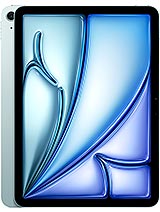
Apple iPad Air 11 (2024) is a premium mid-range tablet featuring the Apple M2 chipset for desktop-class processing and an 11-inch Liquid Retina IPS LCD with P3 wide color, aimed at users who need a powerful home productivity and media hub. Released in mid-2024, it competes with the [Samsung Galaxy Tab S9](/the-samsung-galaxy-tab-s9-is-the-new-standard-for-mobile-media-consumption/) series by offering a more cohesive software ecosystem and superior application support for creative tasks.
The landscape-first design philosophy of this machine signals a significant shift in how we utilize tablets within a residential environment. By relocating the 12 MP ultrawide front camera to the longer edge, the hardware finally aligns with how people actually use tablets: propped up on a kitchen counter or a coffee table. This orientation makes the device an exceptional command center for video calls via FaceTime or Zoom, ensuring that the user remains centered during family catch-ups or work-from-home meetings. The M2 silicon ensures that running a dedicated HomeKit dashboard alongside a streaming video feed in Picture-in-Picture mode remains entirely fluid.
When we transition this tablet into a stationary hub, the iPadOS 17 ecosystem thrives. The ability to place large, interactive widgets on the home screen allows for an at-a-glance view of security camera feeds, thermostat controls, and shared family calendars. Because the 8GB of RAM is managed so efficiently, these widgets update in real-time without the aggressive app-killing often seen on lower-tier Android tablets. We found that the 128GB base storage—a welcome upgrade from the previous 64GB—provides enough headroom for a library of local media and essential home management apps without immediate cloud dependency.
Imagine setting the slab on a magnetic stand in the kitchen. The oleophobic coating on the glass front becomes a practical necessity rather than a luxury, resisting the inevitable smudges from flour-covered fingers while scrolling through a recipe. The build quality, consisting of a recycled aluminum back and frame, feels substantial enough to survive being passed around the living room, yet at 6.1mm thin, it doesn't clutter the aesthetic of a modern interior. This is a tool designed to live on a side table, ready to be picked up for a quick search or left as a beautiful digital photo frame.
The Siri Experience Voice control is often the primary way a home hub is accessed when hands are occupied. The integrated microphone array in this model is surprisingly sensitive, picking up "Siri" commands from across a standard-sized living room even with background ambient noise. This is likely a benefit of the M2's Neural Engine, which handles voice processing with much higher precision than the older A-series chips. Controlling smart lights or asking for a timer becomes a frictionless part of the domestic routine rather than a technical hurdle.
While the tablet lacks the quad-speaker array found in the Pro models, the dual-speaker landscape system delivers enough volume to fill a room for casual music listening. It functions remarkably well as a Spotify or Apple Music controller, allowing guests to easily queue up tracks via the large touch interface. The Bluetooth 5.3 connectivity ensures that when it is paired with external HomePods or Sonos systems, the handoff is instantaneous and the connection remains rock-solid through several walls.
We also noticed that the M2 chip provides a massive advantage for local AI tasks. When using the Photos app to search for specific memories or using the "Look Up" feature on objects in the house, the processing happens almost instantly. This responsiveness makes the tablet feel like an intelligent part of the household rather than just a passive screen. The thermal management is equally impressive; even when acting as a persistent smart home hub for hours, the aluminum chassis remains cool to the touch.
Holding a Featherweight Window At 462 grams, the physical footprint of the handset is optimized for portability within the home. It is light enough to hold with one hand while lounging on a sofa, yet the 80.9% screen-to-body ratio provides enough visual real estate to feel immersive. The weight distribution is centered perfectly, meaning that when holding it in portrait mode to read a digital magazine, the wrist fatigue is significantly lower than with the larger 13-inch sibling or heavy ruggedized tablets.
One-handed usability is a nuanced topic for an 11-inch device. While the bezels are thin, they provide just enough of a thumb-rest to prevent accidental inputs on the Liquid Retina panel. For those with smaller hands, the iPadOS "Reachability" gesture is still present, but the physical lightness of the device means most users will find themselves naturally using two hands for typing while standing. The grip provided by the matte aluminum finish is secure, though it can feel a bit slippery if your hands are particularly dry.
In our tests, the balance of the device becomes most apparent when using it for handheld gaming. Whether it's a high-fidelity title from Apple Arcade or a cloud-streaming session through Xbox Game Pass, the tablet doesn't feel top-heavy. The USB Type-C 3.1 Gen2 port is positioned in a way that allows for easy charging while playing in landscape without the cable digging into your palms. This ergonomic consideration makes it a favorite for long evening sessions in bed.
Security at Your Fingertips Unlike the Pro models that utilize FaceID, this version sticks with the top-mounted Fingerprint sensor (Touch ID). In a home setting, this choice has distinct pros and cons. We found that the sensor is incredibly fast, often waking the screen and authenticating the user in a single fluid motion. It is especially reliable for multiple family members; registering up to five fingers means both parents and children can have instant access to their own profiles or a shared guest space.
However, the lack of FaceID is felt when the tablet is sitting on a stand. You have to physically reach out and touch the power button to unlock it, whereas a Pro model would simply wake up as you glance at it. For a device often used as a stationary hub, this extra physical interaction is a minor friction point. On the plus side, Touch ID is notably more reliable when you are wearing a mask (if you're feeling under the weather) or when the tablet is held at an extreme angle where FaceID cameras might struggle to see your face.
Security remains top-tier regardless of the biometric method. The M2 Secure Enclave protects your biometric data and Apple Pay credentials with the same level of encryption found on MacBooks. This makes the tablet a safe place for managing banking apps or sensitive household documents. Even with wet fingers—say, after washing dishes—the sensor remains surprisingly accurate, though a quick wipe is still recommended for the best performance.
The stereo speaker system is a highlight for media consumption. Although they are only two speakers, they are placed on the shorter ends of the device, creating a wide soundstage when held in landscape mode. This results in clear channel separation that is immediately noticeable when watching Dolby Atmos content on Disney+ or Netflix. The vocals are crisp and sit front-and-center, while the high-end frequencies avoid the tinny distortion that plagues cheaper tablets.
Bass response is understandably limited by the 6.1mm thickness, but it provides enough punch to make action movies feel engaging. For a personal viewing experience in a quiet bedroom, the audio quality is more than sufficient. We noticed that the device handles volume ramping very well; at 50% volume, it's perfect for a bedside table, and at 100%, it can cut through the noise of a boiling kettle in the kitchen without cracking.
The absence of a 3.5mm jack is a reality we've lived with for years, but it's worth mentioning for those who have high-end wired headphones. You will need a USB-C dongle. However, the DisplayPort support over the USB-C port means you can easily output both 4K video and high-quality audio to a living room television or a dedicated monitor setup. This turns the tablet into a powerful media source for the entire family.
The 11.0-inch Liquid Retina IPS LCD remains one of the best non-OLED panels on the market. With a resolution of 1640 x 2360 pixels, the 264 ppi density ensures that text is razor-sharp, making it an excellent device for reading long-form articles or ebooks. The 500 nits brightness is plenty for indoor use, even in brightly lit rooms with significant sunlight. While it doesn't reach the searing peaks of the Pro's Tandem OLED, it maintains a consistent and comfortable viewing experience.
Color accuracy is a major strength here. Supporting the P3 wide color gamut and True Tone technology, the screen adjusts its color temperature based on the ambient light in your room. This makes the display feel more like paper, reducing eye strain during late-night browsing sessions. For home hobbyists who enjoy photo editing or digital sketching with a Stylus, the colors you see on screen will accurately represent the final output. The scratch-resistant glass with its oleophobic coating also feels exceptionally smooth to the touch.
The only real drawback for enthusiasts is the 60Hz refresh rate. In a world where even [mid-range phones](/trend/best-mid-range-phones-2026/) are moving to 120Hz, the lack of ProMotion is visible during fast scrolling or when using a stylus. However, for media playback—which is usually 24 or 30 fps—this is a non-issue. The contrast ratio is excellent for an LCD, though you will notice some slight glowing in the corners (IPS glow) when watching dark movies in a completely blacked-out room. For 95% of home tasks, this screen is gorgeous.
Apple iPad Air 11 (2024) successfully carves out its place as the logical choice for the majority of tablet users. It strips away the expensive 'Pro' features that most people don't use—like the 120Hz display or the LiDAR scanner—and focuses on the core pillars of the experience: raw power, build quality, and a fantastic software ecosystem. The inclusion of the M2 chip means this tablet isn't just fast today; it is built to handle the next five to seven years of software updates comfortably.
For a home hub, the transition to a landscape camera is the single most important hardware change. It acknowledges the reality of how these devices are used for communication and makes the experience feel natural. Whether you are managing a smart home, editing family videos, or just catching up on your favorite shows, the hardware never gets in your way. It is a refined, powerful, and ultimately sensible piece of technology that justifies its price through longevity and versatility.
While the 60Hz screen and the lack of FaceID might deter the most demanding tech enthusiasts, the average household will find nothing but delight in this model. It represents the sweet spot in the lineup, offering nearly all the performance of a high-end laptop in a form factor that is as easy to pick up as a magazine. The Apple iPad Air 11 (2024) is, quite simply, the best all-around tablet for the modern home.
The Modern Dashboard for the Smart Home
The landscape-first design philosophy of this machine signals a significant shift in how we utilize tablets within a residential environment. By relocating the 12 MP ultrawide front camera to the longer edge, the hardware finally aligns with how people actually use tablets: propped up on a kitchen counter or a coffee table. This orientation makes the device an exceptional command center for video calls via FaceTime or Zoom, ensuring that the user remains centered during family catch-ups or work-from-home meetings. The M2 silicon ensures that running a dedicated HomeKit dashboard alongside a streaming video feed in Picture-in-Picture mode remains entirely fluid.
When we transition this tablet into a stationary hub, the iPadOS 17 ecosystem thrives. The ability to place large, interactive widgets on the home screen allows for an at-a-glance view of security camera feeds, thermostat controls, and shared family calendars. Because the 8GB of RAM is managed so efficiently, these widgets update in real-time without the aggressive app-killing often seen on lower-tier Android tablets. We found that the 128GB base storage—a welcome upgrade from the previous 64GB—provides enough headroom for a library of local media and essential home management apps without immediate cloud dependency.
Imagine setting the slab on a magnetic stand in the kitchen. The oleophobic coating on the glass front becomes a practical necessity rather than a luxury, resisting the inevitable smudges from flour-covered fingers while scrolling through a recipe. The build quality, consisting of a recycled aluminum back and frame, feels substantial enough to survive being passed around the living room, yet at 6.1mm thin, it doesn't clutter the aesthetic of a modern interior. This is a tool designed to live on a side table, ready to be picked up for a quick search or left as a beautiful digital photo frame.
Interacting Without Touch
While the tablet lacks the quad-speaker array found in the Pro models, the dual-speaker landscape system delivers enough volume to fill a room for casual music listening. It functions remarkably well as a Spotify or Apple Music controller, allowing guests to easily queue up tracks via the large touch interface. The Bluetooth 5.3 connectivity ensures that when it is paired with external HomePods or Sonos systems, the handoff is instantaneous and the connection remains rock-solid through several walls.
We also noticed that the M2 chip provides a massive advantage for local AI tasks. When using the Photos app to search for specific memories or using the "Look Up" feature on objects in the house, the processing happens almost instantly. This responsiveness makes the tablet feel like an intelligent part of the household rather than just a passive screen. The thermal management is equally impressive; even when acting as a persistent smart home hub for hours, the aluminum chassis remains cool to the touch.
Weight and Balance
One-handed usability is a nuanced topic for an 11-inch device. While the bezels are thin, they provide just enough of a thumb-rest to prevent accidental inputs on the Liquid Retina panel. For those with smaller hands, the iPadOS "Reachability" gesture is still present, but the physical lightness of the device means most users will find themselves naturally using two hands for typing while standing. The grip provided by the matte aluminum finish is secure, though it can feel a bit slippery if your hands are particularly dry.
In our tests, the balance of the device becomes most apparent when using it for handheld gaming. Whether it's a high-fidelity title from Apple Arcade or a cloud-streaming session through Xbox Game Pass, the tablet doesn't feel top-heavy. The USB Type-C 3.1 Gen2 port is positioned in a way that allows for easy charging while playing in landscape without the cable digging into your palms. This ergonomic consideration makes it a favorite for long evening sessions in bed.
The Biometric Choice
However, the lack of FaceID is felt when the tablet is sitting on a stand. You have to physically reach out and touch the power button to unlock it, whereas a Pro model would simply wake up as you glance at it. For a device often used as a stationary hub, this extra physical interaction is a minor friction point. On the plus side, Touch ID is notably more reliable when you are wearing a mask (if you're feeling under the weather) or when the tablet is held at an extreme angle where FaceID cameras might struggle to see your face.
Security remains top-tier regardless of the biometric method. The M2 Secure Enclave protects your biometric data and Apple Pay credentials with the same level of encryption found on MacBooks. This makes the tablet a safe place for managing banking apps or sensitive household documents. Even with wet fingers—say, after washing dishes—the sensor remains surprisingly accurate, though a quick wipe is still recommended for the best performance.
Cinematic Sound Without the Soundbar
The stereo speaker system is a highlight for media consumption. Although they are only two speakers, they are placed on the shorter ends of the device, creating a wide soundstage when held in landscape mode. This results in clear channel separation that is immediately noticeable when watching Dolby Atmos content on Disney+ or Netflix. The vocals are crisp and sit front-and-center, while the high-end frequencies avoid the tinny distortion that plagues cheaper tablets.
Bass response is understandably limited by the 6.1mm thickness, but it provides enough punch to make action movies feel engaging. For a personal viewing experience in a quiet bedroom, the audio quality is more than sufficient. We noticed that the device handles volume ramping very well; at 50% volume, it's perfect for a bedside table, and at 100%, it can cut through the noise of a boiling kettle in the kitchen without cracking.
The absence of a 3.5mm jack is a reality we've lived with for years, but it's worth mentioning for those who have high-end wired headphones. You will need a USB-C dongle. However, the DisplayPort support over the USB-C port means you can easily output both 4K video and high-quality audio to a living room television or a dedicated monitor setup. This turns the tablet into a powerful media source for the entire family.
Visual Precision on a Liquid Canvas
The 11.0-inch Liquid Retina IPS LCD remains one of the best non-OLED panels on the market. With a resolution of 1640 x 2360 pixels, the 264 ppi density ensures that text is razor-sharp, making it an excellent device for reading long-form articles or ebooks. The 500 nits brightness is plenty for indoor use, even in brightly lit rooms with significant sunlight. While it doesn't reach the searing peaks of the Pro's Tandem OLED, it maintains a consistent and comfortable viewing experience.
Color accuracy is a major strength here. Supporting the P3 wide color gamut and True Tone technology, the screen adjusts its color temperature based on the ambient light in your room. This makes the display feel more like paper, reducing eye strain during late-night browsing sessions. For home hobbyists who enjoy photo editing or digital sketching with a Stylus, the colors you see on screen will accurately represent the final output. The scratch-resistant glass with its oleophobic coating also feels exceptionally smooth to the touch.
The only real drawback for enthusiasts is the 60Hz refresh rate. In a world where even [mid-range phones](/trend/best-mid-range-phones-2026/) are moving to 120Hz, the lack of ProMotion is visible during fast scrolling or when using a stylus. However, for media playback—which is usually 24 or 30 fps—this is a non-issue. The contrast ratio is excellent for an LCD, though you will notice some slight glowing in the corners (IPS glow) when watching dark movies in a completely blacked-out room. For 95% of home tasks, this screen is gorgeous.
Final Assessment for the Household
Apple iPad Air 11 (2024) successfully carves out its place as the logical choice for the majority of tablet users. It strips away the expensive 'Pro' features that most people don't use—like the 120Hz display or the LiDAR scanner—and focuses on the core pillars of the experience: raw power, build quality, and a fantastic software ecosystem. The inclusion of the M2 chip means this tablet isn't just fast today; it is built to handle the next five to seven years of software updates comfortably.
For a home hub, the transition to a landscape camera is the single most important hardware change. It acknowledges the reality of how these devices are used for communication and makes the experience feel natural. Whether you are managing a smart home, editing family videos, or just catching up on your favorite shows, the hardware never gets in your way. It is a refined, powerful, and ultimately sensible piece of technology that justifies its price through longevity and versatility.
While the 60Hz screen and the lack of FaceID might deter the most demanding tech enthusiasts, the average household will find nothing but delight in this model. It represents the sweet spot in the lineup, offering nearly all the performance of a high-end laptop in a form factor that is as easy to pick up as a magazine. The Apple iPad Air 11 (2024) is, quite simply, the best all-around tablet for the modern home.
Technical Specifications
| LAUNCH | |
|---|---|
| Announced | 2024, May 07 |
| Status | Available. Released 2024, May 15 |
| PLATFORM | |
| OS | iPadOS 17.4, upgradable to iPadOS 26.3 |
| Chipset | Apple M2 |
| CPU | Octa-core (4x3.48 GHz performance cores and 4 efficiency cores) |
| GPU | Apple GPU (9-core graphics) |
| BODY | |
| Dimensions | 247.6 x 178.5 x 6.1 mm (9.75 x 7.03 x 0.24 in) |
| Weight | 462 g (1.02 lb) |
| Build | Glass front, aluminum back, aluminum frame |
| SIM | eSIM (cellular model only) |
| Info | Stylus support |
| DISPLAY | |
| Type | Liquid Retina IPS LCD, 500 nits (typ) |
| Size | 11.0 inches, 357.6 cm2 (~80.9% screen-to-body ratio) |
| Resolution | 1640 x 2360 pixels (~264 ppi density) |
| Protection | Scratch-resistant glass, oleophobic coating |
| MEMORY | |
| Card slot | No |
| Internal | 128GB 8GB RAM, 256GB 8GB RAM, 512GB 8GB RAM, 1TB 8GB RAM |
| MAIN CAMERA | |
| Single | 12 MP, f/1.8, (wide), 1/3.0", 1.22µm, dual pixel PDAF |
| Features | HDR |
| Video | 4K@24/25/30/60fps, 1080p@25/30/60/120/240fps; gyro-EIS |
| SELFIE CAMERA | |
| Single | 12 MP, f/2.0, 122˚ (ultrawide) |
| Features | HDR |
| Video | 1080p@25/30/60fps; gyro-EIS |
| SOUND | |
| Loudspeaker | Yes, with stereo speakers |
| 3.5mm jack | No |
| COMMS | |
| WLAN | Wi-Fi 802.11 a/b/g/n/ac/6e, dual-band, hotspot |
| Bluetooth | 5.3, A2DP, LE |
| Positioning | GPS, GLONASS (cellular model only) |
| NFC | No |
| Radio | No |
| USB | USB Type-C 3.1 Gen2, DisplayPort, magnetic connector |
| NETWORK | |
| Technology | GSM / HSPA / LTE / 5G |
| 2G bands | GSM 850 / 900 / 1800 / 1900 |
| 3G bands | HSDPA 850 / 900 / 1700(AWS) / 1900 / 2100 |
| 4G bands | 1, 2, 3, 4, 5, 7, 8, 11, 12, 13, 14, 17, 18, 19, 20, 21, 25, 26, 28, 29, 30, 32, 34, 38, 39, 40, 41, 42, 48, 66, 71 - A2903 |
| Info | 1, 2, 3, 4, 5, 7, 8, 12, 13, 14, 17, 18, 19, 20, 25, 26, 28, 29, 30, 32, 34, 38, 39, 40, 41, 42, 48, 66, 71 - A2904 |
| 5G bands | 1, 2, 3, 5, 7, 8, 12, 14, 20, 25, 26, 28, 29, 30, 38, 40, 41, 48, 66, 70, 71, 75, 76, 77, 78, 79 SA/NSA/Sub6 - A2903, A2904 |
| Speed | HSPA, LTE, 5G - cellular model only |
| FEATURES | |
| Sensors | Fingerprint (top-mounted), accelerometer, gyro, compass, barometer |
| BATTERY | |
| Type | Li-Po 7606 mAh (28.93 Wh) |
| Charging | 45W wired |
| MISC | |
| Colors | Space Gray, Starlight, Purple, Blue |
| Models | A2902, A2903, A2904, iPad14,8, iPad14,9 |
| Price | About 700 EUR |