Stripping Back the Digital Noise - The HMD Arc Focuses on Pure Utility
Overview
The Essentials of the HMD Arc Experience
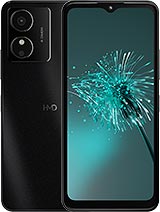
[Brand] HMD Arc is a budget smartphone featuring a 6.52-inch IPS LCD for basic media consumption and a Unisoc SC9863A chipset for fundamental tasks, aimed at users who prioritize software simplicity and long battery life over high-end performance. Released in early 2025, it competes with entry-level offerings that emphasize the essentials of the modern mobile experience without the bloat found in flagship skins.
The choice of Android 14 (Go edition) defines the identity of this device. While many competitors opt for heavy proprietary overlays that consume system resources, this approach keeps the background processes lean. In a market where complexity often masks inefficiency, the focus here remains on a direct relationship between the user and their applications.
The Stock Launcher Experience
The pre-installed launcher on the [Brand] HMD Arc adheres strictly to the Go edition philosophy. Users will find a clean, vertical app drawer and a simplified Google Discovery feed on the leftmost home screen. The UI lacks the heavy blur effects and transparency layers seen in standard Android 14 versions, which is a necessary trade-off for the IMG8322 GPU.
Animations remain functional but are notably shorter in duration. This design choice prevents the hardware from lagging during transition states. We noticed that the system prioritizes responsiveness over visual flair, ensuring that the 4GB RAM is not saturated by cosmetic background tasks. It is a no-nonsense interface for those who view a phone as a tool rather than a playground.
Icons are uniform and follow the Material You color-theming logic, though the customization options are limited compared to the full Android experience. There are no redundant system apps or aggressive push notifications from the manufacturer. This level of software cleanliness is rare in the sub-$150 price bracket.
Customization and Third Party Launcher Support
Software enthusiasts often look toward Nova Launcher or Niagara Launcher to personalize their flow. On the [Brand] HMD Arc, third-party launcher support is present but comes with the standard Android Go caveats. Because the system utilizes a slimmed-down version of the core Android framework, some advanced widget APIs may not behave as expected.
When we tested Nova Launcher, the transition between the home screen and the recent apps menu showed a slight delay. This is a known behavior in Android Go where the gesture navigation is tightly coupled with the system launcher. To maintain the most fluid experience, sticking to the stock launcher or using a minimalist wrapper like Niagara is recommended.
For those who insist on customization, disabling the system's animations in the Developer Options can mitigate some of the friction. However, the Unisoc SC9863A is built on a 28nm process, which means it lacks the sheer IPC (instructions per clock) to handle complex, script-heavy launchers without occasional stutters. Minimalism is not just a stylistic choice here; it is a performance requirement.
Audio and Speaker Dynamics
The device utilizes a single bottom-firing loudspeaker. In our assessment, the audio profile is heavily biased toward the mid-range frequencies, which makes it suitable for podcasts and clear voice calls but less ideal for immersive music playback. At maximum volume, we observed noticeable distortion in the higher registers, specifically with sharp percussion or high-pitched vocals.
Bass response is almost non-existent, which is typical for hardware in this segment. The lack of stereo separation means that gaming and movie watching feel somewhat flat. However, the inclusion of a 3.5mm headphone jack provides a necessary escape hatch. High-quality wired headphones bypass the internal speaker's limitations, offering a much broader soundstage and better frequency response.
For users who rely on the speaker for alarms or ringtones, the output is sufficiently loud to be heard across a room. The clarity of the speaker at 70% volume is actually quite decent for spoken word content. It does not try to be a boombox; it serves its purpose as a functional audio output for system alerts and casual listening.
Communication and Microphone Performance
Microphone quality on the [Brand] HMD Arc is tuned for voice isolation during standard GSM calls. The primary microphone, located at the bottom, captures a clear signal in quiet environments. However, without a dedicated secondary noise-canceling microphone, background sounds like wind or heavy traffic tend to bleed into the conversation.
During video recording, the audio capture is functional but lacks the depth required for content creation. The bit rate is sufficient for recording memos or quick clips to share on messaging apps. We found that the software processing attempts to boost gain, which can occasionally introduce a floor of white noise in silent rooms.
For Wi-Fi calling and VoIP apps like WhatsApp or Signal, the microphone performs reliably. The hardware seems optimized for the human vocal range, ensuring that even in lower signal areas, your voice remains intelligible to the recipient. It is a dependable setup for those whose primary use case is verbal communication.
Haptic Feedback and Tactile UI
The haptic engine in the [Brand] HMD Arc is a standard eccentric rotating mass (ERM) motor. Unlike the sharp, precise clicks of an X-axis linear motor, this system produces a broader vibration. This results in a buzzier feel when typing on the virtual keyboard or receiving notifications.
Minimalists often prefer to turn off haptics for system navigation, and on this device, that might be the better path. The vibration motor lacks the speed to keep up with fast typing, often lagging behind the actual key presses. This can create a disjointed sensation between the physical touch and the feedback.
However, the side-mounted fingerprint sensor provides a subtle tactile buzz upon a successful unlock, which is helpful feedback. The physical buttons for volume and power offer a firm click, suggesting a decent build quality despite the plastic construction. The haptics serve as a basic alert system rather than a sophisticated layer of the user interface.
Gesture Reliability and Navigation
Navigation on the 6.52-inch display is handled via the standard three-button layout by default, but gesture navigation is available in the settings. Given the 576 x 1280 pixel resolution, the touch targets are large, which helps with accuracy. We found that swipes from the edge to go back are generally responsive.
There is a slight learning curve for the 'swipe up and hold' gesture to access the multitasking view. The Unisoc SC9863A chipset, featuring Cortex-A55 cores, needs a moment to render the app cards. This is not a device for power users who flip between ten apps a minute; it rewards a more deliberate, singular pace of use.
Palm rejection is adequate, though the 20:9 aspect ratio makes the screen quite tall. Reaching for the notification shade usually requires a second hand or a significant grip adjustment. The software does not include a one-handed mode in this Go edition variant, so users should expect to use both hands for most navigation tasks.
Software Lifecycle and Launcher Summary
The [Brand] HMD Arc represents the apex of the 'utility-first' philosophy. By utilizing Android 14 (Go edition), it sidesteps many of the performance pitfalls that plague other [budget phones](/trend/best-budget-phones-2026/). The stock launcher is the star of the show because it knows its limits and stays within them.
For the software enthusiast, the lack of bloatware is the primary selling point. You are getting a clean slate. While it may not have the power to run heavy third-party shells with fluid gestures, it provides a stable, predictable environment for the most essential apps. It is a digital tool that stays out of your way.
Ultimately, this device is about endurance and simplicity. The 5000 mAh battery paired with a low-resolution screen and an efficient software stack ensures that the device can easily last through two days of moderate use. It is a calculated compromise where the software does the heavy lifting to compensate for the entry-level hardware specs.
Technical Specifications
| LAUNCH | |
|---|---|
| Announced | 2024, December 18 |
| Status | Available. Released 2025, January |
| PLATFORM | |
| OS | Android 14 (Go edition) |
| Chipset | Unisoc SC9863A (28 nm) |
| CPU | Octa-core (4x1.6 GHz Cortex-A55 & 4x1.2 GHz Cortex-A55) |
| GPU | IMG8322 |
| BODY | |
| Dimensions | 166.4 x 76.9 x 9 mm (6.55 x 3.03 x 0.35 in) |
| Weight | 185.4 g (6.53 oz) |
| SIM | Nano-SIM |
| Info | IP54 dust protected and water resistant (water splashes) - EU only |
| DISPLAY | |
| Type | IPS LCD, 460 nits (peak) |
| Size | 6.52 inches, 102.6 cm2 (~80.2% screen-to-body ratio) |
| Resolution | 576 x 1280 pixels, 20:9 ratio (~215 ppi density) |
| MEMORY | |
| Card slot | microSDXC |
| Internal | 64GB 4GB RAM |
| MAIN CAMERA | |
| Single | 13 MP, (wide), AF |
| Features | LED flash, panorama |
| Video | Yes |
| SELFIE CAMERA | |
| Single | 5 MP |
| Video | Yes |
| SOUND | |
| Loudspeaker | Yes |
| 3.5mm jack | Yes |
| COMMS | |
| WLAN | Wi-Fi 802.11 b/g/n |
| Bluetooth | 5.2, A2DP, LE |
| Positioning | GPS, GALILEO |
| NFC | No |
| Radio | FM radio |
| USB | USB Type-C |
| NETWORK | |
| Technology | GSM / HSPA / LTE |
| 2G bands | GSM 850 / 900 / 1800 / 1900 |
| 3G bands | HSDPA 850 / 900 / 2100 |
| 4G bands | 1, 3, 5, 7, 8, 20, 28, 38, 40, 41 |
| Speed | HSPA, LTE |
| FEATURES | |
| Sensors | Fingerprint (side-mounted), accelerometer, proximity |
| BATTERY | |
| Type | 5000 mAh |
| Charging | 10W wired |
| MISC | |
| Colors | Black |