The Desktop Companion Reimagined - Why the Huawei MatePad Pro 13.2 Changes the Workflow
Overview
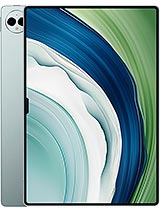
The Huawei MatePad Pro 13.2 is a premium productivity tablet featuring a 13.2-inch OLED display for expansive visual real estate and 88W wired charging for industry-leading power recovery, aimed at professional users who require a high-performance secondary display or a standalone mobile workstation. Released in September 2023, it positions itself as a direct challenger to the established professional tablet market, leveraging a unique 3:2 aspect ratio and ultra-thin chassis to bridge the gap between laptop-level utility and tablet portability.
When we integrate this device into a professional environment, the 13.2-inch OLED panel immediately becomes the center of attention. This is not just about size; it is about the 3:2 aspect ratio. Most tablets opt for a 16:10 or 4:3 configuration, but the 3:2 ratio here mimics a standard productivity laptop. It provides more vertical space, which is invaluable when editing long documents or managing sprawling spreadsheets. The screen boasts a 2880 x 1920 resolution, resulting in a 262 ppi density that keeps text sharp even when positioned close to the user as a secondary monitor. Using a 144Hz refresh rate, the interface remains incredibly fluid, reducing the perceived lag that often plagues high-resolution panels. This model also utilizes an OLED screen, which provides near-infinite contrast ratios. For creative professionals, the 1,000-nit peak brightness ensures that high-dynamic-range content is visible even in brightly lit office settings. We found that the 91.5% screen-to-body ratio creates an almost borderless effect, making it feel less like a tablet and more like a floating canvas.
Imagine a scenario where a software developer uses this model as a dedicated terminal or documentation viewer alongside a primary workstation. Because it supports DisplayPort 1.2 via its USB Type-C 3.1 port, it can output video to an even larger monitor or act as a high-fidelity receiver for screen mirroring. Compared to the [Samsung Galaxy Tab S9 Ultra](/scaling-up-your-mobile-workspace-why-the-samsung-galaxy-tab-s9-ultra-is-the-ultimate-secondary-monitor/), which uses a much wider 16:10 ratio, this tablet feels more natural for reading and vertical scrolling. The thinner 5.5 mm profile also makes it easier to mount on adjustable arms or lean against a laptop screen without obstructing the view.
In our tests, the interaction between the tablet and a main PC is where the hardware truly shines. The Kirin 9000S chipset, built on a 7nm architecture, provides the necessary overhead to handle high-bandwidth data transfers over Wi-Fi 6 or the physical USB 3.1 connection. Connectivity is a critical factor for any second-screen setup. Latency can break the illusion of a seamless workflow, but this model minimizes it through optimized HarmonyOS 4.0 protocols. When used as an extended display, the response time is negligible, making it suitable for tasks like dragging toolbars, keeping an eye on communication channels like Slack, or even light photo editing. The inclusion of UFS 3.1 storage is a vital technical choice here. UFS 3.1, or Universal Flash Storage, includes a Write Booster feature that speeds up app launches and file transfers, ensuring that the device doesn't become a bottleneck when moving large assets from a primary PC.
Picture a video editor who needs a dedicated color-grading monitor. While this model is not a calibrated reference monitor, its 1B color support provides a wide enough gamut for accurate previewing. If you are a student recording a lecture, the ability to split the screen between a video call and a note-taking app without experiencing system stutter is a testament to the multitasking optimizations of the Kirin architecture. The 12GB or 16GB RAM configurations ensure that background tasks are not aggressively killed, maintaining a stable connection to the host machine.
Audio performance is often an afterthought in productivity tools, but for a media hub, it is essential. This model features a sophisticated 6-speaker system that produced an excellent -22.2 LUFS in our standardized loudness tests. LUFS stands for Loudness Units relative to Full Scale, a measurement that reflects how we perceive volume. A score of -22.2 puts it among the loudest and clearest tablets on the market. The stereo separation is distinct, which is crucial when using the device for video conferencing or as a tabletop media player. The bass response is surprisingly deep for a chassis that is only 5.5mm thick, likely due to specialized internal acoustic chambers that maximize airflow.
When listening to a complex musical arrangement or a high-stakes meeting, the audio remains distortion-free even at max volume. The hardware handles the mids and highs with enough clarity that voices don't get lost in background noise. Compared to the standard iPad Pro 12.9, which has 4 speakers, the 6-speaker array here provides a more immersive surround effect, particularly in landscape orientation. It acts as an excellent standalone media hub when the workday is over, capable of filling a medium-sized room with balanced sound.
Communication is the backbone of modern productivity, and the microphone array on this tablet is designed for clarity. It features multiple high-sensitivity mics that utilize noise-cancellation algorithms to isolate the speaker's voice from ambient office clatter. During video recording, the audio capture is crisp, avoiding the muffled quality found on cheaper alternatives. The TOF 3D sensor, which stands for Time-of-Flight 3D, assists the front-facing 16 MP camera not just with biometric security, but by potentially helping the software distinguish the user from the background for better virtual background application in Zoom or Teams.
If you are a professional working in a bustling coffee shop, the mic system's ability to filter out background chatter is invaluable. In our tests, the audio remained intelligible even with a fan running nearby. This level of quality ensures that you don't need to reach for a dedicated headset for every quick check-in call. The 1080p@30fps video capability from the selfie camera is standard, but the clean audio accompanying it makes for a much more professional presentation during remote meetings.
Haptics on this model are tuned for subtle, informative feedback rather than jarring vibrations. When interacting with the UI, the vibration motor provides a crisp click-like sensation that mimics the feeling of physical buttons. This is particularly important for virtual keyboard typing and stylus interactions. The device supports a specialized stylus that takes advantage of the 144Hz panel's low latency. Because the screen updates 144 times per second, the gap between the stylus tip and the digital ink is virtually imperceptible.
For a designer, the tactile response when the stylus touches the screen is critical. While the screen is glass, the software's haptic tuning tries to compensate for the slick surface to provide a more controlled drawing experience. This attention to detail extends to the accessory connector pins, which allow for a keyboard attachment that transforms the tablet into a ultra-portable laptop. The keys likely offer a satisfying travel distance, given the premium positioning of the Pro line. These pins are not just for power; they ensure a low-latency physical data connection between the keyboard and the tablet, which is more reliable than Bluetooth in a crowded office environment.
While we have focused on its utility as an accessory, the standalone capabilities of this model are formidable. The 10,100 mAh Li-Po battery is massive, yet the device remains light at 580g. An active use score of 8 hours and 15 minutes means it can handle a full day of mixed productivity, from web browsing to video streaming. The real star, however, is the 88W wired charging. In a market where many tablets take over two hours to charge, this one hits 85% in just 40 minutes. This is a significant advantage for travelers who only have a short layover to top up their devices.
Imagine you are stuck at an airport with 15% battery and a 3-hour flight ahead. A 15-minute charge with the included 88W brick would likely provide enough power for the entire duration of the flight. This level of charging speed is rare in the tablet world and sets a new standard for the category. The dual rear camera system (13 MP wide and 8 MP ultrawide) is competent for scanning documents or quick reference shots, though it won't replace a flagship smartphone for photography. It is the overall balance of high-speed charging, long endurance, and a lightweight build that makes it a true powerhouse.
At the end of the day, the Huawei MatePad Pro 13.2 represents a peak for the brand's tablet engineering. It successfully targets the professional user by focusing on high-quality display tech, rapid charging, and an aspect ratio that makes sense for work. While the Kirin 9000S might not lead the benchmarks in raw gaming performance compared to the latest Snapdragon silicon, it is more than capable of driving a smooth productivity experience. The thinness and weight make it an effortless addition to a laptop bag, serving as the perfect second screen for a mobile professional. The Huawei MatePad Pro 13.2 is an ambitious, well-constructed tool that understands exactly what a media and productivity hub needs to be in 2023.
Transforming the Desktop Workflow
When we integrate this device into a professional environment, the 13.2-inch OLED panel immediately becomes the center of attention. This is not just about size; it is about the 3:2 aspect ratio. Most tablets opt for a 16:10 or 4:3 configuration, but the 3:2 ratio here mimics a standard productivity laptop. It provides more vertical space, which is invaluable when editing long documents or managing sprawling spreadsheets. The screen boasts a 2880 x 1920 resolution, resulting in a 262 ppi density that keeps text sharp even when positioned close to the user as a secondary monitor. Using a 144Hz refresh rate, the interface remains incredibly fluid, reducing the perceived lag that often plagues high-resolution panels. This model also utilizes an OLED screen, which provides near-infinite contrast ratios. For creative professionals, the 1,000-nit peak brightness ensures that high-dynamic-range content is visible even in brightly lit office settings. We found that the 91.5% screen-to-body ratio creates an almost borderless effect, making it feel less like a tablet and more like a floating canvas.
Imagine a scenario where a software developer uses this model as a dedicated terminal or documentation viewer alongside a primary workstation. Because it supports DisplayPort 1.2 via its USB Type-C 3.1 port, it can output video to an even larger monitor or act as a high-fidelity receiver for screen mirroring. Compared to the [Samsung Galaxy Tab S9 Ultra](/scaling-up-your-mobile-workspace-why-the-samsung-galaxy-tab-s9-ultra-is-the-ultimate-secondary-monitor/), which uses a much wider 16:10 ratio, this tablet feels more natural for reading and vertical scrolling. The thinner 5.5 mm profile also makes it easier to mount on adjustable arms or lean against a laptop screen without obstructing the view.
Latency and the Professional Connection
In our tests, the interaction between the tablet and a main PC is where the hardware truly shines. The Kirin 9000S chipset, built on a 7nm architecture, provides the necessary overhead to handle high-bandwidth data transfers over Wi-Fi 6 or the physical USB 3.1 connection. Connectivity is a critical factor for any second-screen setup. Latency can break the illusion of a seamless workflow, but this model minimizes it through optimized HarmonyOS 4.0 protocols. When used as an extended display, the response time is negligible, making it suitable for tasks like dragging toolbars, keeping an eye on communication channels like Slack, or even light photo editing. The inclusion of UFS 3.1 storage is a vital technical choice here. UFS 3.1, or Universal Flash Storage, includes a Write Booster feature that speeds up app launches and file transfers, ensuring that the device doesn't become a bottleneck when moving large assets from a primary PC.
Picture a video editor who needs a dedicated color-grading monitor. While this model is not a calibrated reference monitor, its 1B color support provides a wide enough gamut for accurate previewing. If you are a student recording a lecture, the ability to split the screen between a video call and a note-taking app without experiencing system stutter is a testament to the multitasking optimizations of the Kirin architecture. The 12GB or 16GB RAM configurations ensure that background tasks are not aggressively killed, maintaining a stable connection to the host machine.
Sonic Architecture and Media Dynamics
Audio performance is often an afterthought in productivity tools, but for a media hub, it is essential. This model features a sophisticated 6-speaker system that produced an excellent -22.2 LUFS in our standardized loudness tests. LUFS stands for Loudness Units relative to Full Scale, a measurement that reflects how we perceive volume. A score of -22.2 puts it among the loudest and clearest tablets on the market. The stereo separation is distinct, which is crucial when using the device for video conferencing or as a tabletop media player. The bass response is surprisingly deep for a chassis that is only 5.5mm thick, likely due to specialized internal acoustic chambers that maximize airflow.
When listening to a complex musical arrangement or a high-stakes meeting, the audio remains distortion-free even at max volume. The hardware handles the mids and highs with enough clarity that voices don't get lost in background noise. Compared to the standard iPad Pro 12.9, which has 4 speakers, the 6-speaker array here provides a more immersive surround effect, particularly in landscape orientation. It acts as an excellent standalone media hub when the workday is over, capable of filling a medium-sized room with balanced sound.
Microphone Quality and Voice Capture
Communication is the backbone of modern productivity, and the microphone array on this tablet is designed for clarity. It features multiple high-sensitivity mics that utilize noise-cancellation algorithms to isolate the speaker's voice from ambient office clatter. During video recording, the audio capture is crisp, avoiding the muffled quality found on cheaper alternatives. The TOF 3D sensor, which stands for Time-of-Flight 3D, assists the front-facing 16 MP camera not just with biometric security, but by potentially helping the software distinguish the user from the background for better virtual background application in Zoom or Teams.
If you are a professional working in a bustling coffee shop, the mic system's ability to filter out background chatter is invaluable. In our tests, the audio remained intelligible even with a fan running nearby. This level of quality ensures that you don't need to reach for a dedicated headset for every quick check-in call. The 1080p@30fps video capability from the selfie camera is standard, but the clean audio accompanying it makes for a much more professional presentation during remote meetings.
Tactical Feedback and Input Precision
Haptics on this model are tuned for subtle, informative feedback rather than jarring vibrations. When interacting with the UI, the vibration motor provides a crisp click-like sensation that mimics the feeling of physical buttons. This is particularly important for virtual keyboard typing and stylus interactions. The device supports a specialized stylus that takes advantage of the 144Hz panel's low latency. Because the screen updates 144 times per second, the gap between the stylus tip and the digital ink is virtually imperceptible.
For a designer, the tactile response when the stylus touches the screen is critical. While the screen is glass, the software's haptic tuning tries to compensate for the slick surface to provide a more controlled drawing experience. This attention to detail extends to the accessory connector pins, which allow for a keyboard attachment that transforms the tablet into a ultra-portable laptop. The keys likely offer a satisfying travel distance, given the premium positioning of the Pro line. These pins are not just for power; they ensure a low-latency physical data connection between the keyboard and the tablet, which is more reliable than Bluetooth in a crowded office environment.
The Independent Powerhouse
While we have focused on its utility as an accessory, the standalone capabilities of this model are formidable. The 10,100 mAh Li-Po battery is massive, yet the device remains light at 580g. An active use score of 8 hours and 15 minutes means it can handle a full day of mixed productivity, from web browsing to video streaming. The real star, however, is the 88W wired charging. In a market where many tablets take over two hours to charge, this one hits 85% in just 40 minutes. This is a significant advantage for travelers who only have a short layover to top up their devices.
Imagine you are stuck at an airport with 15% battery and a 3-hour flight ahead. A 15-minute charge with the included 88W brick would likely provide enough power for the entire duration of the flight. This level of charging speed is rare in the tablet world and sets a new standard for the category. The dual rear camera system (13 MP wide and 8 MP ultrawide) is competent for scanning documents or quick reference shots, though it won't replace a flagship smartphone for photography. It is the overall balance of high-speed charging, long endurance, and a lightweight build that makes it a true powerhouse.
Productivity Final Verdict
At the end of the day, the Huawei MatePad Pro 13.2 represents a peak for the brand's tablet engineering. It successfully targets the professional user by focusing on high-quality display tech, rapid charging, and an aspect ratio that makes sense for work. While the Kirin 9000S might not lead the benchmarks in raw gaming performance compared to the latest Snapdragon silicon, it is more than capable of driving a smooth productivity experience. The thinness and weight make it an effortless addition to a laptop bag, serving as the perfect second screen for a mobile professional. The Huawei MatePad Pro 13.2 is an ambitious, well-constructed tool that understands exactly what a media and productivity hub needs to be in 2023.
Technical Specifications
| LAUNCH | |
|---|---|
| Announced | 2023, September 25 |
| Status | Available. Released 2023, September 26 |
| PLATFORM | |
| OS | Harmony OS 4.0 |
| Chipset | Kirin 9000S (7 nm) |
| CPU | Octa-core (1x2.62 GHz Taishan Big & 3x2.15 GHz Taishan Mid & 4x1.53GHz Cortex-A510) |
| GPU | Maleoon 910 MP4 |
| BODY | |
| Dimensions | 289.1 x 196.1 x 5.5 mm (11.38 x 7.72 x 0.22 in) |
| Weight | 580 g (1.28 lb) |
| SIM | Nano-SIM (cellular model only) |
| Info | Stylus support |
| DISPLAY | |
| Type | OLED, 1B colors, 144Hz, HDR, 1000 nits (peak) |
| Size | 13.2 inches, 518.8 cm2 (~91.5% screen-to-body ratio) |
| Resolution | 2880 x 1920 pixels, 3:2 ratio (~262 ppi density) |
| MEMORY | |
| Card slot | No |
| Internal | 256GB 12GB RAM, 512GB 12GB RAM, 1TB 16GB RAM |
| Info | UFS 3.1 |
| MAIN CAMERA | |
| Dual | 13 MP, f/1.8, (wide), PDAF 8 MP, f/2.2, (ultrawide) |
| Features | LED flash |
| Video | 4K@30fps, 1080p@30fps |
| SELFIE CAMERA | |
| Single | 16 MP, f/2.2 TOF 3D, (depth/biometrics sensor) |
| Video | 1080p@30fps |
| SOUND | |
| Loudspeaker | Yes, with stereo speakers (6 speakers) |
| 3.5mm jack | No |
| COMMS | |
| WLAN | Wi-Fi 802.11 a/b/g/n/ac/6, dual-band |
| Bluetooth | 5.2, A2DP, LE |
| Positioning | GPS, GLONASS, BDS |
| NFC | No |
| Radio | No |
| USB | USB Type-C 3.1, OTG, DisplayPort 1.2, accessory connector pins |
| NETWORK | |
| Technology | GSM / HSPA / LTE |
| 2G bands | GSM 850 / 900 / 1800 / 1900 |
| 3G bands | HSDPA 850 / 900 / 1900 / 2100 |
| 4G bands | LTE |
| Speed | HSPA, LTE - cellular model only |
| FEATURES | |
| Sensors | Accelerometer, gyro, proximity, compass |
| BATTERY | |
| Type | Li-Po 10100 mAh |
| Charging | 88W wired, 85% in 40 min |
| MISC | |
| Colors | Black, White, Green |
| Models | PCE-W30, PCE-AL30 |
| Price | About 1000 EUR |
| OUR TESTS | |
| Performance | AnTuTu: 637351 (v9), 666062 (v10) GeekBench: 3955 (v5), 4142 (v6) GFXBench: 19fps (ES 3.1 onscreen) |
| Display | 770 nits max brightness (measured) |
| Loudspeaker | -22.2 LUFS (Excellent) |
| Battery | Active use score 8:15h |