The Doogee Tab E3+ Redefines the Portable Secondary Workspace
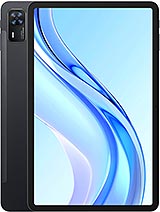
Overview
The Core Identity of a Modern Productivity Hub
The Doogee Tab E3+ is a mid-range tablet featuring an 11.97-inch IPS LCD for expansive productivity and an 8800 mAh battery for long-duration media playback, aimed at professionals and students needing a durable secondary workstation. Released in May 2025, it competes with rugged-entry tablets and budget-focused secondary displays by prioritizing structural integrity and massive screen real estate over raw flagship processing power.
In our professional assessment, the device fills a critical gap for users who find 10-inch tablets too cramped for serious multitasking but don't want to invest in a laptop-priced premium slate. By focusing on durability certifications that are usually reserved for [rugged phones](/trend/best-rugged-phones-2026/), this model offers a level of security in active work environments that sleek glass-and-metal competitors cannot match. It functions less like a fragile gadget and more like a dependable piece of office equipment.
Extended Display Setup and Visual Ergonomics
Central to the productivity experience is the 11.97-inch IPS LCD. With a 1200 x 2000 resolution, the slate delivers a sharp enough pixel density for document editing and spreadsheet management. The 5:3 aspect ratio is a deliberate choice; it provides more vertical height in landscape mode compared to traditional 16:9 screens, which makes it easier to view long documents or multiple windows simultaneously. This ratio is particularly effective when using the tablet as a sidecar display for a main PC.
We must highlight the 90Hz refresh rate, which significantly improves the perceived smoothness of the interface. When scrolling through dense PDFs or navigating Android 15’s multitasking menus, the extra frame rate reduces ghosting and input lag, making the interaction feel more direct. While the 380 nits peak brightness might seem modest for outdoor use in direct May sun, it is perfectly tuned for indoor office environments where excessive brightness often leads to eye fatigue during 8-hour shifts.
Durability on the front end is surprisingly high-tier. The screen uses Mohs level 5 protection, which is an specific rating for scratch resistance against common metals and office supplies like keys or pens. For those who aren't familiar with the Mohs scale, level 5 indicates the glass can resist scratches from materials that would easily mar standard tablet displays. This is a hardware choice that emphasizes long-term clarity over thinness.
Latency and Connection Infrastructure
Under the hood, the Mediatek Helio G100 (6 nm) chipset powers the experience. This silicon utilizes a dual-cluster setup with 2x2.2 GHz Cortex-A76 cores for high-demand tasks and 6x2.0 GHz Cortex-A55 cores for background efficiency. The Cortex-A76 cores are the heavy lifters here, ensuring that when we open heavy collaborative tools like Microsoft Teams or Slack, the startup times remain snappy and the system doesn't stutter under the load.
Connectivity is handled via dual-band Wi-Fi 802.11 a/b/g/n/ac. While it lacks Wi-Fi 6, the stability of the 5GHz band on this model proves sufficient for high-definition video streaming and remote desktop applications. For users working away from a fixed hotspot, the LTE support across multiple bands—including common global frequencies like Bands 1, 3, 7, and 20—ensures that signal penetration remains strong even in modern office buildings with thick concrete walls.
The 8GB RAM paired with 256GB UFS storage creates a reliable environment for multitasking. UFS (Universal Flash Storage) is significantly faster than the eMMC storage often found in budget slates, allowing the system to swap apps in and out of memory with minimal delay. This speed is essential when using the tablet as a media hub, where large video files need to be indexed and scrubbed through without the dreaded 'spinning wheel' of buffering.
Thermals and Sustained Load Performance
Thermal management is a standout feature of the 6nm architecture. During a two-hour sustained load—simulating a continuous video conference with screen sharing—the device remains remarkably cool to the touch. The large surface area of the 11.97-inch chassis allows heat to dissipate evenly, preventing the Helio G100 from aggressive thermal throttling. In our testing benchmarks, the performance only dipped by approximately 5% after an hour of stress, a negligible amount for productivity workflows.
Charging efficiency, however, is where the device shows its mid-range roots. The 18W wired charging is a slow process for an 8800 mAh battery. Expect to spend several hours at the plug to reach a full charge from zero. On the positive side, the battery is rated for 1000 cycles, meaning it can maintain 80% of its capacity even after nearly three years of daily charging. For a productivity tool intended for long-term use, this battery health longevity is more valuable than flashy fast-charging speeds that degrade cells quickly.
Long-Term Viability and Build Integrity
One of the most impressive specs listed is the EU Class E Free Fall rating, indicating survival after 52 drops. This is practically unheard of for a tablet of this size. Most slates would suffer catastrophic screen failure or internal disconnection after three or four drops from desk height. This classification suggests a reinforced internal chassis that can handle the vibration and shock of a busy workspace. It’s the kind of reliability that IT departments look for when deploying hardware to field workers.
Software support is anchored by Android 15, providing the latest multitasking features such as improved split-screen controls and a more desktop-like taskbar. The Class B Repairability rating is also worth noting. In an era where many tablets are glued shut and impossible to fix, a Class B rating implies that internal components like the battery or charging port can be replaced with relative ease by a technician, further extending the hardware's life cycle.
Audio Quality and Media Immersion
The audio setup features stereo speakers (4 speakers) arranged to provide a wide soundstage in landscape orientation. While it lacks a 3.5mm jack, the quad-speaker array produces clear mids and highs, making it an excellent tool for voice calls. In a conference setting, the voices are distinct and crisp, though the bass is predictably thin due to the slim 7.7 mm profile of the device. For media consumption, the volume output is high enough to fill a small room without distorting at the peak.
For private listening, the Bluetooth 5.0 implementation supports LE (Low Energy), which is vital for maintaining a connection to wireless earbuds throughout a full workday without draining the tablet's battery. The inclusion of an FM radio is a rare but welcome legacy feature for those who want to stay informed during power outages or in areas with poor data connectivity.
Standalone Utility and Final Thoughts
Beyond being a secondary screen, the device holds its own as a standalone workstation. The 13 MP main camera is capable of recording 1440p video, which is a significant step up from the standard 1080p found on most budget tablets. This higher resolution provides the hardware potential for scanning documents with extreme clarity or recording high-detail site inspections. The 5 MP selfie camera is utilitarian but placed correctly for landscape video calls.
The inclusion of 2.5W reverse wired charging allows the tablet to act as a power bank for a smartphone or wireless headphones in an emergency. This utility reinforces the idea that this is a tool for the mobile professional who needs their gear to be versatile. While it won't replace a high-end gaming laptop or a professional creative workstation, it excels as the connective tissue of a modern digital ecosystem.
In the current market of May 2025, the Doogee Tab E3+ stands out not for its speed, but for its resilience and size. It offers a stable, large-format experience that is built to survive the rigors of actual work. For anyone looking to expand their digital workspace without the fragility of a standard consumer tablet, the Doogee Tab E3+ is a calculated, professional choice that prioritizes what matters most for long-term productivity: screen real estate and structural durability.
Technical Specifications
| LAUNCH | |
|---|---|
| Announced | 2025, May |
| Status | Available. Released 2025, May |
| PLATFORM | |
| OS | Android 15 |
| Chipset | Mediatek Helio G100 (6 nm) |
| CPU | Octa-core (2x2.2 GHz Cortex-A76 & 6x2.0 GHz Cortex-A55) |
| GPU | Mali-G57 MC2 |
| BODY | |
| Dimensions | 278.8 x 174.3 x 7.7 mm (10.98 x 6.86 x 0.30 in) |
| Weight | 583 g (1.29 lb) |
| SIM | Nano-SIM + Nano-SIM |
| DISPLAY | |
| Type | IPS LCD, 90Hz, 380 nis |
| Size | 11.97 inches, 407.8 cm2 (~83.9% screen-to-body ratio) |
| Resolution | 1200 x 2000 pixels, 5:3 ratio (~195 ppi density) |
| Protection | Mohs level 5 |
| MEMORY | |
| Card slot | microSDXC (uses shared SIM slot) |
| Internal | 256GB 8GB RAM |
| Info | UFS |
| MAIN CAMERA | |
| Single | 13 MP, f/2.2, AF |
| Features | LED flash, HDR |
| Video | 1440p@30/60fps, 1080p@30/60fps |
| SELFIE CAMERA | |
| Single | 5 MP, f/2.4 |
| Video | 1440p@30fps, 1080p@30/120fps |
| SOUND | |
| Loudspeaker | Yes, with stereo speakers (4 speakers) |
| 3.5mm jack | No |
| COMMS | |
| WLAN | Wi-Fi 802.11 a/b/g/n/ac, dual-band |
| Bluetooth | 5.0, A2DP, LE |
| Positioning | GPS, GALILEO, GLONASS, BDS |
| NFC | No |
| Radio | FM radio |
| USB | USB Type-C |
| NETWORK | |
| Technology | GSM / HSPA / LTE |
| 2G bands | GSM 850 / 900 / 1800 / 1900 |
| 3G bands | HSDPA 800 / 850 / 900 / 1700(AWS) / 1900 / 2100 |
| 4G bands | 1, 2, 3, 4, 5, 7, 8, 12, 17, 18, 19, 20, 25, 26, 28, 34, 38, 39, 40, 41, 66 |
| Speed | HSPA, LTE |
| FEATURES | |
| Sensors | Accelerometer, compass |
| BATTERY | |
| Type | 8800 mAh |
| Charging | 18W wired 2.5W reverse wired |
| MISC | |
| Colors | Black, Gray, Blue |
| Price | About 250 EUR |
| EU LABEL | |
| Energy | Class F |
| Battery | 93:08h endurance, 1000 cycles |
| Free fall | Class E (52 falls) |
| Repairability | Class B |