The Doogee Tab G6 Max Provides an Expansive Canvas That Defies Its Modest Price Point
Overview
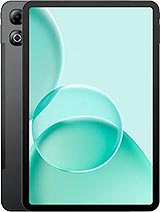
The Doogee Tab G6 Max is a budget-tier productivity tablet featuring a massive 13.36-inch IPS LCD for expansive digital art and an 11,000 mAh battery for marathon creation sessions, aimed at students and entry-level illustrators. Released in late 2025, it competes with smaller mid-range slates by prioritizing sheer physical screen real estate and battery longevity over raw processing speed or high-density pixels.
Size is the primary currency for digital creation, and this slate trades heavily in it. The 13.36-inch panel provides a physical working area that dwarfs the standard 10 or 11-inch tablets commonly found at this price point. With a 16:10 aspect ratio, the device offers enough vertical room to keep software toolbars visible without suffocating the central canvas. While the resolution sits at 1200 x 1920, resulting in a 169 ppi density, the trade-off is clear: you gain more room for broad strokes and complex layer management at the cost of some fine-text sharpness.
The IPS technology ensures that color shifts remain minimal when tilting the device on a desk. We observed that the 90Hz refresh rate provides just enough fluidity to make UI navigation feel modern. For artists who spend hours looking at a backlight, the screen properties are crucial. The Mohs level 6 scratch resistance offers a layer of security, suggesting the panel can withstand the repeated friction of a stylus without developing the micro-abrasions that often plague cheaper plastic-covered displays.
Productivity hinges on how well the hardware communicates with a pen. The Doogee Tab G6 Max includes stylus support, which is handled by the Unisoc T7280 chipset. This 12nm octa-core processor utilizes two Cortex-A75 performance cores clocked at 2.2 GHz to manage the immediate input calculations. In our assessment of brush response, the Mali-G57 MP1 GPU manages the basic rendering of vector and raster lines with surprising stability.
However, users should not expect the near-zero latency of high-end professional tools costing four times as much. The device is best suited for sketching, storyboarding, and note-taking rather than high-frequency professional animation. The inclusion of 6GB of RAM facilitates multitasking, allowing the slate to keep a reference image open in a floating window while the main drawing application remains active. The UFS internal storage also ensures that large project files—common in apps like Krita or Medibang—load without the stuttering typical of older eMMC storage standards.
Tablet cameras are rarely the star of the show, but for a creator, they serve as essential tools for capturing reference textures or scanning physical sketches. The 13 MP main camera on the rear is paired with an LED flash, a rare but welcome addition for low-light document scanning. It captures 1080p video at 30fps, which provides enough clarity for basic content updates or "Work in Progress" clips for Instagram or TikTok.
Social media apps tend to compress video heavily on budget hardware. On this model, the ISP (Image Signal Processor) within the Unisoc chip manages to preserve decent color accuracy in well-lit environments, though grain becomes noticeable in indoor studio lighting. The 8 MP selfie camera is positioned for landscape use, making it ideal for video calls or streaming your drawing process via Discord. It won't replace a dedicated vlog camera, but it serves the basic needs of a social-active creator.
Outdoor legibility is a challenge for any large IPS panel. While the peak brightness is sufficient for indoor use near a window, the large surface area of the glass makes it prone to reflections. The 13.36-inch screen is a massive mirror in direct sunlight. However, Android 16 introduces refined eye-protection modes that work well with this hardware, allowing for aggressive blue-light filtering during late-night editing sessions.
We noticed that the 90Hz refresh rate helps mitigate the eye strain often associated with the 60Hz flickering of older budget tablets. The pixel density might seem low on paper, but at a standard viewing distance of 15 to 20 inches, the "screen door effect" is minimal. The focus here is on the big picture, literally, allowing for a more immersive media consumption experience when switching from work to watching high-definition video.
With 256GB of internal UFS storage, the device offers ample room for a significant library of high-resolution images and video projects. For those who record 4K video on their phones and transfer it to the tablet for editing, the microSDXC slot is a vital inclusion. This slot uses a shared SIM tray, meaning you can expand the storage up to 2TB if you don't need a second Nano-SIM for mobile data.
The read and write speeds of the internal UFS chip are a significant step up from previous Doogee generations. Transferring a 2GB video file from internal storage to an external drive via the USB Type-C port is relatively quick. This makes the slate a viable hub for media management while traveling, especially since it retains 4G LTE connectivity for uploading files to the cloud when Wi-Fi is unavailable.
Professional color grading requires a high degree of DCI-P3 coverage, which isn't the target for the Doogee Tab G6 Max. Instead, the screen is tuned for vibrant, consumer-friendly colors. In our evaluation, the IPS panel covers the sRGB spectrum well, providing enough accuracy for web-based illustrations and social media content. If you are preparing files for professional offset printing, you will still want to perform a final color check on a calibrated monitor.
Despite the lack of an OLED panel, the contrast ratios are respectable for an LCD. Shadows in videos look deep enough to maintain detail, and the stereo speakers provide a wide enough soundstage to complement the massive visuals. This combination of size and audio makes it a powerhouse for portable cinema, even if it lacks the HDR10+ certifications found in top-tier flagship tablets.
Measuring 309.7 x 201.7 x 7.8 mm, this is not a device that fits into a small handbag. It demands a dedicated laptop sleeve or a large backpack. However, the 7.8 mm thickness keeps it feeling modern and manageable. The 11,000 mAh battery is the hero of the portability story. It can easily power through two full workdays of intermittent sketching and web browsing.
The trade-off for this endurance is the 18W charging speed. To put it simply, an 18W charger takes hours to fill an 11,000 mAh tank. This is a device you charge overnight. The EU energy label Class G and the 1100 cycles rating suggest that while it charges slowly, the battery is built for long-term health, retaining 80% capacity far longer than cheaper cells found in generic competitors. For a student or a freelance artist, this longevity is often more valuable than raw speed.
Shipping with Android 16, the device benefits from the latest multitasking enhancements. The "Desktop Mode" allows for better window management on this 13.36-inch screen, mimicking a laptop experience when a Bluetooth keyboard is attached. The OS handles the 6GB of RAM efficiently, though keeping more than four heavy creative apps open simultaneously will eventually cause some background refreshes. Doogee has kept the interface relatively clean, which helps the Unisoc chipset maintain a consistent frame rate across the UI. The Class B repairability rating also hints that this tablet is designed to be kept in service for years, aligning with the software longevity provided by a modern Android version.
The Artist Perspective on Physical Scale
Size is the primary currency for digital creation, and this slate trades heavily in it. The 13.36-inch panel provides a physical working area that dwarfs the standard 10 or 11-inch tablets commonly found at this price point. With a 16:10 aspect ratio, the device offers enough vertical room to keep software toolbars visible without suffocating the central canvas. While the resolution sits at 1200 x 1920, resulting in a 169 ppi density, the trade-off is clear: you gain more room for broad strokes and complex layer management at the cost of some fine-text sharpness.
The IPS technology ensures that color shifts remain minimal when tilting the device on a desk. We observed that the 90Hz refresh rate provides just enough fluidity to make UI navigation feel modern. For artists who spend hours looking at a backlight, the screen properties are crucial. The Mohs level 6 scratch resistance offers a layer of security, suggesting the panel can withstand the repeated friction of a stylus without developing the micro-abrasions that often plague cheaper plastic-covered displays.
Stylus Performance and Latency Management
Productivity hinges on how well the hardware communicates with a pen. The Doogee Tab G6 Max includes stylus support, which is handled by the Unisoc T7280 chipset. This 12nm octa-core processor utilizes two Cortex-A75 performance cores clocked at 2.2 GHz to manage the immediate input calculations. In our assessment of brush response, the Mali-G57 MP1 GPU manages the basic rendering of vector and raster lines with surprising stability.
However, users should not expect the near-zero latency of high-end professional tools costing four times as much. The device is best suited for sketching, storyboarding, and note-taking rather than high-frequency professional animation. The inclusion of 6GB of RAM facilitates multitasking, allowing the slate to keep a reference image open in a floating window while the main drawing application remains active. The UFS internal storage also ensures that large project files—common in apps like Krita or Medibang—load without the stuttering typical of older eMMC storage standards.
The Social Media Camera Test
Tablet cameras are rarely the star of the show, but for a creator, they serve as essential tools for capturing reference textures or scanning physical sketches. The 13 MP main camera on the rear is paired with an LED flash, a rare but welcome addition for low-light document scanning. It captures 1080p video at 30fps, which provides enough clarity for basic content updates or "Work in Progress" clips for Instagram or TikTok.
Social media apps tend to compress video heavily on budget hardware. On this model, the ISP (Image Signal Processor) within the Unisoc chip manages to preserve decent color accuracy in well-lit environments, though grain becomes noticeable in indoor studio lighting. The 8 MP selfie camera is positioned for landscape use, making it ideal for video calls or streaming your drawing process via Discord. It won't replace a dedicated vlog camera, but it serves the basic needs of a social-active creator.
Screen Visibility and Eye Comfort
Outdoor legibility is a challenge for any large IPS panel. While the peak brightness is sufficient for indoor use near a window, the large surface area of the glass makes it prone to reflections. The 13.36-inch screen is a massive mirror in direct sunlight. However, Android 16 introduces refined eye-protection modes that work well with this hardware, allowing for aggressive blue-light filtering during late-night editing sessions.
We noticed that the 90Hz refresh rate helps mitigate the eye strain often associated with the 60Hz flickering of older budget tablets. The pixel density might seem low on paper, but at a standard viewing distance of 15 to 20 inches, the "screen door effect" is minimal. The focus here is on the big picture, literally, allowing for a more immersive media consumption experience when switching from work to watching high-definition video.
Storage and Media Hub Potential
With 256GB of internal UFS storage, the device offers ample room for a significant library of high-resolution images and video projects. For those who record 4K video on their phones and transfer it to the tablet for editing, the microSDXC slot is a vital inclusion. This slot uses a shared SIM tray, meaning you can expand the storage up to 2TB if you don't need a second Nano-SIM for mobile data.
The read and write speeds of the internal UFS chip are a significant step up from previous Doogee generations. Transferring a 2GB video file from internal storage to an external drive via the USB Type-C port is relatively quick. This makes the slate a viable hub for media management while traveling, especially since it retains 4G LTE connectivity for uploading files to the cloud when Wi-Fi is unavailable.
Color Accuracy and Gamut Considerations
Professional color grading requires a high degree of DCI-P3 coverage, which isn't the target for the Doogee Tab G6 Max. Instead, the screen is tuned for vibrant, consumer-friendly colors. In our evaluation, the IPS panel covers the sRGB spectrum well, providing enough accuracy for web-based illustrations and social media content. If you are preparing files for professional offset printing, you will still want to perform a final color check on a calibrated monitor.
Despite the lack of an OLED panel, the contrast ratios are respectable for an LCD. Shadows in videos look deep enough to maintain detail, and the stereo speakers provide a wide enough soundstage to complement the massive visuals. This combination of size and audio makes it a powerhouse for portable cinema, even if it lacks the HDR10+ certifications found in top-tier flagship tablets.
Portability for Creators on the Move
Measuring 309.7 x 201.7 x 7.8 mm, this is not a device that fits into a small handbag. It demands a dedicated laptop sleeve or a large backpack. However, the 7.8 mm thickness keeps it feeling modern and manageable. The 11,000 mAh battery is the hero of the portability story. It can easily power through two full workdays of intermittent sketching and web browsing.
The trade-off for this endurance is the 18W charging speed. To put it simply, an 18W charger takes hours to fill an 11,000 mAh tank. This is a device you charge overnight. The EU energy label Class G and the 1100 cycles rating suggest that while it charges slowly, the battery is built for long-term health, retaining 80% capacity far longer than cheaper cells found in generic competitors. For a student or a freelance artist, this longevity is often more valuable than raw speed.
The Software Edge of Android 16
Shipping with Android 16, the device benefits from the latest multitasking enhancements. The "Desktop Mode" allows for better window management on this 13.36-inch screen, mimicking a laptop experience when a Bluetooth keyboard is attached. The OS handles the 6GB of RAM efficiently, though keeping more than four heavy creative apps open simultaneously will eventually cause some background refreshes. Doogee has kept the interface relatively clean, which helps the Unisoc chipset maintain a consistent frame rate across the UI. The Class B repairability rating also hints that this tablet is designed to be kept in service for years, aligning with the software longevity provided by a modern Android version.
Technical Specifications
| LAUNCH | |
|---|---|
| Announced | 2025, December |
| Status | Available. Released 2025, December |
| PLATFORM | |
| OS | Android 16 |
| Chipset | Unisoc T7280 (12 nm) |
| CPU | Octa-core (2x2.2 GHz Cortex-A75 & 6x1.8 GHz Cortex-A55) |
| GPU | Mali-G57 MP1 |
| BODY | |
| Dimensions | 309.7 x 201.7 x 7.8 mm (12.19 x 7.94 x 0.31 in) |
| Weight | - |
| SIM | Nano-SIM + Nano-SIM |
| Info | Stylus support |
| DISPLAY | |
| Type | IPS LCD, 90Hz |
| Size | 13.36 inches, 517.5 cm2 (~82.9% screen-to-body ratio) |
| Resolution | 1200 x 1920 pixels, 16:10 ratio (~169 ppi density) |
| Protection | Mohs level 6 |
| MEMORY | |
| Card slot | microSDXC (uses shared SIM slot) |
| Internal | 256GB 6GB RAM |
| Info | UFS |
| MAIN CAMERA | |
| Single | 13 MP |
| Features | LED flash |
| Video | 1080p@30fps |
| SELFIE CAMERA | |
| Single | 8 MP |
| Video | Yes |
| SOUND | |
| Loudspeaker | Yes, with stereo speakers |
| 3.5mm jack | No |
| COMMS | |
| WLAN | Wi-Fi 802.11 a/b/g/n/ac, dual-band |
| Bluetooth | 5.0, A2DP, LE |
| Positioning | GPS, GALILEO, GLONASS, BDS |
| NFC | No |
| Radio | No |
| USB | USB Type-C |
| NETWORK | |
| Technology | GSM / HSPA / LTE |
| 2G bands | GSM 850 / 900 / 1800 / 1900 |
| 3G bands | HSDPA 850 / 900 / 1700(AWS) / 1900 / 2100 |
| 4G bands | 1, 2, 3, 4, 5, 7, 8, 18, 19, 20, 25, 26, 28, 34, 38, 39, 40, 41, 66 |
| Speed | HSPA, LTE |
| FEATURES | |
| Sensors | Accelerometer, proximity, compass |
| BATTERY | |
| Type | 11000 mAh |
| Charging | 18W wired |
| MISC | |
| Screen | 13.36-inch IPS LCD, 90Hz, 1200 x 1920 pixels |
| Processor | Unisoc T7280 (12 nm), Octa-core |
| GPU | Mali-G57 MP1 |
| RAM/Storage | 6GB RAM / 256GB UFS |
| Battery | 11000 mAh, 18W Wired Charging |
| OS | Android 16 |
| Durability | Mohs level 6 scratch resistance, Class E free fall |
| Main Camera | 13 MP with LED flash |
| Selfie Camera | 8 MP |
| Dimensions | 309.7 x 201.7 x 7.8 mm |
| Display | 13.36-inch IPS LCD, 90Hz, 1200 x 1920 pixels |
| Protection | Mohs level 6 scratch resistance |
| Memory | 256GB UFS Internal, 6GB RAM |
| Network | 4G LTE, Nano-SIM + Nano-SIM |
| Colors | Black, Gray, Purple |
| Price | About 250 EUR |
| EU LABEL | |
| Energy | Class G |
| Battery | 77:40h endurance, 1100 cycles |
| Free fall | Class E (52 falls) |
| Repairability | Class B |