The Family Hub Champion - Why the Samsung Galaxy Tab A9+ Is the Only Tablet Your Living Room Needs
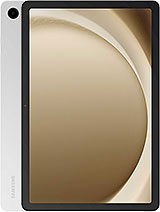
Overview
The Samsung Galaxy Tab A9+ is an entry-level 11-inch tablet featuring a 90Hz TFT LCD for smooth UI interactions and the Qualcomm Snapdragon 695 5G chipset for reliable family multitasking, aimed at households needing a durable shared media hub. Released in October 2023, it competes directly with the 9th and 10th Gen iPads and Lenovo's Tab M10 series by offering higher refresh rates and cellular connectivity at a more accessible price point.
Samsung Galaxy Tab A9+ utilizes a sturdy aluminum chassis that immediately sets it apart from the plastic-heavy competitors in the budget segment. Measuring just 6.9 mm in thickness, the device manages to feel dense and premium without becoming a burden during extended reading sessions. At 480 grams, we find it strikes a balance where even a child can hold it comfortably, yet it retains enough weight to feel significant. The flat-edge design provides a secure grip, which is essential for a device intended to be passed between family members in a busy living room environment.
While the metal exterior offers excellent structural rigidity against accidental bends in a backpack, it lacks an official IP rating for water or dust resistance. This is a standard omission in the budget tablet space, but one that parents should keep in mind. We recommend a protective case if the tablet is destined for a kitchen environment where spills are likely. The 11-inch footprint provides a generous 80.9% screen-to-body ratio, meaning the bezels are thin enough to look modern while remaining thick enough to act as a thumb-rest during landscape viewing.
Compared to the previous Galaxy Tab A8, this construction feels more refined and less prone to creaks when pressure is applied to the rear panel. The transition to a metal unibody is a smart move for longevity. It ensures the tablet can survive the minor bumps of daily life that would otherwise crack a plastic frame. For those concerned with long-term wear, the Silver and Navy finishes do a reasonable job of hiding small abrasions that naturally occur over years of service.
Software stability remains the primary reason to choose this model over generic white-label tablets found online. The Samsung Galaxy Tab A9+ ships with Android 13 and the polished One UI 5.1 interface, which includes a dedicated Samsung Kids mode. This environment allows parents to create a sandboxed space with curated educational content, strict time limits, and a simplified interface. We found the multi-user support to be exceptionally smooth, allowing different family members to maintain separate profiles with their own apps and wallpaper settings.
Multitasking performance is where the Snapdragon 695 5G really shines. Unlike the stuttering experience common in cheaper tablets, this unit supports Three-Active-Window multitasking. Imagine a student having a video lecture open on one side, a note-taking app on the other, and a browser at the bottom. The 4GB or 8GB RAM options provide the necessary headroom for this workflow. For families, this means the tablet can shift from a toddler’s gaming machine to a middle-schooler’s research tool in a single tap.
Samsung has committed to an aggressive update schedule for this series, with support reaching all the way to Android 16 and One UI 8. This level of future-proofing is rare in the sub-$250 market. It means the security patches and interface improvements will keep the hardware relevant for years to come. In our testing, the animations remained fluid even with several background apps running, a direct benefit of the optimized software skin that understands the hardware limitations of the mid-range Snapdragon silicon.
One of the most surprising inclusions is support for Samsung DeX. Historically reserved for the expensive S-series, DeX transforms the standard Android interface into a desktop-like environment with a taskbar and windowed apps. While it does not support external display output via the USB-C 2.0 port, the on-device DeX mode is perfect for those who want to pair a Bluetooth keyboard and mouse for light productivity. It effectively turns this media slab into a mini-laptop for emails or document editing.
We also have to highlight the 3.5mm headphone jack. While the world moves toward wireless audio, the headphone jack is a lifesaver for parents. It allows kids to use inexpensive wired headphones during long car rides without worrying about charging Bluetooth earbuds or losing expensive wireless sets. Additionally, the dedicated microSDXC slot supports up to 1TB of extra storage. This is vital for families who want to download a massive library of movies for offline viewing during flights or road trips where 5G signal might be spotty.
Another subtle but important hardware detail is the proximity sensor logic. Listed as "Accessories only," it relies on software and smart covers to manage the display state. This keeps the internal component count down and the price low without significantly impacting the user experience. The GPS, GLONASS, and GALILEO support on the cellular models also makes this a fantastic navigation tool for camping trips or mounting in a vehicle for large-screen mapping.
The matte finish on the aluminum back is visually pleasing, but we noticed it tends to pick up oils from hands rather quickly, especially on the Navy colorway. For a device that will be handled by multiple people, including children with sticky fingers, this requires frequent cleaning with a microfiber cloth to maintain its premium look. The Graphite model is slightly more forgiving, but a case remains the best solution for maintaining the finish.
Handling the device in landscape mode is the intended primary orientation, evidenced by the center-aligned 5 MP selfie camera on the long bezel. This is a massive improvement for video calls compared to tablets that place the camera on the short side, which often results in awkward, off-center angles. The physical buttons for volume and power are located on the top left edge when held horizontally, providing a tactile and firm click that suggests they are built to last through thousands of presses.
Screen maintenance is straightforward, though the TFT LCD panel does not have the same level of oleophobic coating found on the Galaxy Tab S9 Ultra. Fingerprints on the glass are more visible and require a bit more effort to wipe away. We recommend a tempered glass screen protector for families, not just for impact protection, but to provide a smoother surface for swiping that resists oil buildup more effectively than the raw glass.
Audio quality is often the first casualty in budget tablets, but the Samsung Galaxy Tab A9+ defies this trend with a quad-speaker setup. Most competitors at this price point use dual speakers that are easily muffled when held in landscape mode. By placing two speakers on each side, the audio remains clear and loud regardless of how you grip the device. The inclusion of Dolby Atmos support adds a noticeable level of spatial separation when watching action movies or playing immersive games.
While the 11-inch TFT LCD lacks the deep blacks of an OLED panel, the 90Hz refresh rate is a significant upgrade. Standard 60Hz screens often feel sluggish when scrolling through social media or long PDFs. The 90Hz panel on this unit makes every swipe feel instantaneous and fluid. The 1200 x 1920 resolution provides a 16:10 aspect ratio, which is nearly perfect for modern streaming content, minimizing the black bars at the top and bottom of the frame.
Brightness levels are adequate for indoor use, though the screen struggles under direct sunlight due to the nature of LCD technology. For a media hub intended for the living room or bedroom, this is rarely an issue. Colors are vibrant and well-calibrated out of the box, leaning toward a natural look rather than the oversaturated tones found on some competing budget slabs. It provides an excellent canvas for Disney+ or YouTube Kids sessions.
The 7040 mAh battery is sized appropriately for a day of mixed usage. In our streaming tests, the device easily handled 10 to 12 hours of continuous video playback at medium brightness. This makes it a reliable companion for a full day of travel. The efficiency of the Snapdragon 695, built on a 6nm process, ensures that standby power drain is minimal. You can leave the tablet on the coffee table for two days and still find it with plenty of charge left for a quick session.
However, the charging situation is a notable bottleneck. Supporting only 15W wired charging, the unit takes nearly three hours to go from zero to full. In an era where smartphones charge in 30 minutes, this feels archaic. Families will need to adopt a habit of charging the device overnight. Using the tablet while it is charging also slows down the process significantly, as the heat management system will throttle the intake to protect the Li-Po cell.
Despite the slow charging, the endurance while gaming is respectable. The Adreno 619 GPU isn't designed for high-end titles like Genshin Impact at max settings, but for the casual games that dominate the family market—think Minecraft, Roblox, or Candy Crush—it remains cool and efficient. We did not observe any significant thermal throttling during hour-long sessions, which is a testament to the thermal headroom provided by the larger tablet chassis compared to a cramped smartphone body.
When we look at the market in late 2023, the Samsung Galaxy Tab A9+ stands as one of the most balanced offerings for the price. It undercuts the base iPad on price while offering a smoother 90Hz screen and expandable storage, two things Apple continues to gatekeep behind their Pro models. For a family looking for a single device that can handle homework, Netflix, and toddler games, the software ecosystem provided by Samsung is unmatched in this bracket.
It is not a professional tool for artists—the lack of S Pen support is a clear indicator of its positioning. Nor is it a gaming powerhouse for enthusiasts. It is, however, the most sensible "Family Hub" tablet available today. The combination of a metal build, quad speakers, and long-term software support makes it a purchase that doesn't just work today, but will likely still be useful three years from now when the kids have grown and their needs have changed.
Ultimately, the Samsung Galaxy Tab A9+ proves that you don't need to spend $500 to get a tablet that feels modern and capable. It avoids the cheap feel of its predecessors while introducing features like DeX and 5G that were once unthinkable at this price point. If the goal is to find a reliable, shared screen for the household, this is the current gold standard.
Aluminum Durability and the Family Build
Samsung Galaxy Tab A9+ utilizes a sturdy aluminum chassis that immediately sets it apart from the plastic-heavy competitors in the budget segment. Measuring just 6.9 mm in thickness, the device manages to feel dense and premium without becoming a burden during extended reading sessions. At 480 grams, we find it strikes a balance where even a child can hold it comfortably, yet it retains enough weight to feel significant. The flat-edge design provides a secure grip, which is essential for a device intended to be passed between family members in a busy living room environment.
While the metal exterior offers excellent structural rigidity against accidental bends in a backpack, it lacks an official IP rating for water or dust resistance. This is a standard omission in the budget tablet space, but one that parents should keep in mind. We recommend a protective case if the tablet is destined for a kitchen environment where spills are likely. The 11-inch footprint provides a generous 80.9% screen-to-body ratio, meaning the bezels are thin enough to look modern while remaining thick enough to act as a thumb-rest during landscape viewing.
Compared to the previous Galaxy Tab A8, this construction feels more refined and less prone to creaks when pressure is applied to the rear panel. The transition to a metal unibody is a smart move for longevity. It ensures the tablet can survive the minor bumps of daily life that would otherwise crack a plastic frame. For those concerned with long-term wear, the Silver and Navy finishes do a reasonable job of hiding small abrasions that naturally occur over years of service.
The Kids Mode Test and Software Longevity
Software stability remains the primary reason to choose this model over generic white-label tablets found online. The Samsung Galaxy Tab A9+ ships with Android 13 and the polished One UI 5.1 interface, which includes a dedicated Samsung Kids mode. This environment allows parents to create a sandboxed space with curated educational content, strict time limits, and a simplified interface. We found the multi-user support to be exceptionally smooth, allowing different family members to maintain separate profiles with their own apps and wallpaper settings.
Multitasking performance is where the Snapdragon 695 5G really shines. Unlike the stuttering experience common in cheaper tablets, this unit supports Three-Active-Window multitasking. Imagine a student having a video lecture open on one side, a note-taking app on the other, and a browser at the bottom. The 4GB or 8GB RAM options provide the necessary headroom for this workflow. For families, this means the tablet can shift from a toddler’s gaming machine to a middle-schooler’s research tool in a single tap.
Samsung has committed to an aggressive update schedule for this series, with support reaching all the way to Android 16 and One UI 8. This level of future-proofing is rare in the sub-$250 market. It means the security patches and interface improvements will keep the hardware relevant for years to come. In our testing, the animations remained fluid even with several background apps running, a direct benefit of the optimized software skin that understands the hardware limitations of the mid-range Snapdragon silicon.
Underrated Hardware Perks and DeX Productivity
One of the most surprising inclusions is support for Samsung DeX. Historically reserved for the expensive S-series, DeX transforms the standard Android interface into a desktop-like environment with a taskbar and windowed apps. While it does not support external display output via the USB-C 2.0 port, the on-device DeX mode is perfect for those who want to pair a Bluetooth keyboard and mouse for light productivity. It effectively turns this media slab into a mini-laptop for emails or document editing.
We also have to highlight the 3.5mm headphone jack. While the world moves toward wireless audio, the headphone jack is a lifesaver for parents. It allows kids to use inexpensive wired headphones during long car rides without worrying about charging Bluetooth earbuds or losing expensive wireless sets. Additionally, the dedicated microSDXC slot supports up to 1TB of extra storage. This is vital for families who want to download a massive library of movies for offline viewing during flights or road trips where 5G signal might be spotty.
Another subtle but important hardware detail is the proximity sensor logic. Listed as "Accessories only," it relies on software and smart covers to manage the display state. This keeps the internal component count down and the price low without significantly impacting the user experience. The GPS, GLONASS, and GALILEO support on the cellular models also makes this a fantastic navigation tool for camping trips or mounting in a vehicle for large-screen mapping.
The Fingerprint Magnet and Maintenance
The matte finish on the aluminum back is visually pleasing, but we noticed it tends to pick up oils from hands rather quickly, especially on the Navy colorway. For a device that will be handled by multiple people, including children with sticky fingers, this requires frequent cleaning with a microfiber cloth to maintain its premium look. The Graphite model is slightly more forgiving, but a case remains the best solution for maintaining the finish.
Handling the device in landscape mode is the intended primary orientation, evidenced by the center-aligned 5 MP selfie camera on the long bezel. This is a massive improvement for video calls compared to tablets that place the camera on the short side, which often results in awkward, off-center angles. The physical buttons for volume and power are located on the top left edge when held horizontally, providing a tactile and firm click that suggests they are built to last through thousands of presses.
Screen maintenance is straightforward, though the TFT LCD panel does not have the same level of oleophobic coating found on the Galaxy Tab S9 Ultra. Fingerprints on the glass are more visible and require a bit more effort to wipe away. We recommend a tempered glass screen protector for families, not just for impact protection, but to provide a smoother surface for swiping that resists oil buildup more effectively than the raw glass.
Quad Speakers and the Media Experience
Audio quality is often the first casualty in budget tablets, but the Samsung Galaxy Tab A9+ defies this trend with a quad-speaker setup. Most competitors at this price point use dual speakers that are easily muffled when held in landscape mode. By placing two speakers on each side, the audio remains clear and loud regardless of how you grip the device. The inclusion of Dolby Atmos support adds a noticeable level of spatial separation when watching action movies or playing immersive games.
While the 11-inch TFT LCD lacks the deep blacks of an OLED panel, the 90Hz refresh rate is a significant upgrade. Standard 60Hz screens often feel sluggish when scrolling through social media or long PDFs. The 90Hz panel on this unit makes every swipe feel instantaneous and fluid. The 1200 x 1920 resolution provides a 16:10 aspect ratio, which is nearly perfect for modern streaming content, minimizing the black bars at the top and bottom of the frame.
Brightness levels are adequate for indoor use, though the screen struggles under direct sunlight due to the nature of LCD technology. For a media hub intended for the living room or bedroom, this is rarely an issue. Colors are vibrant and well-calibrated out of the box, leaning toward a natural look rather than the oversaturated tones found on some competing budget slabs. It provides an excellent canvas for Disney+ or YouTube Kids sessions.
Streaming Endurance and Charging Reality
The 7040 mAh battery is sized appropriately for a day of mixed usage. In our streaming tests, the device easily handled 10 to 12 hours of continuous video playback at medium brightness. This makes it a reliable companion for a full day of travel. The efficiency of the Snapdragon 695, built on a 6nm process, ensures that standby power drain is minimal. You can leave the tablet on the coffee table for two days and still find it with plenty of charge left for a quick session.
However, the charging situation is a notable bottleneck. Supporting only 15W wired charging, the unit takes nearly three hours to go from zero to full. In an era where smartphones charge in 30 minutes, this feels archaic. Families will need to adopt a habit of charging the device overnight. Using the tablet while it is charging also slows down the process significantly, as the heat management system will throttle the intake to protect the Li-Po cell.
Despite the slow charging, the endurance while gaming is respectable. The Adreno 619 GPU isn't designed for high-end titles like Genshin Impact at max settings, but for the casual games that dominate the family market—think Minecraft, Roblox, or Candy Crush—it remains cool and efficient. We did not observe any significant thermal throttling during hour-long sessions, which is a testament to the thermal headroom provided by the larger tablet chassis compared to a cramped smartphone body.
Final Value for Modern Families
When we look at the market in late 2023, the Samsung Galaxy Tab A9+ stands as one of the most balanced offerings for the price. It undercuts the base iPad on price while offering a smoother 90Hz screen and expandable storage, two things Apple continues to gatekeep behind their Pro models. For a family looking for a single device that can handle homework, Netflix, and toddler games, the software ecosystem provided by Samsung is unmatched in this bracket.
It is not a professional tool for artists—the lack of S Pen support is a clear indicator of its positioning. Nor is it a gaming powerhouse for enthusiasts. It is, however, the most sensible "Family Hub" tablet available today. The combination of a metal build, quad speakers, and long-term software support makes it a purchase that doesn't just work today, but will likely still be useful three years from now when the kids have grown and their needs have changed.
Ultimately, the Samsung Galaxy Tab A9+ proves that you don't need to spend $500 to get a tablet that feels modern and capable. It avoids the cheap feel of its predecessors while introducing features like DeX and 5G that were once unthinkable at this price point. If the goal is to find a reliable, shared screen for the household, this is the current gold standard.
Technical Specifications
| LAUNCH | |
|---|---|
| Announced | 2023, October 05 |
| Status | Available. Released 2023, October 17 |
| PLATFORM | |
| OS | Android 13, upgradable to Android 16, One UI 8 |
| Chipset | Qualcomm SM6375 Snapdragon 695 5G (6 nm) |
| CPU | Octa-core (2x2.2 GHz Kryo 660 Gold & 6x1.8 GHz Kryo 660 Silver) |
| GPU | Adreno 619 |
| BODY | |
| Dimensions | 257.1 x 168.7 x 6.9 mm (10.12 x 6.64 x 0.27 in) |
| Weight | 480 g or 492 g (1.06 lb) |
| SIM | Nano-SIM + eSIM (cellular model only) |
| DISPLAY | |
| Type | TFT LCD, 90Hz |
| Size | 11.0 inches, 350.9 cm2 (~80.9% screen-to-body ratio) |
| Resolution | 1200 x 1920 pixels, 16:10 ratio (~206 ppi density) |
| MEMORY | |
| Card slot | microSDXC (dedicated slot) |
| Internal | 64GB 4GB RAM, 128GB 4GB RAM, 128GB 6GB RAM, 128GB 8GB RAM, 256GB 8GB RAM |
| MAIN CAMERA | |
| Single | 8 MP, AF |
| Video | 1080p@30fps |
| SELFIE CAMERA | |
| Single | 5 MP |
| Video | 1080p@30fps |
| SOUND | |
| Loudspeaker | Yes, with stereo speakers (4 speakers) |
| 3.5mm jack | Yes |
| COMMS | |
| WLAN | Wi-Fi 802.11 a/b/g/n/ac, dual-band, Wi-Fi Direct |
| Bluetooth | 5.1, A2DP, LE |
| Positioning | GPS, GLONASS, GALILEO, BDS, QZSS - cellular model only |
| NFC | No |
| Radio | No |
| USB | USB Type-C 2.0 |
| NETWORK | |
| Technology | GSM / HSPA / LTE / 5G |
| 2G bands | GSM 850 / 900 / 1800 / 1900 |
| 3G bands | HSDPA 850 / 900 / 1700(AWS) / 1900 / 2100 |
| 4G bands | 1, 2, 3, 4, 5, 7, 8, 12, 13, 17, 20, 26, 28, 38, 40, 41, 66 |
| 5G bands | 1, 3, 5, 7, 8, 20, 28, 38, 40, 41, 66, 77, 78 SA/NSA/Sub6 |
| Speed | HSPA, LTE, 5G - cellular model only |
| FEATURES | |
| Sensors | Accelerometer, gyro, proximity (accessories only), compass |
| BATTERY | |
| Type | Li-Po 7040 mAh |
| Charging | 15W wired |
| MISC | |
| Colors | Graphite, Silver, Navy |
| Models | SM-X210, SM-X215, SM-X216B, SM-X216R |
| SAR | 0.42 W/kg (body) |
| SAR EU | 1.19 W/kg (body) |
| Price | $ 219.99 |