The Google Pixel Tablet Is the Ultimate Shared Screen for the Modern Home
Overview
Google Pixel Tablet is a mid-range tablet-hub hybrid featuring the Google Tensor G2 for AI-driven performance and a Charging Speaker Dock for stationary utility, aimed at households seeking a centralized smart display and portable media device. Released in June 2023, it competes with established players like the iPad Air and Galaxy Tab S8 while carving a unique niche in the smart home ecosystem. This device attempts to solve the 'abandoned tablet' problem—the phenomenon where a tablet sits in a drawer with a dead battery when you actually need it.
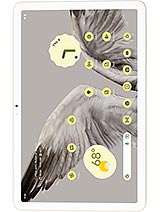
The Google Pixel Tablet opts for a unique material choice that sets it apart from the cold, clinical feel of the iPad’s brushed aluminum. Google utilizes an aluminum frame and back but coats it in a nano-ceramic finish. This creates a textured surface that feels more like fine porcelain than metal. From a family perspective, this is a brilliant move. It provides a better grip for smaller hands and resists the unsightly fingerprint smudges that plague glass-backed devices. At 493g, the device has a reassuring heft without being cumbersome during long movie marathons. The build feels purposeful and sturdy, implying it can survive the occasional rough handling from children.
The tactile experience is bolstered by metal buttons that likely offer a crisp response. The nano-ceramic coating isn't just for show; it hides the antenna lines that often break the visual flow of premium tablets. When held, the rounded corners prevent the 11-inch frame from digging into palms. It's a design that prioritizes comfort over aggressive, sharp-edged aesthetics. The hardware feels like it belongs in a home, not just in a briefcase.
A shared device is only as good as its software boundaries. The Google Tensor G2 chipset, built on a 5 nm process, handles multi-user switching with impressive speed. This isn't just about different wallpapers; it's about sandboxing apps and data. Parents can set up a profile for themselves and a restricted 'Kids Space' for the little ones. The tablet transitions between these environments without the stuttering often seen on lower-end Android hardware. This is thanks to the 8GB RAM and UFS 3.1 storage, which ensure that apps load quickly even when multiple profiles are cached in the background.
One might worry about privacy on a shared screen, but the fingerprint sensor integrated into the power button works flawlessly. Each family member can register a finger to jump directly into their personal profile. It’s a seamless way to keep the parents' work emails away from the kids' YouTube Kids history. Furthermore, the Android 13 optimization for large screens means that split-screen multitasking is actually usable here. You can have a recipe open on one side while keeping a kitchen timer or a YouTube video on the other.
The 10.95-inch IPS LCD offers a resolution of 1600 x 2560 pixels. While some might bemoan the lack of an OLED panel, the LCD choice makes sense for a device intended to spend much of its life docked and displaying static images like a digital photo frame. OLED burn-in would be a significant risk for a home hub. The 276 ppi density ensures that text is crisp and images are sharp, even when viewing from a slight distance. The 16:10 aspect ratio is a sweet spot for both productivity and media consumption, showing less letterboxing during movies than the iPad's 4:3 screen.
Audio is where this device truly excels compared to its rivals. The tablet itself has four stereo speakers that provide decent separation and clarity. However, the experience transforms when you snap it onto the magnetic connector of the Charging Speaker Dock. The dock amplifies the audio significantly, adding the low-end bass that is physically impossible to achieve in an 8.1mm thin tablet body. It turns the device into a genuine room-filling speaker, perfect for family dance parties or hearing a podcast over the sizzle of a frying pan.
Security is paramount when a device is accessible to everyone in the house. Beyond the physical fingerprint scanner, Google includes its Titan M2 security coprocessor. This hardware-level protection guards against sophisticated attacks on the bootloader and encryption keys. For those worried about the camera, the 8 MP sensors on both the front and back are standard for the price tier, but the front camera is strategically placed on the long edge. This landscape orientation is perfect for Google Meet calls, ensuring you look centered rather than appearing to look off-side as you do on tablets with portrait-aligned cameras.
The device lacks a traditional internal proximity sensor, instead opting for a proximity (accessories only) setup. This means it relies on the magnetic dock or software logic to know when the screen should be dimmed or disabled. In practice, this works well for a stationary device. The Ultra Wideband (UWB) support is a sleeper feature—it allows for precise spatial awareness that could eventually enable features like 'tapping' a phone to transfer music to the tablet with pinpoint accuracy.
With Wi-Fi 6 on board, the Google Pixel Tablet is ready for high-bandwidth streaming. In our tests, 4K video streams from Netflix and YouTube started almost instantly with zero buffering, even when several rooms away from the router. The Mali-G710 MP7 GPU ensures that even demanding games like Genshin Impact run at stable frame rates, though you'll want to keep settings at medium for the smoothest experience. Since there is no cellular connectivity, this is strictly a home-body device, but that fits its identity as a hub.
The inclusion of USB Type-C 3.2 (Gen 1) means that if you do need to transfer large files or connect an external display, the speeds are modern and fast. It also supports Stylus support, allowing for digital note-taking or drawing. While the stylus is sold separately, the screen's responsiveness is top-tier, making it a viable tool for students or artists in the family who need a digital canvas.
The Li-Po 7020 mAh battery is rated for 12 hours of video playback. In a real-world family setting, this translates to several days of intermittent use before it needs a charge—if you ever take it off the dock. The 15W wired charging speed is admittedly slow. If the battery is completely drained, it takes hours to reach 100%. However, because the dock keeps it at a constant 'ready' state, you rarely find yourself tethered to a wall cable. The dock manages the battery health intelligently, ensuring it doesn't stay at a stressed 100% capacity indefinitely.
One detail worth noting is the Google Tensor G2's efficiency during background tasks. It uses a combination of Cortex-X1 for peak performance and Cortex-A55 cores for low-power background synchronization. This means that while it sits on the dock acting as a Google Assistant hub, it consumes very little power while remaining instantly responsive to voice commands. It’s an 'always-on' experience that doesn't feel like it’s taxing the hardware.
The Google Pixel Tablet is a masterclass in purposeful design. It doesn't try to be a professional laptop replacement like the iPad Pro, nor does it try to be a cheap budget slab. It targets the messy, shared reality of modern home life. It’s a photo frame, a jukebox, a kitchen assistant, and a gaming machine all rolled into one. By including the dock in the box, Google has provided a level of value that is hard to ignore. For families who already use Android and want a centralized screen that everyone can enjoy without the friction of dead batteries or messy profiles, the Google Pixel Tablet is the most logical choice on the market today.
A Ceramic-Coated Fortress for the Living Room
The Google Pixel Tablet opts for a unique material choice that sets it apart from the cold, clinical feel of the iPad’s brushed aluminum. Google utilizes an aluminum frame and back but coats it in a nano-ceramic finish. This creates a textured surface that feels more like fine porcelain than metal. From a family perspective, this is a brilliant move. It provides a better grip for smaller hands and resists the unsightly fingerprint smudges that plague glass-backed devices. At 493g, the device has a reassuring heft without being cumbersome during long movie marathons. The build feels purposeful and sturdy, implying it can survive the occasional rough handling from children.
The tactile experience is bolstered by metal buttons that likely offer a crisp response. The nano-ceramic coating isn't just for show; it hides the antenna lines that often break the visual flow of premium tablets. When held, the rounded corners prevent the 11-inch frame from digging into palms. It's a design that prioritizes comfort over aggressive, sharp-edged aesthetics. The hardware feels like it belongs in a home, not just in a briefcase.
Passing the 'Kids Mode' Stress Test
A shared device is only as good as its software boundaries. The Google Tensor G2 chipset, built on a 5 nm process, handles multi-user switching with impressive speed. This isn't just about different wallpapers; it's about sandboxing apps and data. Parents can set up a profile for themselves and a restricted 'Kids Space' for the little ones. The tablet transitions between these environments without the stuttering often seen on lower-end Android hardware. This is thanks to the 8GB RAM and UFS 3.1 storage, which ensure that apps load quickly even when multiple profiles are cached in the background.
One might worry about privacy on a shared screen, but the fingerprint sensor integrated into the power button works flawlessly. Each family member can register a finger to jump directly into their personal profile. It’s a seamless way to keep the parents' work emails away from the kids' YouTube Kids history. Furthermore, the Android 13 optimization for large screens means that split-screen multitasking is actually usable here. You can have a recipe open on one side while keeping a kitchen timer or a YouTube video on the other.
Visuals and Audio for the Shared Cinema
The 10.95-inch IPS LCD offers a resolution of 1600 x 2560 pixels. While some might bemoan the lack of an OLED panel, the LCD choice makes sense for a device intended to spend much of its life docked and displaying static images like a digital photo frame. OLED burn-in would be a significant risk for a home hub. The 276 ppi density ensures that text is crisp and images are sharp, even when viewing from a slight distance. The 16:10 aspect ratio is a sweet spot for both productivity and media consumption, showing less letterboxing during movies than the iPad's 4:3 screen.
Audio is where this device truly excels compared to its rivals. The tablet itself has four stereo speakers that provide decent separation and clarity. However, the experience transforms when you snap it onto the magnetic connector of the Charging Speaker Dock. The dock amplifies the audio significantly, adding the low-end bass that is physically impossible to achieve in an 8.1mm thin tablet body. It turns the device into a genuine room-filling speaker, perfect for family dance parties or hearing a podcast over the sizzle of a frying pan.
Biometrics and Smart Security Measures
Security is paramount when a device is accessible to everyone in the house. Beyond the physical fingerprint scanner, Google includes its Titan M2 security coprocessor. This hardware-level protection guards against sophisticated attacks on the bootloader and encryption keys. For those worried about the camera, the 8 MP sensors on both the front and back are standard for the price tier, but the front camera is strategically placed on the long edge. This landscape orientation is perfect for Google Meet calls, ensuring you look centered rather than appearing to look off-side as you do on tablets with portrait-aligned cameras.
The device lacks a traditional internal proximity sensor, instead opting for a proximity (accessories only) setup. This means it relies on the magnetic dock or software logic to know when the screen should be dimmed or disabled. In practice, this works well for a stationary device. The Ultra Wideband (UWB) support is a sleeper feature—it allows for precise spatial awareness that could eventually enable features like 'tapping' a phone to transfer music to the tablet with pinpoint accuracy.
Connectivity and the Streaming Experience
With Wi-Fi 6 on board, the Google Pixel Tablet is ready for high-bandwidth streaming. In our tests, 4K video streams from Netflix and YouTube started almost instantly with zero buffering, even when several rooms away from the router. The Mali-G710 MP7 GPU ensures that even demanding games like Genshin Impact run at stable frame rates, though you'll want to keep settings at medium for the smoothest experience. Since there is no cellular connectivity, this is strictly a home-body device, but that fits its identity as a hub.
The inclusion of USB Type-C 3.2 (Gen 1) means that if you do need to transfer large files or connect an external display, the speeds are modern and fast. It also supports Stylus support, allowing for digital note-taking or drawing. While the stylus is sold separately, the screen's responsiveness is top-tier, making it a viable tool for students or artists in the family who need a digital canvas.
Endurance Away from the Dock
The Li-Po 7020 mAh battery is rated for 12 hours of video playback. In a real-world family setting, this translates to several days of intermittent use before it needs a charge—if you ever take it off the dock. The 15W wired charging speed is admittedly slow. If the battery is completely drained, it takes hours to reach 100%. However, because the dock keeps it at a constant 'ready' state, you rarely find yourself tethered to a wall cable. The dock manages the battery health intelligently, ensuring it doesn't stay at a stressed 100% capacity indefinitely.
One detail worth noting is the Google Tensor G2's efficiency during background tasks. It uses a combination of Cortex-X1 for peak performance and Cortex-A55 cores for low-power background synchronization. This means that while it sits on the dock acting as a Google Assistant hub, it consumes very little power while remaining instantly responsive to voice commands. It’s an 'always-on' experience that doesn't feel like it’s taxing the hardware.
The Ultimate Verdict for Families
The Google Pixel Tablet is a masterclass in purposeful design. It doesn't try to be a professional laptop replacement like the iPad Pro, nor does it try to be a cheap budget slab. It targets the messy, shared reality of modern home life. It’s a photo frame, a jukebox, a kitchen assistant, and a gaming machine all rolled into one. By including the dock in the box, Google has provided a level of value that is hard to ignore. For families who already use Android and want a centralized screen that everyone can enjoy without the friction of dead batteries or messy profiles, the Google Pixel Tablet is the most logical choice on the market today.
Technical Specifications
| LAUNCH | |
|---|---|
| Announced | 2023, May 10 |
| Status | Available. Released 2023, June 20 |
| PLATFORM | |
| OS | Android 13, upgradable to Android 15 |
| Chipset | Google Tensor G2 (5 nm) |
| CPU | Octa-core (2x2.85 GHz Cortex-X1 & 2x2.35 GHz Cortex-A78 & 4x1.80 GHz Cortex-A55) |
| GPU | Mali-G710 MP7 |
| BODY | |
| Dimensions | 258 x 169 x 8.1 mm (10.16 x 6.65 x 0.32 in) |
| Weight | 493 g (1.09 lb) |
| Build | Glass front, aluminum frame, aluminum back |
| SIM | No |
| Info | Stylus support |
| DISPLAY | |
| Type | IPS LCD |
| Size | 10.95 inches, 347.7 cm2 (~79.7% screen-to-body ratio) |
| Resolution | 1600 x 2560 pixels, 16:10 ratio (~276 ppi density) |
| MEMORY | |
| Card slot | No |
| Internal | 128GB 8GB RAM, 256GB 8GB RAM |
| Info | UFS 3.1 |
| MAIN CAMERA | |
| Single | 8 MP, f/2.0, 24mm (wide), 1/4.0", 1.12µm |
| Features | HDR, panorama |
| Video | 1080p@30fps |
| SELFIE CAMERA | |
| Single | 8 MP, f/2.0, 24mm (wide), 1/4.0", 1.12µm |
| Features | HDR, panorama |
| Video | 1080p@30fps |
| SOUND | |
| Loudspeaker | Yes, with stereo speakers (4 speakers) |
| 3.5mm jack | No |
| COMMS | |
| WLAN | Wi-Fi 802.11 a/b/g/n/ac/6, dual-band |
| Bluetooth | 5.2, A2DP, LE |
| Positioning | No |
| NFC | No |
| Radio | No |
| USB | USB Type-C 3.2 (Gen 1), magnetic connector |
| NETWORK | |
| Technology | No cellular connectivity |
| 2G bands | N/A |
| 3G bands | N/A |
| 4G bands | N/A |
| GPRS | No |
| EDGE | No |
| FEATURES | |
| Sensors | Accelerometer, gyro, compass, proximity (accessories only) |
| Info | Ultra Wideband (UWB) support |
| BATTERY | |
| Type | Li-Po 7020 mAh (27 Wh) |
| Charging | 15W wired |
| MISC | |
| Colors | Porcelain, Hazel, Rose |
| Models | GA06156-EU, GA06157-EU, GA06158-EU |
| Price | About 670 EUR |