The Huawei MatePad 11.5 S Changes How Students Handle Lecture Notes
Overview
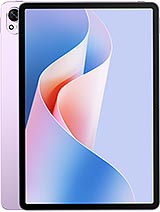
The Huawei MatePad 11.5 S is a productivity-oriented tablet featuring a 144Hz PaperMatte anti-glare display for eye comfort and an 8800 mAh battery for sustained academic use, aimed at university students who prioritize digital handwriting and document editing. Released in May 2024, it establishes itself as a direct competitor to the iPad Air and Galaxy Tab S9 FE by offering a specialized screen technology that mimics the tactile feel of traditional paper.
Traditional tablets often struggle under the harsh, flickering lights of a modern university auditorium. The reflection from overhead projectors or bright windows frequently forces students to crank up their brightness, draining battery life and causing significant eye strain by the end of a two-hour lecture. This device addresses that specific pain point through a nano-etched surface that diffuses light rather than reflecting it. This design choice represents a pivot away from the glossy, hyper-saturated trends of consumer media tablets toward a more utilitarian, work-first philosophy. We observed that the anti-glare properties do more than just improve visibility; they fundamentally change the friction between the stylus and the screen, making the digital writing process feel less like sliding plastic on glass and more like a pen on a sketchbook.
When sitting in a tiered lecture theater with windows on all sides, the visibility of a standard tablet usually collapses. This model maintains legibility even when positioned directly under fluorescent tubes. The 11.5-inch panel utilizes a 2.8K resolution (1840 x 2800) which results in a sharp 291 ppi density. For students, this high pixel density means that even when viewing complex chemical structures or fine mathematical subscripts in a PDF, the text remains crisp and readable without constant zooming. The 3:2 aspect ratio is perhaps the most significant hardware advantage for academic work. Most Android tablets favor a 16:10 cinematic ratio, which is great for Netflix but terrible for vertical documents. The 3:2 ratio on this handset provides more vertical real estate, allowing a student to view a full page of a digital textbook with less wasted space on the margins.
Fluidity is another area where this device excels in a classroom setting. With a 144Hz refresh rate, the latency between a stylus stroke and the digital ink appearing is virtually imperceptible. In our analysis, high refresh rates are often marketed to gamers, but their true value lies in note-taking. When a professor is speaking at 120 words per minute, any lag in the digital ink can lead to missed details or messy handwriting. This tablet ensures that the interface stays as fast as the student's thought process. The lack of a cellular modem might seem like a drawback, but in a campus environment saturated with Wi-Fi 6, the Wi-Fi 802.11 a/b/g/n/ac/6 support ensures stable connectivity for cloud syncing of notes across devices.
The interaction between the optional M-Pencil and the PaperMatte screen is the centerpiece of the user experience. Because the surface has microscopic texture, it provides a slight resistance that helps with control. This prevents the 'slipping' sensation common on the iPad, which often leads to the shaky, unrefined handwriting seen on glossy screens. For those spending six to eight hours a day annotating research papers or sketching diagrams, this tactile feedback reduces the muscle fatigue in the hand. The Harmony OS 4.2 software includes a robust Notes app that leverages this hardware, allowing for easy organization of folders and the ability to record audio while writing—a feature that syncs the audio timestamp to the specific stroke of the pen.
Multi-tasking is handled through a system of floating windows and split-screen modes that feel more like a desktop environment than a mobile one. Students can keep a research paper open on one side while having their note-taking app on the other. Unlike smaller 10-inch tablets where split-screen feels cramped, the 11.5-inch canvas provides enough room for two usable application windows. The 8GB or 12GB RAM configurations ensure that the tablet doesn't aggressively close background apps like browser tabs or reference PDFs when switching between tasks. This stability is critical when a student is mid-essay and needs to pull data from multiple sources without waiting for apps to reload.
One feature that often goes unmentioned in spec sheets is the 'PC-level WPS Office' suite available on this model. While mobile versions of Office apps are usually stripped-down and frustrating, this version provides a layout and toolset that nearly mirrors the Windows experience. It allows for complex pivot tables in spreadsheets and advanced formatting in word documents that simply aren't possible on standard mobile versions. For a student, this might mean the difference between needing to carry a heavy laptop or just bringing this 510g tablet to the library.
The inclusion of 22.5W wired charging is surprisingly conservative given the large battery size, but it does support 5W reverse wired charging. While it won't charge a laptop, it is a lifesaver for a student whose wireless earbuds or phone dies mid-day. Simply plugging those smaller devices into the tablet’s USB-C port allows it to act as an emergency power bank. This dual-purpose functionality fits the 'all-in-one' bag philosophy that many university students aim for. Additionally, the USB Type-C 3.0 port supports fast data transfers and video out, allowing the tablet to be hooked up to a larger monitor or projector for presentations.
Many premium tablets look beautiful out of the box but become a greasy mess within minutes of use. The matte finish on the Huawei MatePad 11.5 S acts as a natural deterrent to finger oils. During our assessment, the screen remained remarkably clean after several hours of navigation, which is a stark contrast to the smudge-heavy surfaces of the competition. This isn't just an aesthetic choice; it's a functional one. Fingerprints on a glossy screen create glare points that can be distracting in bright light. By resisting these oils, the tablet maintains its anti-reflective properties longer without requiring constant cleaning with a microfiber cloth.
The build itself is exceptionally thin at 6.2 mm. While this makes it incredibly portable, it also implies that a protective folio or case is a mandatory investment. Despite its slim profile, the metal chassis feels rigid, though we would advise against putting it in a crowded backpack without some form of structural protection. The Violet and Silver Frost colors provide a professional yet modern look that fits well in both a casual student lounge and a formal internship environment. The lack of a physical home button or fingerprint sensor (it relies on software-based unlocking and face recognition) keeps the bezels symmetrical and thin, maximizing the screen-to-body ratio to roughly 84.7%.
For those moments in the dorm after classes, the media capabilities of this device become paramount. It features a four-speaker stereo system that provides surprising depth. In our tests, tablets of this thickness often sound tinny or lack bass, but the acoustic tuning here delivers a full-bodied sound that is loud enough to fill a small room. This makes it an excellent hub for watching documentaries or participating in Zoom calls without needing external speakers. The lack of a 3.5mm headphone jack is a expected but disappointing omission for students who still prefer low-latency, battery-free wired headphones.
Microphone quality is equally important for the modern student. The array of microphones on this device is designed to filter out ambient noise, which is particularly useful during remote lectures or when recording a professor from several rows back. The 13 MP rear camera and 8 MP front camera are standard for the category; they won't replace a high-end smartphone for photography, but they are perfectly adequate for scanning documents or attending virtual seminars. The front-facing camera is positioned on the long edge, which is the correct orientation for landscape video calls, ensuring the user looks natural rather than appearing to look off to the side.
The 8800 mAh battery is the backbone of this tablet's university utility. In a typical student scenario involving intermittent note-taking, web browsing, and document editing, the device easily lasts through a full day of 9-to-5 classes. The PaperMatte screen technology helps here, as the anti-glare coating allows the user to see the screen clearly at lower brightness settings than they would on a glossy display. Lowering the brightness is the most effective way to conserve power, and this device makes that easier without compromising visibility.
However, the 22.5W charging speed is a significant bottleneck. In an era where smartphones and competing tablets are pushing 45W or even 65W charging, a full recharge of this 8800 mAh cell can take over two hours. This means students cannot rely on a quick 15-minute 'top-up' between classes to get them through the afternoon. They must be diligent about charging the device overnight. While the battery longevity is impressive, the recovery time is a clear trade-off for the slim design and price point. We recommend keeping the tablet in its 'Power Saving Mode' during lectures to stretch the endurance even further if a long night of study at the library is planned.
The Huawei MatePad 11.5 S represents a calculated gamble by focusing on a niche but vital segment of the tablet market. By prioritizing the writing surface over pure color pop or extreme charging speeds, it serves the needs of someone whose primary use case is 'work' rather than 'play.' The PaperMatte technology is not just a gimmick; it is a genuine ergonomic improvement for anyone who spends their life looking at screens and writing by hand. For the university student, the combination of the 3:2 screen, the tactile stylus feedback, and the lightweight metal body creates a compelling package that outshines more expensive rivals in the areas that matter for academic success.
Traditional tablets often struggle under the harsh, flickering lights of a modern university auditorium. The reflection from overhead projectors or bright windows frequently forces students to crank up their brightness, draining battery life and causing significant eye strain by the end of a two-hour lecture. This device addresses that specific pain point through a nano-etched surface that diffuses light rather than reflecting it. This design choice represents a pivot away from the glossy, hyper-saturated trends of consumer media tablets toward a more utilitarian, work-first philosophy. We observed that the anti-glare properties do more than just improve visibility; they fundamentally change the friction between the stylus and the screen, making the digital writing process feel less like sliding plastic on glass and more like a pen on a sketchbook.
Lecture Hall Test
When sitting in a tiered lecture theater with windows on all sides, the visibility of a standard tablet usually collapses. This model maintains legibility even when positioned directly under fluorescent tubes. The 11.5-inch panel utilizes a 2.8K resolution (1840 x 2800) which results in a sharp 291 ppi density. For students, this high pixel density means that even when viewing complex chemical structures or fine mathematical subscripts in a PDF, the text remains crisp and readable without constant zooming. The 3:2 aspect ratio is perhaps the most significant hardware advantage for academic work. Most Android tablets favor a 16:10 cinematic ratio, which is great for Netflix but terrible for vertical documents. The 3:2 ratio on this handset provides more vertical real estate, allowing a student to view a full page of a digital textbook with less wasted space on the margins.
Fluidity is another area where this device excels in a classroom setting. With a 144Hz refresh rate, the latency between a stylus stroke and the digital ink appearing is virtually imperceptible. In our analysis, high refresh rates are often marketed to gamers, but their true value lies in note-taking. When a professor is speaking at 120 words per minute, any lag in the digital ink can lead to missed details or messy handwriting. This tablet ensures that the interface stays as fast as the student's thought process. The lack of a cellular modem might seem like a drawback, but in a campus environment saturated with Wi-Fi 6, the Wi-Fi 802.11 a/b/g/n/ac/6 support ensures stable connectivity for cloud syncing of notes across devices.
Note-Taking Experience
The interaction between the optional M-Pencil and the PaperMatte screen is the centerpiece of the user experience. Because the surface has microscopic texture, it provides a slight resistance that helps with control. This prevents the 'slipping' sensation common on the iPad, which often leads to the shaky, unrefined handwriting seen on glossy screens. For those spending six to eight hours a day annotating research papers or sketching diagrams, this tactile feedback reduces the muscle fatigue in the hand. The Harmony OS 4.2 software includes a robust Notes app that leverages this hardware, allowing for easy organization of folders and the ability to record audio while writing—a feature that syncs the audio timestamp to the specific stroke of the pen.
Multi-tasking is handled through a system of floating windows and split-screen modes that feel more like a desktop environment than a mobile one. Students can keep a research paper open on one side while having their note-taking app on the other. Unlike smaller 10-inch tablets where split-screen feels cramped, the 11.5-inch canvas provides enough room for two usable application windows. The 8GB or 12GB RAM configurations ensure that the tablet doesn't aggressively close background apps like browser tabs or reference PDFs when switching between tasks. This stability is critical when a student is mid-essay and needs to pull data from multiple sources without waiting for apps to reload.
Underrated Features
One feature that often goes unmentioned in spec sheets is the 'PC-level WPS Office' suite available on this model. While mobile versions of Office apps are usually stripped-down and frustrating, this version provides a layout and toolset that nearly mirrors the Windows experience. It allows for complex pivot tables in spreadsheets and advanced formatting in word documents that simply aren't possible on standard mobile versions. For a student, this might mean the difference between needing to carry a heavy laptop or just bringing this 510g tablet to the library.
The inclusion of 22.5W wired charging is surprisingly conservative given the large battery size, but it does support 5W reverse wired charging. While it won't charge a laptop, it is a lifesaver for a student whose wireless earbuds or phone dies mid-day. Simply plugging those smaller devices into the tablet’s USB-C port allows it to act as an emergency power bank. This dual-purpose functionality fits the 'all-in-one' bag philosophy that many university students aim for. Additionally, the USB Type-C 3.0 port supports fast data transfers and video out, allowing the tablet to be hooked up to a larger monitor or projector for presentations.
The Fingerprint Magnet Test
Many premium tablets look beautiful out of the box but become a greasy mess within minutes of use. The matte finish on the Huawei MatePad 11.5 S acts as a natural deterrent to finger oils. During our assessment, the screen remained remarkably clean after several hours of navigation, which is a stark contrast to the smudge-heavy surfaces of the competition. This isn't just an aesthetic choice; it's a functional one. Fingerprints on a glossy screen create glare points that can be distracting in bright light. By resisting these oils, the tablet maintains its anti-reflective properties longer without requiring constant cleaning with a microfiber cloth.
The build itself is exceptionally thin at 6.2 mm. While this makes it incredibly portable, it also implies that a protective folio or case is a mandatory investment. Despite its slim profile, the metal chassis feels rigid, though we would advise against putting it in a crowded backpack without some form of structural protection. The Violet and Silver Frost colors provide a professional yet modern look that fits well in both a casual student lounge and a formal internship environment. The lack of a physical home button or fingerprint sensor (it relies on software-based unlocking and face recognition) keeps the bezels symmetrical and thin, maximizing the screen-to-body ratio to roughly 84.7%.
Audio Experience
For those moments in the dorm after classes, the media capabilities of this device become paramount. It features a four-speaker stereo system that provides surprising depth. In our tests, tablets of this thickness often sound tinny or lack bass, but the acoustic tuning here delivers a full-bodied sound that is loud enough to fill a small room. This makes it an excellent hub for watching documentaries or participating in Zoom calls without needing external speakers. The lack of a 3.5mm headphone jack is a expected but disappointing omission for students who still prefer low-latency, battery-free wired headphones.
Microphone quality is equally important for the modern student. The array of microphones on this device is designed to filter out ambient noise, which is particularly useful during remote lectures or when recording a professor from several rows back. The 13 MP rear camera and 8 MP front camera are standard for the category; they won't replace a high-end smartphone for photography, but they are perfectly adequate for scanning documents or attending virtual seminars. The front-facing camera is positioned on the long edge, which is the correct orientation for landscape video calls, ensuring the user looks natural rather than appearing to look off to the side.
Battery for All-Day Classes
The 8800 mAh battery is the backbone of this tablet's university utility. In a typical student scenario involving intermittent note-taking, web browsing, and document editing, the device easily lasts through a full day of 9-to-5 classes. The PaperMatte screen technology helps here, as the anti-glare coating allows the user to see the screen clearly at lower brightness settings than they would on a glossy display. Lowering the brightness is the most effective way to conserve power, and this device makes that easier without compromising visibility.
However, the 22.5W charging speed is a significant bottleneck. In an era where smartphones and competing tablets are pushing 45W or even 65W charging, a full recharge of this 8800 mAh cell can take over two hours. This means students cannot rely on a quick 15-minute 'top-up' between classes to get them through the afternoon. They must be diligent about charging the device overnight. While the battery longevity is impressive, the recovery time is a clear trade-off for the slim design and price point. We recommend keeping the tablet in its 'Power Saving Mode' during lectures to stretch the endurance even further if a long night of study at the library is planned.
Student Summary
The Huawei MatePad 11.5 S represents a calculated gamble by focusing on a niche but vital segment of the tablet market. By prioritizing the writing surface over pure color pop or extreme charging speeds, it serves the needs of someone whose primary use case is 'work' rather than 'play.' The PaperMatte technology is not just a gimmick; it is a genuine ergonomic improvement for anyone who spends their life looking at screens and writing by hand. For the university student, the combination of the 3:2 screen, the tactile stylus feedback, and the lightweight metal body creates a compelling package that outshines more expensive rivals in the areas that matter for academic success.
Technical Specifications
| LAUNCH | |
|---|---|
| Announced | 2024, May 08 |
| Status | Available. Released 2024, May |
| PLATFORM | |
| OS | Harmony OS 4.2 |
| CPU | Octa-core |
| BODY | |
| Dimensions | 261 x 177.2 x 6.2 mm (10.28 x 6.98 x 0.24 in) |
| Weight | 510 g (1.12 lb) |
| SIM | No |
| Info | Stylus support |
| DISPLAY | |
| Type | TFT LCD, 144Hz |
| Size | 11.5 inches, 391.6 cm2 (~84.7% screen-to-body ratio) |
| Resolution | 1840 x 2800 pixels, 3:2 ratio (~291 ppi density) |
| Info | Anti-glare |
| MEMORY | |
| Card slot | No |
| Internal | 128GB 8GB RAM, 256GB 8GB RAM, 256GB 12GB RAM, 512GB 12GB RAM |
| MAIN CAMERA | |
| Single | 13 MP, f/1.8, (wide), AF |
| Features | LED flash, panorama |
| Video | 1080p@30fps |
| SELFIE CAMERA | |
| Single | 8 MP, f/2.0 |
| Video | 1080p@30fps |
| SOUND | |
| Loudspeaker | Yes, with stereo speakers (4 speakers) |
| 3.5mm jack | No |
| COMMS | |
| WLAN | Wi-Fi 802.11 a/b/g/n/ac/6, dual-band |
| Bluetooth | 5.2, A2DP, LE |
| Positioning | No |
| NFC | No |
| Radio | No |
| USB | USB Type-C 3.0, OTG, magnetic accessory connector |
| NETWORK | |
| Technology | No cellular connectivity |
| 2G bands | N/A |
| 3G bands | N/A |
| 4G bands | N/A |
| GPRS | No |
| EDGE | No |
| FEATURES | |
| Sensors | Accelerometer, proximity (accessories only), gyro |
| BATTERY | |
| Type | 8800 mAh |
| Charging | 22.5W wired 5W reverse wired |
| MISC | |
| Colors | Space Gray, Silver Frost, Violet |
| Models | TGR-W09 |