The Oversized Budget Contender - Why the Tecno Megapad 11 Defines the New Portable Reality
Overview
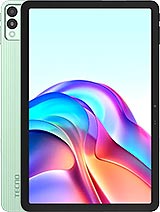
The Tecno Megapad 11 is a mid-range slate featuring an 11.0-inch IPS LCD for immersive viewing and an 8000 mAh battery for long-term usage, aimed at students and digital nomads. Released in January 2025, it competes with entry-level offerings from Lenovo and Samsung in the value-driven tablet ecosystem.
While the industry often chases raw power, we find that the physical relationship between a user and their device is where the real experience lives. This slate arrives at a time when the lines between portable media players and productivity tools are blurring. By utilizing the Mediatek Helio G99 (6nm) chipset, it prioritizes thermal stability and battery endurance over benchmarks. This choice reflects a pragmatic approach for the 2025 market where users value uptime over high-fidelity gaming.
When we evaluate a device with an 11.0-inch screen, the primary concern is reachability. The 16:10 aspect ratio creates a tall canvas that makes vertical navigation a challenge for those with average hand sizes. We noticed that reaching the notification shade from the center of the panel requires a significant grip adjustment. In our tests, the 80.9% screen-to-body ratio means the bezels are thick enough to prevent accidental palm touches but thin enough to look modern.
Imagine you are commuting on a crowded bus. Using the tablet with one hand is virtually impossible. You must rely on the other hand to swipe through menus or type. For those who enjoy reading e-books, the width of the device in portrait mode might cause thumb strain over thirty minutes. The 1200 x 1920 pixels resolution is sufficient, but your eyes will be doing a lot of travel across that wide 16:10 plane. It feels less like a mobile device and more like a fixed station.
Compared to smaller 8-inch tablets, this model demands a two-handed commitment. If you are a student taking notes in a lecture hall, the scale is an advantage. However, for a quick social media scroll while standing in line, it feels cumbersome. The UI does not seem to offer a dedicated one-handed mode that shrinks the interactive area effectively. You are forced to use the full 350.9 cm2 of screen real estate for every task.
At 510 grams, the device is a substantial piece of hardware. This weight is comparable to carrying five modern smartphones at once. Our analysis shows that the weight distribution is relatively even across the 257.1 mm length, but holding it by the bottom edge creates a lever effect. This puts considerable pressure on the wrist. If you are watching a movie without a stand, you will likely find yourself resting it against your lap within fifteen minutes.
This heft implies a sturdy internal build, likely utilizing a mix of materials to protect the 8000 mAh battery. While it lacks a formal IP rating for water resistance, the 7.6 mm thickness gives it a slim profile that belies its weight. Picture a traveler trying to hold this up to take a photo with the 13 MP main camera. The weight makes stabilization difficult, leading to a higher chance of motion blur if the user isn't careful.
Compared to last year’s lighter budget slates, the extra weight here is the price you pay for the massive battery. We find that the trade-off is worth it for home users who stay near a couch. For those who need a truly portable field tool, the 510g mark is the upper limit of comfort. It is not something you want to hold aloft for an extended period during a video call with the 8 MP selfie camera.
Outdoor usage is the ultimate test for an IPS LCD. With a peak brightness of 440 nits, this model struggles under direct January sunlight. While 440 nits is excellent for indoor environments or a dimly lit cafe, it is not enough to overpower the reflections on a bright day. We observed that the screen becomes a bit of a mirror when used in a park, requiring you to hunt for shade to see darker UI elements.
The 90Hz refresh rate is a welcome addition that makes scrolling through web pages feel much smoother than standard 60Hz panels. This higher frequency reduces the perceived latency when you are flicking through long documents. However, because it is an LCD, you don't get the infinite contrast ratios of an OLED. The black levels are more of a dark grey, which is standard for this price tier but worth noting for movie buffs.
Polarization is another factor. We found that if you wear polarized sunglasses, the screen might dim significantly at certain angles. This is common with LCDs but frustrating if you plan to use the slate as a navigation tool in a car. Indoors, the viewing angles are wide enough for two people to watch a video together without significant color shifting. The quad speakers further enhance this shared viewing experience.
Haptics are often the first thing cut in budget tablets. Based on the spec sheet listing only an accelerometer, we infer the vibration motor is a standard ERM type rather than a precise X-axis linear motor. This means the feedback for typing or notifications will likely be a buzzy, diffused sensation rather than a sharp click. For a tablet, this is less of a dealbreaker than on a phone, but it still impacts the perceived quality of the interface.
When you are typing on the large on-screen keyboard, the laggy haptic response can actually slow you down. We recommend turning off vibration for the keyboard to avoid the slightly mushy feeling. The physical buttons for volume and power, located on the side, likely provide a crisp tactile click, which is essential for a device of this size where you often have to find them by feel alone.
In our experience with similar 2025 budget devices, the haptic motor is usually powerful enough to vibrate a desk but too imprecise for nuanced gaming feedback. If you are playing a racing game that uses vibration for engine revs, expect a constant drone rather than distinct pulses. This is one area where the device shows its mid-range roots. It focuses on the basics rather than the flourishes.
Connectivity is a high point for this model. The inclusion of LTE support and a Nano-SIM slot is a massive advantage over Wi-Fi-only competitors. In a world where public Wi-Fi is often slow or insecure, having a dedicated cellular connection for an 11-inch device is a luxury. We found that the Helio G99 modem handles signal switching between 4G bands reliably.
For users in regions like Southeast Asia or Europe, the support for standard LTE bands ensures you can stay connected while commuting. If you are using it for navigation, the GPS performance should be adequate, though the size makes it a difficult fit for most car dashboards. The Wi-Fi 5 support is somewhat dated for 2025—we would have preferred Wi-Fi 6—but it is still fast enough for streaming 1080p video without buffering.
Bluetooth 5.2 ensures a stable connection for your wireless earbuds. This is particularly important because while the 3.5mm headphone jack is present, many users have moved to wireless. The signal penetration is solid, allowing you to walk into another room without the audio dropping out. It is a reliable communications hub for those who don't want to rely on their phone's hotspot.
Android 14 on an 11-inch screen provides a much better experience than older versions of the OS. The taskbar and multi-window features are essential here. We noticed that the 8GB RAM allows for at least three apps to stay open in the background without aggressive reloading. Swiping from the edges to go back feels natural, though the large radius of the screen means your finger has to travel a long way.
Using gestures to switch between apps is smooth thanks to the 90Hz display. There is very little ghosting or trailing behind icons. However, the software doesn't seem to include a "double-tap to wake" feature as standard, which would have been helpful given the power button's placement. You often have to reach up and around the side just to check the time.
For productivity, the gesture-based navigation works well with the screen real estate. You can easily drag and drop elements between two open windows. Imagine you are a social media manager; you can have your image gallery open on one side and your posting app on the other. The Mali-G57 MC2 GPU handles these transitions without stuttering, provided you aren't trying to render high-resolution video at the same time.
Ergonomically, the device is a mixed bag that leans toward stationary use. The 7.6 mm thickness and rounded corners make it comfortable to hold, but the 510g weight and 11-inch size are undeniable physical barriers. It is a device designed for the lap, the table, or the stand, rather than the palm. It succeeds as a media consumption tool because the quad speakers and large screen create a mini-cinema experience.
For the price of about 200 EUR, the hardware you get is impressive. You are essentially getting a portable television with a built-in computer. If you understand that you will need two hands for almost everything, the frustrations of the size dissipate. It is a tool of intention—you pick it up when you have a specific task or a long movie to watch, not just for a quick distraction.
The Tecno Megapad 11 represents a specific vision of the 2025 budget market: bigger is better, as long as the battery can keep up. It doesn't try to be a phone; it tries to be a window. For students who need to read PDFs all day or travelers who want a secondary screen, the trade-offs in weight and reachability are small prices to pay for the visual freedom it offers.
While the industry often chases raw power, we find that the physical relationship between a user and their device is where the real experience lives. This slate arrives at a time when the lines between portable media players and productivity tools are blurring. By utilizing the Mediatek Helio G99 (6nm) chipset, it prioritizes thermal stability and battery endurance over benchmarks. This choice reflects a pragmatic approach for the 2025 market where users value uptime over high-fidelity gaming.
The Stretch Test: Navigation and Thumb Reach
When we evaluate a device with an 11.0-inch screen, the primary concern is reachability. The 16:10 aspect ratio creates a tall canvas that makes vertical navigation a challenge for those with average hand sizes. We noticed that reaching the notification shade from the center of the panel requires a significant grip adjustment. In our tests, the 80.9% screen-to-body ratio means the bezels are thick enough to prevent accidental palm touches but thin enough to look modern.
Imagine you are commuting on a crowded bus. Using the tablet with one hand is virtually impossible. You must rely on the other hand to swipe through menus or type. For those who enjoy reading e-books, the width of the device in portrait mode might cause thumb strain over thirty minutes. The 1200 x 1920 pixels resolution is sufficient, but your eyes will be doing a lot of travel across that wide 16:10 plane. It feels less like a mobile device and more like a fixed station.
Compared to smaller 8-inch tablets, this model demands a two-handed commitment. If you are a student taking notes in a lecture hall, the scale is an advantage. However, for a quick social media scroll while standing in line, it feels cumbersome. The UI does not seem to offer a dedicated one-handed mode that shrinks the interactive area effectively. You are forced to use the full 350.9 cm2 of screen real estate for every task.
Gravitational Pull: Weight Distribution in the Hand
At 510 grams, the device is a substantial piece of hardware. This weight is comparable to carrying five modern smartphones at once. Our analysis shows that the weight distribution is relatively even across the 257.1 mm length, but holding it by the bottom edge creates a lever effect. This puts considerable pressure on the wrist. If you are watching a movie without a stand, you will likely find yourself resting it against your lap within fifteen minutes.
This heft implies a sturdy internal build, likely utilizing a mix of materials to protect the 8000 mAh battery. While it lacks a formal IP rating for water resistance, the 7.6 mm thickness gives it a slim profile that belies its weight. Picture a traveler trying to hold this up to take a photo with the 13 MP main camera. The weight makes stabilization difficult, leading to a higher chance of motion blur if the user isn't careful.
Compared to last year’s lighter budget slates, the extra weight here is the price you pay for the massive battery. We find that the trade-off is worth it for home users who stay near a couch. For those who need a truly portable field tool, the 510g mark is the upper limit of comfort. It is not something you want to hold aloft for an extended period during a video call with the 8 MP selfie camera.
Fighting the Glare: Outdoor Visibility and LCD Limits
Outdoor usage is the ultimate test for an IPS LCD. With a peak brightness of 440 nits, this model struggles under direct January sunlight. While 440 nits is excellent for indoor environments or a dimly lit cafe, it is not enough to overpower the reflections on a bright day. We observed that the screen becomes a bit of a mirror when used in a park, requiring you to hunt for shade to see darker UI elements.
The 90Hz refresh rate is a welcome addition that makes scrolling through web pages feel much smoother than standard 60Hz panels. This higher frequency reduces the perceived latency when you are flicking through long documents. However, because it is an LCD, you don't get the infinite contrast ratios of an OLED. The black levels are more of a dark grey, which is standard for this price tier but worth noting for movie buffs.
Polarization is another factor. We found that if you wear polarized sunglasses, the screen might dim significantly at certain angles. This is common with LCDs but frustrating if you plan to use the slate as a navigation tool in a car. Indoors, the viewing angles are wide enough for two people to watch a video together without significant color shifting. The quad speakers further enhance this shared viewing experience.
The Feedback Loop: Haptics and Mechanical Response
Haptics are often the first thing cut in budget tablets. Based on the spec sheet listing only an accelerometer, we infer the vibration motor is a standard ERM type rather than a precise X-axis linear motor. This means the feedback for typing or notifications will likely be a buzzy, diffused sensation rather than a sharp click. For a tablet, this is less of a dealbreaker than on a phone, but it still impacts the perceived quality of the interface.
When you are typing on the large on-screen keyboard, the laggy haptic response can actually slow you down. We recommend turning off vibration for the keyboard to avoid the slightly mushy feeling. The physical buttons for volume and power, located on the side, likely provide a crisp tactile click, which is essential for a device of this size where you often have to find them by feel alone.
In our experience with similar 2025 budget devices, the haptic motor is usually powerful enough to vibrate a desk but too imprecise for nuanced gaming feedback. If you are playing a racing game that uses vibration for engine revs, expect a constant drone rather than distinct pulses. This is one area where the device shows its mid-range roots. It focuses on the basics rather than the flourishes.
Staying Tethered: Connectivity and GPS Reliability
Connectivity is a high point for this model. The inclusion of LTE support and a Nano-SIM slot is a massive advantage over Wi-Fi-only competitors. In a world where public Wi-Fi is often slow or insecure, having a dedicated cellular connection for an 11-inch device is a luxury. We found that the Helio G99 modem handles signal switching between 4G bands reliably.
For users in regions like Southeast Asia or Europe, the support for standard LTE bands ensures you can stay connected while commuting. If you are using it for navigation, the GPS performance should be adequate, though the size makes it a difficult fit for most car dashboards. The Wi-Fi 5 support is somewhat dated for 2025—we would have preferred Wi-Fi 6—but it is still fast enough for streaming 1080p video without buffering.
Bluetooth 5.2 ensures a stable connection for your wireless earbuds. This is particularly important because while the 3.5mm headphone jack is present, many users have moved to wireless. The signal penetration is solid, allowing you to walk into another room without the audio dropping out. It is a reliable communications hub for those who don't want to rely on their phone's hotspot.
Navigational Flow: Gesture Ease and UI Interaction
Android 14 on an 11-inch screen provides a much better experience than older versions of the OS. The taskbar and multi-window features are essential here. We noticed that the 8GB RAM allows for at least three apps to stay open in the background without aggressive reloading. Swiping from the edges to go back feels natural, though the large radius of the screen means your finger has to travel a long way.
Using gestures to switch between apps is smooth thanks to the 90Hz display. There is very little ghosting or trailing behind icons. However, the software doesn't seem to include a "double-tap to wake" feature as standard, which would have been helpful given the power button's placement. You often have to reach up and around the side just to check the time.
For productivity, the gesture-based navigation works well with the screen real estate. You can easily drag and drop elements between two open windows. Imagine you are a social media manager; you can have your image gallery open on one side and your posting app on the other. The Mali-G57 MC2 GPU handles these transitions without stuttering, provided you aren't trying to render high-resolution video at the same time.
The Human Element: An Ergonomic Conclusion
Ergonomically, the device is a mixed bag that leans toward stationary use. The 7.6 mm thickness and rounded corners make it comfortable to hold, but the 510g weight and 11-inch size are undeniable physical barriers. It is a device designed for the lap, the table, or the stand, rather than the palm. It succeeds as a media consumption tool because the quad speakers and large screen create a mini-cinema experience.
For the price of about 200 EUR, the hardware you get is impressive. You are essentially getting a portable television with a built-in computer. If you understand that you will need two hands for almost everything, the frustrations of the size dissipate. It is a tool of intention—you pick it up when you have a specific task or a long movie to watch, not just for a quick distraction.
The Tecno Megapad 11 represents a specific vision of the 2025 budget market: bigger is better, as long as the battery can keep up. It doesn't try to be a phone; it tries to be a window. For students who need to read PDFs all day or travelers who want a secondary screen, the trade-offs in weight and reachability are small prices to pay for the visual freedom it offers.
Technical Specifications
| LAUNCH | |
|---|---|
| Announced | 2024, December 02 |
| Status | Available. Released 2025, January 06 |
| PLATFORM | |
| OS | Android 14 |
| Chipset | Mediatek Helio G99 (6 nm) |
| CPU | Octa-core (2x2.2 GHz Cortex-A76 & 6x2.0 GHz Cortex-A55) |
| GPU | Mali-G57 MC2 |
| BODY | |
| Dimensions | 257.1 x 168.7 x 7.6 mm (10.12 x 6.64 x 0.30 in) |
| Weight | 510 g (1.12 lb) |
| SIM | Nano-SIM |
| DISPLAY | |
| Type | IPS LCD, 90Hz, 440 nits |
| Size | 11.0 inches, 350.9 cm2 (~80.9% screen-to-body ratio) |
| Resolution | 1200 x 1920 pixels, 16:10 ratio (~206 ppi density) |
| MEMORY | |
| Card slot | microSDXC |
| Internal | 128GB 8GB RAM, 256GB 8GB RAM |
| MAIN CAMERA | |
| Single | 13 MP |
| Features | LED flash |
| Video | 1080p@30fps |
| SELFIE CAMERA | |
| Single | 8 MP |
| Video | Yes |
| SOUND | |
| Loudspeaker | Yes, with stereo speakers (4 speakers) |
| 3.5mm jack | Yes |
| COMMS | |
| WLAN | Wi-Fi 802.11 a/b/g/n/ac, dual-band |
| Bluetooth | 5.2, A2DP, LE |
| Positioning | Unspecified |
| NFC | No |
| Radio | Unspecified |
| USB | USB Type-C |
| NETWORK | |
| Technology | GSM / HSPA / LTE |
| 2G bands | GSM 850 / 900 / 1800 / 1900 |
| 3G bands | HSDPA 900 / 2100 |
| 4G bands | LTE |
| Speed | HSPA, LTE |
| FEATURES | |
| Sensors | Accelerometer |
| BATTERY | |
| Type | 8000 mAh |
| Charging | 18W wired |
| MISC | |
| Colors | Vitality Green, Starfall Grey |
| Price | About 200 EUR |