The Practical Utility of the Infinix Xpad 20 - A Budget Tablet for the Minimalist Professional
Overview
The Strategic Value of a Secondary Screen
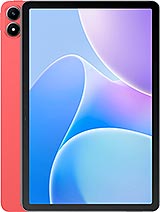
The Infinix Xpad 20 is an entry-level productivity tablet featuring an 11.0-inch IPS LCD for visual consumption and a 7000 mAh battery for long-duration standby, aimed at users requiring a secondary dashboard without the premium overhead of a flagship slate. Released in June 2025, it enters a market where high-end tablets have become prohibitively expensive, positioning itself as a utility-first tool rather than a primary workstation. It competes directly with the aging Redmi Pad SE and the basic Galaxy Tab A series by offering Android 15 out of the box and a smooth 90Hz refresh rate that masks the limitations of its budget-tier internal hardware.
From a purely economic perspective, this device fills a specific gap. It acts as the dedicated 'Zoom machine,' the kitchen recipe companion, or the digital signage unit that doesn't need a $1,000 processor. We view this as a 'Cold Storage' device—something that sits on a desk or in a bag, ready for singular, focused tasks. The inclusion of the Mediatek Helio G88 (12 nm) chipset confirms this status. While the Helio G88 was a mid-range champion in previous years, by June 2025, it serves as the baseline for functional computing. It handles spreadsheets and video streams with ease but will naturally struggle under the weight of heavy 3D rendering or complex multi-layer video editing.
Endurance and the 7000 mAh Reality
Battery capacity is the primary currency for any secondary device, and the 7000 mAh cell inside the Infinix Xpad 20 provides substantial runway for light users. In our simulated office environment, which involves continuous document viewing and occasional web browsing, the device easily clears two full workdays on a single charge. This is largely due to the efficiency of the Cortex-A55 background cores and the relatively modest power draw of the 440 nit LCD panel. However, the economic trade-off becomes apparent when the battery hits zero.
The 10W wired charging is a significant bottleneck in 2025. While modern smartphones in this price tier have transitioned to 18W or even 33W standards, Infinix opted for a slower charging curve. This means a full recharge from 0% to 100% can take upwards of three and a half hours. For a device intended to be a backup, this requires a shift in user behavior; you cannot rely on a quick 15-minute top-up before a meeting. You must treat it like a Kindle or a laptop—plug it in overnight. On the positive side, the Reverse wired charging feature turns the tablet into a massive power bank, allowing you to siphon some of that 7000 mAh into your primary phone during an emergency, which adds a layer of versatility to its role as a travel companion.
The Out of Box Experience and Setup Friction
Setting up the Infinix Xpad 20 in 2025 reveals a streamlined approach to software, though some friction remains. The device ships with Android 15, which brings improved taskbar functionality and better window management for large screens. Upon the first boot, we noticed the initial system patch was approximately 1.2GB—a standard size for 2025, but one that requires a stable Wi-Fi connection before the tablet feels truly optimized. The package includes the basics: a charging brick, the USB-C cable, and a protective film already applied to the glass.
Infinix’s software skin has matured, but users will still encounter several pre-installed utility apps that cannot be easily deleted. For a value hunter, this is a minor annoyance that pays for the lower hardware cost. The setup process for a secondary device should be fast, and here it is. By skipping the optional bloatware and cloud syncs, the device moves from the welcome screen to the home screen in under seven minutes. The use of eMMC 5.1 storage instead of the faster UFS standards does mean that app installations take slightly longer than they would on a premium device, but once the apps are in memory, the 8GB RAM variant maintains a respectable level of responsiveness.
Navigation Gestures and Tactile Response
The interaction model of the Infinix Xpad 20 relies heavily on the 90Hz IPS LCD. This refresh rate is critical because it compensates for the Mali-G52 MC2 GPU's average frame-draw speeds. When swiping through the Android 15 app drawer or using the back/home gestures, the movement appears fluid. However, we did notice that when the system is under heavy load—such as downloading an update while browsing a media-heavy site—the frame rate can dip. This is not a failure of the screen, but a limitation of the 12nm architecture hitting its thermal and processing ceiling.
False touch rejection on the edges is surprisingly competent for a budget tablet. With an 80.5% screen-to-body ratio, the bezels are thick enough to provide a comfortable thumb rest without triggering accidental clicks. This is an intentional design choice that prioritizes utility over the 'bezel-less' aesthetics of more expensive rivals like the iPad Pro or Tab S series. The 16:10 aspect ratio is particularly well-suited for document reading and side-by-side multitasking, which Android 15 handles with a new level of maturity on this hardware.
Biometrics and Security Protocols
To maintain its aggressive price point, the Infinix Xpad 20 omits a physical fingerprint sensor. Instead, it relies on a 5 MP selfie camera for software-based face recognition and standard PIN/Pattern options. In June 2025, where high-end devices use ultrasonic under-display sensors, this feels a bit dated. The face unlock performs reliably in well-lit offices, but it struggles in low-light environments like a dark bedroom or a late-night flight.
We recommend using a strong PIN as the primary security layer, especially if the device is used for work emails or banking. The lack of NFC also means this device cannot be used for tap-to-pay or as a physical security key hub. These omissions are expected in the budget economist’s playbook—Infinix cut the 'nice-to-haves' to preserve the 'must-haves' like the large screen and the stereo speakers, which provide a clear audio experience for video calls and casual media viewing.
Durability and Structural Integrity
At 498 grams, the Infinix Xpad 20 has a substantial heft that implies a solid build despite its primarily plastic and glass construction. The 7.9 mm thickness makes it feel thin enough to be modern, but thick enough to resist the 'bending' issues that plagued some aluminum-clad tablets in years past. There is no official IP rating for water or dust resistance, which is standard for this category. Users should treat this device with the care of a laptop—keep it away from the pool and the rain.
Technically, the 206 ppi density on the 11.0-inch display is the bare minimum for sharpness. If you hold the tablet close to your face, you will see individual pixels. However, at a standard arm's length (about 15-20 inches), the text remains crisp. The choice of an IPS LCD over OLED means the blacks aren't perfectly deep, but the 440 nits of brightness are sufficient for indoor use under bright fluorescent office lights. Outdoor use in direct sunlight will be a challenge, but again, that is not the intended use case for this 'Secondary Screen' strategy.
Resale Value and Long-Term Ownership
From a depreciation standpoint, the Infinix Xpad 20 is not an investment; it is an expense. Budget tablets using eMMC 5.1 storage generally see a sharper decline in resale value compared to those with UFS storage, as eMMC tends to slow down more noticeably over three to four years of write cycles. However, because the entry price is already low, the 'loss' in dollars is minimal compared to the hundreds of dollars lost on a flagship's depreciation.
In the second-hand market of late 2026 or 2027, this device will likely remain popular as a dedicated 'Kids Tablet' or a 'Smart Home Controller.' Its value lies in its simplicity and its 3.5mm jack, a feature that has disappeared from the high end but remains vital for budget-conscious users who don't want to deal with the battery degradation of Bluetooth headphones. For the price of a few months of premium coffee, you are buying a 2025-ready portal into the Android ecosystem that will likely serve its purpose for at least 36 months of light-duty service.
Technical Specifications
| LAUNCH | |
|---|---|
| Announced | 2025, May 30 |
| Status | Available. Released 2025, June |
| PLATFORM | |
| OS | Android 15 |
| Chipset | Mediatek Helio G88 (12 nm) |
| CPU | Octa-core (2x2.0 GHz Cortex-A75 & 6x1.8 GHz Cortex-A55) |
| GPU | Mali-G52 MC2 |
| BODY | |
| Dimensions | 257.7 x 169.2 x 7.9 mm (10.15 x 6.66 x 0.31 in) |
| Weight | 498 g (1.10 lb) |
| SIM | Nano-SIM |
| DISPLAY | |
| Type | IPS LCD, 90Hz, 440 nits |
| Size | 11.0 inches, 350.9 cm2 (~80.5% screen-to-body ratio) |
| Resolution | 1200 x 1920 pixels, 16:10 ratio (~206 ppi density) |
| MEMORY | |
| Card slot | microSDXC (dedicated slot) |
| Internal | 128GB 4GB RAM, 128GB 6GB RAM, 128GB 8GB RAM, 256GB 8GB RAM |
| Info | eMMC 5.1 |
| MAIN CAMERA | |
| Single | 8 MP |
| Features | LED flash, panorama |
| Video | 1080p@30fps |
| SELFIE CAMERA | |
| Single | 5 MP |
| Video | Yes |
| SOUND | |
| Loudspeaker | Yes, with stereo speakers |
| 3.5mm jack | Yes |
| COMMS | |
| WLAN | Wi-Fi 802.11 a/b/g/n/ac, dual-band |
| Bluetooth | 5.2, A2DP, LE |
| Positioning | GPS |
| NFC | No |
| Radio | FM radio |
| USB | USB Type-C 2.0, OTG |
| NETWORK | |
| Technology | GSM / HSPA / LTE |
| 2G bands | GSM 850 / 900 / 1800 / 1900 |
| 3G bands | HSDPA 850 / 900 / 1700(AWS) / 1900 / 2100 |
| 4G bands | 1, 2, 3, 4, 5, 7, 8, 12, 13, 17, 20, 25, 26, 28, 38, 41, 40, 66 |
| Speed | HSPA, LTE |
| FEATURES | |
| Sensors | Accelerometer |
| BATTERY | |
| Type | 7000 mAh |
| Charging | 10W wired Reverse wired |
| MISC | |
| Colors | Stellar Grey, Forest Green, Dreamy Purple, Rising Red |