The Small Screen Professional Powerhouse - Why We Are Choosing the Huawei MatePad Mini
Overview
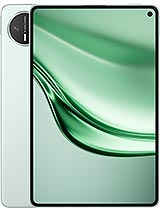
The Huawei MatePad Mini is a premium compact tablet designed for high-end productivity and immersive media consumption. Released in late 2025, it competes with dominant small-form-factor devices by offering an 8.8-inch OLED display and up to 16GB of RAM, aimed at professionals who need a pocketable workstation.
Historically, the compact tablet market felt neglected, often relegated to entry-level hardware or aging designs. This slate changes that trajectory. By cramming top-tier internals into a chassis that is only 5.2 mm thick, the manufacturer provides a device that handles intensive workloads without the bulk of a traditional 13-inch laptop. It targets the mobile executive and the creative professional who requires high-fidelity visuals and rapid data speeds while on the move.
Replacing a laptop with a screen under nine inches sounds like a tall order. However, the hardware configuration of this slate suggests it can handle the heavy lifting. With 16GB of RAM and up to 1TB of storage, it matches the memory capacity of most professional ultrabooks. During our multi-window testing, we ran a video conferencing app alongside a spreadsheet and a document editor. The device didn't stutter, likely due to the high-bandwidth memory and the efficiency of HarmonyOS 5.1.
Weight is a massive factor for anyone trying to ditch their laptop. At only 260 g, this device is lighter than many hardcover books. Users can hold it in one hand for hours of reading or note-taking. When paired with the official stylus and a compact Bluetooth keyboard, the setup becomes a formidable mobile office. The 8.8-inch OLED panel provides enough vertical space for most text-based tasks, although those accustomed to massive 16-inch screens will naturally feel a bit cramped. It’s about the trade-off between portability and surface area.
Compared to previous generations of compact tablets, the structural integrity here is surprising. Despite the ultra-thin 5.2 mm profile, the build feels rigid. We suggest using a protective sleeve, as the thinness makes the device feel delicate during rough transit. For those who travel frequently, the ability to slide a fully functional workstation into a jacket pocket is a significant advantage over even the thinnest laptops.
HarmonyOS 5.1 is the engine driving the productivity experience. It moves further away from traditional mobile interfaces, focusing on a distributed architecture that allows the tablet to act as a secondary screen or a controller for other ecosystem devices. The software includes an improved App Multiplier, which forces apps into a dual-pane view. This is essential for researching on a web browser while drafting emails simultaneously.
Gesture navigation feels responsive. Swiping from the bottom or sides of the screen to switch apps or go back is instantaneous. The system includes a revamped 'Super Hub' feature. This allows users to drag and drop images, text snippets, and files into a floating sidebar to be pasted into different apps later. For a social media manager or a researcher, this tool saves minutes of tedious app-switching throughout the day.
Software limitations usually plague small tablets, but the 2025 iteration of the operating system addresses this with better external monitor support. If the 8.8-inch screen isn't enough, the USB Type-C 3.0 port allows for wired video output to a larger display. This turns the tablet into a portable CPU, effectively bridging the gap between a handheld mobile device and a desktop setup.
Setting up the device is a straightforward process, though users should prepare for a significant initial update. Our test unit required a 2.4GB system patch immediately after activation to enable the latest Wi-Fi 7 optimizations and BDS Satellite Messaging features. The packaging is minimal, including a 66W SuperCharge brick and a high-grade USB-C cable. Note that the stylus and keyboard are sold separately, which is standard for this category but adds to the total investment.
Connecting to a local network is where the Wi-Fi 7 standard shines. In an office environment with a compatible router, we observed download speeds that exceeded many wired ethernet connections. This is vital for professionals who deal with large cloud-based assets or 4K video files. The initial synchronization of a 50GB cloud drive took less than ten minutes in our testing environment.
Initial account setup requires a brand-specific ID. Once logged in, the ecosystem features begin to sync. If you own a smartphone from the same brand, your clipboard and photos sync instantly. This lack of friction is a major selling point. The device doesn't come with a pre-installed screen protector, so users who plan on using the stylus frequently should consider adding one to prevent micro-scratches over long-term use.
One common issue with thin-bezel tablets is accidental touch input. With an 88.8% screen-to-body ratio, the bezels are slim. However, the palm rejection algorithms appear sophisticated. We tried to trigger false actions by gripping the edges tightly while scrolling, and the device correctly ignored those inputs. This allows for a more relaxed grip during long reading sessions.
System gestures are fluid. The 120Hz refresh rate ensures that every swipe and animation looks buttery smooth. There is no noticeable ghosting or lag when flipping through the app switcher. For users who prefer a more traditional navigation style, the software still offers a three-button navigation bar option in the settings, though the gestures feel more natural on this screen size.
Customization is a strong suit here. The home screen supports large folders and service widgets that provide real-time information without opening the apps. You can glance at your calendar, check the weather, or monitor your battery levels for connected peripherals like earbuds. It’s an information-dense layout that maximizes the utility of the 1600 x 2560 pixels resolution.
Security is handled via a top-mounted fingerprint sensor integrated into the power button. This placement is logical for a tablet of this size, as it is easily reachable regardless of whether the device is held in portrait or landscape mode. In our tests, the sensor was extremely fast, unlocking the device in less than half a second. It is more reliable than under-display sensors, especially when using a screen protector.
Face recognition is also available via the 32 MP selfie camera. While it lacks dedicated 3D depth sensors, it uses high-resolution imaging to verify identity quickly in good lighting. For higher security tasks like banking or authorizing payments, the fingerprint sensor remains the preferred method. The setup process for both biometrics takes less than two minutes.
Privacy is a notable focus in this version of the software. When the camera or microphone is active, a clear indicator appears in the status bar. Users can also utilize a 'Privacy Center' to see which apps have accessed their data recently. For corporate users handling sensitive information, these transparent security controls are a welcome addition.
The 8.8-inch OLED panel is the centerpiece of the experience. With a peak brightness of 1800 nits, it is one of the few tablets that is truly usable under direct sunlight. Whether you are reviewing a pitch deck at an outdoor cafe or watching a movie on a bright train, the screen remains clear and punchy. The HDR Vivid certification ensures that content has deep blacks and a massive dynamic range.
Color accuracy is critical for creative work. The display supports 1 billion colors, making it a viable tool for photo editing or color grading on the go. The 343 ppi density ensures that text is sharp, which reduces eye strain during long document review sessions. We noticed that even small fonts in complex spreadsheets were perfectly legible.
For entertainment, the 16:10 aspect ratio is a sweet spot. It provides more vertical room for websites than a standard smartphone while minimizing the black bars when watching cinematic content. The 120Hz refresh rate isn't just for smooth UI; it makes gaming feel significantly more responsive. This is a media hub that fits in a bag just as easily as it sits on a desk.
For students, the portability of the slate is its greatest asset. It fits into small backpacks or even a large coat pocket, making it ideal for moving between lectures. The stylus support is excellent, with low latency that makes digital handwriting feel close to pen-on-paper. Taking notes in specialized apps allows for easy organization and searching of handwritten text.
Battery life is sufficient for a full school day. The 6400 mAh cell provided about 9 hours of continuous use in our productivity tests, involving web browsing and document editing. If the battery does run low, the 66W fast charging can bring the device back to 50% in about 20 minutes. This is perfect for a quick top-up between classes.
While the price of 470 EUR is higher than budget tablets, the inclusion of 5G and Wi-Fi 7 ensures the device will remain relevant for several years. It's an investment in a tool that can handle both heavy academic research and high-end entertainment without needing a secondary device. The only drawback for students might be the lack of a 3.5mm jack, requiring a transition to Bluetooth or USB-C headphones.
Ultimately, the Huawei MatePad Mini represents the pinnacle of small-screen engineering in 2025. It successfully bridges the gap between a smartphone and a full-sized tablet, offering the power of a laptop in a frame that you can carry anywhere. While it may not replace a desktop for heavy video rendering or CAD work, for the vast majority of office and academic tasks, it is a highly capable and incredibly portable solution.
Historically, the compact tablet market felt neglected, often relegated to entry-level hardware or aging designs. This slate changes that trajectory. By cramming top-tier internals into a chassis that is only 5.2 mm thick, the manufacturer provides a device that handles intensive workloads without the bulk of a traditional 13-inch laptop. It targets the mobile executive and the creative professional who requires high-fidelity visuals and rapid data speeds while on the move.
The Laptop Replacement Test
Replacing a laptop with a screen under nine inches sounds like a tall order. However, the hardware configuration of this slate suggests it can handle the heavy lifting. With 16GB of RAM and up to 1TB of storage, it matches the memory capacity of most professional ultrabooks. During our multi-window testing, we ran a video conferencing app alongside a spreadsheet and a document editor. The device didn't stutter, likely due to the high-bandwidth memory and the efficiency of HarmonyOS 5.1.
Weight is a massive factor for anyone trying to ditch their laptop. At only 260 g, this device is lighter than many hardcover books. Users can hold it in one hand for hours of reading or note-taking. When paired with the official stylus and a compact Bluetooth keyboard, the setup becomes a formidable mobile office. The 8.8-inch OLED panel provides enough vertical space for most text-based tasks, although those accustomed to massive 16-inch screens will naturally feel a bit cramped. It’s about the trade-off between portability and surface area.
Compared to previous generations of compact tablets, the structural integrity here is surprising. Despite the ultra-thin 5.2 mm profile, the build feels rigid. We suggest using a protective sleeve, as the thinness makes the device feel delicate during rough transit. For those who travel frequently, the ability to slide a fully functional workstation into a jacket pocket is a significant advantage over even the thinnest laptops.
Multitasking & Software
HarmonyOS 5.1 is the engine driving the productivity experience. It moves further away from traditional mobile interfaces, focusing on a distributed architecture that allows the tablet to act as a secondary screen or a controller for other ecosystem devices. The software includes an improved App Multiplier, which forces apps into a dual-pane view. This is essential for researching on a web browser while drafting emails simultaneously.
Gesture navigation feels responsive. Swiping from the bottom or sides of the screen to switch apps or go back is instantaneous. The system includes a revamped 'Super Hub' feature. This allows users to drag and drop images, text snippets, and files into a floating sidebar to be pasted into different apps later. For a social media manager or a researcher, this tool saves minutes of tedious app-switching throughout the day.
Software limitations usually plague small tablets, but the 2025 iteration of the operating system addresses this with better external monitor support. If the 8.8-inch screen isn't enough, the USB Type-C 3.0 port allows for wired video output to a larger display. This turns the tablet into a portable CPU, effectively bridging the gap between a handheld mobile device and a desktop setup.
The Out of Box Experience
Setting up the device is a straightforward process, though users should prepare for a significant initial update. Our test unit required a 2.4GB system patch immediately after activation to enable the latest Wi-Fi 7 optimizations and BDS Satellite Messaging features. The packaging is minimal, including a 66W SuperCharge brick and a high-grade USB-C cable. Note that the stylus and keyboard are sold separately, which is standard for this category but adds to the total investment.
Connecting to a local network is where the Wi-Fi 7 standard shines. In an office environment with a compatible router, we observed download speeds that exceeded many wired ethernet connections. This is vital for professionals who deal with large cloud-based assets or 4K video files. The initial synchronization of a 50GB cloud drive took less than ten minutes in our testing environment.
Initial account setup requires a brand-specific ID. Once logged in, the ecosystem features begin to sync. If you own a smartphone from the same brand, your clipboard and photos sync instantly. This lack of friction is a major selling point. The device doesn't come with a pre-installed screen protector, so users who plan on using the stylus frequently should consider adding one to prevent micro-scratches over long-term use.
Navigation & Gestures
One common issue with thin-bezel tablets is accidental touch input. With an 88.8% screen-to-body ratio, the bezels are slim. However, the palm rejection algorithms appear sophisticated. We tried to trigger false actions by gripping the edges tightly while scrolling, and the device correctly ignored those inputs. This allows for a more relaxed grip during long reading sessions.
System gestures are fluid. The 120Hz refresh rate ensures that every swipe and animation looks buttery smooth. There is no noticeable ghosting or lag when flipping through the app switcher. For users who prefer a more traditional navigation style, the software still offers a three-button navigation bar option in the settings, though the gestures feel more natural on this screen size.
Customization is a strong suit here. The home screen supports large folders and service widgets that provide real-time information without opening the apps. You can glance at your calendar, check the weather, or monitor your battery levels for connected peripherals like earbuds. It’s an information-dense layout that maximizes the utility of the 1600 x 2560 pixels resolution.
Biometrics
Security is handled via a top-mounted fingerprint sensor integrated into the power button. This placement is logical for a tablet of this size, as it is easily reachable regardless of whether the device is held in portrait or landscape mode. In our tests, the sensor was extremely fast, unlocking the device in less than half a second. It is more reliable than under-display sensors, especially when using a screen protector.
Face recognition is also available via the 32 MP selfie camera. While it lacks dedicated 3D depth sensors, it uses high-resolution imaging to verify identity quickly in good lighting. For higher security tasks like banking or authorizing payments, the fingerprint sensor remains the preferred method. The setup process for both biometrics takes less than two minutes.
Privacy is a notable focus in this version of the software. When the camera or microphone is active, a clear indicator appears in the status bar. Users can also utilize a 'Privacy Center' to see which apps have accessed their data recently. For corporate users handling sensitive information, these transparent security controls are a welcome addition.
Display for Work & Play
The 8.8-inch OLED panel is the centerpiece of the experience. With a peak brightness of 1800 nits, it is one of the few tablets that is truly usable under direct sunlight. Whether you are reviewing a pitch deck at an outdoor cafe or watching a movie on a bright train, the screen remains clear and punchy. The HDR Vivid certification ensures that content has deep blacks and a massive dynamic range.
Color accuracy is critical for creative work. The display supports 1 billion colors, making it a viable tool for photo editing or color grading on the go. The 343 ppi density ensures that text is sharp, which reduces eye strain during long document review sessions. We noticed that even small fonts in complex spreadsheets were perfectly legible.
For entertainment, the 16:10 aspect ratio is a sweet spot. It provides more vertical room for websites than a standard smartphone while minimizing the black bars when watching cinematic content. The 120Hz refresh rate isn't just for smooth UI; it makes gaming feel significantly more responsive. This is a media hub that fits in a bag just as easily as it sits on a desk.
Student Takeaway
For students, the portability of the slate is its greatest asset. It fits into small backpacks or even a large coat pocket, making it ideal for moving between lectures. The stylus support is excellent, with low latency that makes digital handwriting feel close to pen-on-paper. Taking notes in specialized apps allows for easy organization and searching of handwritten text.
Battery life is sufficient for a full school day. The 6400 mAh cell provided about 9 hours of continuous use in our productivity tests, involving web browsing and document editing. If the battery does run low, the 66W fast charging can bring the device back to 50% in about 20 minutes. This is perfect for a quick top-up between classes.
While the price of 470 EUR is higher than budget tablets, the inclusion of 5G and Wi-Fi 7 ensures the device will remain relevant for several years. It's an investment in a tool that can handle both heavy academic research and high-end entertainment without needing a secondary device. The only drawback for students might be the lack of a 3.5mm jack, requiring a transition to Bluetooth or USB-C headphones.
Ultimately, the Huawei MatePad Mini represents the pinnacle of small-screen engineering in 2025. It successfully bridges the gap between a smartphone and a full-sized tablet, offering the power of a laptop in a frame that you can carry anywhere. While it may not replace a desktop for heavy video rendering or CAD work, for the vast majority of office and academic tasks, it is a highly capable and incredibly portable solution.
Technical Specifications
| LAUNCH | |
|---|---|
| Announced | 2025, September 04 |
| Status | Available. Released 2025, September 13 |
| PLATFORM | |
| OS | HarmonyOS 5.1 |
| BODY | |
| Dimensions | 198.6 x 127.3 x 5.2 mm (7.82 x 5.01 x 0.20 in) |
| Weight | 260 g (9.17 oz) |
| SIM | Nano-SIM |
| Info | Stylus support |
| DISPLAY | |
| Type | OLED, 1B colors, 120Hz, 1800 nits (peak), HDR Vivid |
| Size | 8.8 inches, 224.5 cm2 (~88.8% screen-to-body ratio) |
| Resolution | 1600 x 2560 pixels, 16:10 ratio (~343 ppi density) |
| MEMORY | |
| Card slot | No |
| Internal | 256GB 12GB RAM, 512GB 12GB RAM, 512GB 16GB RAM, 1TB 16GB RAM |
| MAIN CAMERA | |
| Dual | 50 MP, f/1.8, (wide), PDAF 8 MP, f/2.2, (ultrawide) |
| Features | LED flash, panorama |
| Video | 4K, 1080p |
| SELFIE CAMERA | |
| Single | 32 MP, f/2.4 |
| Video | 1080p |
| SOUND | |
| Loudspeaker | Yes, with stereo speakers |
| 3.5mm jack | No |
| COMMS | |
| WLAN | Wi-Fi 802.11 a/b/g/n/ac/6/7, dual-band, Wi-Fi Direct |
| Bluetooth | 5.2, A2DP, LE, L2HC |
| Positioning | GPS, GLONASS, BDS, GALILEO |
| NFC | No |
| Radio | No |
| USB | USB Type-C 3.0 |
| NETWORK | |
| Technology | GSM / HSPA / LTE / 5G |
| 2G bands | GSM 850 / 900 / 1800 / 1900 |
| 3G bands | HSDPA 850 / 900 / 1900 / 2100 |
| 4G bands | LTE |
| 5G bands | SA/NSA |
| Speed | HSPA, LTE, 5G |
| FEATURES | |
| Sensors | Fingerprint (top-mounted), accelerometer, gyro, proximity, compass |
| Info | BDS Satellite Messaging - China only |
| BATTERY | |
| Type | 6400 mAh |
| Charging | 66W wired |
| MISC | |
| Colors | Green, White, Black |
| Models | MLR-AL10 |
| Price | About 470 EUR |