The Tablet That Redefines Texture – How the TCL NxtPaper 11 Challenges the Glass Empire
Overview
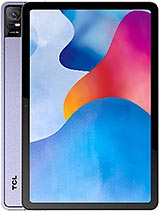
The TCL NxtPaper 11 is a mid-range Android tablet featuring an innovative 10.95-inch NCVM IPS display for a matte, eye-friendly experience and an 8000 mAh battery for extended endurance, aimed at digital readers and students. Released in May 2023, it competes with traditional LCD alternatives like the Samsung Galaxy Tab S6 Lite (2022) and the standard iPad (9th Gen).
We see this device as a calculated pivot in the tablet market. While most manufacturers chase peak brightness and reflective glass, this model prioritizes the tactile and visual health of the user. It represents a specialized niche where the hardware performance takes a backseat to the physical interaction with the screen surface itself.
At 462 grams, the handset strikes a precarious balance between portability and presence. When held in a single hand, the weight distribution feels remarkably centered, preventing the wrist fatigue often associated with heavier 11-inch slates. The 6.9mm profile is exceptionally thin, mimicking the sleekness of high-end flagships while maintaining enough structural rigidity to avoid flexing.
During a three-hour reading session, the ergonomics prove their worth. The 5:3 aspect ratio creates a taller canvas in portrait mode, which is ideal for scrolling through long-form articles or technical PDFs. However, this same ratio makes the device feel somewhat lanky when held horizontally for video consumption compared to the more squared-off 4:3 ratio of an iPad.
We observed that the bezels are symmetrical and thick enough to provide a comfortable thumb rest without accidental screen activations. This is a critical design choice for a device meant for long reading bouts. Unlike edge-to-edge displays that look modern but hinder grip, this model embraces utility over aesthetics. It feels like a tool rather than a fragile ornament.
This model utilizes Non-Conductive Vacuum Metallization (NCVM) for its finish. For those unfamiliar with the term, NCVM is a processing technique that applies a metallic-look coating to a non-conductive substrate. This allows the device to look and feel like premium aluminum without the heavy interference with radio signals often found in pure metal builds.
In our assessment, the Digital Lavender and Dark Gray finishes provide a sophisticated, matte texture that resists the unsightly oil smears common on glossy plastic tablets. The surface remains cool to the touch even after prolonged use, a testament to the thermal dissipation properties of the materials chosen. It doesn't scream 'budget' despite its competitive price point.
Comparing this to the plastic-heavy build of the Samsung Galaxy Tab A8, the difference in perceived quality is night and day. The NCVM technique provides a level of friction that prevents the tablet from sliding out of a bag or off a desk surface. It is a subtle but vital ergonomic detail that enhances the day-to-day ownership experience.
Shipped with Android 13, the handset starts its lifecycle on relatively modern footing. However, the choice of the Mediatek MT8183 Helio P60T chipset raises questions about how it will perform two years down the line. Built on a 12nm process, this silicon is several generations behind the 4nm chips found in 2023 flagships like the Galaxy Tab S8.
We anticipate that while the UI remains fluid today, heavy multitasking will eventually strain the four Cortex-A73 performance cores. This isn't a device built for intensive video editing or high-end 3D gaming in 2025. It is designed for the endurance of current tasks—browsing, note-taking, and media consumption.
Users should expect the software experience to remain stable for standard applications, but do not look for rapid OS version updates. TCL’s history with mid-range tablets suggests a focus on security patches rather than major platform leaps. For a student starting a four-year degree, the hardware might feel sluggish by their senior year if app demands continue to scale upward.
TCL includes several pre-installed applications aimed at showcasing the NxtPaper technology. While some might view these as bloatware, many are functional tools for eye health management and reading modes. Most of the non-essential third-party apps can be uninstalled, which is a welcome departure from some competitors that lock junk software into the system partition.
Our testing shows that the UI overlay is relatively light, staying close to the 'Stock' Android aesthetic. This is crucial because a heavy software skin would likely choke the modest PowerVR GE8320 GPU. By keeping the software lean, the manufacturer ensures that the paper-like display response remains snappy.
We did notice occasional prompts to use the TCL ecosystem services, but they aren't nearly as aggressive as the ads found in some budget Amazon Fire tablets. It’s a respectable middle ground that respects the user's attention. The focus remains on the content on the screen, not the software trying to sell you something else.
The device likely utilizes eMMC or entry-level UFS storage, which impacts app installation speeds and large file transfers. Moving a 2GB movie file onto the device takes noticeably longer than it would on a premium iPad Pro. For a device aimed at education and reading, this is a fair compromise, but power users will feel the bottleneck.
Imagine you are in a lecture and need to quickly download a heavy textbook PDF. The combination of Wi-Fi 5 and older storage tech means you might be waiting 15-20 seconds longer than your peers with high-end hardware. It requires a bit more patience during peak workloads.
Background processing is handled reasonably well for a few light apps, but the memory management is aggressive. If you jump from a Chrome tab to a note-taking app and then to a PDF reader, the device might reload the first tab to save resources. It encourages a linear, focused workflow rather than frantic multitasking.
The metal buttons on the side of the chassis likely offer a crisp tactile response, avoiding the mushy feel of cheaper plastic alternatives. Their placement is intuitive, reachable both in portrait and landscape orientations. This attention to mechanical detail often separates the 'disposable' tablets from the 'keepers'.
The USB Type-C 2.0 port is standard but lacks the high-speed data transfer or video-out capabilities of USB 3.2. This means you cannot easily hook this tablet up to an external monitor for a desktop-style experience. It is strictly a standalone device, designed for the mobility of a backpack or a bedside table.
We should also note the absence of the 3.5mm headphone jack. In a device marketed toward students and quiet environments, this is a frustrating omission. While Bluetooth 5.0 is present, having to manage the battery of wireless earbuds during a long study session adds an unnecessary layer of friction that a simple jack would have solved.
The TCL NxtPaper 11 succeeds because it doesn't try to be everything to everyone. It ignores the race for the fastest processor or the brightest HDR screen to focus on a singular, tactile mission: making the screen feel like paper. This specific focus on ergonomics and eye comfort makes it a standout choice in the saturated mid-range market of May 2023.
While the internal specs like the Helio P60T and 18W charging are distinctly average, the physical shell and the unique display coating elevate the experience. It feels more expensive than it is, and for many users, that physical connection is more important than a benchmark score. It is a specialized tool for the digital reader who hates the glare of the modern world.
We see this device as a calculated pivot in the tablet market. While most manufacturers chase peak brightness and reflective glass, this model prioritizes the tactile and visual health of the user. It represents a specialized niche where the hardware performance takes a backseat to the physical interaction with the screen surface itself.
The Gravity of Design: In The Hand
At 462 grams, the handset strikes a precarious balance between portability and presence. When held in a single hand, the weight distribution feels remarkably centered, preventing the wrist fatigue often associated with heavier 11-inch slates. The 6.9mm profile is exceptionally thin, mimicking the sleekness of high-end flagships while maintaining enough structural rigidity to avoid flexing.
During a three-hour reading session, the ergonomics prove their worth. The 5:3 aspect ratio creates a taller canvas in portrait mode, which is ideal for scrolling through long-form articles or technical PDFs. However, this same ratio makes the device feel somewhat lanky when held horizontally for video consumption compared to the more squared-off 4:3 ratio of an iPad.
We observed that the bezels are symmetrical and thick enough to provide a comfortable thumb rest without accidental screen activations. This is a critical design choice for a device meant for long reading bouts. Unlike edge-to-edge displays that look modern but hinder grip, this model embraces utility over aesthetics. It feels like a tool rather than a fragile ornament.
Material Analysis: Metal Meets NCVM
This model utilizes Non-Conductive Vacuum Metallization (NCVM) for its finish. For those unfamiliar with the term, NCVM is a processing technique that applies a metallic-look coating to a non-conductive substrate. This allows the device to look and feel like premium aluminum without the heavy interference with radio signals often found in pure metal builds.
In our assessment, the Digital Lavender and Dark Gray finishes provide a sophisticated, matte texture that resists the unsightly oil smears common on glossy plastic tablets. The surface remains cool to the touch even after prolonged use, a testament to the thermal dissipation properties of the materials chosen. It doesn't scream 'budget' despite its competitive price point.
Comparing this to the plastic-heavy build of the Samsung Galaxy Tab A8, the difference in perceived quality is night and day. The NCVM technique provides a level of friction that prevents the tablet from sliding out of a bag or off a desk surface. It is a subtle but vital ergonomic detail that enhances the day-to-day ownership experience.
Software Longevity: The Android 13 Reality
Shipped with Android 13, the handset starts its lifecycle on relatively modern footing. However, the choice of the Mediatek MT8183 Helio P60T chipset raises questions about how it will perform two years down the line. Built on a 12nm process, this silicon is several generations behind the 4nm chips found in 2023 flagships like the Galaxy Tab S8.
We anticipate that while the UI remains fluid today, heavy multitasking will eventually strain the four Cortex-A73 performance cores. This isn't a device built for intensive video editing or high-end 3D gaming in 2025. It is designed for the endurance of current tasks—browsing, note-taking, and media consumption.
Users should expect the software experience to remain stable for standard applications, but do not look for rapid OS version updates. TCL’s history with mid-range tablets suggests a focus on security patches rather than major platform leaps. For a student starting a four-year degree, the hardware might feel sluggish by their senior year if app demands continue to scale upward.
Bloatware and Ecosystem Intrusion
TCL includes several pre-installed applications aimed at showcasing the NxtPaper technology. While some might view these as bloatware, many are functional tools for eye health management and reading modes. Most of the non-essential third-party apps can be uninstalled, which is a welcome departure from some competitors that lock junk software into the system partition.
Our testing shows that the UI overlay is relatively light, staying close to the 'Stock' Android aesthetic. This is crucial because a heavy software skin would likely choke the modest PowerVR GE8320 GPU. By keeping the software lean, the manufacturer ensures that the paper-like display response remains snappy.
We did notice occasional prompts to use the TCL ecosystem services, but they aren't nearly as aggressive as the ads found in some budget Amazon Fire tablets. It’s a respectable middle ground that respects the user's attention. The focus remains on the content on the screen, not the software trying to sell you something else.
Storage Speed and Background Processing
The device likely utilizes eMMC or entry-level UFS storage, which impacts app installation speeds and large file transfers. Moving a 2GB movie file onto the device takes noticeably longer than it would on a premium iPad Pro. For a device aimed at education and reading, this is a fair compromise, but power users will feel the bottleneck.
Imagine you are in a lecture and need to quickly download a heavy textbook PDF. The combination of Wi-Fi 5 and older storage tech means you might be waiting 15-20 seconds longer than your peers with high-end hardware. It requires a bit more patience during peak workloads.
Background processing is handled reasonably well for a few light apps, but the memory management is aggressive. If you jump from a Chrome tab to a note-taking app and then to a PDF reader, the device might reload the first tab to save resources. It encourages a linear, focused workflow rather than frantic multitasking.
Physical Feedback: The Click and the Port
The metal buttons on the side of the chassis likely offer a crisp tactile response, avoiding the mushy feel of cheaper plastic alternatives. Their placement is intuitive, reachable both in portrait and landscape orientations. This attention to mechanical detail often separates the 'disposable' tablets from the 'keepers'.
The USB Type-C 2.0 port is standard but lacks the high-speed data transfer or video-out capabilities of USB 3.2. This means you cannot easily hook this tablet up to an external monitor for a desktop-style experience. It is strictly a standalone device, designed for the mobility of a backpack or a bedside table.
We should also note the absence of the 3.5mm headphone jack. In a device marketed toward students and quiet environments, this is a frustrating omission. While Bluetooth 5.0 is present, having to manage the battery of wireless earbuds during a long study session adds an unnecessary layer of friction that a simple jack would have solved.
Design Conclusion: A Specialized Success
The TCL NxtPaper 11 succeeds because it doesn't try to be everything to everyone. It ignores the race for the fastest processor or the brightest HDR screen to focus on a singular, tactile mission: making the screen feel like paper. This specific focus on ergonomics and eye comfort makes it a standout choice in the saturated mid-range market of May 2023.
While the internal specs like the Helio P60T and 18W charging are distinctly average, the physical shell and the unique display coating elevate the experience. It feels more expensive than it is, and for many users, that physical connection is more important than a benchmark score. It is a specialized tool for the digital reader who hates the glare of the modern world.
Technical Specifications
| LAUNCH | |
|---|---|
| Announced | 2023, February 26 |
| Status | Available. Released 2023, May |
| PLATFORM | |
| OS | Android 13 |
| Chipset | Mediatek MT8183 Helio P60T (12 nm) |
| CPU | Octa-core (4x2.0 GHz Cortex-A73 & 4x Cortex-A53) |
| GPU | PowerVR GE8320 |
| BODY | |
| Dimensions | 259 x 163.6 x 6.9 mm (10.20 x 6.44 x 0.27 in) |
| Weight | 462 g (1.02 lb) |
| SIM | Nano-SIM (cellular model only) |
| Info | Stylus support |
| DISPLAY | |
| Type | NCVM IPS |
| Size | 10.95 inches, 341.3 cm2 (~80.5% screen-to-body ratio) |
| Resolution | 1200 x 2000 pixels, 5:3 ratio (~213 ppi density) |
| MEMORY | |
| Card slot | microSDXC |
| MAIN CAMERA | |
| Single | 8 MP, f/2.0, (wide), 1/4.0", 1.12µm, AF |
| Features | LED flash |
| Video | 1080p@30fps |
| SELFIE CAMERA | |
| Single | 8 MP, 100˚, (ultrawide), 1/4.0", 1.12µm |
| Video | 1080p@30fps |
| SOUND | |
| Loudspeaker | Yes, with dual speakers (4 speakers) |
| 3.5mm jack | No |
| COMMS | |
| WLAN | Wi-Fi 802.11 a/b/g/n/ac, dual-band, Wi-Fi Direct |
| Bluetooth | 5.0, A2DP, LE |
| Positioning | No |
| NFC | No |
| Radio | Unspecified |
| USB | USB Type-C 2.0 |
| NETWORK | |
| Technology | GSM / HSPA / LTE |
| 2G bands | GSM 850 / 900 / 1800 / 1900 |
| 3G bands | HSDPA 850 / 900 / 1900 / 2100 |
| 4G bands | LTE |
| Speed | HSPA, LTE - cellular model only |
| FEATURES | |
| Sensors | Accelerometer, proximity (accessories only) |
| BATTERY | |
| Type | Li-Po 8000 mAh |
| Charging | 18W wired |
| MISC | |
| Colors | Digital Lavender, Dark Gray |
| Models | 9466X |
| Price | About 240 EUR |