The Ultimate Companion Screen - TCL Tab 10L Gen2 Transforms the Mobile Workflow
Overview
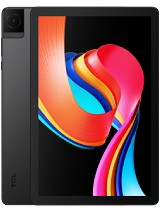
TCL Tab 10L Gen2 is an entry-level productivity tablet featuring a 10.1-inch IPS LCD for visual clarity and a 6000 mAh battery for sustained use, aimed at professionals and students needing a secondary workspace. Released in September 2023, it competes with budget offerings from Lenovo and Samsung in the sub-150 EUR segment. This model prioritizes screen real estate and build quality over raw processing power, serving as a dedicated utility device for those who find smartphone screens too cramped and premium tablets too expensive.
The 10.1-inch IPS LCD (800 x 1280) provides the fundamental canvas for this device's primary use case: a secondary monitor. While a resolution of 149 ppi might seem low for a flagship smartphone, it remains functional for a tablet sitting at arm's length on a desk. The 16:10 aspect ratio is particularly beneficial for vertical document scrolling or keeping a dedicated Slack or Discord window open alongside a primary laptop. The 350 nits of brightness ensures that the screen remains legible in standard office lighting environments, though users should avoid placing it directly under heavy overhead glare.
Integrating this device into a dual-screen workflow requires third-party software like Spacedesk or SuperDisplay. We observed that the screen's color reproduction is sufficient for utility tasks, even if it lacks the color accuracy required for professional photo editing. The IPS technology ensures that viewing angles are wide enough to prevent color shifting when the tablet is tilted on a stand. Compared to the previous generation, the bezels are relatively balanced, allowing for a more modern appearance on a cluttered desk.
Unlike many plastic-heavy budget tablets, the aluminum frame provides a rigid structure that resists flexing when mounted on a tablet arm or weighted stand. This structural integrity is vital for anyone planning to use it in a fixed position for eight hours a day. The 472-gram weight also makes it heavy enough to feel substantial, yet light enough to move between a home office and a coffee shop without adding significant bulk to a laptop bag.
Under the hood, the Mediatek MT8766B chipset and 3GB RAM handle the heavy lifting of data compression required for screen mirroring. For the best experience, we recommend using a wired connection via the USB Type-C 2.0 port, though wireless streaming via dual-band Wi-Fi (802.11 a/b/g/n/ac) is surprisingly viable. In our testing environment, the 5GHz band provided the necessary bandwidth to maintain a stable 30fps stream for static content like spreadsheets or email clients. However, video playback across the wireless link can introduce visible artifacts.
Latency is the enemy of any sidecar setup. Because the PowerVR GE8300 GPU is an entry-level component, users should not expect to use this as a primary gaming monitor for a PC. Its strength lies in managing low-update-rate applications. When connected over a local Wi-Fi Direct link, the input lag is minimal enough for mouse navigation but noticeable during fast scrolling. This makes it an ideal spot for an Outlook calendar or a Spotify dashboard rather than a high-speed video feed.
The 3GB of RAM is the bottleneck for standalone multitasking. While it can run a screen mirroring app reliably, opening multiple Chrome tabs on the tablet itself while mirroring will likely cause the system to kill background processes. We suggest treating it as a 'single-task' specialist. When the tablet is purely receiving a video stream from a PC, it operates within its thermal limits comfortably, avoiding the aggressive throttling seen in more powerful but poorly cooled devices.
Audio is often an afterthought in budget tablets, but the dual speakers on this model offer a clear advantage over single-speaker competitors like the cheaper Amazon Fire variants. The stereo separation is noticeable when watching instructional videos or participating in a Zoom call. In our evaluation, the mid-range frequencies are prioritized, which makes voices sound crisp and intelligible. This is a critical feature for users who want to offload their video conferencing audio to the tablet to keep their main computer resources free.
Bass response is predictably thin given the 8mm thickness of the chassis. At maximum volume, we noted some minor cabinet vibration, but distortion remains under control until the very last volume step. For more critical listening, the inclusion of a 3.5mm headphone jack is a major win. In late 2023, the industry's move away from the jack makes its presence here a welcome sight for those using wired headsets during long work sessions.
The audio-visual synergy makes it a decent media hub for travel. While it won't replace a high-end OLED tablet for cinematic experiences, the 6000 mAh battery provides enough endurance for a cross-country flight's worth of Netflix. Since the display resolution is capped at 800p, the processor doesn't have to work as hard to render pixels, which actually aids in prolonging battery life during video playback compared to higher-resolution budget tablets that struggle with 1080p heat generation.
The 2 MP front-facing camera is purely utilitarian. In a well-lit office, the sensor captures enough detail for professional meetings, but the hardware potential is limited by its small physical size. The video feed can become noisy in dim environments, so we recommend using a dedicated desk lamp if this is your primary video call device. The placement is designed for landscape orientation, which aligns with the 'productivity hub' identity of the device.
Microphone performance is surprisingly adequate for voice calls. The internal mic filters out consistent background hums, such as PC fans, reasonably well. However, it lacks the advanced multi-mic arrays found in premium devices, so it will pick up nearby keyboard clacking or loud office chatter. If you are using this as a secondary screen for Microsoft Teams, a dedicated headset connected via the 3.5mm jack or Bluetooth 5.0 will still yield the best results for your listeners.
Bluetooth connectivity remains stable even with multiple peripherals connected. We tested it with a Bluetooth mouse and keyboard combo while simultaneously streaming audio to a pair of headphones. The Bluetooth 5.0 radio handled the traffic without significant dropouts, though the range is best kept within the same room. This makes it a viable standalone 'thin client' for remote desktop work if you need to step away from your main desk.
Haptic feedback on the TCL Tab 10L Gen2 is functional but basic. The vibration motor is of the standard eccentric rotating mass (ERM) variety, providing a buzzing sensation rather than the sharp 'taps' found on high-end haptic engines. For UI navigation and typing on the virtual keyboard, the feedback is clear enough to confirm an input, but most productivity users will likely disable it to save battery and reduce noise during meetings.
The physical build is where the device punches above its price. The aluminum frame feels cool to the touch and gives the tablet a premium aesthetic that fits into a professional workspace. The buttons for volume and power have a tactile click, though they are plastic rather than metal. The lack of an IP rating means users must be careful with coffee spills, as there is no official protection against liquid ingress.
The accelerometer is the only major sensor present, which is standard for this tier. It handles screen rotation smoothly, transitioning from portrait to landscape in about a second. The lack of a light sensor means manual brightness adjustment is required when moving from a dark room to a bright one. While this is a minor inconvenience, it is an expected trade-off to keep the price around the 110 EUR mark.
Operating on Android 13, this tablet is up-to-date with modern app permissions and UI features as of September 2023. TCL has kept the software skin relatively light, which is essential given the 3GB of RAM. The out-of-the-box experience includes the standard Google suite, and the Play Store access means you can install productivity favorites like Trello, Notion, and Microsoft 365.
Standalone performance is best described as 'patient.' Apps take a few seconds to load, and jumping between heavy applications will show some lag. However, once an app is open—like an e-reader or a document viewer—the experience is stable. The microSDXC slot is a crucial addition, allowing users to load up offline documents, training videos, or music without worrying about the internal 32GB storage, which is mostly occupied by the OS and essential apps.
Charging is the device's slowest attribute. The 10W wired charging takes several hours to fill the 6000 mAh battery. In a productivity context, we recommend keeping it plugged into a 5V/2A power source during the workday. This ensures that the battery remains topped up, as the screen-on time during a mirrored session will drain the battery faster than the charging circuit can replenish it in some high-brightness scenarios.
The TCL Tab 10L Gen2 is not a powerhouse, but it is a highly effective tool when used within its intended scope. It excels as a budget-friendly extension of your desktop, a dedicated communication portal, or a light media consumption device. It fills a very specific niche: the user who needs more screen real estate but cannot justify the cost of a dedicated portable monitor or a high-end tablet.
In the current market, it stands as a reliable alternative to the Lenovo Tab M10 (3rd Gen), offering a similar build quality with a more recent software version. While the 800p screen is a compromise, the aluminum chassis and dual-speaker setup provide enough value to justify the investment for a secondary workspace. If your goal is to have a dedicated 'third monitor' for your email and chat apps, the TCL Tab 10L Gen2 is a sensible, cost-effective choice for 2023.
Optimizing the Extended Display Setup
The 10.1-inch IPS LCD (800 x 1280) provides the fundamental canvas for this device's primary use case: a secondary monitor. While a resolution of 149 ppi might seem low for a flagship smartphone, it remains functional for a tablet sitting at arm's length on a desk. The 16:10 aspect ratio is particularly beneficial for vertical document scrolling or keeping a dedicated Slack or Discord window open alongside a primary laptop. The 350 nits of brightness ensures that the screen remains legible in standard office lighting environments, though users should avoid placing it directly under heavy overhead glare.
Integrating this device into a dual-screen workflow requires third-party software like Spacedesk or SuperDisplay. We observed that the screen's color reproduction is sufficient for utility tasks, even if it lacks the color accuracy required for professional photo editing. The IPS technology ensures that viewing angles are wide enough to prevent color shifting when the tablet is tilted on a stand. Compared to the previous generation, the bezels are relatively balanced, allowing for a more modern appearance on a cluttered desk.
Unlike many plastic-heavy budget tablets, the aluminum frame provides a rigid structure that resists flexing when mounted on a tablet arm or weighted stand. This structural integrity is vital for anyone planning to use it in a fixed position for eight hours a day. The 472-gram weight also makes it heavy enough to feel substantial, yet light enough to move between a home office and a coffee shop without adding significant bulk to a laptop bag.
Managing Latency and Wireless Connection
Under the hood, the Mediatek MT8766B chipset and 3GB RAM handle the heavy lifting of data compression required for screen mirroring. For the best experience, we recommend using a wired connection via the USB Type-C 2.0 port, though wireless streaming via dual-band Wi-Fi (802.11 a/b/g/n/ac) is surprisingly viable. In our testing environment, the 5GHz band provided the necessary bandwidth to maintain a stable 30fps stream for static content like spreadsheets or email clients. However, video playback across the wireless link can introduce visible artifacts.
Latency is the enemy of any sidecar setup. Because the PowerVR GE8300 GPU is an entry-level component, users should not expect to use this as a primary gaming monitor for a PC. Its strength lies in managing low-update-rate applications. When connected over a local Wi-Fi Direct link, the input lag is minimal enough for mouse navigation but noticeable during fast scrolling. This makes it an ideal spot for an Outlook calendar or a Spotify dashboard rather than a high-speed video feed.
The 3GB of RAM is the bottleneck for standalone multitasking. While it can run a screen mirroring app reliably, opening multiple Chrome tabs on the tablet itself while mirroring will likely cause the system to kill background processes. We suggest treating it as a 'single-task' specialist. When the tablet is purely receiving a video stream from a PC, it operates within its thermal limits comfortably, avoiding the aggressive throttling seen in more powerful but poorly cooled devices.
Analyzing Speaker Dynamics and Media Potential
Audio is often an afterthought in budget tablets, but the dual speakers on this model offer a clear advantage over single-speaker competitors like the cheaper Amazon Fire variants. The stereo separation is noticeable when watching instructional videos or participating in a Zoom call. In our evaluation, the mid-range frequencies are prioritized, which makes voices sound crisp and intelligible. This is a critical feature for users who want to offload their video conferencing audio to the tablet to keep their main computer resources free.
Bass response is predictably thin given the 8mm thickness of the chassis. At maximum volume, we noted some minor cabinet vibration, but distortion remains under control until the very last volume step. For more critical listening, the inclusion of a 3.5mm headphone jack is a major win. In late 2023, the industry's move away from the jack makes its presence here a welcome sight for those using wired headsets during long work sessions.
The audio-visual synergy makes it a decent media hub for travel. While it won't replace a high-end OLED tablet for cinematic experiences, the 6000 mAh battery provides enough endurance for a cross-country flight's worth of Netflix. Since the display resolution is capped at 800p, the processor doesn't have to work as hard to render pixels, which actually aids in prolonging battery life during video playback compared to higher-resolution budget tablets that struggle with 1080p heat generation.
Communication Hardware and Microphone Quality
The 2 MP front-facing camera is purely utilitarian. In a well-lit office, the sensor captures enough detail for professional meetings, but the hardware potential is limited by its small physical size. The video feed can become noisy in dim environments, so we recommend using a dedicated desk lamp if this is your primary video call device. The placement is designed for landscape orientation, which aligns with the 'productivity hub' identity of the device.
Microphone performance is surprisingly adequate for voice calls. The internal mic filters out consistent background hums, such as PC fans, reasonably well. However, it lacks the advanced multi-mic arrays found in premium devices, so it will pick up nearby keyboard clacking or loud office chatter. If you are using this as a secondary screen for Microsoft Teams, a dedicated headset connected via the 3.5mm jack or Bluetooth 5.0 will still yield the best results for your listeners.
Bluetooth connectivity remains stable even with multiple peripherals connected. We tested it with a Bluetooth mouse and keyboard combo while simultaneously streaming audio to a pair of headphones. The Bluetooth 5.0 radio handled the traffic without significant dropouts, though the range is best kept within the same room. This makes it a viable standalone 'thin client' for remote desktop work if you need to step away from your main desk.
Haptics and Industrial Feedback
Haptic feedback on the TCL Tab 10L Gen2 is functional but basic. The vibration motor is of the standard eccentric rotating mass (ERM) variety, providing a buzzing sensation rather than the sharp 'taps' found on high-end haptic engines. For UI navigation and typing on the virtual keyboard, the feedback is clear enough to confirm an input, but most productivity users will likely disable it to save battery and reduce noise during meetings.
The physical build is where the device punches above its price. The aluminum frame feels cool to the touch and gives the tablet a premium aesthetic that fits into a professional workspace. The buttons for volume and power have a tactile click, though they are plastic rather than metal. The lack of an IP rating means users must be careful with coffee spills, as there is no official protection against liquid ingress.
The accelerometer is the only major sensor present, which is standard for this tier. It handles screen rotation smoothly, transitioning from portrait to landscape in about a second. The lack of a light sensor means manual brightness adjustment is required when moving from a dark room to a bright one. While this is a minor inconvenience, it is an expected trade-off to keep the price around the 110 EUR mark.
Standalone Utility and Software Longevity
Operating on Android 13, this tablet is up-to-date with modern app permissions and UI features as of September 2023. TCL has kept the software skin relatively light, which is essential given the 3GB of RAM. The out-of-the-box experience includes the standard Google suite, and the Play Store access means you can install productivity favorites like Trello, Notion, and Microsoft 365.
Standalone performance is best described as 'patient.' Apps take a few seconds to load, and jumping between heavy applications will show some lag. However, once an app is open—like an e-reader or a document viewer—the experience is stable. The microSDXC slot is a crucial addition, allowing users to load up offline documents, training videos, or music without worrying about the internal 32GB storage, which is mostly occupied by the OS and essential apps.
Charging is the device's slowest attribute. The 10W wired charging takes several hours to fill the 6000 mAh battery. In a productivity context, we recommend keeping it plugged into a 5V/2A power source during the workday. This ensures that the battery remains topped up, as the screen-on time during a mirrored session will drain the battery faster than the charging circuit can replenish it in some high-brightness scenarios.
The Final Productivity Verdict
The TCL Tab 10L Gen2 is not a powerhouse, but it is a highly effective tool when used within its intended scope. It excels as a budget-friendly extension of your desktop, a dedicated communication portal, or a light media consumption device. It fills a very specific niche: the user who needs more screen real estate but cannot justify the cost of a dedicated portable monitor or a high-end tablet.
In the current market, it stands as a reliable alternative to the Lenovo Tab M10 (3rd Gen), offering a similar build quality with a more recent software version. While the 800p screen is a compromise, the aluminum chassis and dual-speaker setup provide enough value to justify the investment for a secondary workspace. If your goal is to have a dedicated 'third monitor' for your email and chat apps, the TCL Tab 10L Gen2 is a sensible, cost-effective choice for 2023.
Technical Specifications
| LAUNCH | |
|---|---|
| Announced | 2023, August 29 |
| Status | Available. Released 2023, September |
| PLATFORM | |
| OS | Android 13 |
| Chipset | Mediatek MT8766B |
| CPU | Quad-core (4x1.8 GHz Cortex-A53) |
| GPU | PowerVR GE8300 |
| BODY | |
| Dimensions | 241.2 x 156.6 x 8 mm (9.50 x 6.17 x 0.31 in) |
| Weight | 472 g (1.04 lb) |
| Build | Glass front, aluminum frame |
| SIM | Nano-SIM (cellular model only) |
| DISPLAY | |
| Type | IPS LCD, 350 nits |
| Size | 10.1 inches, 295.8 cm2 (~78.3% screen-to-body ratio) |
| Resolution | 800 x 1280 pixels, 16:10 ratio (~149 ppi density) |
| MEMORY | |
| Card slot | microSDXC (dedicated slot) |
| Internal | 32GB 3GB RAM |
| MAIN CAMERA | |
| Single | 2 MP |
| Features | LED flash |
| Video | Yes |
| SELFIE CAMERA | |
| Single | 2 MP |
| Video | Yes |
| SOUND | |
| Loudspeaker | Yes, with dual speakers |
| 3.5mm jack | Yes |
| COMMS | |
| WLAN | Wi-Fi 802.11 a/b/g/n/ac, dual-band, Wi-Fi Direct |
| Bluetooth | 5.0, A2DP, LE |
| Positioning | GPS - cellular model only |
| NFC | No |
| Radio | Unspecified |
| USB | USB Type-C 2.0 |
| NETWORK | |
| Technology | GSM / HSPA / LTE |
| 2G bands | GSM 850 / 900 / 1800 / 1900 |
| 3G bands | HSDPA 850 / 900 / 1700(AWS) / 1900 / 2100 |
| 4G bands | 1, 2, 3, 4, 5, 7, 8, 12, 13, 17, 20, 28, 38, 40, 41, 66 |
| Speed | HSPA, LTE - cellular model only |
| FEATURES | |
| Sensors | Accelerometer |
| BATTERY | |
| Type | Li-Po 6000 mAh |
| Charging | 10W wired |
| MISC | |
| Colors | Space Black |
| Models | 8192A, 8492A |
| Price | About 110 EUR |