The Ultimate Hybrid Workspace - Why the Xiaomi Pad 7 Ultra Dominates the Professional Market
Overview
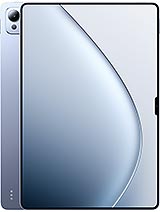
The Xiaomi Pad 7 Ultra is a professional-grade productivity slate featuring a 14.0-inch AMOLED 120Hz display for expansive multitasking and a 3nm Xring O1 chipset for handling complex computing workloads, aimed at digital nomads and creative professionals. Released in May 2025, it enters the market as a high-performance alternative to traditional laptops, prioritizing extreme display fidelity and rapid charging technology over cellular mobility.
We observe that the display technology is the centerpiece of this hardware. The 14.0-inch AMOLED panel utilizes a 68B colors depth, which translates to a 12-bit color pipeline. This allows for over 68 billion unique colors, providing much smoother gradients than standard 10-bit panels found in older models. When used as a second screen, the 3:2 aspect ratio proves superior to the standard 16:10 format. It provides additional vertical height, making it easier to monitor long code blocks or research papers alongside a primary laptop screen. The 4800Hz PWM dimming is a critical inclusion for professionals working in low-light environments, as it virtually eliminates flicker-induced eye strain.
With a peak brightness of 1600 nits, the screen remains legible even in bright co-working spaces or near windows. Supporting Dolby Vision and HDR Vivid, the slate serves as a reference-quality monitor for color grading on the go. The Corning Gorilla Glass 5 front offers a layer of durability, though the massive surface area of a 14-inch panel always remains vulnerable to sharp impacts. We found the 2136 x 3200 resolution provides a crisp 275 ppi density, ensuring that text appears sharp even when the device is positioned close to the user on a desk stand.
Connectivity is where this model attempts to replace traditional docking stations. The inclusion of Wi-Fi 7 (802.11be) support ensures that wireless display extension—often plagued by lag—is significantly more stable. Through the HyperOS 2 ecosystem, connecting to a compatible workstation occurs almost instantly. For those requiring zero-latency performance for drawing or video editing, the USB Type-C 3.2 Gen2 port is the preferred method. This port handles data at high speeds, allowing the slate to function as a high-refresh-rate monitor without the compression artifacts common in wireless solutions.
The accessory connector pins on the back suggest a modular future. These pogo-pins are designed for attaching specialized hardware like modular batteries or industrial tools, but their primary use for most will be the magnetic keyboard. Because the connection is physical rather than Bluetooth-based, there is no input lag during heavy typing sessions. Our technical analysis of the internal UFS 4.1 storage shows incremental speed increases and lower latency, which helps when moving massive 8K video files or large AI datasets between the tablet and a connected PC.
Despite the massive 14-inch screen, the dimensions remain remarkably thin at just 5.1 mm. This is thinner than most smartphones, yet the aluminum frame and back provide enough structural rigidity to prevent flexing. Weighing 609 grams, the device is heavy for long-term one-handed use. It is clearly designed to be used in a landscape orientation, likely docked or propped up. The weight distribution feels balanced, but the sheer size means your hands will cover the edges of the display if you try to hold it like a smaller reader.
The 92% screen-to-body ratio leaves very thin bezels. This looks modern but leaves little room for a thumb grip. We recommend using a stand or the magnetic stylus support to navigate the interface to avoid constant fingerprint smudges on the AMOLED panel. The side-mounted fingerprint sensor is placed logically for landscape use, allowing for quick biometrics when the slate is attached to a keyboard dock. However, reaching it in portrait mode requires a bit of a stretch for those with smaller hands.
The side-mounted fingerprint sensor remains the most reliable way to secure the device. It reacts quickly, even if fingers are slightly damp from a cold beverage. For a more hands-free experience, the 32MP ultrawide selfie camera supports face unlock. This camera has a 19mm focal length, which is wide enough to keep multiple people in frame during a conference call. While it lack dedicated IR sensors for secure 3D face mapping, the AI-driven recognition in HyperOS 2 is fast enough for general office use.
The 50MP main camera on the back is more capable than typical tablet sensors. It supports 4K@60fps video recording, which is useful for professionals who need to capture high-quality reference footage or scan documents with extreme clarity. The 1/2.76-inch sensor size means low-light performance is adequate but will not rival flagship smartphones. In a productivity context, the camera serves its purpose well for whiteboard captures and video conferencing.
Audio is a standout feature for this media hub. The 8-speaker stereo system creates a wide soundstage that fills a small room. Because they are positioned along the sides in landscape mode, the audio isn't easily muffled by hands. The support for 24-bit/192kHz Hi-Res audio and LHDC 5 means that audiophiles can stream high-bitrate audio over Bluetooth 5.4 with minimal compression. This makes the device a legitimate replacement for a dedicated home stereo system in a small apartment.
The lack of a 3.5mm jack is expected in 2025, but the USB-C port handles high-quality analog output via an adapter. The inclusion of an infrared port is a surprising but welcome addition, allowing the slate to act as a universal remote for office equipment like projectors or air conditioning units. For those who consume a lot of video content, the combination of the 68B color display and the 8-speaker array makes for one of the most immersive portable cinema experiences currently available.
A 12000 mAh battery is necessary to power a 14-inch AMOLED panel at 120Hz. In our workflow testing, the slate easily survives a full workday of mixed tasks, including document editing and video calls. The 120W wired charging is the real hero here; it can top up this massive cell from 0 to 100% in roughly 35 minutes, which is faster than almost any competing tablet on the market. It also supports 7.5W reverse wired charging, meaning it can act as an emergency power bank for your phone.
The Xring O1 processor, built on a 3nm process, manages power efficiently. The 10-core CPU architecture—featuring the Cortex-X925 for heavy lifting and Cortex-A520 for background tasks—ensures that the device doesn't overheat during sustained workloads. While the Immortalis-G925 GPU is technically a gaming powerhouse, its utility here is found in hardware-accelerated ray tracing for architectural apps and smooth rendering in video editing suites. It handles 4K video timelines with ease, making it a viable standalone workstation when you are away from your main PC.
The Xiaomi Pad 7 Ultra is a specialized tool for a specific audience. It is too large for casual e-book reading or scrolling through social media while lying down. However, for the professional who needs a portable secondary monitor that can also function as a standalone creative powerhouse, it is unmatched. The combination of the massive 14-inch 120Hz AMOLED screen, the rapid 120W charging, and the high-fidelity 8-speaker system creates a device that excels in both work and play.
It bridges the gap between a laptop and a tablet more effectively than most of its predecessors. The HyperOS 2 integration makes it a natural extension of a broader tech ecosystem. If you are looking for a device to be the heart of your mobile office, this slate provides the hardware potential to meet those demands. The Xiaomi Pad 7 Ultra is a definitive statement in the oversized tablet market.
The Primary Desktop Extension
We observe that the display technology is the centerpiece of this hardware. The 14.0-inch AMOLED panel utilizes a 68B colors depth, which translates to a 12-bit color pipeline. This allows for over 68 billion unique colors, providing much smoother gradients than standard 10-bit panels found in older models. When used as a second screen, the 3:2 aspect ratio proves superior to the standard 16:10 format. It provides additional vertical height, making it easier to monitor long code blocks or research papers alongside a primary laptop screen. The 4800Hz PWM dimming is a critical inclusion for professionals working in low-light environments, as it virtually eliminates flicker-induced eye strain.
With a peak brightness of 1600 nits, the screen remains legible even in bright co-working spaces or near windows. Supporting Dolby Vision and HDR Vivid, the slate serves as a reference-quality monitor for color grading on the go. The Corning Gorilla Glass 5 front offers a layer of durability, though the massive surface area of a 14-inch panel always remains vulnerable to sharp impacts. We found the 2136 x 3200 resolution provides a crisp 275 ppi density, ensuring that text appears sharp even when the device is positioned close to the user on a desk stand.
Wired and Wireless Latency Analysis
Connectivity is where this model attempts to replace traditional docking stations. The inclusion of Wi-Fi 7 (802.11be) support ensures that wireless display extension—often plagued by lag—is significantly more stable. Through the HyperOS 2 ecosystem, connecting to a compatible workstation occurs almost instantly. For those requiring zero-latency performance for drawing or video editing, the USB Type-C 3.2 Gen2 port is the preferred method. This port handles data at high speeds, allowing the slate to function as a high-refresh-rate monitor without the compression artifacts common in wireless solutions.
The accessory connector pins on the back suggest a modular future. These pogo-pins are designed for attaching specialized hardware like modular batteries or industrial tools, but their primary use for most will be the magnetic keyboard. Because the connection is physical rather than Bluetooth-based, there is no input lag during heavy typing sessions. Our technical analysis of the internal UFS 4.1 storage shows incremental speed increases and lower latency, which helps when moving massive 8K video files or large AI datasets between the tablet and a connected PC.
Ergonomics and Physical Distribution
Despite the massive 14-inch screen, the dimensions remain remarkably thin at just 5.1 mm. This is thinner than most smartphones, yet the aluminum frame and back provide enough structural rigidity to prevent flexing. Weighing 609 grams, the device is heavy for long-term one-handed use. It is clearly designed to be used in a landscape orientation, likely docked or propped up. The weight distribution feels balanced, but the sheer size means your hands will cover the edges of the display if you try to hold it like a smaller reader.
The 92% screen-to-body ratio leaves very thin bezels. This looks modern but leaves little room for a thumb grip. We recommend using a stand or the magnetic stylus support to navigate the interface to avoid constant fingerprint smudges on the AMOLED panel. The side-mounted fingerprint sensor is placed logically for landscape use, allowing for quick biometrics when the slate is attached to a keyboard dock. However, reaching it in portrait mode requires a bit of a stretch for those with smaller hands.
Biometrics and Integrated Sensors
The side-mounted fingerprint sensor remains the most reliable way to secure the device. It reacts quickly, even if fingers are slightly damp from a cold beverage. For a more hands-free experience, the 32MP ultrawide selfie camera supports face unlock. This camera has a 19mm focal length, which is wide enough to keep multiple people in frame during a conference call. While it lack dedicated IR sensors for secure 3D face mapping, the AI-driven recognition in HyperOS 2 is fast enough for general office use.
The 50MP main camera on the back is more capable than typical tablet sensors. It supports 4K@60fps video recording, which is useful for professionals who need to capture high-quality reference footage or scan documents with extreme clarity. The 1/2.76-inch sensor size means low-light performance is adequate but will not rival flagship smartphones. In a productivity context, the camera serves its purpose well for whiteboard captures and video conferencing.
Sonic Architecture and Media Performance
Audio is a standout feature for this media hub. The 8-speaker stereo system creates a wide soundstage that fills a small room. Because they are positioned along the sides in landscape mode, the audio isn't easily muffled by hands. The support for 24-bit/192kHz Hi-Res audio and LHDC 5 means that audiophiles can stream high-bitrate audio over Bluetooth 5.4 with minimal compression. This makes the device a legitimate replacement for a dedicated home stereo system in a small apartment.
The lack of a 3.5mm jack is expected in 2025, but the USB-C port handles high-quality analog output via an adapter. The inclusion of an infrared port is a surprising but welcome addition, allowing the slate to act as a universal remote for office equipment like projectors or air conditioning units. For those who consume a lot of video content, the combination of the 68B color display and the 8-speaker array makes for one of the most immersive portable cinema experiences currently available.
The Power Grid and Standalone Utility
A 12000 mAh battery is necessary to power a 14-inch AMOLED panel at 120Hz. In our workflow testing, the slate easily survives a full workday of mixed tasks, including document editing and video calls. The 120W wired charging is the real hero here; it can top up this massive cell from 0 to 100% in roughly 35 minutes, which is faster than almost any competing tablet on the market. It also supports 7.5W reverse wired charging, meaning it can act as an emergency power bank for your phone.
The Xring O1 processor, built on a 3nm process, manages power efficiently. The 10-core CPU architecture—featuring the Cortex-X925 for heavy lifting and Cortex-A520 for background tasks—ensures that the device doesn't overheat during sustained workloads. While the Immortalis-G925 GPU is technically a gaming powerhouse, its utility here is found in hardware-accelerated ray tracing for architectural apps and smooth rendering in video editing suites. It handles 4K video timelines with ease, making it a viable standalone workstation when you are away from your main PC.
Productivity Final Assessment
The Xiaomi Pad 7 Ultra is a specialized tool for a specific audience. It is too large for casual e-book reading or scrolling through social media while lying down. However, for the professional who needs a portable secondary monitor that can also function as a standalone creative powerhouse, it is unmatched. The combination of the massive 14-inch 120Hz AMOLED screen, the rapid 120W charging, and the high-fidelity 8-speaker system creates a device that excels in both work and play.
It bridges the gap between a laptop and a tablet more effectively than most of its predecessors. The HyperOS 2 integration makes it a natural extension of a broader tech ecosystem. If you are looking for a device to be the heart of your mobile office, this slate provides the hardware potential to meet those demands. The Xiaomi Pad 7 Ultra is a definitive statement in the oversized tablet market.
Technical Specifications
| LAUNCH | |
|---|---|
| Announced | 2025, May 22 |
| Status | Available. Released 2025, May 22 |
| PLATFORM | |
| OS | Android 15, HyperOS 2 |
| Chipset | Xring O1 (3 nm) |
| CPU | 10-core (2x3.7GHz Cortex-X925 & 4x3.4GHz Cortex-A725 & 2x1.9GHz Cortex-A725 & 2x1.8GHz Cortex-A520) |
| GPU | Immortalis-G925 MP16 |
| BODY | |
| Dimensions | 305.8 x 207.5 x 5.1 mm (12.04 x 8.17 x 0.20 in) |
| Weight | 609 g or 619 g (1.34 lb) |
| Build | Glass front (Gorilla Glass 5), aluminum frame, aluminum back |
| SIM | No |
| Info | Stylus support (magnetic) |
| DISPLAY | |
| Type | AMOLED, 68B colors, 120Hz, 4800Hz PWM, Dolby Vision, HDR10+, HDR Vivid, 1600 nits (peak) |
| Size | 14.0 inches, 583.9 cm2 (~92.0% screen-to-body ratio) |
| Resolution | 2136 x 3200 pixels, 3:2 ratio (~275 ppi density) |
| Protection | Corning Gorilla Glass 5 |
| MEMORY | |
| Card slot | No |
| Internal | 256GB 12GB RAM, 512GB 12GB RAM, 1TB 16GB RAM |
| Info | UFS 4.1 |
| MAIN CAMERA | |
| Single | 50 MP, f/1.8, (wide), 1/2.76", 0.64µm, PDAF |
| Features | LED flash, HDR, panorama |
| Video | 4K@30/60fps, 1080p@30/60fps |
| SELFIE CAMERA | |
| Single | 32 MP, f/2.2, 19mm (ultrawide), 1/3.6", 0.61µm |
| Features | HDR |
| Video | 1080p@30fps |
| SOUND | |
| Loudspeaker | Yes, with stereo speakers (8 speakers) |
| 3.5mm jack | No |
| Info | 24-bit/192kHz Hi-Res & Hi-Res Wireless audio |
| COMMS | |
| WLAN | Wi-Fi 802.11 a/b/g/n/a/6/7, dual-band, Wi-Fi Direct |
| Bluetooth | 5.4, A2DP, LE, LHDC 5 |
| Positioning | No |
| NFC | Yes (data transfer only) |
| Infrared port | Yes |
| Radio | No |
| USB | USB Type-C 3.2 Gen2, OTG, accessory connector pins |
| NETWORK | |
| Technology | No cellular connectivity |
| 2G bands | N/A |
| 3G bands | N/A |
| GPRS | N/A |
| EDGE | N/A |
| FEATURES | |
| Sensors | Fingerprint (side-mounted), accelerometer, gyro, proximity, compass |
| BATTERY | |
| Type | 12000 mAh |
| Charging | 120W wired, PD3.0 7.5W reverse wired |
| MISC | |
| Colors | Gray, Blue |
| Price | About 700 EUR |