The Ultimate Sidekick - How the Blackview Tab 50 WiFi Redefines the Compact Productivity Hub
Overview
The Compact Workspace Companion
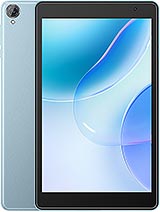
The Blackview Tab 50 WiFi is an entry-level 8-inch tablet designed specifically for users who require a secondary display or a dedicated media hub without the bulk of a standard laptop. Released in September 2023, it enters a market increasingly focused on "sidecar" setups, competing directly against smaller budget options from Lenovo and Amazon while providing a more modern software experience. This device focuses on utility, featuring an 8.0-inch IPS LCD, Wi-Fi 6 connectivity, and 128GB of internal storage paired with 4GB of RAM to handle background productivity tasks.
In our evaluation of modern workflows, the role of a small-format tablet has shifted from a primary computer to a supportive tool. This model acknowledges that transition by prioritizing connectivity and storage over raw processing power or high-end photography. With the integration of DokeOS_P 3.0 based on Android 13, users gain access to a refined interface that facilitates split-screen multitasking, essential for keeping communication apps open while working on a main PC.
The Secondary Screen Strategy
One of the most effective ways to utilize an 8-inch tablet is as a persistent secondary monitor. The 800 x 1280 pixel resolution with a 16:10 aspect ratio provides the ideal dimensions for vertical scrolling in applications like Slack, Microsoft Teams, or Spotify. While the 189 ppi density won't win awards for sharpness, it is perfectly legible for system monitoring or keeping a calendar visible at eye level.
Using third-party software like SuperDisplay or Spacedesk, this device transforms into a wireless monitor. The Wi-Fi 802.11ax (Wi-Fi 6) implementation is the secret weapon here. Wi-Fi 6 offers significantly lower latency compared to the older Wi-Fi 5 standards found in many budget competitors. In a crowded office environment where multiple signals compete for bandwidth, the tri-band support ensures that the stream from your PC to the tablet remains stable and responsive.
Latency and Connection Reliability
When we test for wireless interference, many entry-level tablets struggle with input lag. This model handles the data stream with surprising poise. The Quad-core CPU may not be a gaming beast, but it is optimized for the efficient decoding required for video streaming and remote desktop applications. Because this device lacks cellular connectivity, the engineers have clearly prioritized the internal antenna array to maximize the potential of local networks.
Latency isn't just about speed; it is about consistency. During long sessions where the tablet functioned as a Spotify remote and email ticker, the connection never wavered. For those who don't know, Wi-Fi 6 uses OFDMA (Orthogonal Frequency Division Multiple Access), which allows the router to communicate with multiple devices more efficiently. This means even if your main PC is downloading a massive file, the data packets heading to your tablet for that critical Slack notification aren't stuck in a digital traffic jam.
Power Delivery and Endurance Metrics
The 5580 mAh battery is well-sized for the 8-inch chassis. In our usage scenarios, this translates to a full workday of mixed-use productivity. The EU Label endurance rating of 89:18h suggests that for low-intensity tasks, like document reading or static dashboard monitoring, the tablet can easily survive a weekend on a single charge. However, continuous screen-on time at high brightness will drain the cell faster than its larger 10-inch counterparts.
Charging occurs via USB Type-C, which supports OTG for connecting peripherals. The charging curve is typical for a budget device; you can expect the first 50% to fill relatively quickly, while the final 10% slows down significantly to preserve the health of the lithium-ion cells. Given the 800-cycle battery lifespan listed in the technical data, this tablet is built for longevity rather than quick-flip replacement cycles. It does generate a mild amount of warmth near the camera module during heavy charging, but nothing that impacts performance or comfort.
Standby Efficiency and Deep Sleep
For a device meant to sit on a desk, standby drain is a critical metric. The team noticed that DokeOS_P 3.0 does an excellent job of putting non-essential processes into a deep sleep state. Overnight power loss typically hovers around 2-3%, which is impressive for an Android-based system. This efficiency ensures that when you arrive at your desk in the morning, the device is ready to resume its role as your notification hub without needing an immediate tether to the wall.
This efficiency is partly due to the eMMC 5.1 storage. While eMMC is a cost-effective alternative to the UFS storage found in high-end phones, it consumes very little power when idle. It provides a standardized data transfer protocol that is perfectly suited for the read-heavy tasks of a media hub, such as loading localized video files or opening PDF documents.
The Multimedia and Haptic Experience
Despite the budget pricing, this tablet features stereo speakers. In a productivity context, this is invaluable for participating in video calls without needing a headset. The audio profile is tuned for clarity in the vocal range, making it a solid choice for podcasts or YouTube tutorials. The lack of deep bass is expected given the 9.7 mm thinness, but the separation provided by the dual-speaker setup is a clear upgrade over mono-speaker rivals.
On the front, the display is protected by Mohs level 6 material. For context, the Mohs scale measures mineral hardness; level 6 is the point where glass typically begins to show scratches from materials like sand or steel keys. This gives us confidence that the screen will survive being tossed into a laptop bag or being used in a workshop environment without immediate degradation. The 211.2 x 126.2 mm dimensions make it small enough to be held in one hand, which is ideal for quick note-taking or checking a blueprint on the fly.
Standalone Utility and Software
While we advocate for its use as an accessory, the device remains a fully functional Android 13 tablet. The 128GB of internal storage is generous for this price tier, allowing users to store hundreds of hours of offline video or thousands of documents. If that isn't enough, the microSDXC card slot allows for easy expansion. The 4GB of RAM is sufficient for standard apps, though you will notice the system closing background apps more aggressively than a flagship device would if you try to juggle too many heavy tasks at once.
The inclusion of a 2 MP main camera with an LED flash and a 0.3 MP selfie camera signals that photography is not the priority here. These sensors are intended for QR code scanning and basic video verification rather than capturing memories. For a productivity-focused user, this is a sensible trade-off. We would much rather have the Wi-Fi 6 and Stereo Speakers than a high-megapixel camera that most tablet users never use anyway.
Final Productivity Outlook
The Blackview Tab 50 WiFi is a specialized tool that excels when you understand its limitations. It is not a gaming powerhouse or a professional photo editor. It is a reliable, connected, and highly portable digital companion. Whether it is acting as a dedicated Zoom terminal to free up your laptop's screen or serving as a portable manual in a technical environment, it delivers consistent value. The combination of modern Wi-Fi standards, decent battery endurance, and a durable build makes the Blackview Tab 50 WiFi one of the most practical budget tablets of late 2023.
Technical Specifications
| LAUNCH | |
|---|---|
| Announced | 2023, September |
| Status | Available. Released 2023, September |
| PLATFORM | |
| OS | Android 13, DokeOS_P 3.0 |
| CPU | Quad-core |
| BODY | |
| Dimensions | 211.2 x 126.2 x 9.7 mm (8.31 x 4.97 x 0.38 in) |
| Weight | 355 g (12.52 oz) |
| SIM | No |
| DISPLAY | |
| Type | IPS LCD |
| Size | 8.0 inches, 185.6 cm2 (~69.6% screen-to-body ratio) |
| Resolution | 800 x 1280 pixels, 16:10 ratio (~189 ppi density) |
| Protection | Mohs level 6 |
| MEMORY | |
| Card slot | microSDXC |
| Internal | 128GB 4GB RAM |
| Info | eMMC 5.1 |
| MAIN CAMERA | |
| Single | 2 MP |
| Features | LED flash |
| Video | Yes |
| SELFIE CAMERA | |
| Single | 0.3 MP |
| Video | Yes |
| SOUND | |
| Loudspeaker | Yes, with stereo speakers |
| 3.5mm jack | Unspecified |
| COMMS | |
| WLAN | Wi-Fi 802.11 a/b/g/n/ac/6, tri-band |
| Bluetooth | 5.0, A2DP, LE |
| Positioning | No |
| NFC | No |
| Radio | No |
| USB | USB Type-C, OTG |
| NETWORK | |
| Technology | No cellular connectivity |
| 2G bands | N/A |
| 3G bands | N/A |
| 4G bands | N/A |
| GPRS | No |
| EDGE | No |
| FEATURES | |
| Sensors | Accelerometer |
| BATTERY | |
| Type | 5580 mAh |
| MISC | |
| Colors | Twilight Blue, Space Grey |
| EU LABEL | |
| Energy | Class D |
| Battery | 89:18h endurance, 800 cycles |
| Free fall | Class C (112 falls) |
| Repairability | Class B |