Umidigi The Secret Weapon for Your Desk - Why the G2 Tab Wins as a Budget Productivity Hub
Overview
The G2 Tab is a budget productivity tablet featuring a 10.1-inch IPS LCD for workspace expansion and Wi-Fi 6 connectivity for low-latency wireless display usage, aimed at professionals seeking a dedicated secondary digital dashboard. Released in early 2023, it enters a market saturated with underpowered budget slabs, distinguishing itself by prioritizing modern wireless standards over raw processing muscle or high-resolution optics. While it functions as a standalone Android device, its true value lies in its utility as a companion to a primary workstation, providing a cost-effective solution for monitoring communications or hosting static reference materials.
Setting up the G2 Tab as an extended display requires understanding the limitations and strengths of its 800 x 1280 pixel resolution. At approximately 149 ppi, this is not a panel designed for high-density design work or reading fine-print legalese. Instead, it serves as an ideal canvas for high-visibility tools. We found that utilizing the 16:10 aspect ratio provides a more natural vertical orientation for Slack channels, Spotify playlists, or Discord servers than the more squared-off 4:3 displays found on more expensive rivals. The IPS LCD technology ensures that viewing angles remain stable when the tablet is mounted on a stand next to a primary monitor, preventing the color shifting that plagues cheaper TN panels often found in this price tier.
Integrating this device into a daily workflow involves software like SuperDisplay or Spacedesk. Because the hardware relies on the RK3562 chipset, which utilizes a 22nm process, the thermal ceiling is relatively low. This is actually a benefit for long-term desk use. The device does not generate excessive heat when acting as a wireless receiver for a PC's video output. We observed that the quad-core 2.0 GHz CPU manages the video stream decompression without significant stuttering, provided the background Android processes are kept to a minimum. Users should treat this as a specialized tool rather than a general-purpose multitasker.
The inclusion of Wi-Fi 802.11ax (Wi-Fi 6) is the standout technical specification for a device in this category. Most budget tablets in early 2023 still cling to Wi-Fi 5 or even Wi-Fi 4, which introduces significant latency in wireless display scenarios. By supporting Wi-Fi 6, this model reduces the network-induced lag that often makes secondary screens feel disconnected or sluggish. When paired with a Wi-Fi 6 router, the connection remains stable even in environments with multiple competing signals. This technical edge is what transforms the device from a toy into a legitimate productivity accessory.
Latency is the enemy of any digital workspace. While a wired connection via the USB Type-C port is always the most reliable, the wireless performance here is surprisingly viable for non-gaming tasks. Moving a cursor across the desktop onto the tablet's screen feels fluid enough for daily administrative duties. The 4GB of RAM is sufficient to keep the wireless display application active in the foreground without the system killing the process to save resources. However, users should avoid running heavy local apps on the tablet simultaneously, as the RK3562 will quickly reach its limits.
Software agility is provided by Android 13, which brings improved taskbar functionality and split-screen management compared to older versions. While the 64GB of internal storage is modest, the dedicated microSDXC slot is a critical feature for media hub utility. Professionals can offload large PDF libraries, training videos, or local assets to an external card, keeping the internal storage free for system updates and essential apps. This hardware flexibility allows the device to act as a standalone reference library when disconnected from the main PC.
One quirk of the hardware is the lack of positioning sensors (No GPS). While this might seem like a drawback for a mobile device, it reinforces the tablet's identity as an indoor, desk-bound hub. By stripping out unnecessary sensors, the manufacturer has focused the budget on the stereo speakers and the display. The 6000 mAh battery provides enough endurance for a full 8-hour workday of screen-on time at moderate brightness, though the 10W wired charging speed necessitates an overnight charge cycle if the battery is fully depleted.
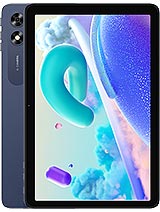
The physical build of the G2 Tab is substantial, weighing in at 576 g (1.27 lb). This weight, combined with a 9.3 mm thickness, gives it a sturdy presence on a desk stand but makes it less ideal for prolonged handheld reading. The Midnight Blue finish is visually professional but functions as a significant fingerprint magnet. We recommend a matte screen protector and a dedicated folio case to maintain a clean appearance. The plastic construction is thick enough to prevent chassis flex, which is a common failure point in ultra-budget tablets.
The button placement is standard, but the tactile feedback is surprisingly firm. We noticed that the edges of the screen bezel are thick enough to provide a secure grip without accidental touches, which is useful when repositioning the device on a monitor arm. The USB Type-C port is centered on the side, making it easy to route a charging cable cleanly behind a laptop or monitor setup. This attention to physical layout supports its role as a permanent fixture in a professional environment.
Audio performance is delivered via stereo speakers that provide sufficient clarity for video conferencing or background podcasts. While they lack deep bass, the vocal range is crisp. For those requiring a more private experience, the inclusion of a 3.5mm jack is a major win. In 2023, the industry's move away from the headphone jack has left many professionals scrambling for dongles. The ability to plug in a standard set of studio monitors or wired earbuds directly into the tablet ensures a zero-latency audio path during calls.
The 8 MP front camera is positioned for landscape use, which is the correct choice for a productivity tablet. While the 720p@30fps video capability won't win any cinematography awards, it is perfectly adequate for Microsoft Teams or Zoom meetings. The hardware potential for video calls is supported by the Wi-Fi 6 chip, ensuring that the video stream remains consistent even when the home network is under load. The rear camera, also an 8 MP sensor with LED flash, is primarily useful for document scanning rather than photography.
When not tethered to a PC, the G2 Tab handles light productivity tasks with reasonable competence. Writing emails, editing Google Docs, or browsing research papers is smooth enough on the Android 13 interface. The 800 x 1280 resolution means you will see fewer lines of text than on a high-end display, but the 10.1-inch size keeps fonts large and legible. The quad-core processor is optimized for low power consumption, which prevents the device from getting uncomfortably hot during long reading sessions.
We must emphasize that this is not a gaming machine. Titles like Genshin Impact or Diablo Immortal will struggle significantly on the RK3562. However, for a media hub, it excels. Streaming services like Netflix or YouTube run without issue, and the IPS panel provides decent color reproduction for casual viewing. The 6000 mAh battery is well-matched to the low-power chipset, often outlasting more powerful tablets that have to push higher pixel counts and more demanding CPUs.
The G2 Tab succeeds because it does not try to be an iPad or a Galaxy Tab S-series competitor. It is a specialized tool. It fills the gap for users who need a dedicated, low-cost screen that won't lag when connected to their primary computer. The combination of Wi-Fi 6, Android 13, and a 10.1-inch display creates a high-value proposition for those who understand its specific use case. It is a reliable, steady, and modern companion for the modern digital workspace.
The Secondary Screen Strategy
Setting up the G2 Tab as an extended display requires understanding the limitations and strengths of its 800 x 1280 pixel resolution. At approximately 149 ppi, this is not a panel designed for high-density design work or reading fine-print legalese. Instead, it serves as an ideal canvas for high-visibility tools. We found that utilizing the 16:10 aspect ratio provides a more natural vertical orientation for Slack channels, Spotify playlists, or Discord servers than the more squared-off 4:3 displays found on more expensive rivals. The IPS LCD technology ensures that viewing angles remain stable when the tablet is mounted on a stand next to a primary monitor, preventing the color shifting that plagues cheaper TN panels often found in this price tier.
Integrating this device into a daily workflow involves software like SuperDisplay or Spacedesk. Because the hardware relies on the RK3562 chipset, which utilizes a 22nm process, the thermal ceiling is relatively low. This is actually a benefit for long-term desk use. The device does not generate excessive heat when acting as a wireless receiver for a PC's video output. We observed that the quad-core 2.0 GHz CPU manages the video stream decompression without significant stuttering, provided the background Android processes are kept to a minimum. Users should treat this as a specialized tool rather than a general-purpose multitasker.
Wi-Fi 6 and Connection Stability
The inclusion of Wi-Fi 802.11ax (Wi-Fi 6) is the standout technical specification for a device in this category. Most budget tablets in early 2023 still cling to Wi-Fi 5 or even Wi-Fi 4, which introduces significant latency in wireless display scenarios. By supporting Wi-Fi 6, this model reduces the network-induced lag that often makes secondary screens feel disconnected or sluggish. When paired with a Wi-Fi 6 router, the connection remains stable even in environments with multiple competing signals. This technical edge is what transforms the device from a toy into a legitimate productivity accessory.
Latency is the enemy of any digital workspace. While a wired connection via the USB Type-C port is always the most reliable, the wireless performance here is surprisingly viable for non-gaming tasks. Moving a cursor across the desktop onto the tablet's screen feels fluid enough for daily administrative duties. The 4GB of RAM is sufficient to keep the wireless display application active in the foreground without the system killing the process to save resources. However, users should avoid running heavy local apps on the tablet simultaneously, as the RK3562 will quickly reach its limits.
Under-the-Radar Productivity Enhancements
Software agility is provided by Android 13, which brings improved taskbar functionality and split-screen management compared to older versions. While the 64GB of internal storage is modest, the dedicated microSDXC slot is a critical feature for media hub utility. Professionals can offload large PDF libraries, training videos, or local assets to an external card, keeping the internal storage free for system updates and essential apps. This hardware flexibility allows the device to act as a standalone reference library when disconnected from the main PC.
One quirk of the hardware is the lack of positioning sensors (No GPS). While this might seem like a drawback for a mobile device, it reinforces the tablet's identity as an indoor, desk-bound hub. By stripping out unnecessary sensors, the manufacturer has focused the budget on the stereo speakers and the display. The 6000 mAh battery provides enough endurance for a full 8-hour workday of screen-on time at moderate brightness, though the 10W wired charging speed necessitates an overnight charge cycle if the battery is fully depleted.
Handling the Physical Chassis
The physical build of the G2 Tab is substantial, weighing in at 576 g (1.27 lb). This weight, combined with a 9.3 mm thickness, gives it a sturdy presence on a desk stand but makes it less ideal for prolonged handheld reading. The Midnight Blue finish is visually professional but functions as a significant fingerprint magnet. We recommend a matte screen protector and a dedicated folio case to maintain a clean appearance. The plastic construction is thick enough to prevent chassis flex, which is a common failure point in ultra-budget tablets.
The button placement is standard, but the tactile feedback is surprisingly firm. We noticed that the edges of the screen bezel are thick enough to provide a secure grip without accidental touches, which is useful when repositioning the device on a monitor arm. The USB Type-C port is centered on the side, making it easy to route a charging cable cleanly behind a laptop or monitor setup. This attention to physical layout supports its role as a permanent fixture in a professional environment.
Audio and Standalone Media Utility
Audio performance is delivered via stereo speakers that provide sufficient clarity for video conferencing or background podcasts. While they lack deep bass, the vocal range is crisp. For those requiring a more private experience, the inclusion of a 3.5mm jack is a major win. In 2023, the industry's move away from the headphone jack has left many professionals scrambling for dongles. The ability to plug in a standard set of studio monitors or wired earbuds directly into the tablet ensures a zero-latency audio path during calls.
The 8 MP front camera is positioned for landscape use, which is the correct choice for a productivity tablet. While the 720p@30fps video capability won't win any cinematography awards, it is perfectly adequate for Microsoft Teams or Zoom meetings. The hardware potential for video calls is supported by the Wi-Fi 6 chip, ensuring that the video stream remains consistent even when the home network is under load. The rear camera, also an 8 MP sensor with LED flash, is primarily useful for document scanning rather than photography.
Standalone Utility and Software Environment
When not tethered to a PC, the G2 Tab handles light productivity tasks with reasonable competence. Writing emails, editing Google Docs, or browsing research papers is smooth enough on the Android 13 interface. The 800 x 1280 resolution means you will see fewer lines of text than on a high-end display, but the 10.1-inch size keeps fonts large and legible. The quad-core processor is optimized for low power consumption, which prevents the device from getting uncomfortably hot during long reading sessions.
We must emphasize that this is not a gaming machine. Titles like Genshin Impact or Diablo Immortal will struggle significantly on the RK3562. However, for a media hub, it excels. Streaming services like Netflix or YouTube run without issue, and the IPS panel provides decent color reproduction for casual viewing. The 6000 mAh battery is well-matched to the low-power chipset, often outlasting more powerful tablets that have to push higher pixel counts and more demanding CPUs.
Final Productivity Verdict
The G2 Tab succeeds because it does not try to be an iPad or a Galaxy Tab S-series competitor. It is a specialized tool. It fills the gap for users who need a dedicated, low-cost screen that won't lag when connected to their primary computer. The combination of Wi-Fi 6, Android 13, and a 10.1-inch display creates a high-value proposition for those who understand its specific use case. It is a reliable, steady, and modern companion for the modern digital workspace.
Technical Specifications
| LAUNCH | |
|---|---|
| Announced | 2023 |
| Status | Available. Released 2023 |
| PLATFORM | |
| OS | Android 13 |
| Chipset | RK3562 (22 nm) |
| CPU | Quad-core 2.0 GHz |
| BODY | |
| Dimensions | 244.8 x 162.2 x 9.3 mm (9.64 x 6.39 x 0.37 in) |
| Weight | 576 g (1.27 lb) |
| SIM | No |
| DISPLAY | |
| Type | IPS LCD |
| Size | 10.1 inches, 295.8 cm2 (~74.5% screen-to-body ratio) |
| Resolution | 800 x 1280 pixels, 16:10 ratio (~149 ppi density) |
| MEMORY | |
| Card slot | microSDXC (dedicated slot) |
| Internal | 64GB 4GB RAM |
| MAIN CAMERA | |
| Single | 8 MP, f/2.2, (wide) |
| Features | LED flash |
| Video | 720p@30fps |
| SELFIE CAMERA | |
| Single | 8 MP, f/2.2, (wide) |
| Video | 720p@30fps |
| SOUND | |
| Loudspeaker | Yes, with stereo speakers |
| 3.5mm jack | Yes |
| COMMS | |
| WLAN | Wi-Fi 802.11 a/b/g/n/ac/6, dual-band |
| Bluetooth | 5.0, A2DP, LE |
| Positioning | No |
| NFC | No |
| Radio | No |
| USB | USB Type-C |
| NETWORK | |
| Technology | No cellular connectivity |
| 2G bands | N/A |
| Info | N/A |
| 4G bands | N/A |
| GPRS | N/A |
| EDGE | N/A |
| FEATURES | |
| Sensors | Accelerometer |
| BATTERY | |
| Type | 6000 mAh |
| Charging | 10W wired |
| MISC | |
| Colors | Midnight Blue |