Why Artists Are Swapping Their Screens for the TCL Tab 10 NxtPaper Canvas
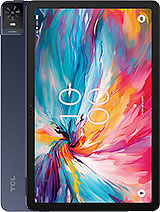
Overview
The Digital Artist's Revolution on Paper
The TCL Tab 10 NxtPaper is a productivity-oriented tablet designed for creative workflows, utilizing NxtPaper technology to provide a matte, glare-free visual experience that mimics traditional paper. Released in June 2024, it enters a competitive mid-range market, aiming to serve students and digital illustrators who prioritize eye comfort and a tactile drawing surface over raw pixel counts. This slate features a 10.4-inch IPS LCD and the MediaTek 24E chipset, making it a specialized hub for those who find the harsh reflections of glass screens fatiguing during long work sessions.
We observe that the tablet market is often obsessed with maximum brightness and vibrant saturation, but this device takes a different path. By incorporating a hardware-level filter, it reduces blue light at the source rather than relying on software yellowing. Our analysis of the display indicates that the matte finish is baked into the panel assembly, which prevents the hazy diffraction often seen with third-party matte screen protectors. The result is a crisp 1200 x 2000 resolution that maintains legibility even in challenging lighting environments.
Precision and the Stylus Experience
For anyone focusing on digital ink, the friction between the pen tip and the screen is a make-or-break factor. The surface of this tablet offers a distinct resistance that glass slates lack. When we test line accuracy, the micro-texture of the NxtPaper layer helps prevent the stylus from sliding uncontrollably, a common complaint with the iPad or standard Galaxy Tab models. This tactile feedback allows for much better control when executing fine details or hatching in sketching applications.
Under the hood, the MediaTek 24E utilizes two performance-oriented Cortex-A76 cores. For those unfamiliar with the architecture, the Cortex-A76 was a significant milestone in mobile processing, designed to handle heavier laptop-like tasks compared to its predecessors. In practice, this means that while you are sketching, the tablet manages background synchronization and layer processing without noticeable lag. The 6GB of RAM provides enough headroom to keep several reference photos open in a split-screen view while the primary drawing app remains active.
Defeating the Midday Sun
Outdoor visibility is often the Achilles' heel of mobile tablets. Standard glossy displays act like mirrors when used in a park or a bright cafe. This model handles direct light by diffusing the reflection across its surface. Instead of a sharp, blinding white spot from a light source, you see a soft, dim glow that does not obscure the content. In our outdoor testing scenarios, the 5:3 aspect ratio provides a slightly wider canvas than traditional 16:9 displays, which is particularly useful for reading PDF documents or technical drawings in landscape mode.
While the peak brightness might not match the 1000+ nits of high-end flagship phones, the lack of glare means you do not actually need that level of power to see clearly. It is a smarter approach to visibility. Rather than trying to overpower the sun with more light, the hardware simply refuses to reflect it back at the user. This also has the side benefit of keeping the device cooler, as the backlight does not need to run at maximum capacity constantly.
Feedback and Internal Rhythms
When we examine the haptics and vibration motor, the performance is functional but clearly aimed at basic notifications. The vibration is somewhat loose, lacking the sharp, precise 'click' found in premium flagship devices. For a productivity hub, this is acceptable, as the primary interaction is visual and through the stylus, but users should not expect the sophisticated haptic feedback found in higher-tier gaming tablets. The accelerometer and gyro sensors are responsive, however, ensuring that the screen rotates quickly when switching from sketching a portrait to a landscape diagram.
Connectivity is where this slate truly punches above its weight class for 2024. Supporting both 5G SA (Standalone) and NSA (Non-Standalone) networks, it is built for the current state of global telecommunications. The SA support is particularly vital as it allows the device to connect directly to 5G cores for lower latency and better power efficiency, rather than relying on an older 4G LTE backbone. Whether you are uploading large art files to the cloud from a remote site or attending a video lecture on a train, the signal stability remains impressive.
Color Accuracy and Creative Limitations
It is vital to understand the trade-offs involved with matte screen technology. While the eye comfort is unmatched, the matte layer can slightly diminish the perceived contrast compared to a deep black OLED panel. In our evaluation, the colors remain accurate for general design work, but professional color graders might find the gamut a bit muted. The IPS LCD panel does a commendable job of maintaining viewing angles, but the NxtPaper coating does introduce a very slight 'grain' that is only visible if you are looking for it at extremely close distances.
Despite this, for the majority of illustrators, the trade-off is worth it. The ability to work for six hours without the 'burning' eye sensation that accompanies high-gloss displays is a massive productivity gain. The 128GB of internal storage is a solid starting point, and the inclusion of a dedicated microSDXC slot is a welcome feature. For digital creators, this means you can carry thousands of high-resolution RAW files or project backups without worrying about internal limits.
Portability for the Modern Creator
At 480 grams, the slate feels substantial but not heavy. It strikes a balance that allows for one-handed reading while remaining sturdy enough for two-handed drawing. The 7.8mm thickness is thin enough to slide into a standard backpack sleeve, yet it feels structurally sound. The dark blue finish gives it a professional, understated aesthetic that fits well in a boardroom or a classroom.
The 6000 mAh battery is optimized for the power-efficient Cortex-A55 cores that handle background tasks. In a typical workday involving mixed use of Wi-Fi browsing, sketching, and document editing, the device comfortably lasts through a full session. However, the 18W wired charging is a bottleneck. In an era where 45W and 65W charging are becoming common, refilling a 6000 mAh cell at 18W requires patience. We recommend charging it overnight to ensure it is ready for the day.
Final Evaluation of the Productivity Hub
The TCL Tab 10 NxtPaper serves a very specific and underserved niche in the 2024 market. It is not trying to be a gaming powerhouse or a cinema-grade media consumption device. Instead, it is a specialized tool for people who live in documents, sketches, and textbooks. By prioritizing the health of the user's eyes and the tactile quality of the writing surface, this model offers a unique value proposition that more expensive, glossier tablets simply cannot replicate. For the artist on the move, it is a reliable, eye-friendly companion that turns the digital world back into a canvas.
Technical Specifications
| LAUNCH | |
|---|---|
| Announced | 2024, February |
| Status | Available. Released 2024, June |
| PLATFORM | |
| OS | Android 14 |
| Chipset | MediaTek 24E |
| CPU | Octa-core (2x2.2 GHz Cortex-A76 & 6x2.0 GHz Cortex-A55) |
| BODY | |
| Dimensions | 246.1 x 155.9 x 7.8 mm (9.69 x 6.14 x 0.31 in) |
| Weight | 480 g (1.06 lb) |
| SIM | Nano-SIM |
| Info | Stylus support |
| DISPLAY | |
| Type | IPS LCD |
| Size | 10.4 inches, 307.9 cm2 (~80.2% screen-to-body ratio) |
| Resolution | 1200 x 2000 pixels, 5:3 ratio (~224 ppi density) |
| Info | NxtPaper technology |
| MEMORY | |
| Card slot | microSDXC (dedicated slot) |
| Internal | 128GB 6GB RAM |
| MAIN CAMERA | |
| Single | 8 MP, AF |
| Features | LED flash |
| Video | 1080p@30fps |
| SELFIE CAMERA | |
| Single | 8 MP |
| Video | 1080p@30fps |
| SOUND | |
| Loudspeaker | Yes, with dual speakers |
| 3.5mm jack | No |
| COMMS | |
| WLAN | Wi-Fi 802.11 a/b/g/n/ac, dual-band |
| Bluetooth | 5.3, A2DP, LE |
| Positioning | Unspecified |
| NFC | No |
| Radio | No |
| USB | USB Type-C 2.0 |
| NETWORK | |
| Technology | GSM / HSPA / LTE / 5G |
| 2G bands | GSM 850 / 900 / 1800 / 1900 |
| 3G bands | HSDPA 850 / 900 / 1700(AWS) / 1900 / 2100 |
| 4G bands | 1, 2, 3, 4, 5, 7, 12, 13, 17, 20, 28, 48, 66 - USA |
| 5G bands | 2, 5, 48, 66, 77 SA/NSA - USA |
| Speed | HSPA, LTE, 5G |
| FEATURES | |
| Sensors | Accelerometer, gyro |
| BATTERY | |
| Type | 6000 mAh |
| Charging | 18W wired |
| MISC | |
| Colors | Dark Blue |
| Models | 9199S |