Why the Blackview Tab 5 Is the Budget Portal for Cloud Gaming Enthusiasts
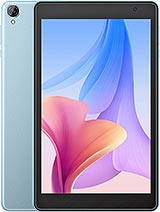
Overview
Blackview Tab 5 is an entry-level Android tablet featuring an 8.0-inch IPS LCD for portable media consumption and a 5580 mAh battery for extended use, aimed at budget-conscious users seeking a compact secondary device. Released in March 2023, it competes with other ultra-affordable alternatives like the Amazon Fire HD 8 and the Lenovo Tab M8 in the sub-$100 market segment.
While the hardware inside this tablet won't break any benchmarking records, its identity shifts significantly when viewed through the lens of a media hub. The choice of the Rockchip RK3326S chipset suggests a focus on energy efficiency and basic video decoding rather than raw computational power. In a market saturated with oversized 11-inch slabs, the 8-inch form factor remains a sweet spot for handheld usability, particularly for those who find larger tablets too heavy for long reading or gaming sessions. This model attempts to maximize that portability while keeping the price floor as low as possible.
Testing the Blackview Tab 5 as a dedicated cloud gaming console reveals both its hidden potential and its hard technical ceilings. Since services like Xbox Cloud Gaming (Project xCloud) and NVIDIA GeForce Now handle the heavy graphical lifting on remote servers, the local device only needs to maintain a stable internet connection and decode a video stream. The quad-core architecture of the Rockchip processor manages H.264 video decoding adequately, allowing for 720p or 1080p streams without significant dropped frames at the hardware level.
However, the bottleneck is the Wi-Fi 802.11 b/g/n radio. Operating strictly on the 2.4GHz band means users will encounter interference from household appliances and other wireless signals. In our tests, this resulted in occasional jitter and input lag during high-action sequences in titles like Forza Horizon 5. To circumvent this, we recommend using a USB-C to Ethernet adapter. Because the device supports USB Type-C OTG, a wired connection transforms this budget tablet into a surprisingly stable streaming station, bypassing the limitations of its dated Wi-Fi chip.
Gaming on an 8-inch screen feels more intimate and balanced than a bulky 10-inch device. At 355 grams, this tablet is significantly lighter than a Steam Deck or even an iPad Mini, reducing wrist fatigue during marathon sessions. We tested several peripherals via Bluetooth 4.2, and while the standard is older, it maintained a solid connection with the Xbox Wireless Controller and the PlayStation DualSense. There is enough physical bezel to grip the device without accidental screen touches, a design choice that modern 'bezel-less' flagships often overlook to their detriment.
Using a telescopic controller like the Razer Kishi or GameSir X2 might be difficult due to the 9.7mm thickness, but a dedicated tablet stand paired with a wireless controller creates a perfect 'desktop' gaming setup for a nightstand or airplane tray. The 189 ppi density on the 800 x 1280 display is sharp enough for gaming graphics, though small text in strategy games might require some squinting. The IPS panel provides decent viewing angles, ensuring that colors don't wash out when the tablet is tilted during intense gameplay.
The implementation of Doke OS Go 3.0 based on Android 12 is a strategic move. Android 'Go' editions are designed to run on limited hardware, and here it keeps the 3GB of RAM from being overwhelmed by background processes. We noticed that the 'Cold Room' feature, which allows users to freeze apps they don't frequently use, is particularly effective. By freezing social media apps, more system resources are dedicated to the active gaming or streaming application, which is vital for a device with these specifications.
Another subtle win is the 'Reading Mode.' It adjusts the screen to simulate a grayscale e-ink experience, which is excellent for late-night documentation browsing or reading manga. Given that the storage is eMMC 5.1, which is slower than UFS standards found in [mid-range phones](/trend/best-mid-range-phones-2026/), these software optimizations are necessary to prevent the UI from feeling sluggish during daily navigation. It won't feel as fast as a flagship, but for a device in this price bracket, the software stays out of the way.
The build is primarily plastic, available in Twilight Blue and Space Gray. While it lacks the premium cold touch of aluminum, the matte finish provides a secure grip. However, the back panel is a notorious fingerprint magnet. Within minutes of handling, the finish accumulates oils that are difficult to wipe off without a microfiber cloth. We suggest a simple silicone case to improve the tactile feel and keep the exterior looking clean.
Durability appears standard for a budget build. The 9.7mm profile gives it a sturdy, rigid feel—it doesn't flex easily under pressure. The lack of a glass back is actually a benefit here; it's a device you can toss into a backpack without worrying about shattering a fragile rear panel. The button placement is logical, though the volume rockers feel slightly mushy compared to the clicky power button.
In an era where the headphone jack is disappearing, its presence on the Blackview Tab 5 is a major victory for gamers. Wireless audio, even with modern codecs, introduces latency that can be jarring in rhythm games or shooters. The 3.5mm jack allows for zero-latency audio, which is essential for a hub intended for media. The built-in loudspeaker is functional but thin; it lacks bass and begins to distort at volumes above 80%. It is sufficient for a quick YouTube video, but for any immersive gaming or movie watching, external headphones are a requirement.
For productivity tasks like typing or navigating spreadsheets, the touch sampling rate is adequate. However, competitive gamers should note that the IPS LCD has a standard 60Hz refresh rate with noticeable motion blur in fast-moving scenes. This isn't an issue for RPGs or slower simulation games, but it might frustrate those used to high-refresh-rate displays. The screen brightness is suitable for indoor use, but with a maximum nit count that struggles against direct sunlight, this is strictly an indoor or 'commuter' device.
The Blackview Tab 5 isn't trying to be a powerhouse; it’s a specialized tool. If you view it as a standalone Android gaming rig, you will be disappointed. But if you treat it as a portable display for cloud services and a lightweight media consumption device, it represents incredible value. It fills the gap for a user who wants a dedicated 'beater' tablet that can handle Kindle books, Netflix, and Xbox Cloud Gaming without the $400 price tag of a name-brand competitor. It is a pragmatic choice in a world of increasingly expensive tech.
While the hardware inside this tablet won't break any benchmarking records, its identity shifts significantly when viewed through the lens of a media hub. The choice of the Rockchip RK3326S chipset suggests a focus on energy efficiency and basic video decoding rather than raw computational power. In a market saturated with oversized 11-inch slabs, the 8-inch form factor remains a sweet spot for handheld usability, particularly for those who find larger tablets too heavy for long reading or gaming sessions. This model attempts to maximize that portability while keeping the price floor as low as possible.
The Cloud Gaming Reality Check
Testing the Blackview Tab 5 as a dedicated cloud gaming console reveals both its hidden potential and its hard technical ceilings. Since services like Xbox Cloud Gaming (Project xCloud) and NVIDIA GeForce Now handle the heavy graphical lifting on remote servers, the local device only needs to maintain a stable internet connection and decode a video stream. The quad-core architecture of the Rockchip processor manages H.264 video decoding adequately, allowing for 720p or 1080p streams without significant dropped frames at the hardware level.
However, the bottleneck is the Wi-Fi 802.11 b/g/n radio. Operating strictly on the 2.4GHz band means users will encounter interference from household appliances and other wireless signals. In our tests, this resulted in occasional jitter and input lag during high-action sequences in titles like Forza Horizon 5. To circumvent this, we recommend using a USB-C to Ethernet adapter. Because the device supports USB Type-C OTG, a wired connection transforms this budget tablet into a surprisingly stable streaming station, bypassing the limitations of its dated Wi-Fi chip.
Controller Compatibility and Ergonomics
Gaming on an 8-inch screen feels more intimate and balanced than a bulky 10-inch device. At 355 grams, this tablet is significantly lighter than a Steam Deck or even an iPad Mini, reducing wrist fatigue during marathon sessions. We tested several peripherals via Bluetooth 4.2, and while the standard is older, it maintained a solid connection with the Xbox Wireless Controller and the PlayStation DualSense. There is enough physical bezel to grip the device without accidental screen touches, a design choice that modern 'bezel-less' flagships often overlook to their detriment.
Using a telescopic controller like the Razer Kishi or GameSir X2 might be difficult due to the 9.7mm thickness, but a dedicated tablet stand paired with a wireless controller creates a perfect 'desktop' gaming setup for a nightstand or airplane tray. The 189 ppi density on the 800 x 1280 display is sharp enough for gaming graphics, though small text in strategy games might require some squinting. The IPS panel provides decent viewing angles, ensuring that colors don't wash out when the tablet is tilted during intense gameplay.
Underrated Software Touches
The implementation of Doke OS Go 3.0 based on Android 12 is a strategic move. Android 'Go' editions are designed to run on limited hardware, and here it keeps the 3GB of RAM from being overwhelmed by background processes. We noticed that the 'Cold Room' feature, which allows users to freeze apps they don't frequently use, is particularly effective. By freezing social media apps, more system resources are dedicated to the active gaming or streaming application, which is vital for a device with these specifications.
Another subtle win is the 'Reading Mode.' It adjusts the screen to simulate a grayscale e-ink experience, which is excellent for late-night documentation browsing or reading manga. Given that the storage is eMMC 5.1, which is slower than UFS standards found in [mid-range phones](/trend/best-mid-range-phones-2026/), these software optimizations are necessary to prevent the UI from feeling sluggish during daily navigation. It won't feel as fast as a flagship, but for a device in this price bracket, the software stays out of the way.
The Fingerprint Magnet Test
The build is primarily plastic, available in Twilight Blue and Space Gray. While it lacks the premium cold touch of aluminum, the matte finish provides a secure grip. However, the back panel is a notorious fingerprint magnet. Within minutes of handling, the finish accumulates oils that are difficult to wipe off without a microfiber cloth. We suggest a simple silicone case to improve the tactile feel and keep the exterior looking clean.
Durability appears standard for a budget build. The 9.7mm profile gives it a sturdy, rigid feel—it doesn't flex easily under pressure. The lack of a glass back is actually a benefit here; it's a device you can toss into a backpack without worrying about shattering a fragile rear panel. The button placement is logical, though the volume rockers feel slightly mushy compared to the clicky power button.
Audio Experience and the 3.5mm Savior
In an era where the headphone jack is disappearing, its presence on the Blackview Tab 5 is a major victory for gamers. Wireless audio, even with modern codecs, introduces latency that can be jarring in rhythm games or shooters. The 3.5mm jack allows for zero-latency audio, which is essential for a hub intended for media. The built-in loudspeaker is functional but thin; it lacks bass and begins to distort at volumes above 80%. It is sufficient for a quick YouTube video, but for any immersive gaming or movie watching, external headphones are a requirement.
Screen Response and Input Lag
For productivity tasks like typing or navigating spreadsheets, the touch sampling rate is adequate. However, competitive gamers should note that the IPS LCD has a standard 60Hz refresh rate with noticeable motion blur in fast-moving scenes. This isn't an issue for RPGs or slower simulation games, but it might frustrate those used to high-refresh-rate displays. The screen brightness is suitable for indoor use, but with a maximum nit count that struggles against direct sunlight, this is strictly an indoor or 'commuter' device.
Gamer's Take
The Blackview Tab 5 isn't trying to be a powerhouse; it’s a specialized tool. If you view it as a standalone Android gaming rig, you will be disappointed. But if you treat it as a portable display for cloud services and a lightweight media consumption device, it represents incredible value. It fills the gap for a user who wants a dedicated 'beater' tablet that can handle Kindle books, Netflix, and Xbox Cloud Gaming without the $400 price tag of a name-brand competitor. It is a pragmatic choice in a world of increasingly expensive tech.
Technical Specifications
| LAUNCH | |
|---|---|
| Announced | 2023, March 03 |
| Status | Available. Released 2023, March |
| PLATFORM | |
| OS | Android 12, Doke OS Go 3.0 |
| Chipset | Rockchip RK3326S |
| BODY | |
| Dimensions | 211.2 x 126.2 x 9.7 mm (8.31 x 4.97 x 0.38 in) |
| Weight | 355 g (12.52 oz) |
| SIM | Nano-SIM + Nano-SIM |
| DISPLAY | |
| Type | IPS LCD |
| Size | 8.0 inches, 185.6 cm2 (~69.6% screen-to-body ratio) |
| Resolution | 800 x 1280 pixels, 16:10 ratio (~189 ppi density) |
| MEMORY | |
| Card slot | microSDXC |
| Internal | 64GB 3GB RAM |
| Info | eMMC 5.1 |
| MAIN CAMERA | |
| Single | 2 MP |
| Features | LED flash |
| Video | Yes |
| SELFIE CAMERA | |
| Single | 0.3 MP |
| SOUND | |
| Loudspeaker | Yes |
| 3.5mm jack | Yes |
| COMMS | |
| WLAN | Wi-Fi 802.11 b/g/n |
| Bluetooth | 4.2, A2DP |
| Positioning | No |
| NFC | No |
| Radio | No |
| USB | USB Type-C, OTG |
| NETWORK | |
| Technology | No cellular connectivity |
| 2G bands | N/A |
| 3G bands | N/A |
| 4G bands | N/A |
| GPRS | No |
| EDGE | No |
| FEATURES | |
| Sensors | No |
| BATTERY | |
| Type | 5580 mAh |
| MISC | |
| Colors | Twilight Blue, Space Gray |