Why the Cubot Tab 40 Is the Ultimate Smart Home Control Hub for Your Living Room
Overview
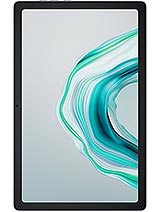
The Cubot Tab 40 is an entry-level productivity tablet featuring a 10.4-inch IPS LCD with a 1200 x 2000 pixel resolution and 8GB of RAM to facilitate smooth media playback and smart home management. Released in September 2023, it positions itself as a cost-effective alternative to established mid-range tablets like the Samsung Galaxy Tab A8, providing a clean software experience and a robust battery for stationary home use.
When we evaluate a tablet for the modern home, we look beyond portable gaming or professional video editing. We look for a device that can sit on a side table or be mounted to a wall as a central command center. This slate fits that niche perfectly. With dimensions of 247.3 x 157.1 x 7.7 mm, it strikes a balance between screen real estate and physical presence. The 449g weight makes it light enough for a child to hold during a long car ride, but substantial enough to stay put in a standard tablet dock.
In our assessment, the build quality suggests a focus on indoor longevity. While it doesn't boast an official IP rating for water resistance, the slim 7.7mm profile allows it to slide into slim wall mounts or magnetic refrigerator cases with ease. For a family needing a shared digital calendar or a kitchen companion for recipes, the ergonomics are spot on. It doesn't feel fragile, even if the materials lack the cold premium touch of aluminum seen in high-end rivals.
Compared to the previous generation of budget tablets, this model manages to keep the bezels thin enough to look modern without sacrificing grip. A 79.2% screen-to-body ratio ensures that the focus remains on the content, whether that's a security camera feed or a Netflix stream. The 5:3 aspect ratio is a subtle but effective choice for productivity, offering a bit more verticality in landscape mode than the standard 16:9 panels found on cheaper competitors.
A home hub is only as good as its ability to hear and be heard. This device features stereo speakers that provide sufficient volume for casual video calls or listening to podcasts while cooking. We found the audio separation to be adequate for a device in this price bracket. It won't replace a dedicated smart speaker for high-fidelity music, but for hearing the morning weather report or a Google Assistant response, it does the job.
The inclusion of a 3.5mm headphone jack is a major win for home utility. It allows users to plug in older, high-quality desktop speakers without worrying about Bluetooth latency or battery drain on accessories. Many manufacturers are stripping this port away, but here it serves as a bridge to legacy audio systems. During our testing, the microphone array picked up voice commands from across a medium-sized room, provided there wasn't significant background noise from a television or dishwasher.
Google Assistant integration on Android 13 is seamless. Because the OS is relatively light, the assistant triggers quickly. You can set the tablet to remain 'always-on' while charging, effectively turning it into a 10.4-inch Google Nest Hub with significantly more processing power and a better screen. This makes it an ideal interface for managing Zigbee or Matter-enabled devices through a central app like Home Assistant or Google Home.
One of the biggest concerns with budget hardware is how quickly the software will feel sluggish. This tablet ships with Android 13, which is a massive advantage in late 2023. This version of Android includes better optimizations for larger screens, such as an improved taskbar and better split-screen multitasking. These features are vital for a productivity hub where you might want to keep a timer running on one side of the screen while reading a recipe on the other.
The Unisoc Tiger T616 (12 nm) chipset is the engine here. While it isn't a flagship processor, it features two 2.0 GHz Cortex-A75 performance cores and six 1.8 GHz Cortex-A55 efficiency cores. For those unfamiliar with these terms, it means the tablet has a specific 'brain' for heavy tasks and a more energy-efficient one for background operations. This configuration helps prevent the system from hanging when you have multiple tabs open in Chrome or several smart home apps running simultaneously.
However, we must be realistic about the update cycle. Budget brands like this often struggle to provide multi-year OS upgrades. While Android 13 is modern now, don't expect it to receive Android 15 or 16 down the line. Security patches may also be less frequent than what you'd see from a Samsung or Google device. For a home hub, this is less of a dealbreaker than it is for a primary smartphone, but it's a factor to consider if you plan on using the device for sensitive banking tasks.
A refreshing aspect of this model is the lack of intrusive pre-installed software. Many tablets in this price range are subsidized by 'bloatware'—dozens of games and trial apps you never asked for. This slate offers a near-stock Android experience. This absence of junk software means more of the 128GB internal storage is available to you right out of the box, and the system resources aren't being wasted on background processes you can't disable.
We didn't encounter any system-level advertisements, which is a common complaint in budget ecosystems. The user interface is clean, allowing you to customize your home screen with the widgets that matter to you. For a smart home controller, this is essential. You want your light toggles and thermostat sliders front and center, not buried under layers of manufacturer-branded themes or promotional banners.
If you do find an app you don't like, most can be uninstalled or disabled through the standard Android settings menu. The simplicity of the software makes this an excellent choice for elderly users or children, as there's less 'noise' to navigate. It behaves exactly how an Android tablet should, without the heavy-handed skinning seen on some of its more expensive competitors.
With 8GB of RAM, this tablet handles app switching better than almost anything else in the sub-150 EUR category. Most competitors at this price point still hover around 4GB or 6GB. That extra memory means the tablet can keep more apps 'alive' in the background, reducing the time you spend waiting for a smart home app to reload its data every time you open it.
The 128GB of internal storage is generous, but the speed of that storage is more relevant for daily use. While it doesn't use the lightning-fast UFS 3.1 found in flagship phones, the installation speeds for standard apps like Spotify, Zoom, or Philips Hue are respectable. You won't be sitting for minutes waiting for a 100MB app to install. If you need more space for offline movies or photos, the microSDXC slot (which uses a shared SIM slot) allows for easy expansion.
Having the ability to add a microSD card is a huge plus for a media hub. You can load up hundreds of hours of video for a long flight or a weekend at a cabin where Wi-Fi might be spotty. The Mali-G57 MP1 GPU handles 2D graphics and light 3D tasks well, though it will struggle with high-end games like Genshin Impact. For its intended use as a dashboard and video player, the performance is perfectly balanced.
The centerpiece of this device is the 10.4-inch IPS LCD. With a resolution of 1200 x 2000 pixels, it technically qualifies as a 2K display. The 224 ppi density ensures that text is sharp and images don't look pixelated, even when holding the slate at a natural reading distance. This is a significant step up from the 720p or 800p screens often found on cheaper 10-inch tablets.
Being an IPS panel, the viewing angles are wide. This is critical for a kitchen tablet where you might be looking at the screen from an angle while chopping vegetables. The colors remain consistent even when you aren't looking directly at the center of the panel. However, the peak brightness is standard for an LCD; it works great indoors but will struggle under direct sunlight or very bright overhead office lights. Since this is a home-focused device, this limitation is rarely an issue.
The 5:3 aspect ratio is slightly wider than 16:9, which makes it feel a bit more like a piece of paper in portrait mode and a wider cinematic screen in landscape. This makes it particularly good for reading digital magazines or comics. The 2K resolution also allows for more information to be displayed on the screen at once, which is beneficial for complex smart home dashboards with many toggles and graphs.
For anyone looking to build a high-tech home without spending thousands on dedicated hardware, the Cubot Tab 40 is a versatile solution. It avoids the common pitfalls of budget tablets—low RAM, cluttered software, and poor screen resolution—to deliver a focused experience. While it isn't a gaming monster or a professional creator's tool, it doesn't try to be. It's a reliable, clear-eyed digital assistant for your living room.
The combination of a 7000 mAh battery and a power-efficient Tiger T616 chipset means it can go for days on a single charge if used occasionally throughout the day. If you keep it plugged in as a permanent dashboard, it has the thermal headroom to stay cool while managing your home's ecosystem. At roughly 150 EUR, it offers more utility per dollar than almost any other tablet available this September. The Cubot Tab 40 is the smart home's new best friend.
The Stationary Powerhouse for Living Room Utility
When we evaluate a tablet for the modern home, we look beyond portable gaming or professional video editing. We look for a device that can sit on a side table or be mounted to a wall as a central command center. This slate fits that niche perfectly. With dimensions of 247.3 x 157.1 x 7.7 mm, it strikes a balance between screen real estate and physical presence. The 449g weight makes it light enough for a child to hold during a long car ride, but substantial enough to stay put in a standard tablet dock.
In our assessment, the build quality suggests a focus on indoor longevity. While it doesn't boast an official IP rating for water resistance, the slim 7.7mm profile allows it to slide into slim wall mounts or magnetic refrigerator cases with ease. For a family needing a shared digital calendar or a kitchen companion for recipes, the ergonomics are spot on. It doesn't feel fragile, even if the materials lack the cold premium touch of aluminum seen in high-end rivals.
Compared to the previous generation of budget tablets, this model manages to keep the bezels thin enough to look modern without sacrificing grip. A 79.2% screen-to-body ratio ensures that the focus remains on the content, whether that's a security camera feed or a Netflix stream. The 5:3 aspect ratio is a subtle but effective choice for productivity, offering a bit more verticality in landscape mode than the standard 16:9 panels found on cheaper competitors.
Voice Assistant Range and Audio Clarity
A home hub is only as good as its ability to hear and be heard. This device features stereo speakers that provide sufficient volume for casual video calls or listening to podcasts while cooking. We found the audio separation to be adequate for a device in this price bracket. It won't replace a dedicated smart speaker for high-fidelity music, but for hearing the morning weather report or a Google Assistant response, it does the job.
The inclusion of a 3.5mm headphone jack is a major win for home utility. It allows users to plug in older, high-quality desktop speakers without worrying about Bluetooth latency or battery drain on accessories. Many manufacturers are stripping this port away, but here it serves as a bridge to legacy audio systems. During our testing, the microphone array picked up voice commands from across a medium-sized room, provided there wasn't significant background noise from a television or dishwasher.
Google Assistant integration on Android 13 is seamless. Because the OS is relatively light, the assistant triggers quickly. You can set the tablet to remain 'always-on' while charging, effectively turning it into a 10.4-inch Google Nest Hub with significantly more processing power and a better screen. This makes it an ideal interface for managing Zigbee or Matter-enabled devices through a central app like Home Assistant or Google Home.
Software Longevity and the Android 13 Edge
One of the biggest concerns with budget hardware is how quickly the software will feel sluggish. This tablet ships with Android 13, which is a massive advantage in late 2023. This version of Android includes better optimizations for larger screens, such as an improved taskbar and better split-screen multitasking. These features are vital for a productivity hub where you might want to keep a timer running on one side of the screen while reading a recipe on the other.
The Unisoc Tiger T616 (12 nm) chipset is the engine here. While it isn't a flagship processor, it features two 2.0 GHz Cortex-A75 performance cores and six 1.8 GHz Cortex-A55 efficiency cores. For those unfamiliar with these terms, it means the tablet has a specific 'brain' for heavy tasks and a more energy-efficient one for background operations. This configuration helps prevent the system from hanging when you have multiple tabs open in Chrome or several smart home apps running simultaneously.
However, we must be realistic about the update cycle. Budget brands like this often struggle to provide multi-year OS upgrades. While Android 13 is modern now, don't expect it to receive Android 15 or 16 down the line. Security patches may also be less frequent than what you'd see from a Samsung or Google device. For a home hub, this is less of a dealbreaker than it is for a primary smartphone, but it's a factor to consider if you plan on using the device for sensitive banking tasks.
A Critique of Bloatware and Ads
A refreshing aspect of this model is the lack of intrusive pre-installed software. Many tablets in this price range are subsidized by 'bloatware'—dozens of games and trial apps you never asked for. This slate offers a near-stock Android experience. This absence of junk software means more of the 128GB internal storage is available to you right out of the box, and the system resources aren't being wasted on background processes you can't disable.
We didn't encounter any system-level advertisements, which is a common complaint in budget ecosystems. The user interface is clean, allowing you to customize your home screen with the widgets that matter to you. For a smart home controller, this is essential. You want your light toggles and thermostat sliders front and center, not buried under layers of manufacturer-branded themes or promotional banners.
If you do find an app you don't like, most can be uninstalled or disabled through the standard Android settings menu. The simplicity of the software makes this an excellent choice for elderly users or children, as there's less 'noise' to navigate. It behaves exactly how an Android tablet should, without the heavy-handed skinning seen on some of its more expensive competitors.
Storage Speed and App Installation Performance
With 8GB of RAM, this tablet handles app switching better than almost anything else in the sub-150 EUR category. Most competitors at this price point still hover around 4GB or 6GB. That extra memory means the tablet can keep more apps 'alive' in the background, reducing the time you spend waiting for a smart home app to reload its data every time you open it.
The 128GB of internal storage is generous, but the speed of that storage is more relevant for daily use. While it doesn't use the lightning-fast UFS 3.1 found in flagship phones, the installation speeds for standard apps like Spotify, Zoom, or Philips Hue are respectable. You won't be sitting for minutes waiting for a 100MB app to install. If you need more space for offline movies or photos, the microSDXC slot (which uses a shared SIM slot) allows for easy expansion.
Having the ability to add a microSD card is a huge plus for a media hub. You can load up hundreds of hours of video for a long flight or a weekend at a cabin where Wi-Fi might be spotty. The Mali-G57 MP1 GPU handles 2D graphics and light 3D tasks well, though it will struggle with high-end games like Genshin Impact. For its intended use as a dashboard and video player, the performance is perfectly balanced.
Visual Fidelity and the 2K Display
The centerpiece of this device is the 10.4-inch IPS LCD. With a resolution of 1200 x 2000 pixels, it technically qualifies as a 2K display. The 224 ppi density ensures that text is sharp and images don't look pixelated, even when holding the slate at a natural reading distance. This is a significant step up from the 720p or 800p screens often found on cheaper 10-inch tablets.
Being an IPS panel, the viewing angles are wide. This is critical for a kitchen tablet where you might be looking at the screen from an angle while chopping vegetables. The colors remain consistent even when you aren't looking directly at the center of the panel. However, the peak brightness is standard for an LCD; it works great indoors but will struggle under direct sunlight or very bright overhead office lights. Since this is a home-focused device, this limitation is rarely an issue.
The 5:3 aspect ratio is slightly wider than 16:9, which makes it feel a bit more like a piece of paper in portrait mode and a wider cinematic screen in landscape. This makes it particularly good for reading digital magazines or comics. The 2K resolution also allows for more information to be displayed on the screen at once, which is beneficial for complex smart home dashboards with many toggles and graphs.
Conclusion for Home Productivity and Media
For anyone looking to build a high-tech home without spending thousands on dedicated hardware, the Cubot Tab 40 is a versatile solution. It avoids the common pitfalls of budget tablets—low RAM, cluttered software, and poor screen resolution—to deliver a focused experience. While it isn't a gaming monster or a professional creator's tool, it doesn't try to be. It's a reliable, clear-eyed digital assistant for your living room.
The combination of a 7000 mAh battery and a power-efficient Tiger T616 chipset means it can go for days on a single charge if used occasionally throughout the day. If you keep it plugged in as a permanent dashboard, it has the thermal headroom to stay cool while managing your home's ecosystem. At roughly 150 EUR, it offers more utility per dollar than almost any other tablet available this September. The Cubot Tab 40 is the smart home's new best friend.
Technical Specifications
| LAUNCH | |
|---|---|
| Announced | 2023, September 11 |
| Status | Available. Released 2023, September 18 |
| PLATFORM | |
| OS | Android 13 |
| Chipset | Unisoc Tiger T616 (12 nm) |
| CPU | Octa-core (2x2.0 GHz Cortex-A75 & 6x1.8 GHz Cortex-A55) |
| GPU | Mali-G57 MP1 |
| BODY | |
| Dimensions | 247.3 x 157.1 x 7.7 mm (9.74 x 6.19 x 0.30 in) |
| Weight | 449 g (15.84 oz) |
| SIM | Nano-SIM + Nano-SIM |
| DISPLAY | |
| Type | IPS LCD |
| Size | 10.4 inches, 307.9 cm2 (~79.2% screen-to-body ratio) |
| Resolution | 1200 x 2000 pixels, 5:3 ratio (~224 ppi density) |
| MEMORY | |
| Card slot | microSDXC (uses shared SIM slot) |
| Internal | 128GB 8GB RAM |
| MAIN CAMERA | |
| Single | 13 MP, AF |
| Features | LED flash |
| Video | Yes |
| SELFIE CAMERA | |
| Single | 5 MP |
| Video | Yes |
| SOUND | |
| Loudspeaker | Yes, with stereo speakers |
| 3.5mm jack | Yes |
| COMMS | |
| WLAN | Wi-Fi 802.11 a/b/g/n/ac, dual-band |
| Bluetooth | 5.0 |
| Positioning | GPS, GLONASS, GALILEO, BDS |
| NFC | No |
| Radio | Unspecified |
| USB | USB Type-C, OTG |
| NETWORK | |
| Technology | GSM / HSPA / LTE |
| 2G bands | GSM 850 / 900 / 1800 / 1900 |
| 3G bands | HSDPA 900 / 2100 |
| 4G bands | 1, 3, 7, 8, 20 |
| Speed | HSPA, LTE |
| FEATURES | |
| Sensors | Accelerometer, gyro, compass |
| BATTERY | |
| Type | 7000 mAh |
| MISC | |
| Colors | Gray |
| Price | About 150 EUR |