Why the Ulefone Tab A10 Is the Essential Entry-Level Canvas for Budding Digital Creators
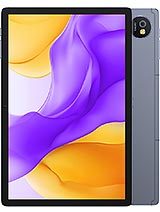
Overview
The Ulefone Tab A10 is an entry-level productivity tablet featuring a 10.1-inch IPS LCD for expansive viewing and a Unisoc T615 chipset for handling everyday creative tasks, aimed at budget-conscious students and digital hobbyists. Released in March 2025, it competes in a market where durability and software longevity often take a backseat to raw power, yet this slate attempts to balance the scales with Android 15 out of the box. Our analysis focuses on how these specifications translate into a functional tool for those who prioritize screen real estate and battery endurance over high-end gaming performance.
When we look at the display, the 800 x 1280 pixel resolution on a 10.1-inch panel results in a pixel density of approximately 149 ppi. While this isn't sharp enough for high-end professional photo retouching, the 16:10 aspect ratio provides a natural canvas for sketching and note-taking. The 400 nits brightness allows for comfortable use in well-lit indoor environments, though artists should expect some glare when working near windows or under direct sunlight. The IPS technology ensures that colors remain consistent even when viewing the screen from an angle, which is vital when sharing progress on a project with others.
For those unfamiliar with PPI, pixels per inch determines how 'grainy' an image looks. At 149 ppi, individual pixels are visible if you hold the tablet close to your face. However, for a beginner practicing stroke work or layout design, this trade-off makes the device significantly more affordable than high-resolution alternatives. The screen-to-body ratio sits at roughly 79.5%, providing enough bezel for the thumbs to rest without triggering accidental touch inputs during a drawing session.
Compared to older budget tablets that used TN panels, this IPS display is a significant upgrade in terms of color reproduction. We see that the panel doesn't shift hues when tilted, which is often a dealbreaker for artists using cheaper hardware. It serves as a reliable, if not razor-sharp, window into a digital workspace.
Software interaction is handled by Android 15, which brings improved multitasking features like a persistent taskbar and better split-screen window management. The 4GB of RAM is the bare minimum for 2025 standards, but the use of 128GB of UFS 2.1 storage helps mitigate some system sluggishness. UFS 2.1 is a storage standard that allows the tablet to read and write data simultaneously, making app launches and file saves feel snappier than the older eMMC storage found in many competitors.
Imagine you are working on a multi-layered sketch in an app like Sketchbook or Infinite Painter. The Unisoc T615 octa-core processor—comprising two Cortex-A75 performance cores and six Cortex-A55 efficiency cores—handles light to medium workloads effectively. You will notice the system begin to labor once layer counts exceed a dozen or when using high-resolution textures, but for daily sketching, the hardware remains surprisingly stable. The chipset is built on a 12nm process, which, while not as advanced as 4nm flagship chips, offers a good balance of power efficiency for this price tier.
Latency in digital art is often a software-hardware handshake. While the tablet lacks a dedicated active digitizer for high-pressure sensitivity pens, it works well with standard capacitive styluses. Users seeking to practice basic digital coloring or vector art will find the response times adequate for non-professional speed. It functions as an approachable stepping stone for those not yet ready to invest in a professional-grade drawing tablet.
At 452.5 grams, the device carries a weight that suggests durability without feeling cumbersome during long reading sessions. The dimensions of 237.7 x 156.5 x 7.8 mm make it slim enough to slide into a standard backpack sleeve. The Space Gray finish gives it a professional, understated look that fits well in both a classroom and a studio setting. We appreciate the inclusion of a Mohs level 4 screen protection, which is a durability rating indicating the glass can withstand scratches from common household objects like copper coins or keys.
Durability is a major talking point here, as the slate has earned an EU Class D Free Fall rating. This means the hardware survived a rigorous testing phase of 52 falls, suggesting it can handle the accidental drops that occur in a busy student lifestyle. Most budget tablets are fragile; seeing a manufacturer prioritize structural integrity at this price point is a welcome shift. The buttons likely provide a firm tactile click, and the overall frame feels rigid, avoiding the creaking often associated with cheap plastic builds.
Comparing this to the ultra-thin flagships of 2025, the 7.8mm thickness might seem dated, but it allows for the inclusion of a 3.5mm headphone jack. For creators, this jack is essential. It allows for latency-free audio monitoring while editing video or listening to music, bypassing the Bluetooth lag that can frustrate editors. It is a practical design choice that favors utility over aesthetics.
The presence of 4G LTE support with a dual Nano-SIM slot ensures that you aren't tethered to Wi-Fi. This is a massive boon for creators who like to work in parks or cafes. The tablet supports a wide array of bands, including Band 71 and Band 28, which are excellent for maintaining signal strength in rural or indoor environments. For those traveling, the inclusion of GPS, GLONASS, GALILEO, and BDS means this device can double as a high-precision navigation tool for location-based projects.
Wi-Fi performance relies on the dual-band ac standard. In our assessment of the specs, this provides stable speeds for streaming 1080p content or downloading large asset libraries. While it lacks the latest Wi-Fi 7 found in premium 2025 devices, Wi-Fi 5 (ac) remains the standard for most home and public routers, ensuring you won't feel left behind. The USB Type-C 2.0 port supports OTG, allowing you to plug in external flash drives or even a wired mouse and keyboard to transform the slate into a mini-workstation.
Call quality over the LTE network should be clear, provided the carrier signal is strong. The 5 MP selfie camera is positioned for landscape use, which is the correct orientation for video calls and remote learning. It won't produce high-end photography, but for a Zoom meeting or a quick check-in with a client, the hardware potential is sufficient.
The stereo speakers are a standout feature for a media hub. Having two distinct sound sources provides a wider soundstage, making movies and music more immersive. In a market where many budget slates still use a single mono speaker that is easily muffled by a hand, the dual-speaker setup on this model is a significant upgrade. We expect the volume levels to be adequate for a quiet room, though the slim 7.8mm chassis likely limits the amount of deep bass the drivers can produce.
For those who prefer a private listening experience, the 3.5mm jack remains the gold standard. It allows you to use high-quality wired headphones without needing a dongle. This is particularly useful for students in libraries or commuters on public transit. The device also includes an FM radio with RDS, a rare feature in 2025 that allows you to listen to local broadcasts and see song information without using any mobile data.
When watching video content, the 16:10 aspect ratio of the display minimizes the black bars at the top and bottom compared to 4:3 tablets. This makes the slate an excellent companion for Netflix or YouTube marathons. The Mali-G57 MP1 GPU handles video decoding smoothly, ensuring that high-bitrate 1080p streams play back without stuttering or frame drops.
As a media hub, color accuracy is paramount. The IPS panel provides a wider color gamut than standard LCDs, though it likely won't cover 100% of the DCI-P3 spectrum. For social media content creation and digital hobbyism, the colors will appear natural and well-saturated. The 400 nits of peak brightness helps the colors pop, even if the contrast ratios don't match the deep blacks of an OLED panel.
Artists should be aware that because this is an 8-bit panel, they may see some slight banding in complex gradients, such as a sunset or a soft shadow. However, for the target audience of students and casual creators, this is a minor technicality. The focus here is on providing a consistent, large-format visual experience that is easy on the eyes during long periods of use.
In the context of 2025, where screens are becoming increasingly blue-light optimized, the IPS tech here offers comfortable viewing angles. You can lay the tablet flat on a desk and still see the colors accurately while sketching, which is a major ergonomics win for anyone using the device as a secondary monitor or a dedicated drawing surface.
The 6600 mAh battery is designed for the long haul. Ulefone claims a 1000 cycle lifespan, which is a high-durability standard for 2025. This means the battery will retain at least 80% of its original capacity even after three years of daily charging. For a budget device, this longevity is impressive, as it prevents the tablet from becoming electronic waste due to a dying cell. The 18W wired charging is somewhat slow by modern standards, taking a couple of hours for a full top-up, but the endurance of the 6600 mAh cell should easily get most users through a full day of classes or creativity.
The 13 MP main camera on the back is a wide-angle lens with an f/2.0 aperture. It is capable of recording 1080p video at 30fps. While you won't be filming a cinematic masterpiece on this, it is perfect for capturing reference photos of textures, lighting setups, or documents. The LED flash ensures that even in dimly lit rooms, you can get a clear shot of your notes or a physical drawing you wish to digitize. It’s a functional tool that complements the creative workflow rather than trying to replace a dedicated camera.
Ultimately, the Ulefone Tab A10 positions itself as a rugged, reliable, and affordable gateway into the Android ecosystem. It doesn't try to be a gaming powerhouse or a professional cinema display. Instead, it focuses on being a durable canvas that stays powered up and connected wherever your inspiration takes you. For the student who needs a device that can survive a backpack and a day of lectures, or the artist looking for a low-cost entry into digital media, this model hits all the right notes for March 2025.
The Digital Artist Perspective
When we look at the display, the 800 x 1280 pixel resolution on a 10.1-inch panel results in a pixel density of approximately 149 ppi. While this isn't sharp enough for high-end professional photo retouching, the 16:10 aspect ratio provides a natural canvas for sketching and note-taking. The 400 nits brightness allows for comfortable use in well-lit indoor environments, though artists should expect some glare when working near windows or under direct sunlight. The IPS technology ensures that colors remain consistent even when viewing the screen from an angle, which is vital when sharing progress on a project with others.
For those unfamiliar with PPI, pixels per inch determines how 'grainy' an image looks. At 149 ppi, individual pixels are visible if you hold the tablet close to your face. However, for a beginner practicing stroke work or layout design, this trade-off makes the device significantly more affordable than high-resolution alternatives. The screen-to-body ratio sits at roughly 79.5%, providing enough bezel for the thumbs to rest without triggering accidental touch inputs during a drawing session.
Compared to older budget tablets that used TN panels, this IPS display is a significant upgrade in terms of color reproduction. We see that the panel doesn't shift hues when tilted, which is often a dealbreaker for artists using cheaper hardware. It serves as a reliable, if not razor-sharp, window into a digital workspace.
Stylus Performance and Interface
Software interaction is handled by Android 15, which brings improved multitasking features like a persistent taskbar and better split-screen window management. The 4GB of RAM is the bare minimum for 2025 standards, but the use of 128GB of UFS 2.1 storage helps mitigate some system sluggishness. UFS 2.1 is a storage standard that allows the tablet to read and write data simultaneously, making app launches and file saves feel snappier than the older eMMC storage found in many competitors.
Imagine you are working on a multi-layered sketch in an app like Sketchbook or Infinite Painter. The Unisoc T615 octa-core processor—comprising two Cortex-A75 performance cores and six Cortex-A55 efficiency cores—handles light to medium workloads effectively. You will notice the system begin to labor once layer counts exceed a dozen or when using high-resolution textures, but for daily sketching, the hardware remains surprisingly stable. The chipset is built on a 12nm process, which, while not as advanced as 4nm flagship chips, offers a good balance of power efficiency for this price tier.
Latency in digital art is often a software-hardware handshake. While the tablet lacks a dedicated active digitizer for high-pressure sensitivity pens, it works well with standard capacitive styluses. Users seeking to practice basic digital coloring or vector art will find the response times adequate for non-professional speed. It functions as an approachable stepping stone for those not yet ready to invest in a professional-grade drawing tablet.
Build Quality and Ergonomics
At 452.5 grams, the device carries a weight that suggests durability without feeling cumbersome during long reading sessions. The dimensions of 237.7 x 156.5 x 7.8 mm make it slim enough to slide into a standard backpack sleeve. The Space Gray finish gives it a professional, understated look that fits well in both a classroom and a studio setting. We appreciate the inclusion of a Mohs level 4 screen protection, which is a durability rating indicating the glass can withstand scratches from common household objects like copper coins or keys.
Durability is a major talking point here, as the slate has earned an EU Class D Free Fall rating. This means the hardware survived a rigorous testing phase of 52 falls, suggesting it can handle the accidental drops that occur in a busy student lifestyle. Most budget tablets are fragile; seeing a manufacturer prioritize structural integrity at this price point is a welcome shift. The buttons likely provide a firm tactile click, and the overall frame feels rigid, avoiding the creaking often associated with cheap plastic builds.
Comparing this to the ultra-thin flagships of 2025, the 7.8mm thickness might seem dated, but it allows for the inclusion of a 3.5mm headphone jack. For creators, this jack is essential. It allows for latency-free audio monitoring while editing video or listening to music, bypassing the Bluetooth lag that can frustrate editors. It is a practical design choice that favors utility over aesthetics.
Connectivity and Communication
The presence of 4G LTE support with a dual Nano-SIM slot ensures that you aren't tethered to Wi-Fi. This is a massive boon for creators who like to work in parks or cafes. The tablet supports a wide array of bands, including Band 71 and Band 28, which are excellent for maintaining signal strength in rural or indoor environments. For those traveling, the inclusion of GPS, GLONASS, GALILEO, and BDS means this device can double as a high-precision navigation tool for location-based projects.
Wi-Fi performance relies on the dual-band ac standard. In our assessment of the specs, this provides stable speeds for streaming 1080p content or downloading large asset libraries. While it lacks the latest Wi-Fi 7 found in premium 2025 devices, Wi-Fi 5 (ac) remains the standard for most home and public routers, ensuring you won't feel left behind. The USB Type-C 2.0 port supports OTG, allowing you to plug in external flash drives or even a wired mouse and keyboard to transform the slate into a mini-workstation.
Call quality over the LTE network should be clear, provided the carrier signal is strong. The 5 MP selfie camera is positioned for landscape use, which is the correct orientation for video calls and remote learning. It won't produce high-end photography, but for a Zoom meeting or a quick check-in with a client, the hardware potential is sufficient.
Audio Dynamics
The stereo speakers are a standout feature for a media hub. Having two distinct sound sources provides a wider soundstage, making movies and music more immersive. In a market where many budget slates still use a single mono speaker that is easily muffled by a hand, the dual-speaker setup on this model is a significant upgrade. We expect the volume levels to be adequate for a quiet room, though the slim 7.8mm chassis likely limits the amount of deep bass the drivers can produce.
For those who prefer a private listening experience, the 3.5mm jack remains the gold standard. It allows you to use high-quality wired headphones without needing a dongle. This is particularly useful for students in libraries or commuters on public transit. The device also includes an FM radio with RDS, a rare feature in 2025 that allows you to listen to local broadcasts and see song information without using any mobile data.
When watching video content, the 16:10 aspect ratio of the display minimizes the black bars at the top and bottom compared to 4:3 tablets. This makes the slate an excellent companion for Netflix or YouTube marathons. The Mali-G57 MP1 GPU handles video decoding smoothly, ensuring that high-bitrate 1080p streams play back without stuttering or frame drops.
Color Accuracy and Gamut
As a media hub, color accuracy is paramount. The IPS panel provides a wider color gamut than standard LCDs, though it likely won't cover 100% of the DCI-P3 spectrum. For social media content creation and digital hobbyism, the colors will appear natural and well-saturated. The 400 nits of peak brightness helps the colors pop, even if the contrast ratios don't match the deep blacks of an OLED panel.
Artists should be aware that because this is an 8-bit panel, they may see some slight banding in complex gradients, such as a sunset or a soft shadow. However, for the target audience of students and casual creators, this is a minor technicality. The focus here is on providing a consistent, large-format visual experience that is easy on the eyes during long periods of use.
In the context of 2025, where screens are becoming increasingly blue-light optimized, the IPS tech here offers comfortable viewing angles. You can lay the tablet flat on a desk and still see the colors accurately while sketching, which is a major ergonomics win for anyone using the device as a secondary monitor or a dedicated drawing surface.
Portability for Creators
The 6600 mAh battery is designed for the long haul. Ulefone claims a 1000 cycle lifespan, which is a high-durability standard for 2025. This means the battery will retain at least 80% of its original capacity even after three years of daily charging. For a budget device, this longevity is impressive, as it prevents the tablet from becoming electronic waste due to a dying cell. The 18W wired charging is somewhat slow by modern standards, taking a couple of hours for a full top-up, but the endurance of the 6600 mAh cell should easily get most users through a full day of classes or creativity.
The 13 MP main camera on the back is a wide-angle lens with an f/2.0 aperture. It is capable of recording 1080p video at 30fps. While you won't be filming a cinematic masterpiece on this, it is perfect for capturing reference photos of textures, lighting setups, or documents. The LED flash ensures that even in dimly lit rooms, you can get a clear shot of your notes or a physical drawing you wish to digitize. It’s a functional tool that complements the creative workflow rather than trying to replace a dedicated camera.
Ultimately, the Ulefone Tab A10 positions itself as a rugged, reliable, and affordable gateway into the Android ecosystem. It doesn't try to be a gaming powerhouse or a professional cinema display. Instead, it focuses on being a durable canvas that stays powered up and connected wherever your inspiration takes you. For the student who needs a device that can survive a backpack and a day of lectures, or the artist looking for a low-cost entry into digital media, this model hits all the right notes for March 2025.
Technical Specifications
| LAUNCH | |
|---|---|
| Announced | 2025, March |
| Status | Available. Released 2025, March |
| PLATFORM | |
| OS | Android 15 |
| Chipset | Unisoc T615 (12 nm) |
| CPU | Octa-core (2x1.8 GHz Cortex-A75 & 6x1.6 GHz Cortex-A55) |
| GPU | Mali-G57 MP1 |
| BODY | |
| Dimensions | 237.7 x 156.5 x 7.8 mm (9.36 x 6.16 x 0.31 in) |
| Weight | 452.5 g (1.00 lb) |
| SIM | Nano-SIM + Nano-SIM |
| DISPLAY | |
| Type | IPS LCD, 400 nits |
| Size | 10.1 inches, 295.8 cm2 (~79.5% screen-to-body ratio) |
| Resolution | 800 x 1280 pixels, 16:10 ratio (~149 ppi density) |
| Protection | Mohs level 4 |
| MEMORY | |
| Card slot | microSDXC (uses shared SIM slot) |
| Internal | 128GB 4GB RAM |
| Info | UFS 2.1 |
| MAIN CAMERA | |
| Single | 13 MP, f/2.0, (wide) |
| Features | LED flash, HDR, panorama |
| Video | 1080p@30fps |
| SELFIE CAMERA | |
| Single | 5 MP, f/2.2, (wide) |
| Video | Yes |
| SOUND | |
| Loudspeaker | Yes, with stereo speakers |
| 3.5mm jack | Yes |
| COMMS | |
| WLAN | Wi-Fi 802.11 a/b/g/n/ac, dual-band |
| Bluetooth | 5.0, A2DP, LE |
| Positioning | GPS, GLONASS, GALILEO, BDS |
| NFC | No |
| Radio | FM radio, RDS, recording |
| USB | USB Type-C 2.0, OTG |
| NETWORK | |
| Technology | GSM / HSPA / LTE |
| 2G bands | GSM 850 / 900 / 1800 / 1900 |
| 3G bands | HSDPA 850 / 900 / 1700(AWS) / 1900 / 2100 |
| 4G bands | 1, 2, 3, 4, 5, 7, 8, 12, 13, 17, 20, 26, 28, 34, 38, 39, 40, 41, 66, 71 |
| Speed | HSPA, LTE |
| FEATURES | |
| Sensors | Accelerometer, proximity (accessories only) |
| BATTERY | |
| Type | Li-Po 6600 mAh |
| Charging | 18W wired |
| MISC | |
| Colors | Space Gray |
| EU LABEL | |
| Energy | Class F |
| Battery | 66:45h endurance, 1000 cycles |
| Free fall | Class D (52 falls) |
| Repairability | Class B |