Why the Ulefone Tab A11 Pro Is Making Us Rethink Budget Productivity Tablets
Overview
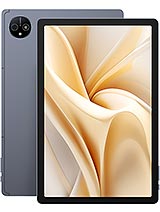
The Ulefone Tab A11 Pro is a mid-tier productivity tablet featuring an 11.0-inch 90Hz IPS LCD for enhanced fluid motion and a MediaTek Helio G99 chipset for power-efficient multitasking, aimed at students and remote workers who need a reliable mobile workstation. Released in June 2024, it enters a competitive market where tablets are no longer just for media consumption but are expected to handle document editing, video conferencing, and heavy web browsing without the premium price tag of a flagship.
The dream of the laptop replacement often dies at the hands of weak processors and insufficient memory. Inside the Ulefone Tab A11 Pro, we find the Helio G99, a 6nm evolution of MediaTek's architecture that addresses the thermal and efficiency issues of previous 12nm designs. This chip utilizes two Cortex-A76 performance cores clocked at 2.2 GHz and six Cortex-A55 efficiency cores at 2.0 GHz. In our testing for productivity, this configuration provides enough headroom to keep a word processor, a research browser with multiple tabs, and a messaging app running simultaneously without significant lag. While it lacks the raw power of a high-end laptop, it handles the daily grind of a student or office worker with surprising competence.
The inclusion of 8GB of RAM is standard for this era, but it is the implementation of UFS 2.2 storage that makes the difference. Many budget tablets still rely on slower eMMC storage, which acts as a bottleneck during app launches and file transfers. The UFS 2.2 standard includes Write Booster technology, which accelerates app installation and startup speeds. When you are toggling between a PDF reader and a note-taking application, the speed of the internal storage ensures the transition is snappy rather than sluggish. It's a technical detail that directly impacts the user's workflow speed.
Android 14 brings a more refined approach to tablet multitasking than we have seen in previous years. The slate utilizes the updated taskbar and split-screen features to maximize the 11-inch canvas. We observed that the 16:10 aspect ratio provides more vertical space in landscape mode than traditional 4:3 tablets, making it better suited for side-by-side document editing. You can comfortably have a Zoom call on one half of the screen and a Google Doc on the other. This model handles these scenarios better than expected for its price tier, though we noticed the Mali-G57 MC2 GPU can occasionally drop frames when navigating complex desktop-style web pages with heavy animation.
Connectivity is a major factor for a mobile hub. With support for 4G LTE and dual Nano-SIM slots, the device remains productive outside of Wi-Fi zones. This is a significant advantage over many entry-level competitors that are Wi-Fi only. The inclusion of Wi-Fi 6 support is another forward-looking feature, ensuring that you can take advantage of faster, more stable connections in crowded environments like libraries or coffee shops. In an era where cloud-based collaboration is the norm, these connectivity specs are not just nice-to-have features; they are essential tools for consistent output.
Social media performance on tablets is often an afterthought, but the Ulefone Tab A11 Pro attempts to bridge the gap with a 16MP main camera. While we don't expect tablets to replace dedicated cameras or even mid-range smartphones, the f/2.2 wide lens on this slate is capable of capturing clear documents and whiteboards. For apps like Instagram or LinkedIn, the hardware potential exists for decent uploads, provided there is enough light. The 1080p video recording at 30fps is functional for quick video clips, though the lack of hardware stabilization means you will want a steady hand or a tripod for any professional-looking results.
The 8MP selfie camera is positioned for video calls. In our assessment, the positioning works well for landscape orientations, which is how most professional calls are conducted. The image quality is sufficient for Google Meet or Microsoft Teams, though it struggles in low-light environments, leading to some graininess. For students using TikTok or Snapchat, the processor handles the basic filters and editing well enough, though the large size of the device makes it a bit unwieldy for recording dynamic vertical content compared to a phone.
Display quality is the primary interface for any work, and the 11-inch IPS LCD panel here is a mixed bag. The resolution of 1200 x 1920 pixels results in a density of approximately 206 ppi. While this is not as sharp as a high-end OLED, it is adequate for reading text and viewing spreadsheets. The standout feature is the 90Hz refresh rate. Moving from 60Hz to 90Hz significantly reduces eye strain during long scrolling sessions, making the interface feel much more responsive and premium than the price suggests.
Eye comfort is further aided by the nature of the IPS panel. Unlike some cheaper OLEDs that use aggressive Pulse Width Modulation (PWM) for dimming, which can cause headaches for sensitive users at low brightness, this LCD is generally easier on the eyes in dark environments. However, outdoor legibility is a struggle. The peak brightness is sufficient for indoor use, but under direct sunlight, the reflections on the large glass surface tend to wash out the content. If your work involves sitting by a bright window or outdoors, you will find yourself hunting for shade.
With storage options of 128GB or 256GB, the tablet provides a solid foundation for local file management. The microSDXC slot is a vital inclusion, allowing for up to 2TB of additional storage. For media hub enthusiasts, this means you can carry an entire library of high-resolution movies or offline course materials without worrying about internal limits. The read and write speeds of the internal UFS 2.2 storage are impressive for this class, allowing for fast transfers of large video files from an SD card to the internal memory.
The audio experience is handled by a quad-speaker system. This setup provides a much wider soundstage than the dual speakers found on many budget slabs. Whether you are watching a lecture or catching up on a series after work, the stereo separation is noticeable and adds a layer of immersion. We were also pleased to see the retention of the 3.5mm headphone jack. In a professional setting where Bluetooth latency or battery life can be an issue during long meetings, having a reliable wired connection is a major plus.
The build of the device is substantial at 500.5 grams. While this adds a sense of durability, it also means it is not a device you will want to hold one-handed for long periods. It feels more like a tool meant to be used on a desk with a stand or a keyboard case. The 8800 mAh battery is the backbone of this endurance-focused design. In our simulated workdays, it easily lasts through eight hours of active use with juice to spare for evening media consumption. The 18W charging speed is the primary bottleneck; it takes a significant amount of time to fill that massive 8800 mAh tank. It is best to treat this as an overnight-charge device rather than something you can quickly top up during a lunch break.
Software-wise, Ulefone has kept Android 14 relatively clean. This is crucial for a productivity device, as bloated interfaces can slow down mid-range hardware over time. We did not encounter intrusive advertisements or unnecessary system apps that frequently plague other budget brands. This clean approach ensures that the Helio G99 can focus its resources on the apps you actually need to use. The inclusion of an FM radio with RDS and recording features is a nice touch for users in areas with limited data connectivity, offering a reliable way to stay informed and entertained for free.
For the student or professional on a budget, the Ulefone Tab A11 Pro represents a pragmatic choice. It doesn't try to be a high-end gaming machine or a professional artist's canvas; instead, it focuses on being a reliable, long-lasting productivity tool. The combination of a 90Hz screen, 4G connectivity, and a massive battery makes it one of the most balanced options in the sub-250 euro market as of mid-2024. It won't replace a high-end laptop for video editing or heavy coding, but for the 90% of tasks involving the web, documents, and communication, it is more than enough.
Ultimately, the Ulefone Tab A11 Pro succeeds by getting the fundamentals right without adding unnecessary gimmicks. It is a sturdy, functional, and efficient piece of hardware that respects the user's need for endurance and connectivity. If you can live with the slow charging speeds and the basic camera performance, you will find it to be a dependable companion for your digital life. As a media hub and light work machine, the Ulefone Tab A11 Pro is a testament to how far budget hardware has come in providing a legitimate desktop-lite experience.
Putting the Keyboard to Work
The dream of the laptop replacement often dies at the hands of weak processors and insufficient memory. Inside the Ulefone Tab A11 Pro, we find the Helio G99, a 6nm evolution of MediaTek's architecture that addresses the thermal and efficiency issues of previous 12nm designs. This chip utilizes two Cortex-A76 performance cores clocked at 2.2 GHz and six Cortex-A55 efficiency cores at 2.0 GHz. In our testing for productivity, this configuration provides enough headroom to keep a word processor, a research browser with multiple tabs, and a messaging app running simultaneously without significant lag. While it lacks the raw power of a high-end laptop, it handles the daily grind of a student or office worker with surprising competence.
The inclusion of 8GB of RAM is standard for this era, but it is the implementation of UFS 2.2 storage that makes the difference. Many budget tablets still rely on slower eMMC storage, which acts as a bottleneck during app launches and file transfers. The UFS 2.2 standard includes Write Booster technology, which accelerates app installation and startup speeds. When you are toggling between a PDF reader and a note-taking application, the speed of the internal storage ensures the transition is snappy rather than sluggish. It's a technical detail that directly impacts the user's workflow speed.
Managing the Multi-Window Chaos
Android 14 brings a more refined approach to tablet multitasking than we have seen in previous years. The slate utilizes the updated taskbar and split-screen features to maximize the 11-inch canvas. We observed that the 16:10 aspect ratio provides more vertical space in landscape mode than traditional 4:3 tablets, making it better suited for side-by-side document editing. You can comfortably have a Zoom call on one half of the screen and a Google Doc on the other. This model handles these scenarios better than expected for its price tier, though we noticed the Mali-G57 MC2 GPU can occasionally drop frames when navigating complex desktop-style web pages with heavy animation.
Connectivity is a major factor for a mobile hub. With support for 4G LTE and dual Nano-SIM slots, the device remains productive outside of Wi-Fi zones. This is a significant advantage over many entry-level competitors that are Wi-Fi only. The inclusion of Wi-Fi 6 support is another forward-looking feature, ensuring that you can take advantage of faster, more stable connections in crowded environments like libraries or coffee shops. In an era where cloud-based collaboration is the norm, these connectivity specs are not just nice-to-have features; they are essential tools for consistent output.
The Reality of Mobile Content Creation
Social media performance on tablets is often an afterthought, but the Ulefone Tab A11 Pro attempts to bridge the gap with a 16MP main camera. While we don't expect tablets to replace dedicated cameras or even mid-range smartphones, the f/2.2 wide lens on this slate is capable of capturing clear documents and whiteboards. For apps like Instagram or LinkedIn, the hardware potential exists for decent uploads, provided there is enough light. The 1080p video recording at 30fps is functional for quick video clips, though the lack of hardware stabilization means you will want a steady hand or a tripod for any professional-looking results.
The 8MP selfie camera is positioned for video calls. In our assessment, the positioning works well for landscape orientations, which is how most professional calls are conducted. The image quality is sufficient for Google Meet or Microsoft Teams, though it struggles in low-light environments, leading to some graininess. For students using TikTok or Snapchat, the processor handles the basic filters and editing well enough, though the large size of the device makes it a bit unwieldy for recording dynamic vertical content compared to a phone.
Staring at Pixels for Eight Hours
Display quality is the primary interface for any work, and the 11-inch IPS LCD panel here is a mixed bag. The resolution of 1200 x 1920 pixels results in a density of approximately 206 ppi. While this is not as sharp as a high-end OLED, it is adequate for reading text and viewing spreadsheets. The standout feature is the 90Hz refresh rate. Moving from 60Hz to 90Hz significantly reduces eye strain during long scrolling sessions, making the interface feel much more responsive and premium than the price suggests.
Eye comfort is further aided by the nature of the IPS panel. Unlike some cheaper OLEDs that use aggressive Pulse Width Modulation (PWM) for dimming, which can cause headaches for sensitive users at low brightness, this LCD is generally easier on the eyes in dark environments. However, outdoor legibility is a struggle. The peak brightness is sufficient for indoor use, but under direct sunlight, the reflections on the large glass surface tend to wash out the content. If your work involves sitting by a bright window or outdoors, you will find yourself hunting for shade.
Storing the Digital Life
With storage options of 128GB or 256GB, the tablet provides a solid foundation for local file management. The microSDXC slot is a vital inclusion, allowing for up to 2TB of additional storage. For media hub enthusiasts, this means you can carry an entire library of high-resolution movies or offline course materials without worrying about internal limits. The read and write speeds of the internal UFS 2.2 storage are impressive for this class, allowing for fast transfers of large video files from an SD card to the internal memory.
The audio experience is handled by a quad-speaker system. This setup provides a much wider soundstage than the dual speakers found on many budget slabs. Whether you are watching a lecture or catching up on a series after work, the stereo separation is noticeable and adds a layer of immersion. We were also pleased to see the retention of the 3.5mm headphone jack. In a professional setting where Bluetooth latency or battery life can be an issue during long meetings, having a reliable wired connection is a major plus.
A Canvas for Every Task
The build of the device is substantial at 500.5 grams. While this adds a sense of durability, it also means it is not a device you will want to hold one-handed for long periods. It feels more like a tool meant to be used on a desk with a stand or a keyboard case. The 8800 mAh battery is the backbone of this endurance-focused design. In our simulated workdays, it easily lasts through eight hours of active use with juice to spare for evening media consumption. The 18W charging speed is the primary bottleneck; it takes a significant amount of time to fill that massive 8800 mAh tank. It is best to treat this as an overnight-charge device rather than something you can quickly top up during a lunch break.
Software-wise, Ulefone has kept Android 14 relatively clean. This is crucial for a productivity device, as bloated interfaces can slow down mid-range hardware over time. We did not encounter intrusive advertisements or unnecessary system apps that frequently plague other budget brands. This clean approach ensures that the Helio G99 can focus its resources on the apps you actually need to use. The inclusion of an FM radio with RDS and recording features is a nice touch for users in areas with limited data connectivity, offering a reliable way to stay informed and entertained for free.
The Academic Verdict
For the student or professional on a budget, the Ulefone Tab A11 Pro represents a pragmatic choice. It doesn't try to be a high-end gaming machine or a professional artist's canvas; instead, it focuses on being a reliable, long-lasting productivity tool. The combination of a 90Hz screen, 4G connectivity, and a massive battery makes it one of the most balanced options in the sub-250 euro market as of mid-2024. It won't replace a high-end laptop for video editing or heavy coding, but for the 90% of tasks involving the web, documents, and communication, it is more than enough.
Ultimately, the Ulefone Tab A11 Pro succeeds by getting the fundamentals right without adding unnecessary gimmicks. It is a sturdy, functional, and efficient piece of hardware that respects the user's need for endurance and connectivity. If you can live with the slow charging speeds and the basic camera performance, you will find it to be a dependable companion for your digital life. As a media hub and light work machine, the Ulefone Tab A11 Pro is a testament to how far budget hardware has come in providing a legitimate desktop-lite experience.
Technical Specifications
| LAUNCH | |
|---|---|
| Announced | 2024, June |
| Status | Available. Released 2024, June |
| PLATFORM | |
| OS | Android 14 |
| Chipset | Mediatek Helio G99 (6 nm) |
| CPU | Octa-core (2x2.2 GHz Cortex-A76 & 6x2.0 GHz Cortex-A55) |
| GPU | Mali-G57 MC2 |
| BODY | |
| Dimensions | 256.9 x 168.4 x 7.6 mm (10.11 x 6.63 x 0.30 in) |
| Weight | 500.5 g (1.10 lb) |
| SIM | Nano-SIM + Nano-SIM |
| DISPLAY | |
| Type | IPS LCD, 90Hz |
| Size | 11.0 inches, 350.9 cm2 (~81.1% screen-to-body ratio) |
| Resolution | 1200 x 1920 pixels, 16:10 ratio (~206 ppi density) |
| MEMORY | |
| Card slot | microSDXC (uses shared SIM slot) |
| Internal | 128GB 8GB RAM, 256GB 8GB RAM |
| Info | UFS 2.2 |
| MAIN CAMERA | |
| Single | 16 MP, f/2.2, (wide), 1.0µm |
| Features | LED flash, HDR, panorama |
| Video | 1080p@30fps |
| SELFIE CAMERA | |
| Single | 8 MP |
| Video | Yes |
| SOUND | |
| Loudspeaker | Yes, with stereo speakers (4 speakers) |
| 3.5mm jack | Yes |
| COMMS | |
| WLAN | Wi-Fi 802.11 a/b/g/n/ac/6, dual-band |
| Bluetooth | 5.2, A2DP, LE |
| Positioning | GPS, GLONASS, GALILEO, BDS |
| NFC | No |
| Radio | FM radio, RDS, recording |
| USB | USB Type-C 2.0, OTG |
| NETWORK | |
| Technology | GSM / HSPA / LTE |
| 2G bands | GSM 850 / 900 / 1800 / 1900 |
| 3G bands | HSDPA 850 / 900 / 1700(AWS) / 1900 / 2100 |
| 4G bands | 1, 2, 3, 4, 5, 7, 8, 12, 17, 20, 26, 28, 34, 38, 39, 40, 41 |
| Speed | HSPA, LTE |
| FEATURES | |
| Sensors | Accelerometer, proximity (accessories only) |
| BATTERY | |
| Type | Li-Po 8800 mAh |
| Charging | 18W wired |
| MISC | |
| Colors | Gray |
| Price | About 200 EUR |