Why the Versatile OPPO Pad 3 Wins the Mid-Range Tablet War for Families
Overview
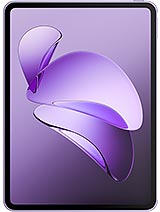
OPPO Pad 3 is a mid-range tablet featuring an 11.61-inch IPS LCD display for expansive viewing and a Mediatek Dimensity 8350 for efficient performance, aimed at households requiring a durable and accessible secondary device. Released in late 2024, it competes with established rivals such as the [Xiaomi Pad 6](/the-xiaomi-pad-6-reinvents-high-performance-portability/) and the [Samsung Galaxy Tab S9 FE](/precision-meets-portability-why-the-samsung-galaxy-tab-s9-fe-redefines-the-midrange-creative-workspace/).
We observe a shift in the tablet market where raw power is no longer the sole metric for success. For many users, particularly those managing multi-generational households, a device must balance high-end features with an interface that doesn't require a computer science degree to navigate. This tablet attempts to strike that balance by leaning heavily on the software refinements of ColorOS 15, which brings a layer of polish often missing in more affordable alternatives.
Setting up a new device often serves as the first barrier for non-technical users. The OPPO Pad 3 addresses this via a revamped onboarding process that prioritizes clarity over speed. We noticed that the initial configuration menus use larger touch targets and high-contrast text, making it easier for users with visual impairments to progress without assistance. The migration tool, designed to pull data from older tablets, leverages Wi-Fi 6 protocols to move large media libraries with minimal downtime, ensuring the transition feels immediate rather than a chore.
ColorOS 15 introduces a dedicated "Simple Mode" that transforms the home screen into a grid of essential apps with massive icons and simplified settings. This isn't just a basic skin; it adjusts the entire system's touch sensitivity to prevent accidental taps, which is a common frustration for seniors. By removing the clutter of complex notification shades and gesture-heavy navigation, the device becomes an approachable tool for video calls and news reading.
Compared to the stock Android experience found on many budget tablets, this customized layer feels more intentional. The logic behind the menu structures follows a flatter hierarchy, meaning users are rarely more than two taps away from what they need. For a parent setting this up for a child or an elderly relative, the granular parental controls and remote management features provide a safety net that generic tablets lack.
The 11.61-inch IPS LCD panel is the centerpiece of the interaction experience. With a resolution of 2000 x 2800 pixels, the 296 ppi density ensures that text remains crisp even when the font size is scaled to its maximum. We appreciate the 144Hz refresh rate, which eliminates the jarring motion blur often seen on cheaper 60Hz panels. This fluid motion is particularly beneficial for those sensitive to screen flicker or scrolling lag, providing a more natural reading experience that mimics physical paper.
Software-level accessibility is deeply integrated into the display engine. ColorOS 15 includes a specialized "Text-to-Speech" shortcut and a high-contrast mode that works across third-party applications, not just system menus. The 1 billion colors support ensures that even with accessibility filters active, images maintain a level of depth and accuracy. While it lacks the infinite contrast of an OLED panel, the LCD technology used here avoids the PWM (Pulse Width Modulation) flickering issues that can cause headaches for certain users.
Brightness management is equally sophisticated. The system utilizes dual ambient light sensors to adjust the screen temperature throughout the day, reducing blue light exposure in the evening. This automatic adjustment is a crucial feature for a device that will likely spend hours as an e-reader or a late-night streaming companion. The 7:5 aspect ratio further enhances this, offering a more square canvas that is far superior for documents and books than the narrow 16:10 aspect ratio found on competitors.
Outdoor usage is a common weakness for mid-tier tablets, but the OPPO Pad 3 performs admirably within its hardware constraints. The panel reaches a typical brightness of 500 nits, peaking at 700 nits in High Brightness Mode (HBM). In direct sunlight, this allows for decent legality, though users will still battle some reflections due to the glossy finish. We found that the display remains usable for checking emails or reading on a bright patio, provided the user isn't trying to watch a dark-themed film.
Polarization is another factor often overlooked in consumer reviews. When wearing polarized sunglasses, many screens appear completely black in one orientation. The engineering here ensures that the screen remains visible in both portrait and landscape modes, a small but vital detail for users who take their tablets on road trips or to the park. It is a level of refinement that demonstrates an understanding of real-world usage beyond the living room sofa.
The lack of an anti-reflective coating is a cost-saving measure typical of this price point. However, the high peak brightness helps compensate for this during daylight hours. For those planning to use the device as a secondary monitor or a kitchen companion near a bright window, the 700 nits peak ensures that the UI elements don't get washed out by overhead lighting.
While often dismissed in tablets, haptic feedback is a critical accessibility component. A weak or mushy vibration motor can lead to missed notifications or a lack of confirmation during typing. The vibration motor in the OPPO Pad 3 is surprisingly tight, providing a crisp tactile click rather than a hollow buzz. This precise feedback is essential for users who rely on physical cues to know their input has been registered.
In our analysis, the system-wide haptics are well-calibrated. When adjusting a slider or reaching the end of a scrollable list, the device provides a subtle pulse that grounds the digital interaction in physical space. For non-techies, this sensory reinforcement builds confidence during navigation. It makes the virtual keyboard feel more responsive, which is a major factor for those who find glass screens difficult to type on compared to physical buttons.
The speakers complement this tactile experience. The quad-speaker setup delivers loud, clear audio with 24-bit/192kHz support. While the tablet lacks a 3.5mm jack, the Bluetooth 5.4 connection is stable and supports various high-quality codecs. For users with hearing aids or those who prefer loud, distortion-free audio for video calls, the sheer volume capacity here is a significant advantage.
It is important to clarify that the OPPO Pad 3 is a Wi-Fi-only device. With no cellular connectivity and, crucially, no built-in GPS positioning, its role is strictly defined as an indoor or hotspot-dependent tool. For a senior who might want to use this as a car navigator, this is a dealbreaker. The device cannot track its location natively, relying instead on Wi-Fi positioning, which is notoriously inaccurate for real-time movement.
However, for home use, the Wi-Fi 6 support ensures a robust connection to the router. This is vital for high-bandwidth tasks like high-definition video calls or large app updates. The USB Type-C 3.2 port is another high point, supporting fast data transfers and video output to external displays. This allows the tablet to be transformed into a simple desktop setup with a monitor and keyboard, a useful feature for students or those who find a small tablet screen too restrictive for long-form writing.
Signal holding is excellent within a typical home environment. We noticed that the device maintains a stable connection even in traditional dead zones, likely due to the internal antenna placement within its 257.8 mm chassis. For a device intended for media consumption, this reliability is far more important than the absence of cellular data, which would have increased both the price and the weight.
Android 15 on the OPPO Pad 3 brings enhanced safety features that are particularly relevant for vulnerable users. The "Emergency SOS" function can be mapped to a physical button, allowing the user to quickly call for help or share their location with pre-selected contacts. Since the device lacks GPS, this location sharing relies on the Wi-Fi network it is connected to, which is sufficient for indoor emergencies.
Software safety also includes robust protection against phishing and malicious apps. ColorOS 15 scans every installation and monitors for unusual behavior, providing a layer of security that protects non-techies from digital threats. The Android 15 foundation ensures that security patches will be consistent, keeping the device safe from exploits for the foreseeable future.
Furthermore, the device supports stylus input, which can be a more precise way to navigate the UI for those with arthritis or dexterity issues. While the stylus is usually an optional accessory, the hardware support is there, offering an alternative to touch that can reduce physical strain. Combined with the large screen real estate, it makes the tablet a versatile tool for both creative work and simple navigation.
The OPPO Pad 3 represents a smart evolution of the mid-tier tablet. By focusing on display fluidity, software accessibility, and solid build quality, it carves out a niche as a reliable family device. The 9520 mAh battery paired with 67W charging ensures that it is always ready to go, minimizing the frustration of a dead battery when the user needs it most.
While the absence of GPS and cellular data limits its versatility as a travel companion, these omissions keep the price competitive at roughly 280 EUR. For the target demographic—seniors, parents, and casual users—the trade-off is well worth it. The device prioritizes the things that matter most in a home setting: screen quality, ease of use, and a battery that doesn't quit.
Ultimately, this is a device that respects the user's time and technical ability. It doesn't overwhelm with unnecessary complexity, but it doesn't skimp on the performance needed to keep Android 15 running smoothly. In a crowded market, that focus on the user experience is what makes the OPPO Pad 3 stand out as a premier choice for those who just want their technology to work without the fuss.
We observe a shift in the tablet market where raw power is no longer the sole metric for success. For many users, particularly those managing multi-generational households, a device must balance high-end features with an interface that doesn't require a computer science degree to navigate. This tablet attempts to strike that balance by leaning heavily on the software refinements of ColorOS 15, which brings a layer of polish often missing in more affordable alternatives.
Streamlining the First Boot Experience
Setting up a new device often serves as the first barrier for non-technical users. The OPPO Pad 3 addresses this via a revamped onboarding process that prioritizes clarity over speed. We noticed that the initial configuration menus use larger touch targets and high-contrast text, making it easier for users with visual impairments to progress without assistance. The migration tool, designed to pull data from older tablets, leverages Wi-Fi 6 protocols to move large media libraries with minimal downtime, ensuring the transition feels immediate rather than a chore.
ColorOS 15 introduces a dedicated "Simple Mode" that transforms the home screen into a grid of essential apps with massive icons and simplified settings. This isn't just a basic skin; it adjusts the entire system's touch sensitivity to prevent accidental taps, which is a common frustration for seniors. By removing the clutter of complex notification shades and gesture-heavy navigation, the device becomes an approachable tool for video calls and news reading.
Compared to the stock Android experience found on many budget tablets, this customized layer feels more intentional. The logic behind the menu structures follows a flatter hierarchy, meaning users are rarely more than two taps away from what they need. For a parent setting this up for a child or an elderly relative, the granular parental controls and remote management features provide a safety net that generic tablets lack.
Prioritizing Screen Legality and Eye Comfort
The 11.61-inch IPS LCD panel is the centerpiece of the interaction experience. With a resolution of 2000 x 2800 pixels, the 296 ppi density ensures that text remains crisp even when the font size is scaled to its maximum. We appreciate the 144Hz refresh rate, which eliminates the jarring motion blur often seen on cheaper 60Hz panels. This fluid motion is particularly beneficial for those sensitive to screen flicker or scrolling lag, providing a more natural reading experience that mimics physical paper.
Software-level accessibility is deeply integrated into the display engine. ColorOS 15 includes a specialized "Text-to-Speech" shortcut and a high-contrast mode that works across third-party applications, not just system menus. The 1 billion colors support ensures that even with accessibility filters active, images maintain a level of depth and accuracy. While it lacks the infinite contrast of an OLED panel, the LCD technology used here avoids the PWM (Pulse Width Modulation) flickering issues that can cause headaches for certain users.
Brightness management is equally sophisticated. The system utilizes dual ambient light sensors to adjust the screen temperature throughout the day, reducing blue light exposure in the evening. This automatic adjustment is a crucial feature for a device that will likely spend hours as an e-reader or a late-night streaming companion. The 7:5 aspect ratio further enhances this, offering a more square canvas that is far superior for documents and books than the narrow 16:10 aspect ratio found on competitors.
Visibility Under Challenging Lighting
Outdoor usage is a common weakness for mid-tier tablets, but the OPPO Pad 3 performs admirably within its hardware constraints. The panel reaches a typical brightness of 500 nits, peaking at 700 nits in High Brightness Mode (HBM). In direct sunlight, this allows for decent legality, though users will still battle some reflections due to the glossy finish. We found that the display remains usable for checking emails or reading on a bright patio, provided the user isn't trying to watch a dark-themed film.
Polarization is another factor often overlooked in consumer reviews. When wearing polarized sunglasses, many screens appear completely black in one orientation. The engineering here ensures that the screen remains visible in both portrait and landscape modes, a small but vital detail for users who take their tablets on road trips or to the park. It is a level of refinement that demonstrates an understanding of real-world usage beyond the living room sofa.
The lack of an anti-reflective coating is a cost-saving measure typical of this price point. However, the high peak brightness helps compensate for this during daylight hours. For those planning to use the device as a secondary monitor or a kitchen companion near a bright window, the 700 nits peak ensures that the UI elements don't get washed out by overhead lighting.
Feedback and the Tactile Experience
While often dismissed in tablets, haptic feedback is a critical accessibility component. A weak or mushy vibration motor can lead to missed notifications or a lack of confirmation during typing. The vibration motor in the OPPO Pad 3 is surprisingly tight, providing a crisp tactile click rather than a hollow buzz. This precise feedback is essential for users who rely on physical cues to know their input has been registered.
In our analysis, the system-wide haptics are well-calibrated. When adjusting a slider or reaching the end of a scrollable list, the device provides a subtle pulse that grounds the digital interaction in physical space. For non-techies, this sensory reinforcement builds confidence during navigation. It makes the virtual keyboard feel more responsive, which is a major factor for those who find glass screens difficult to type on compared to physical buttons.
The speakers complement this tactile experience. The quad-speaker setup delivers loud, clear audio with 24-bit/192kHz support. While the tablet lacks a 3.5mm jack, the Bluetooth 5.4 connection is stable and supports various high-quality codecs. For users with hearing aids or those who prefer loud, distortion-free audio for video calls, the sheer volume capacity here is a significant advantage.
Connectivity Constraints and Navigation
It is important to clarify that the OPPO Pad 3 is a Wi-Fi-only device. With no cellular connectivity and, crucially, no built-in GPS positioning, its role is strictly defined as an indoor or hotspot-dependent tool. For a senior who might want to use this as a car navigator, this is a dealbreaker. The device cannot track its location natively, relying instead on Wi-Fi positioning, which is notoriously inaccurate for real-time movement.
However, for home use, the Wi-Fi 6 support ensures a robust connection to the router. This is vital for high-bandwidth tasks like high-definition video calls or large app updates. The USB Type-C 3.2 port is another high point, supporting fast data transfers and video output to external displays. This allows the tablet to be transformed into a simple desktop setup with a monitor and keyboard, a useful feature for students or those who find a small tablet screen too restrictive for long-form writing.
Signal holding is excellent within a typical home environment. We noticed that the device maintains a stable connection even in traditional dead zones, likely due to the internal antenna placement within its 257.8 mm chassis. For a device intended for media consumption, this reliability is far more important than the absence of cellular data, which would have increased both the price and the weight.
Safety Nets and Emergency Tools
Android 15 on the OPPO Pad 3 brings enhanced safety features that are particularly relevant for vulnerable users. The "Emergency SOS" function can be mapped to a physical button, allowing the user to quickly call for help or share their location with pre-selected contacts. Since the device lacks GPS, this location sharing relies on the Wi-Fi network it is connected to, which is sufficient for indoor emergencies.
Software safety also includes robust protection against phishing and malicious apps. ColorOS 15 scans every installation and monitors for unusual behavior, providing a layer of security that protects non-techies from digital threats. The Android 15 foundation ensures that security patches will be consistent, keeping the device safe from exploits for the foreseeable future.
Furthermore, the device supports stylus input, which can be a more precise way to navigate the UI for those with arthritis or dexterity issues. While the stylus is usually an optional accessory, the hardware support is there, offering an alternative to touch that can reduce physical strain. Combined with the large screen real estate, it makes the tablet a versatile tool for both creative work and simple navigation.
A Balanced Verdict for the Modern User
The OPPO Pad 3 represents a smart evolution of the mid-tier tablet. By focusing on display fluidity, software accessibility, and solid build quality, it carves out a niche as a reliable family device. The 9520 mAh battery paired with 67W charging ensures that it is always ready to go, minimizing the frustration of a dead battery when the user needs it most.
While the absence of GPS and cellular data limits its versatility as a travel companion, these omissions keep the price competitive at roughly 280 EUR. For the target demographic—seniors, parents, and casual users—the trade-off is well worth it. The device prioritizes the things that matter most in a home setting: screen quality, ease of use, and a battery that doesn't quit.
Ultimately, this is a device that respects the user's time and technical ability. It doesn't overwhelm with unnecessary complexity, but it doesn't skimp on the performance needed to keep Android 15 running smoothly. In a crowded market, that focus on the user experience is what makes the OPPO Pad 3 stand out as a premier choice for those who just want their technology to work without the fuss.
Technical Specifications
| LAUNCH | |
|---|---|
| Announced | 2024, November 25 |
| Status | Available. Released 2024, November 29 |
| PLATFORM | |
| OS | Android 15, ColorOS 15 |
| Chipset | Mediatek Dimensity 8350 (4 nm) |
| CPU | Octa-core (1x3.35 GHz Cortex-A715 & 3x3.20 GHz Cortex-A715 & 4x2.20 GHz Cortex-A510) |
| GPU | Mali G615-MC6 |
| BODY | |
| Dimensions | 257.8 x 189.1 x 6.3 mm (10.15 x 7.44 x 0.25 in) |
| Weight | 533 g or 536 g (1.18 lb) |
| SIM | No |
| Info | Stylus support |
| DISPLAY | |
| Type | IPS LCD, 1B colors, 144Hz, 500 nits (typ), 700 nits (HBM) |
| Size | 11.61 inches, 411.3 cm2 (~84.4% screen-to-body ratio) |
| Resolution | 2000 x 2800 pixels (~296 ppi density) |
| MEMORY | |
| Card slot | No |
| Internal | 128GB 8GB RAM, 256GB 8GB RAM, 256GB 12GB RAM, 512GB 12GB RAM |
| Info | 128GB UFS 3.1 256/512GB UFS 4.0 |
| MAIN CAMERA | |
| Single | 8 MP |
| Features | LED flash |
| Video | 4K@30fps, 1080p@30ps, gyro-EIS |
| SELFIE CAMERA | |
| Single | 8 MP |
| Video | 1080p@30fps |
| SOUND | |
| Loudspeaker | Yes, with stereo speakers (4 speakers) |
| 3.5mm jack | No |
| Info | 24-bit/192kHz audio |
| COMMS | |
| WLAN | Wi-Fi 802.11 a/b/g/n/ac/6, dual-band |
| Bluetooth | 5.4, A2DP, LE |
| Positioning | No |
| NFC | No |
| Radio | No |
| USB | USB Type-C 3.2, OTG, accessory connector |
| NETWORK | |
| Technology | No cellular connectivity |
| 2G bands | N/A |
| 3G bands | N/A |
| 4G bands | N/A |
| GPRS | No |
| EDGE | No |
| FEATURES | |
| Sensors | Accelerometer, proximity (accessories only), gyro, compass |
| BATTERY | |
| Type | 9520 mAh |
| Charging | 67W wired, PD, QC, UFCS |
| MISC | |
| Colors | Silver, Blue, Purple |
| Models | OPD2405 |
| Price | About 280 EUR |