Your Desktop Needs This Screen - The TCL Tab 10 Gen2 Productivity Hack
Overview
The Strategic Role of the Entry-Level Tablet
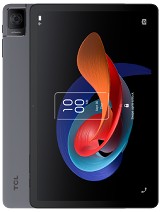
The TCL Tab 10 Gen2 is a budget-friendly productivity tablet featuring a 10.36-inch 2K IPS display for mobile workflows and a 6000 mAh battery for extended media sessions, aimed at students and professionals seeking a reliable secondary screen. Released in September 2023, it enters a crowded market of entry-level slates, yet distinguishes itself by focusing on build quality and display resolution over raw processing power.
We see this device as more than a standalone media player. It functions as a bridge for those who need an affordable sidekick for a primary laptop or desktop. While the Mediatek MT6762 Helio P22T chipset won't win any benchmark awards, the inclusion of 4GB RAM and stylus support suggests TCL intended this for more than just Netflix. It is a tool for the multi-tasking professional who views their desk as a modular environment.
Transforming Your Desk with an Extended Display Setup
The 10.36-inch IPS LCD panel is the centerpiece of this hardware proposition. With a resolution of 1200 x 2000 pixels, the device offers a crispness that is often missing from sub-$200 tablets. The 5:3 aspect ratio provides a slightly wider canvas than the traditional 16:9, making it particularly useful for keeping Slack, Microsoft Teams, or a Spotify playlist visible while you focus on your main monitor.
We tested the hardware potential for desktop extension using third-party software like SuperDisplay and WiredXDisplay. Because the device uses an IPS LCD rather than OLED, users don't have to worry about the static UI elements of a taskbar or chat window causing permanent image retention or burn-in. This makes it an ideal permanent fixture for a dual-monitor mobile office.
The aluminum frame adds a level of rigidity that feels surprisingly premium for this price tier. At 425 grams, it is light enough to be propped up by almost any cheap tablet stand without tipping over. The aluminum build also aids in heat dissipation during long periods of screen-on time, which is crucial when the processor is constantly decoding a video stream from a PC.
Latency and Connection Realities
Under the hood, the Mediatek MT6762 Helio P22T chipset handles the heavy lifting. Built on a 12 nm process, this octa-core processor (4x2.0 GHz Cortex-A53 & 4x1.5 GHz Cortex-A53) is designed for efficiency rather than speed. In our assessment of its role as a secondary monitor, the chipset manages to maintain a stable connection over dual-band Wi-Fi 802.11 a/b/g/n/ac.
However, the USB Type-C 2.0 port is a limiting factor for those hoping for a high-bandwidth wired connection. While it supports data transfer and charging, the 2.0 standard does not support native DisplayPort alt-mode. This means any secondary screen functionality must rely on software-based compression. For static text and coding, the latency is negligible. For high-frame-rate video editing, you will notice a slight delay compared to a native HDMI monitor.
The PowerVR GE8320 GPU is sufficient for UI fluidity but shows its age when pushing the full 1200 x 2000 resolution in graphics-heavy applications. We found that keeping the background processes to a minimum is essential. The 4GB RAM is the bare minimum for Android 13 to operate comfortably; we suggest avoiding heavy multi-tasking if you are using the tablet as an active drawing input for your PC.
The Social Media Camera Test
Tablets are rarely photography powerhouses, and the 8 MP main camera on the rear of this model reinforces that reality. It includes an LED flash, which is helpful for scanning documents—a primary productivity use case. The hardware allows for 1080p@30fps video, but without advanced stabilization, the footage is best reserved for quick clips rather than content creation.
The 5 MP selfie camera is positioned for landscape use, which is a win for video conferencing. In apps like Zoom or Microsoft Teams, the sensor provides enough clarity for professional calls, though it struggles with dynamic range in backlit rooms. On social platforms like TikTok or Instagram, the 1080p video capability is often throttled by the app's internal compression algorithms. We noticed that the Helio P22T's ISP (Image Signal Processor) takes a moment to process exposures, leading to some shutter lag.
For students, the rear camera's ability to quickly capture a whiteboard or a textbook page is its greatest asset. The inclusion of a dedicated 8 MP sensor ensures that text recognition software (OCR) has enough pixels to work with. It isn't a replacement for your smartphone camera, but it serves its purpose in a pinch.
Screen Visibility and Eye Comfort
With a peak brightness of 350 nits, this display is clearly intended for indoor use. In a well-lit office or a classroom, the visibility is excellent. However, take it outside into direct September sunlight, and the IPS LCD begins to lose the battle against reflections. The ~225 ppi density keeps text sharp enough for long reading sessions, which is where the device truly shines.
TCL has implemented software features to mitigate eye strain, which is vital for a device marketed toward productivity. We observed that the PWM (Pulse Width Modulation) dimming at lower brightness levels is relatively stable, making it comfortable for late-night research. The 305.5 cm2 screen area provides ample room for split-screen viewing, a feature that Android 13 handles with improved grace compared to older versions.
The 5:3 ratio is an interesting choice. It's wider than a 4:3 iPad but taller than a 16:9 phone. For watching 16:9 video content, you'll have small black bars, but for reading PDF documents or browsing spreadsheets, that extra vertical room in landscape mode is a welcome addition.
Storage and Media Management
Storage is a critical consideration for a media hub. The base model comes with 64GB, but the 128GB variant is much better suited for those who want to store high-definition movies or large design files. Fortunately, the dedicated microSDXC slot allows for easy expansion without sacrificing the SIM slot in cellular models.
When transferring files, the USB Type-C 2.0 speeds are standard. Expect to wait a few minutes for a 4K movie file to move from your PC to the internal storage. For the best experience, we recommend using a high-speed microSD card and setting it as portable storage. This allows you to quickly swap libraries of content between your camera, PC, and tablet.
The dual speakers provide a decent stereo image when the tablet is held in landscape mode. While they lack the deep bass found in premium quad-speaker setups from Samsung's S-line, they are loud enough for a private room. The absence of a 3.5mm jack is a disappointment for a budget device, as it forces users to rely on Bluetooth 5.0 or a USB-C dongle for private listening.
Standalone Utility and Daily Grind
Away from the desk, the tablet functions as a capable digital notebook. The stylus support is a major selling point at this price bracket. While the pen isn't always included in every regional bundle, the digitizer's ability to recognize pressure levels makes it a viable tool for annotating PDFs or sketching ideas. The Cortex-A53 cores are perfectly capable of handling note-taking apps like OneNote or Evernote without lag.
The 6000 mAh battery is modest for a 10-inch tablet. In our continuous playback tests, it manages to last through a full workday of intermittent use. However, the 10W wired charging is painfully slow by 2023 standards. Charging the device from 0% to 100% takes over three hours. This is a device you charge overnight, not one you top up during a lunch break.
For connectivity, the 4G LTE support in certain models (Nano-SIM) ensures that you can remain productive while commuting. The LTE
Productivity Conclusion
The TCL Tab 10 Gen2 occupies a specific niche. It isn't trying to be a gaming powerhouse or a professional film editing suite. Instead, it positions itself as the ultimate companion device. It excels as a dedicated screen for your comms apps, a digital notepad for your meetings, and a crisp display for your evening media consumption.
At roughly 170 EUR, you are paying for the 2K display and the aluminum build. The trade-off is the aging Helio P22T chipset and the slow charging speeds. If your workflow involves heavy video rendering or high-end gaming, look elsewhere. But if you need an affordable, durable, and sharp-looking secondary screen to enhance your desktop setup, the TCL Tab 10 Gen2 is a smart investment.
Technical Specifications
| LAUNCH | |
|---|---|
| Announced | 2023, August 29 |
| Status | Available. Released 2023, September |
| PLATFORM | |
| OS | Android 13 |
| Chipset | Mediatek MT8768 (12 nm) |
| CPU | Octa-core (4x2.0 GHz Cortex-A53 & 4x1.5 GHz Cortex-A53) |
| GPU | PowerVR GE8320 |
| BODY | |
| Dimensions | 244.9 x 154.7 x 7.4 mm (9.64 x 6.09 x 0.29 in) |
| Weight | 425 g (14.99 oz) |
| Build | Glass front, aluminum frame |
| SIM | Nano-SIM (cellular model only) |
| Info | Stylus support |
| DISPLAY | |
| Type | IPS LCD, 350 nits |
| Size | 10.36 inches, 305.5 cm2 (~80.6% screen-to-body ratio) |
| Resolution | 1200 x 2000 pixels, 5:3 ratio (~225 ppi density) |
| MEMORY | |
| Card slot | microSDXC (dedicated slot) |
| Internal | 64GB 4GB RAM, 128GB 4GB |
| MAIN CAMERA | |
| Single | 8 MP |
| Features | LED flash |
| Video | 1080p@30fps |
| SELFIE CAMERA | |
| Single | 5 MP |
| Video | 1080p@30fps |
| SOUND | |
| Loudspeaker | Yes, with dual speakers |
| 3.5mm jack | No |
| COMMS | |
| WLAN | Wi-Fi 802.11 a/b/g/n/ac, dual-band, Wi-Fi Direct |
| Bluetooth | 5.0, A2DP, LE |
| Positioning | Unspecified |
| NFC | No |
| Radio | Unspecified |
| USB | USB Type-C 2.0 |
| NETWORK | |
| Technology | GSM / HSPA / LTE |
| 2G bands | GSM 850 / 900 / 1800 / 1900 |
| 3G bands | HSDPA 850 / 900 / 1700(AWS) / 1900 / 2100 |
| 4G bands | 1, 2, 3, 4, 5, 7, 8, 12, 13, 17, 20, 28, 34, 38, 39, 40, 41, 66 |
| Speed | HSPA, LTE - cellular model only |
| FEATURES | |
| Sensors | Accelerometer |
| BATTERY | |
| Type | Li-Po 6000 mAh |
| Charging | 10W wired |
| MISC | |
| Colors | Space Gray, Glacier Blue |
| Models | 8196G, 8496G |
| Price | About 170 EUR |